iMovie doesn’t install fonts. It reads whatever macOS already has, the same way Pages and Keynote do, so a typeface that isn’t on the machine won’t turn up in the title editor no matter how far you scroll.
On iPhone and iPad it’s flatter still. Titles there pull from a fixed list baked into the app, and there’s no install path inside it.
One version note before anything else. iMovie for Mac needs macOS 15.6 or later, according to Apple’s own App Store listing (Apple, 2026). That baseline matters because font validation happens at the system level, not inside iMovie.
What Are Custom Fonts in iMovie?
Nothing about them is special to iMovie, which is the part people find odd at first. You install a typeface on the Mac and iMovie picks it up along with every other app. That’s the whole mechanism.
No font store in the app. No download manager, no per-app library. It borrows from the device’s collection of fonts and leaves it at that.
Font Book does the installing. It also validates each file before it goes live anywhere, iMovie included, which is worth knowing when a font refuses to install for reasons that look mysterious.
Font Formats iMovie Reads
Apple’s Font Book documentation covers TrueType and OpenType, each in a plain version, plus collection files that hold several styles at once.
- TrueType (.ttf) is the everyday desktop format and macOS reads it natively.
- Variable TrueType uses the same .ttf extension but packs multiple weights and widths into one file.
- TrueType Collection (.ttc) bundles related TrueType styles together.
- OpenType (.otf) is what most paid and premium fonts ship in.
- OpenType-SVG, also .otf, exists for multicolor glyphs.
- OpenType Collection (.ttc) does the same bundling job on the OpenType side.
iMovie’s built-in title styles default to different typefaces, Gill Sans and Helvetica Neue among them. Most of the defaults sit on the clean end, a plain sans-serif font rather than anything decorative.
Where to Find Fonts for iMovie Titles
Most people end up at Google Fonts, Adobe Fonts, dafont.com, or MyFonts long before Font Book ever opens.
| Source | Cost | License Scope | Format |
|---|---|---|---|
| Google Fonts | Free | Open source, commercial use included | TrueType, Variable |
| Adobe Fonts | Included with Creative Cloud | Personal and commercial | OpenType |
| dafont.com | Free to paid, varies by font | Often personal-use only unless stated | TrueType, OpenType |
| MyFonts | Per-font purchase | Commercial, per license terms | OpenType |
Google Fonts carries 1,942 font families as of July 2026, according to its own directory, and every one is free for commercial use.
If you’re weighing the two big libraries against each other, the Google Fonts vs Adobe Fonts comparison goes deeper than this section can, though the headline number is that Adobe Fonts offers more than 30,000 fonts to Creative Cloud subscribers, all pre-cleared for personal and commercial work.
Free archives like dafont.com mix genuinely free fonts with personal-use-only ones, and the difference is usually a single line of text on the download page. Read it. A client video is a bad place to find out you skipped it.
Font Licensing for iMovie Projects
Price tells you nothing here. The license decides whether a font can legally appear in something you publish or sell.
Personal-use licenses show up constantly on free font sites, and they block anything monetized. That includes ad-supported YouTube uploads, which catches people off guard more often than paid client work does.
- Google Fonts ships under the SIL Open Font License or Apache License, both cleared for commercial use with no extra step.
- Adobe Fonts covers personal and commercial work for as long as the Creative Cloud subscription stays active.
- Plenty of dafont.com uploads are personal-use only unless the author’s readme says otherwise.
Desktop, webfont, and app-embedding licenses all work differently, and reading one plain breakdown of font licensing once beats guessing project by project.
One habit I’d recommend is dropping the license file, or just the download page link, into the same folder as the project. Proof of rights is then one click away if a client or a platform ever asks.
How to Install a Font With Font Book

Font Book does the installing, not iMovie. Worth repeating, because people go looking in the wrong app.
Managed work machines and a few other edge cases complicate things, and the full process for installing fonts on Mac covers those. The everyday version takes about thirty seconds.
- Download the font file (.ttf or .otf) and find it in Finder, usually in Downloads.
- Double-click the file to open the font preview window.
- Click Install Font in that window, or drag the file straight into an open Font Book.
- Wait for validation to finish. A successful install puts the font in the All Fonts collection.
That last step is where Font Book runs its error check. It’s also why a download that looked perfectly fine in Finder sometimes refuses to install.
How to Apply a Custom Font to an iMovie Title
Where iMovie’s Font Controls Live
Select a title and a small row of controls appears above the viewer, with font, size, and color. That row is the quick version. The last entry in the font pop-up menu, Show Fonts, opens the full macOS font list, and Command+T reaches the same System Font Panel without the menu detour.
Not every title cooperates. Apple’s documentation notes that some title styles don’t expose a font choice at all, which covers most of the heavily animated and theme-styled ones.
Steps to Change a Title’s Font
With the title already sitting in the timeline:
- Double-click the title text in the viewer to select it.
- Open Show Fonts, or hit Command+T.
- Find the installed font by name and click it. The preview updates right away.
- Click Apply above the viewer.
Forgetting that last click is the single most common reason a font change looks like it didn’t take. The preview lies a little. Nothing sticks until Apply.
iMovie on Mac vs iPhone and iPad for Custom Fonts
The two versions handle this almost oppositely.
Custom Font Access on Mac
Mac iMovie reads the whole system font list that Font Book manages, so anything installed through the steps above becomes available immediately. Show Fonts and Command+T land in the same expanded panel. Each title also carries its own font setting, rather than the project holding one globally, which is handy when you want a heavier face for the opener and something quieter for the lower thirds.
Fixed Font List on iPhone and iPad
Standard titles on mobile let you choose a font per title, but only from what’s already there. Magic Movie and Storyboard projects go further and apply one font across every title at once, set through Styles.
Apple’s iMovie for iPhone guide describes it as tapping the Font button, then tapping one of the fonts offered. No mention of adding anything, because there’s nothing to add.
| Platform | Font Source | Install Method | Limitation |
|---|---|---|---|
| Mac | Any font in Font Book | Font Book, drag or Install Font | None beyond format support |
| iPhone | iMovie’s built-in list only | Not applicable | No custom font install path |
| iPad | iMovie’s built-in list only | Not applicable | No custom font install path |
iMovie or Canva and Photoshop for Custom Text
iMovie’s font panel is quick, and also capped. What you’ve installed sets one limit. The title template sets another one you can’t argue with.
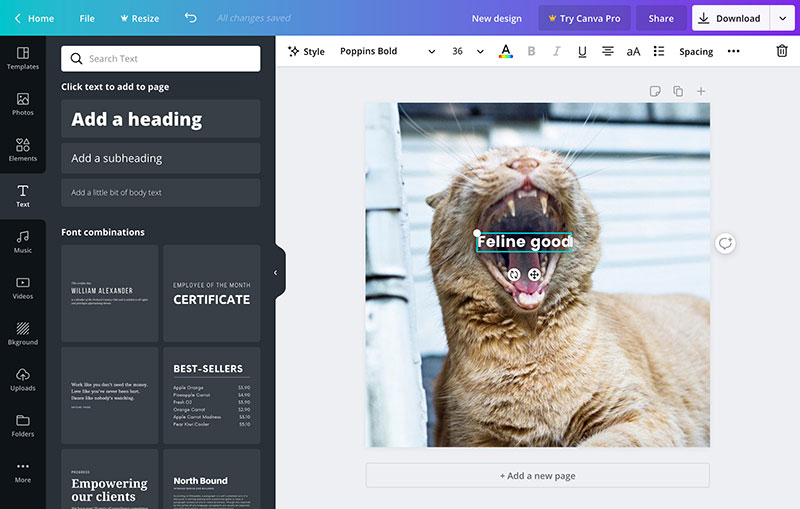
Building the text as a graphic in Canva or Photoshop sidesteps both. Export it with a transparent background, drop it into the timeline as a normal clip, done.
| Method | Strength | Trade-off |
|---|---|---|
| iMovie font panel | Instant, no export step | Limited to installed system fonts and template rules |
| Canva overlay | Full layout and multi-font control in one graphic | Extra export and import step for every change |
| Photoshop overlay | Pixel-level control over spacing and effects | Steeper learning curve, separate paid app |
Getting a custom font into Canva is its own separate process, unrelated to anything happening in Font Book, and uploading fonts to Canva walks through it.
Photoshop goes the other way. Adding fonts to Photoshop leans on the same OS-level install, just reached from a different app’s font menu.
Canva alone reported more than 265 million monthly active users by the end of 2025, so an overlay habit built there carries over to plenty of work beyond one iMovie title.
People who outgrow both routes usually land on Final Cut Pro. Its Text inspector has tracking and kerning sliders, controls iMovie’s font panel simply doesn’t offer.
Fixing a Font That Will Not Show Up in iMovie
It installed fine in Font Book and iMovie still can’t see it. Nine times out of ten that’s a stale font list inside the app, or a file problem Font Book already flagged and you clicked past without reading.
| Symptom | Likely Cause | Fix |
|---|---|---|
| Font missing entirely | iMovie hasn’t refreshed its font list | Quit and reopen iMovie |
| Font grayed out in Font Book | Font is deactivated, not removed | Select it, choose Edit, then Activate |
| Font shows twice or acts oddly | Duplicate copies installed | Choose File, then Resolve Duplicates in Font Book |
When the Font File Is the Problem
Font Book raises its objections at install time, and those warnings are easy to miss.
- A yellow warning icon means more than one copy is installed, and only the one marked Active copy actually loads.
- A font that fails its check picks up a red icon in the Font Validation window, visible under File, then Validate Font.
- A font can also be installed and switched off at the same time, sitting dimmed in the list until you reactivate it.
Libraries get out of hand fast. Extensis, the font-management company, reports that the average creative professional’s font library runs upwards of 4,500 fonts. At that size a stray duplicate disappears into the pile.
When iMovie Needs a Restart
Most Mac apps read the font list once at launch and never check again for the rest of the session.
iMovie is no different from Photoshop or Illustrator here. Install a font while the app is already open and it usually won’t appear until you restart.
- Quit fully with Command+Q. Closing the project window isn’t enough.
- Reopen and check the font list again.
- Still missing? Restart the Mac before you start suspecting the file itself.
When Custom Fonts Do Not Work in iMovie
Some failures aren’t failures. A font can be installed correctly and still be unavailable, on purpose.
Theme-Locked and Style-Locked Titles
iMovie greys out the font control on certain title styles because the typeface is part of a fixed graphic or animation. Theme-styled titles built around a background graphic behave this way, and so do animated ones where the motion depends on the lettering itself. Magic Movie and Storyboard projects sit in their own category, since Styles owns the font there.
And those project styles keep the last word. Change the style later and it overrides whatever custom font you’d already applied to an individual title inside it.
iOS and iPadOS Restrictions
iOS and iPadOS have allowed system-wide font installation since iOS 13, through Settings, General, then Fonts.
The catch is that each app has to request Apple’s font-picker API by name. iMovie for iPhone and iPad doesn’t request it.
- Pages, Keynote, Mail, and a scattering of third-party apps built against the same API will read the system list.
- iMovie, Notes, and Safari’s Reader View ignore it entirely, whatever you’ve installed in Settings.
So the phone can be holding a custom font that no app on it can reach. iMovie happens to be one of those apps.
Corrupt or Unlicensed Font Files
Not every broken font announces itself.
- Malformed internal tables sometimes slip past a quick validation pass, then cause glitches during playback or export.
- Personal-use-only fonts install and apply like any other, and using one in a monetized video or client project breaks the terms all the same.
- iMovie runs no license check of its own, so nothing in the app will ever warn you.
Starting from fonts that are free for commercial use removes that whole category of problem.
FAQ on How To Add Fonts To Imovie
What is Font Book?
Font Book is the font manager built into macOS. It installs, validates, and organizes TrueType and OpenType files system-wide, making any font available across every app on the Mac, including iMovie, without a separate per-app installation step.
Are iMovie’s default title fonts different from regular macOS system fonts?
No. iMovie draws its default title fonts from the same macOS system font list Font Book manages. Nothing is exclusive to iMovie; every default title font also appears in Pages, Keynote, and TextEdit.
Can you use iMovie fonts automatically in other Apple apps too?
Yes, in reverse too. Any font installed through Font Book becomes available everywhere at once, so a font pulled in for an iMovie title also shows up in Pages, Keynote, Mail, and Final Cut Pro without reinstalling it.
Do you need to restart your Mac after installing a new font?
Rarely. Font Book’s install applies system-wide immediately; the cache issue lives inside individual apps, not macOS itself. Quitting and reopening iMovie almost always solves a missing font, and a full Mac restart is only a backup step.
What happens to your custom font when you share the project with someone else?
iMovie embeds rendered text, not the font file, when you export a finished video, so playback never breaks anywhere. Sharing the raw project is different: the recipient’s Mac needs the same font installed, or the title falls back to a substitute.
Is there a limit to how many fonts one iMovie project can use?
No hard cap exists inside iMovie itself. Every title in a project can use a different installed font, limited only by how many fonts Font Book can hold on the Mac, which realistically means thousands before performance becomes a concern.
Can variable fonts be used in iMovie titles?
Yes, but only through the weight instances a variable font ships with, since iMovie exposes Font, Size, and Style controls, not a continuous weight-axis slider. Font Book installs the file as one family with several selectable weights.
What Should You Check First in How To Add Fonts To Imovie?
License first, install status second, title style third. That order matters more than it sounds like it should.
- Confirm the license terms before you download anything.
- Verify that Font Book actually installed the file, and that it’s active.
- Check whether the title style you picked even offers a font control.
Checking the license first adds a step per font. It also closes the one gap Font Book’s validation never catches, which is a personal-use file that installs perfectly and still isn’t cleared for monetized video.
Once installing stops being the obstacle, the choice itself becomes the interesting part, and a dedicated list of fonts for subtitles handles the legibility and pairing questions that come next.

Renowned for his expertise in logo design and visual branding, Bogdan has developed a multitude of logos for various clients.
His skills extend to creating posters, vector illustrations, business cards, and brochures. Additionally, Bogdan's UI kits were featured on marketplaces like Visual Hierarchy and UI8.
He also wrote in the past years on sites like Design Your Way, WebDesignerDepot, WPDean, Designmodo, Speckyboy, Slider Revolution, and more.
- The Windsurf Logo History, Colors, Font, And Meaning - 10 October 2026
- How to Remove Background From Product Photos (No Photoshop) - 10 October 2026
- How Designers can Build a Stronger Online Creative Identity - 9 October 2026

Bogdan Sandu is a seasoned designer who has been designing websites since 2008. Renowned for his expertise in logo design and visual branding, Bogdan has developed a multitude of logos for various clients. His skills extend to creating posters, vector illustrations, business cards, and brochures. Additionally, Bogdan's UI kits were featured on marketplaces like Visual Hierarchy and UI8. He also wrote in the past years on sites like Design Your Way, WebDesignerDepot, WPDean, Designmodo, Speckyboy, Slider Revolution, and more.
You Might Also Like