There is no font installer inside After Effects. Nothing under File, nothing hiding in Edit or Preferences. The font dropdown in the Character panel only mirrors what your operating system already knows about, so every question about adding a font is really a question about Windows, macOS, or Adobe Fonts.
This usually comes up the first time a client sends over their brand typeface and the project needs it by Friday.
The library side of things has gotten a lot bigger lately. Adobe’s April 2025 update added more than 1,500 new typefaces to Adobe Fonts, its largest library expansion in five years (Adobe, 2025).
What Does It Mean to Add a Font to After Effects?
The word “add” is doing a lot of quiet work here. What you’re really doing is registering a typeface with your operating system, or flipping it on through Adobe Fonts. After Effects just reads that list.
A font, in the plain sense, is a complete set of characters that share one weight, width and style. After Effects was never built to manage type on its own, which is why the app has no import command for it.
So when you “add” a font, one of two things happens. The file gets installed at the operating system level on Windows or macOS. Or it gets activated through Adobe Fonts inside the Creative Cloud desktop app. Either way, After Effects reads whatever is currently registered at that system level, and the Character panel dropdown is a live reflection of that list. Nothing more.
Installing and activating are not the same move, and mixing them up wastes a lot of time. A local install copies a physical file onto your machine. Activation flips a switch on a font Adobe already hosts, so there’s no download, no folder, and no file to lose track of six months later.
Which Font File Formats Does After Effects Support?
OpenType (.otf) and TrueType (.ttf) both work natively, which covers almost everything you’ll ever be handed. Font collection files (.ttc and .otc) work too, along with OpenType variable fonts.
| Format | Extension | Support in After Effects |
|---|---|---|
| OpenType | .otf | Full, most common today |
| TrueType | .ttf | Full, most common today |
| Font Collection | .ttc / .otc | Partial, bundles multiple faces |
| Variable Font | .otf / .ttf with axes | Full, added in version 26.0 (January 2026 release) |
Type 1 (PostScript) fonts are the one legacy format that no longer works at all. Adobe ended support for authoring with Type 1 fonts across all Creative Cloud applications, including After Effects, starting with releases from early 2023 onward, per Adobe’s official documentation. An old project that still references one now shows it as missing instead of loading it.
CID-keyed fonts are a different matter, and they get confused with Type 1 constantly. They’re typically packaged inside the OpenType/CFF format rather than existing as a standalone legacy format, so that change never touched them. They keep working normally through the standard system font folders.
Native Variable Font Axes support arrived in After Effects version 26.0, released in January 2026 (Adobe, 2026). One variable font file now holds every weight and width you’d otherwise be managing across a dozen separate files.
You can keyframe those axes directly through Text Animators once the font is applied. Weight, width and slant turn into properties you animate rather than fonts you swap out mid-timeline, which is genuinely useful for title work.
Where After Effects Reads Its Installed Fonts From
Two folders feed that dropdown. One is the standard operating system font folder (Fonts on Windows, Library/Fonts on macOS). The other is a local Adobe-only fonts folder, reserved for apps like After Effects, Photoshop and Illustrator.
That second folder explains a weirdly common situation, where a font shows up in Photoshop but stays invisible in your video editing software. Or the reverse. It depends entirely on where the file landed.
None of this is specific to After Effects. Every Creative Cloud app pulls from the same font layer, which is also why a font you installed for Illustrator last month usually just works here with no extra step.
New installs rarely appear right away. After Effects caches its font list when it launches, so anything added while the app is open tends to stay invisible until you relaunch. This is behind most of the “why isn’t my font showing up” panic, and it has nothing to do with a broken file. Stale cache, waiting on a restart.
How to Install a Font on Windows or Mac for After Effects

Install it at the operating system level first. The steps look slightly different depending on your machine, but the end goal is the same either way: get the font registered, then relaunch.
Windows Installation Steps
- Download the .otf or .ttf file and extract it if it arrived zipped
- Right click the font file and select Install, or drag it straight into the Fonts folder under Windows Settings
- Confirm it appears under Settings, Personalization, Fonts
- Close After Effects fully if it was open, then relaunch it
Windows sometimes needs the file “unblocked” first if it came from a browser and got flagged. Right click the file, open Properties, and look near the bottom for an Unblock option.
macOS Installation Steps
- Double click the font file to preview it inside Font Book
- Click Install Font in the top right of the preview window
- Check that it’s now listed under All Fonts in Font Book
- Quit and reopen After Effects to force a font list refresh
Font Book flags duplicate or corrupted fonts before it installs anything, which catches a lot of problems early. The full walkthrough for installing fonts on a Mac gets into what those validation warnings actually mean, because they’re not always obvious.
A font that installs cleanly and still doesn’t appear in the dropdown almost always comes down to the same thing. The app was never actually restarted. Reopening the font menu isn’t the same as quitting the program.
How to Activate and Sync Adobe Fonts for After Effects
If you already pay for Creative Cloud, this is the path of least resistance. Adobe Fonts holds more than 30,000 typefaces from over 150 type foundries, all included at no extra cost with a Creative Cloud subscription (Adobe Fonts FAQ).
Nothing gets downloaded or manually installed. Activation is a toggle in the Creative Cloud desktop app, and once it’s flipped, the font syncs to every Creative Cloud application on that machine.
- Open the Creative Cloud desktop app and go to the Fonts tab, or browse fonts.adobe.com directly
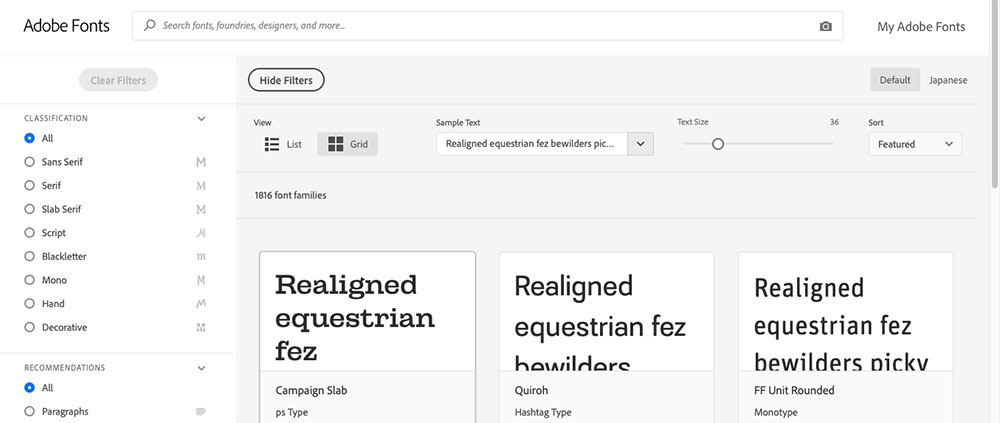
- Search or filter using Adobe Font Finder, which lets you browse by classification, weight, or variable font support
- Click Activate on the family, or on individual styles within it if you only need one weight
- Give it a moment to sync, then reopen the Character panel in After Effects
Working through the font finders built into the Creative Cloud app is usually faster than digging through a downloaded library, especially when you need one specific weight out of a family and nothing else.
Open a project that references an Adobe Fonts typeface you haven’t activated, and you get a Resolve Fonts prompt offering to sync it for you. No manual step at that point.
The sync carries across apps, too. Activate once and it’s ready in Adobe Premiere without going back to the Creative Cloud panel a second time.
Local Install vs Adobe Fonts vs Third-Party Manager: Which Method Should You Use?
For a one-off project, a local install is fine. Adobe Fonts makes more sense for ongoing Creative Cloud work. A third-party manager only starts earning its keep once you’re juggling client brand fonts across more than one machine.
| Attribute | Local Install | Adobe Fonts | Third-Party Manager |
|---|---|---|---|
| Setup effort | Manual, per machine | One click activation | One time setup, then automatic |
| Restart needed | Usually yes | Rarely | Rarely, auto-activates |
| Cross device sync | No | Yes, via Creative Cloud | Yes, on paid tiers |
| License handling | Manual tracking | Covered by subscription | Built in for team libraries |
A freelancer on a single machine has no reason to overcomplicate any of this. Install the file, restart, move on.
Teams already inside Creative Cloud get more out of Adobe Fonts, mostly because it stops people from emailing font files around and hoping everyone installed the same version.
Studios running several client brand kits are the ones who actually need a dedicated manager. Once you’re activating and deactivating dozens of non-Adobe fonts in a given week, doing it by hand stops being reasonable.
Keep in mind that Adobe Fonts only covers what Adobe licenses directly, and that leaves out most client-supplied brand typefaces. If budget is what’s driving the decision rather than a subscription you already pay for, the tradeoffs between Google Fonts and Adobe Fonts are worth reading through first.
Third-Party Font Managers for After Effects
Once After Effects work involves fonts Adobe doesn’t host, the same names keep surfacing: FontBase, Monotype Connect (formerly Extensis Suitcase Fusion) and RightFont.
Auto-activation isn’t new, by the way. Extensis built the first dedicated After Effects auto-activation plug-in into Suitcase Fusion 7 back in 2016, and every major Creative Cloud app has gotten one since (Extensis, 2016). Monotype acquired Extensis in 2024, and by 2026 the Suitcase Fusion product line had been fully folded into Monotype Connect, carrying that same Adobe auto-activation feature forward under the new name.
FontBase is free on Mac, Windows and Linux, syncs Google Fonts directly, and handles large libraries without bogging down. The catch is that auto-activation inside After Effects sits behind the paid Awesome tier, priced around three dollars a month as of 2026. Cheap, but it’s still a paywall on the one feature most people want.
Monotype Connect ships the dedicated After Effects auto-activation plug-in plus cloud sync across machines, and it’s built for teams managing hundreds of client fonts. Mac and Windows only. The one-time purchase option is gone, too. Pricing is subscription-based, starting at roughly 200 dollars per user annually for the standard tier as of 2026 (Monotype).
RightFont stays macOS only and sells as a one time purchase instead of a subscription, which is increasingly rare. FontExplorer X Pro fills a similar role for agencies that need a shared, license-compliant library across a whole team rather than one designer’s laptop.
Why After Effects Shows a Missing Font Warning in the Character Panel
The warning fires when a text layer calls for a typeface that isn’t installed or activated on whatever machine is opening the project. You’ll see the font name wrapped in brackets inside the Character panel, with a substitute typeface standing in until the real one turns up.
Adobe Fonts typefaces sort themselves out through the automatic sync mentioned earlier. A font that was never in your Adobe Fonts library, or one that only ever lived locally on a different computer, doesn’t get that courtesy.
The usual causes:
- A project file moved to a new computer that never had the font installed
- A collaborator opens your project without the same local fonts
- A font manager like FontBase or Monotype Connect deactivated the font between sessions
- The font was uninstalled from the system entirely since the project was last saved
Other Adobe apps behave the same way. Open a document with a missing typeface in InDesign and you get an almost identical bracketed warning.
Fixing it means either tracking down and reinstalling the original font, or selecting the affected text layer and picking a replacement from the Character panel dropdown.
How to Fix Missing Fonts in a Motion Graphics Template (MOGRT)
You can’t fix this in Premiere Pro, which is where the template usually gets used. Premiere has no font-swapping tool for MOGRTs. The fix happens back in After Effects, followed by a re-export.
There’s a way to catch it before a client ever sees it. A Compatibility checkbox during MOGRT export warns you if the composition references any font that isn’t available through Adobe Fonts, per Adobe’s own documentation. Worth ticking every time.
- Reopen the source After Effects project that generated the .mogrt file, not the exported template itself
- Find the text layer referencing the missing font in the timeline
- Replace the font through the Character panel, or reinstall the original if you hold the license
- Re-export the Motion Graphics template so it overwrites the broken version
Font family, style, size and faux-bold controls all get exposed to Premiere through the Essential Graphics panel. The substitution itself still has to happen in After Effects.
And a template built without exposed font controls locks the Premiere editor out of changing anything at all, missing font or not. That setup happens in the Essential Graphics panel before export. There’s no fixing it afterward.
Font Licensing for Commercial and Client Video Projects
The thing that trips people up is that a font license cares about your output, not about which software you opened the file in.
- Video and broadcast use is permitted for in-house, commercial exhibition, and broadcast projects, including distribution through YouTube or Vimeo (Adobe Fonts licensing FAQ)
- App and device embedding is not covered by a standard font license. That needs a separate agreement directly from the foundry (Adobe Fonts licensing FAQ)
- A desktop license covers installing and using a font inside design software like After Effects, and nothing beyond that (Monotype)
- A web font license covers embedding a font in a website’s own code, which is a separate grant entirely from a desktop license (Monotype)
Most disputes start in the gap between what covers your desktop and what covers a client’s finished video. A broader look at font licensing breaks down how desktop, web and embedding rights typically split across foundries.
Free for personal use is not the same as clear for a paid client project. Commercial use, even just burned into a rendered video, usually needs its own license tier.
Check before delivery rather than after. Foundries do watch for commercial use of their free tiers, and a rendered video with a recognizable client name on it is exactly the kind of thing that gets noticed.
When Adding a Font to After Effects Does Not Work
Sometimes a font installs perfectly and After Effects still refuses to use it. The font file is rarely the problem, at least not at first.
A corrupted font cache is the ugliest version of this. The font database on disk gets corrupted and produces the “font dictionary can’t be read” crash on launch, according to Adobe’s own troubleshooting documentation. Free bitmap fonts pulled from random download sites are the most common culprit behind that same crash, per the same Adobe guide.
Adobe Fonts also deactivates things on its own. Creative Cloud periodically removes typefaces that have gone unused for a while. Adobe’s documentation describes this in general terms as fonts unused for “several months” rather than publishing an exact day count. A commonly cited community estimate puts the window around 150 days, but that figure isn’t officially confirmed by Adobe, so treat it as a rough rule of thumb.
Then there’s the boring stuff. Installing a font requires admin rights on Windows, and often on managed macOS machines too, so locked-down work computers block it outright. Family name conflicts cause their own mess, where two versions of the same family are installed at once (one local, one through a manager) and After Effects can’t reliably tell them apart.
Clearing a corrupted cache is a specific fix, not a general one. Delete the AdobeFnt.lst files from the TypeSupport folder and restart the computer. A plain relaunch handles a stale font list, but it won’t touch this.
If none of that works, the font itself is probably bad. Removing it and sourcing a clean copy solves more of these cases than any amount of cache clearing.
FAQ on How To Add Fonts To After Effects
Is It Safe to Use a Free Font From a Site Like Dafont in a Paid Project?
Dafont hosts fonts under many different individual licenses, not one blanket rule. Some clear commercial use freely, others require a paid license beyond personal work. Check each license file first, or start from a list of fonts cleared for free commercial use.
Can You Use Google Fonts Directly Inside After Effects?
Not directly. After Effects has no live connection to Google Fonts, so the guide on how to use Google Fonts covers the download step. Install the file at the system level, then relaunch After Effects to see it in the Character panel.
What Happens When You Run Collect Files on a Project With Custom Fonts?
Collect Files bundles every footage, audio and image file a project references, but it does not copy font files. It only generates a text report listing which fonts were used, so fonts still need manual reinstalling on whatever machine opens the collected project.
Do You Need Administrator Rights to Install a Font on a Shared or Managed Computer?
Usually yes. Windows and macOS both restrict system-level font folders to admin accounts. On a company machine managed through IT, installation gets blocked entirely, and the font has to go through an approved software portal or an MDM profile instead.
What Should You Fix First in How to Add Fonts to After Effects?
Almost every failure here traces back to the operating system layer, so check that install before you go poking at Adobe Fonts activation or a third-party manager. Every other method still depends on that same underlying registration.
Work through it in order:
- Restart After Effects to clear a stale font cache
- Confirm the font sits in the correct operating system folder
- Check Adobe Fonts activation or manager sync only after that
Two minutes per project. It saves hours of chasing a font manager conflict that was never the real cause.
Installing it cleanly is only half the job, though. The font pairing generator is the practical next step, matching that new typeface against a second one before either of them gets near a timeline.

Renowned for his expertise in logo design and visual branding, Bogdan has developed a multitude of logos for various clients.
His skills extend to creating posters, vector illustrations, business cards, and brochures. Additionally, Bogdan's UI kits were featured on marketplaces like Visual Hierarchy and UI8.
He also wrote in the past years on sites like Design Your Way, WebDesignerDepot, WPDean, Designmodo, Speckyboy, Slider Revolution, and more.
- The Windsurf Logo History, Colors, Font, And Meaning - 10 October 2026
- How to Remove Background From Product Photos (No Photoshop) - 10 October 2026
- How Designers can Build a Stronger Online Creative Identity - 9 October 2026

Bogdan Sandu is a seasoned designer who has been designing websites since 2008. Renowned for his expertise in logo design and visual branding, Bogdan has developed a multitude of logos for various clients. His skills extend to creating posters, vector illustrations, business cards, and brochures. Additionally, Bogdan's UI kits were featured on marketplaces like Visual Hierarchy and UI8. He also wrote in the past years on sites like Design Your Way, WebDesignerDepot, WPDean, Designmodo, Speckyboy, Slider Revolution, and more.
You Might Also Like