Disney’s wordmark is built on a proprietary custom script typeface derived from Walt Disney’s own stylized autograph. The closest publicly available version of that lettering is Waltograph, a freeware display script font designed by Justin Callaghan and first released in 2000. Disney’s internal logo lettering is not available as a licensed typeface. Waltograph captures its spirit closely enough that Disney has used it on official materials on several occasions.
For its corporate documents and secondary branding, Disney has historically relied on Times as its official corporate typeface, used across Walt Disney World Resort signage and Walt Disney Imagineering materials. Disney Parks use a wide range of typefaces across different areas, including Univers, Futura, Kabel, and Gill Sans, depending on the specific attraction or zone.
What Type of Font Is the Disney Logo Font?
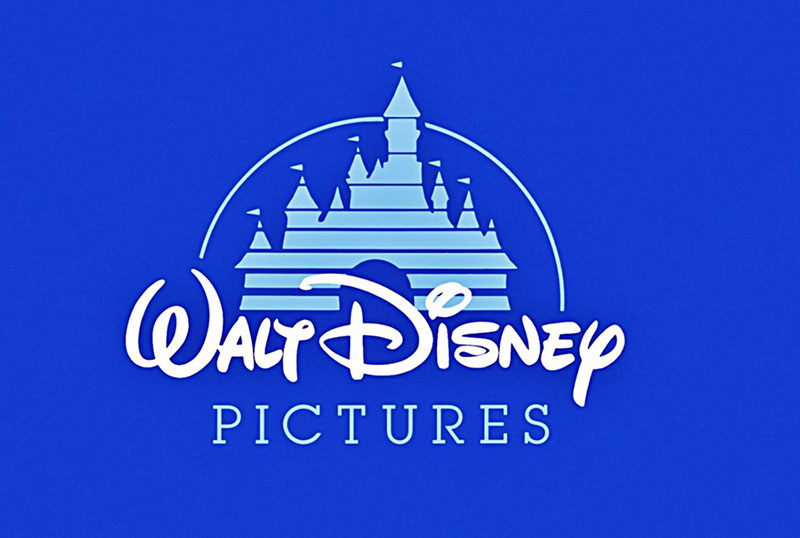
The Disney wordmark falls under the display script classification. It is a wet-brush, informal script with high contrast between thick and thin strokes, sweeping ascenders, and exaggerated decorative curves.
A few things make it visually distinct:
- The capital “D” features exaggerated loops at top and bottom, proportioned using the golden ratio
- Lowercase letters connect in a flowing cursive style
- The “t” resembles a stylized “y” at certain weights
- Letter spacing is tight, giving the wordmark a compact, unified look
This style sits firmly outside the conventions of serif or sans-serif classification. It is a script font, specifically a calligraphic display variant, designed for use at large sizes on movie titles, merchandise, and signage rather than body text.
Understanding typography elements like x-height, leading, and stroke contrast helps explain why this lettering reads as warm and handcrafted rather than rigid or corporate.
Who Designed the Disney Font?
The Disney logo lettering was not designed by a single typographer in the traditional sense. It originated from Walt Disney’s actual handwritten autograph, which first appeared on merchandise and film credits in the 1930s.
Over the following decades, Disney’s in-house design teams refined the signature repeatedly. By the 1970s, the letterforms had diverged significantly from Walt’s original handwriting. The capital “D” received its most dramatic redraw during this period, gaining the exaggerated curves and off-center vertical line seen in the modern logo.
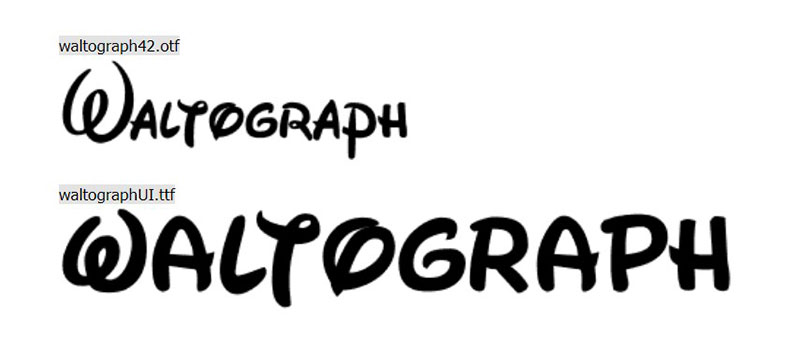
The publicly available version, Waltograph, was created by Justin Callaghan starting in 2000 under the name Walt Disney Script. Callaghan built it by referencing Disney’s corporate logos, theme park signage, and hand-titled artwork. He renamed it Waltograph in 2004 with version 4.2, which introduced revised kerning, new ligatures, and the companion Waltograph UI variant. Callaghan operates through the site mickeyavenue.com. The project is unofficial and not affiliated with The Walt Disney Company.
In 2006, Disney updated its theatrical logo with a redrawn 3D version of the script, created by animation director Mike Gabriel and producer Baker Bloodworth, rendered by Weta FX and Yu+Co. This version is sometimes called “New Waltograph” in fan circles.
Is the Disney Font Free to Use?
The official Disney logo font is proprietary and not available for public download. It cannot be licensed by third parties. Full stop.
Waltograph, the closest public equivalent, is a different situation:
- Personal use: free to download from DaFont and similar platforms
- Commercial use: requires licensing directly from Justin Callaghan via mickeyavenue.com
- License type: Creative Commons NonCommercial-ShareAlike (CC BY-NC-SA)
- File formats: OTF and TTF, compatible with Windows, Mac, Linux, iOS, and Android
Waltograph contains 231 defined characters and 136 unique glyphs. The font has accumulated over 13 million downloads on DaFont alone, which tells you something about demand. For commercial projects, the safest path is contacting Callaghan directly rather than assuming the free download covers your use case. If you need to add it to Adobe Illustrator or Photoshop, the installation process is standard.
If you want to upload it to Canva, that requires a Pro subscription, as Canva does not include Waltograph in its native library. You can also add it to Figma through a local font install.
Understanding font licensing rules before using any typeface commercially is worth the time. This is one of those areas where people regularly get it wrong.
What Font Did Disney Use Before?
Disney’s typography history is more layered than most people expect. The wordmark did not spring fully formed from Walt’s pen.
| Period | Logo Style | Notable Feature |
| 1923–1936 | Simple letterhead text, no signature script | No distinctive wordmark yet |
| ~1937 | Walt’s autograph introduced as wordmark | First use of signature-based lettering |
| 1948 | Bolder lowercase cursive variant | Less legible, more stylized |
| 1970s | Refined signature, “Productions” in sans-serif added | Thicker strokes, more legible |
| 1983 | “Pictures” replaced “Productions” in serif type | Shift toward cinematic identity |
| 2011–present | Wordmark shortened to “Disney” | Simpler, bolder, larger letterforms |
Before 2009, the words “The” and “Company” in the corporate logo were set in Times, a classic serif typeface, flanking the signature script. That combination reflected Disney’s dual identity as both a creative studio and a major corporation. The 2009 rebrand dropped Times from the primary corporate identity.
What Are the Best Free Alternatives to Waltograph?
If personal use licensing for Waltograph still feels restrictive for your project, or you want something with a slightly different feel, these are worth trying:
| Font | Similarity | License | Source |
| Walt Disney Script v4.1 | Near-identical to Waltograph, earlier version | Free / Personal Use | DaFont, FontGet |
| Mouse Memoirs | Rounded, playful, similar whimsy | Free | 1001 Fonts |
| Walt Melody | Calligraphic script, Disney-adjacent feel | Free / Personal Use | 1001 Fonts |
| Lemonjuice | Casual brush script, loose letterforms | Free / Personal Use | WhatFontIs |
| Smile Parade | Cheerful script with informal bounce | Free / Personal Use | WhatFontIs |
None of these are commercially clean out of the box. Always check the license file before using any of them in client work or on products. If you need something fully cleared for commercial use, paid options from Adobe Fonts or similar platforms are the safer call.
For broader inspiration, it’s worth exploring fantasy fonts or signature fonts as categories, both of which overlap with the Disney aesthetic in different ways.
How to Use a Disney-Style Font in Your Projects
In Canva
Canva’s native library does not include Waltograph. On the free plan, look for script fonts like Adlery Swash or Sacramento as rough stand-ins. On Canva Pro, you can upload custom fonts after downloading Waltograph from DaFont.
In Adobe Illustrator or Photoshop
Download the OTF or TTF file and install it system-wide. It will appear in both applications automatically on next launch. For Illustrator, the Waltograph 42 variant gives you the most complete character set including ligatures, which is worth using when you want accurate Disney-style letter connections.
CSS / Web Use
Waltograph is not available on Google Fonts or Adobe Fonts for web embedding. You would need to self-host it, which requires commercial licensing from the designer. For web projects that just need a similar feel, pairing a casual script from Google Fonts with a complementary body font tends to work better than trying to replicate the exact Disney look. The font pairing generator is a practical starting point for finding those combinations.
For Cricut and Vinyl Projects
Waltograph works well for Cricut Design Space. Install it on your computer first, then it becomes available in the Cricut app when you select “System Fonts.” Keep letter size above roughly 1 inch or the connected strokes become difficult to cut cleanly.
Why Did Disney Choose This Font?
The short answer: they did not choose it in the conventional sense. The wordmark grew organically from Walt Disney’s personal autograph, which was already appearing on film credits and merchandise throughout the 1930s.
The decision to keep and refine that signature over nearly a century comes down to a few specific factors:
- Brand continuity: The signature predates modern brand strategy. Maintaining it connects the company visually to its founder across 100+ years
- Emotional differentiation: When tech companies and fashion brands moved toward geometric sans-serifs, Disney kept the handwritten script. The contrast is intentional
- Recognizability at scale: The letterforms, especially the stylized “D,” are distinctive enough to function as a standalone symbol without supporting elements
Disney’s commitment to this style runs counter to most current font trends, and that is arguably the point. The psychology of this font choice is well documented: script fonts read as personal, warm, and approachable. Combined with the castle imagery, the wordmark creates an association with childhood memory and storytelling that a geometric sans-serif simply cannot replicate.
The 2011 simplification, shortening the wordmark from “Walt Disney Pictures” to just “Disney,” was a strategic move recognizing that the single word had become sufficient. No castle needed. No tagline. The logo carries the weight on its own. That level of recognition takes decades to build, and the consistent use of a single distinctive typeface is a large part of why it works. This is one of the clearest examples of how strong logo design principles compound over time.
For a deeper look at how other major brands approach their typography, it is worth comparing Disney’s approach to how Coca-Cola and Star Wars have handled their own iconic lettering systems. Different strategies, but the same underlying principle: consistency over time is the actual brand asset.
FAQ on What Font Does Disney Use
What is the official Disney font called?
Disney’s wordmark uses a proprietary custom script based on Walt Disney’s autograph. The closest public version is Waltograph, designed by Justin Callaghan. The actual logo lettering is not available as a licensed or downloadable typeface.
Is Waltograph the same as the Disney font?
Not exactly. Waltograph is an unofficial fan-made typeface inspired by the Disney logo lettering. It captures the spirit of the wordmark closely. Disney has used it on some materials, but the two are distinct. The official logo remains proprietary.
Can I download the Disney font for free?
Waltograph is free for personal use and available on DaFont and FontGet. Commercial use requires licensing from Justin Callaghan directly through mickeyavenue.com. The official Disney typeface cannot be downloaded at all.
Who created Waltograph?
Justin Callaghan created it, releasing the first version in 2000 under the name Walt Disney Script. He renamed it Waltograph in 2004. It comes in 2 variants: Waltograph 42 for standard use and Waltograph UI for small screen sizes.
What type of font is the Disney logo font?
It is a display script typeface with calligraphic characteristics. High stroke contrast, flowing cursive letterforms, and decorative capitals place it firmly outside standard serif vs sans-serif classifications.
What font does Disney use for body text and corporate documents?
Disney has historically used Times as its official corporate typeface, seen in Walt Disney World Resort and Walt Disney Imagineering materials. Park signage uses a mix of Univers, Futura, Kabel, and Gill Sans depending on the area.
Is the Disney font based on Walt Disney’s real handwriting?
Partially. The wordmark originated from Walt’s stylized autograph, first used on film credits around 1937. Over decades, Disney’s designers refined it significantly. By the 1970s, the letterforms had moved well beyond his actual signature, especially the capital “D.”
What are good free alternatives to the Disney font?
Mouse Memoirs, Walt Melody, and Lemonjuice are reasonable starting points. For invitations or personal projects, also look at handwriting and script fonts on DaFont. None are commercially clean without checking the individual license file first.
Can I use the Disney font in Canva?
Canva does not include Waltograph natively. On a Canva Pro plan, you can upload it after downloading from DaFont. The free plan does not support custom font uploads, so you would need a Disney-adjacent script from Canva’s existing library instead.
Why has Disney kept the same font for so long?
Consistency is the asset. The script connects the modern brand directly to its founder, and its typographic distinctiveness means it functions as a symbol on its own. No other major entertainment company uses a founder’s handwriting as its primary typography.
Conclusion
If you came here asking what font does Disney use, the answer has two parts: a proprietary custom script no one can license, and Waltograph as the closest public alternative for personal projects.
The Disney wordmark is not just a typeface choice. It is a branding decision built over nearly a century, rooted in Walt Disney’s autograph and refined into one of the most recognized examples of iconic fonts in the world.
For your own work, Waltograph covers most personal use cases. Commercial projects need direct licensing. Either way, now you know exactly what you are working with.

Renowned for his expertise in logo design and visual branding, Bogdan has developed a multitude of logos for various clients.
His skills extend to creating posters, vector illustrations, business cards, and brochures. Additionally, Bogdan's UI kits were featured on marketplaces like Visual Hierarchy and UI8.
He also wrote in the past years on sites like Design Your Way, WebDesignerDepot, WPDean, Designmodo, Speckyboy, Slider Revolution, and more.
- Iconic Helvetica Font Pairing Ideas That Always Work - 30 October 2026
- Designing One Flutter App for Phones, Tablets, Mac and Vision Pro - 30 October 2026
- The Clickup Logo History, Colors, Font, And Meaning - 28 October 2026

Bogdan Sandu is a seasoned designer who has been designing websites since 2008. Renowned for his expertise in logo design and visual branding, Bogdan has developed a multitude of logos for various clients. His skills extend to creating posters, vector illustrations, business cards, and brochures. Additionally, Bogdan's UI kits were featured on marketplaces like Visual Hierarchy and UI8. He also wrote in the past years on sites like Design Your Way, WebDesignerDepot, WPDean, Designmodo, Speckyboy, Slider Revolution, and more.
You Might Also Like