There is no doubt that people prefer to read subtitles on videos rather than to turn up the volume. Adding accurate captions manually is too slow and repetitive, especially when global audiences are watching. To meet this need, modern content creators have begun uploading auto-captions with their videos.
Doing this has completely changed workflow, content engagement, and reach. In this guide, we’ll explore a range of tools anyone can use as an auto-caption generator, without advanced editing skills.
Part 1. The Necessity of AI Subtitle Generators in Today’s Market
For content creators, small businesses, and filmmakers alike, an auto-caption generator is a good idea. In today’s market, it has become a necessity, especially when trying to reach audiences on the other side of the world. Here, we will review some reasons why having an AI subtitle generator is necessary:
- Saved Time: Typing subtitles manually for long videos is exhausting and slow. AI subtitle generators significantly cut editing time and improve workflow.
- For Doom-scrollers: These days, many people scroll with the sound off, so having clear subtitles keeps them engaged. The subtitles help ensure that every key message is still seen.
- Inclusivity: Subtitles are a good way to reach deaf and hard‑of‑hearing audiences, as well as non‑native speakers.
- Professionalism for Brands: Polished subtitles make videos look more premium and trustworthy. AI tools help small brands and filmmakers match professional standards.
Part 2. A Detailed Review of Top AI Subtitle Generators
Modern technology has advanced to the point that users, content creators, and professional brands can choose from many tools to create their subtitles. In this part, we will explore the top video subtitle generators that every user should consider while creating inclusive content:
1. Filmora (Top Choice)
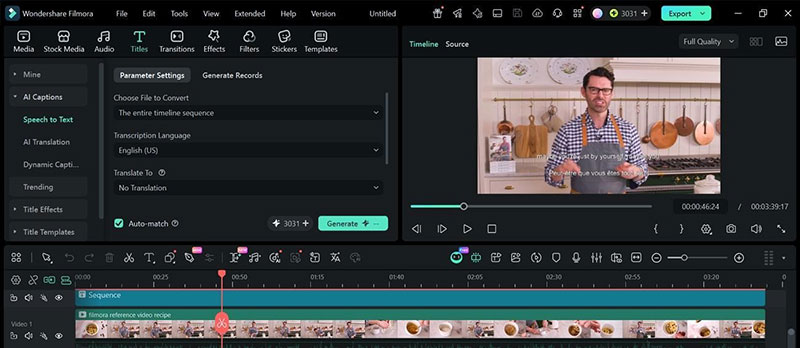
A tool that works as a free auto caption generator is Wondershare Filmora. With its built‑in Speech‑to‑Text feature, it turns spoken audio into subtitles within seconds. It supports 26 languages, making it easier for creators, teachers, and brands to reach global audiences.
Users can quickly generate captions on the timeline, edit word timing, and even export SRT files for use on YouTube or Instagram. This makes Filmora ideal for anyone who wants fast, accurate subtitles all inside their video editor.
2. Kapwing
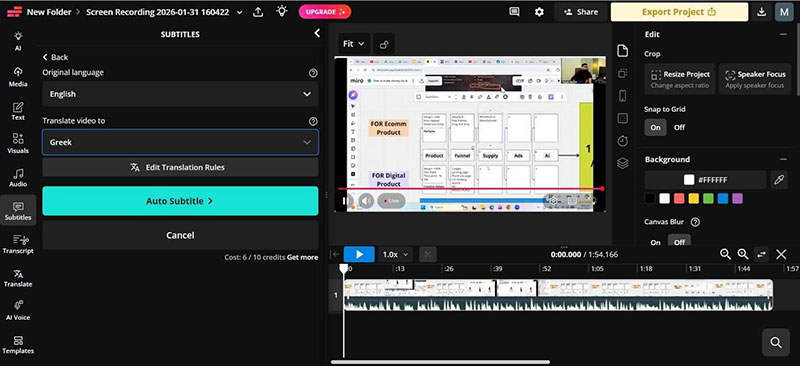
An online subtitle generator that can convert audio into editable captions in seconds. Creators, marketers, and everyday users can generate, edit, and export subtitles with this tool on any desktop or mobile browser. Kapwing is a good tool for on-the-go editing and supports around 100+ languages. The best thing about this tool is that you can access it both on PC and phone.
3. VEED.io
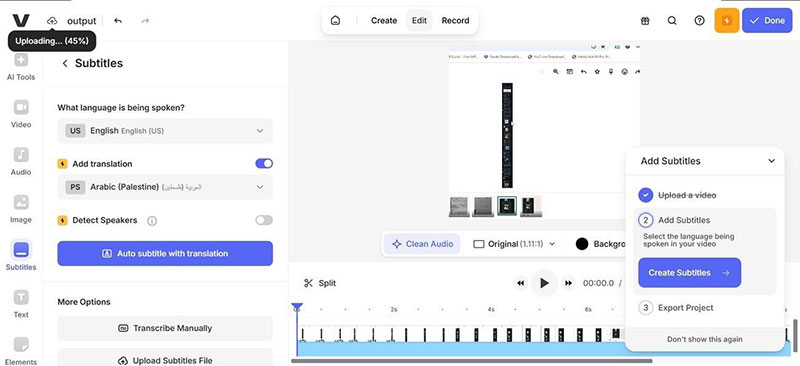
This tool offers a smooth experience, automatically generating subtitles in a few seconds. It uses AI to auto-generate captions and allows users to tweak timing. Furthermore, VEED.io provides full customization of fonts and styles and supports multilingual subtitles, so content can reach a wider audience.
4. Descript
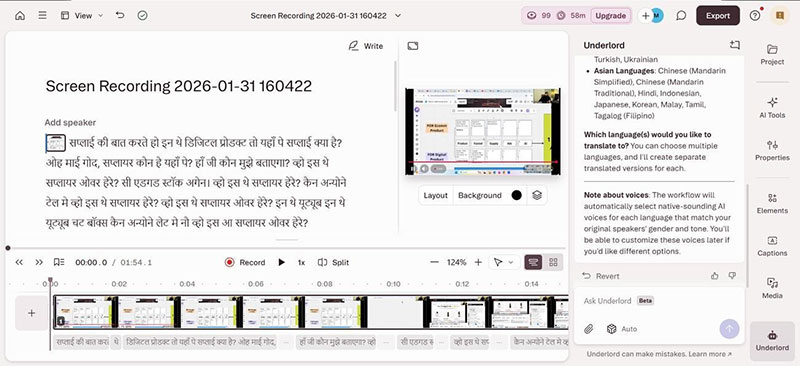
For users who are afraid of ruining video formatting when editing, Descript is a good option. It transcribes your footage into text, which can then be converted into subtitles. Descript’s best feature is text-based editing, where deleting words edits the video itself. This tool is also available as a downloadable desktop app for PC and Mac.
5. CapCut
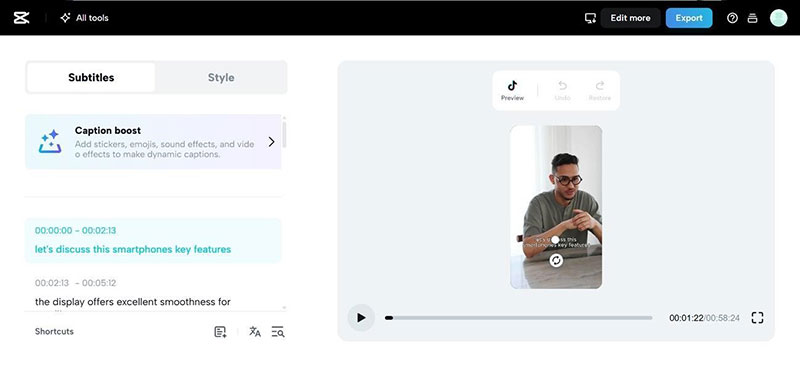
Thanks to TikTokers and social media influencers, Capcut is quite popular with the public. Its AI model generates automatic subtitles instantly and pairs them with stylish animations. Therefore, users can customize fonts, colors, and timing for their videos. CapCut is available on both Android and iPhone, so users can edit on the go.
6. Adobe Premiere Pro
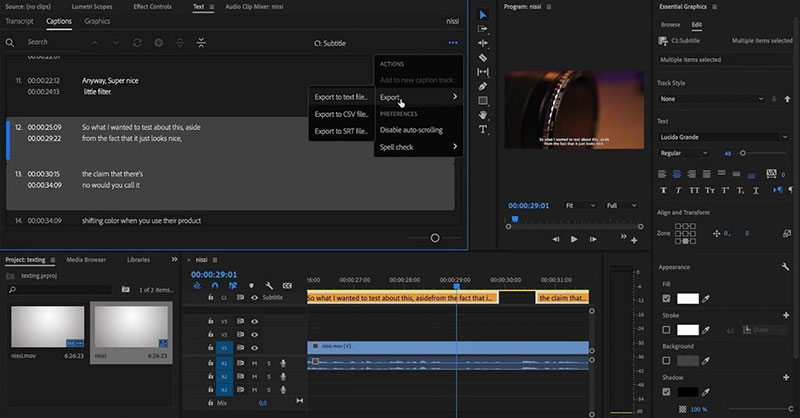
A software that is difficult for beginners, Adobe Premiere Pro, offers a professional subtitle generator powered by speech-to-text technology. This software can generate transcripts and convert them into captions. Also, subtitles can be exported in multiple formats, including SRT. Typically, advanced users or professional creators use Adobe Premiere Pro for high-quality productions.
7. Clipchamp
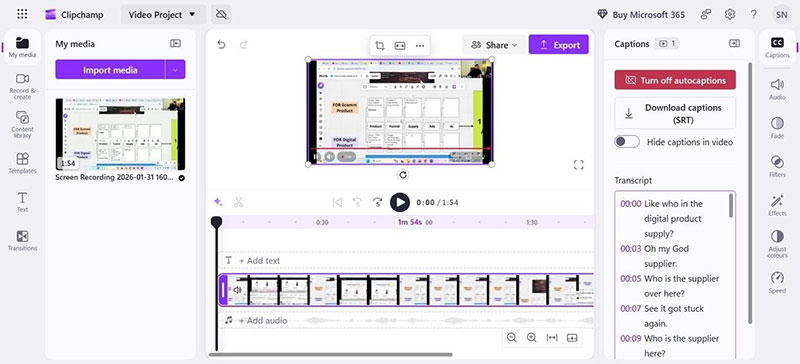
It is a beginner-friendly tool that creates subtitles with a minimal interface and built-in caption features. You can generate and edit subtitles directly on the timeline and customize their appearance as well. Luckily, Clipchamp supports exporting videos with embedded captions, so your videos are ready to share. This is a great free AI subtitle generator that requires no editing knowledge.
8. Vimeo
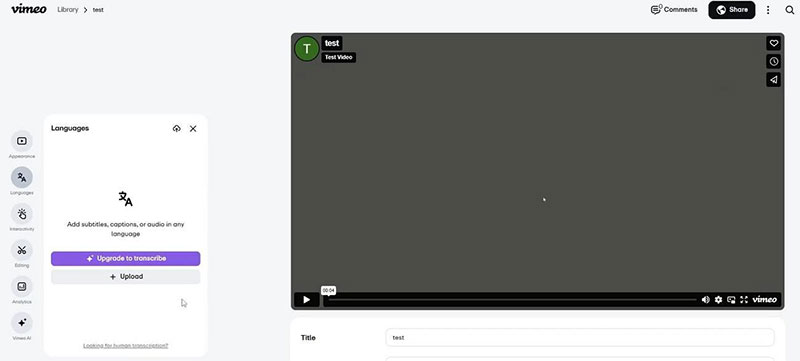
A hosting platform, Vimeo offers subtitle generation features for busy video creators. It can automatically create subtitles and transcripts for uploaded videos, especially with paid plans. Vimeo works online on both Windows and Mac, plus mobile devices, so you can edit your videos anytime, anywhere.
9. Happy Scribe
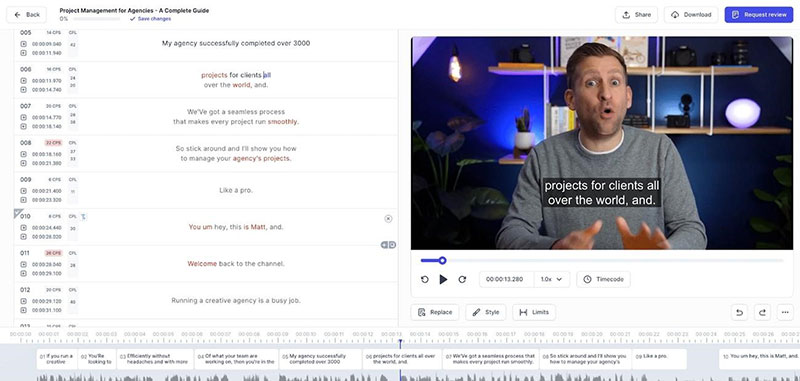
This tool works online and is accessible via a browser, prioritizing accuracy over flashy animations. Happy Scribe is built for precision, so journalists and educators will turn to this tool more than others. It supports multiple subtitle formats, including SRT and VTT, and includes a powerful editor for refining timing and text.
10. Rev AI Captions

Among other tools, Rev AI Captions can generate subtitles for videos that integrate with platforms like YouTube, Vimeo, and Google Drive. Essentially, it is a web‑based service used by agencies and businesses, accessible from any desktop browser. Rev AI Captions can create subtitles with 95% accuracy.
Part 3. Comparison Table for Top Automatic Caption Generators
In the table below, we have compared all the aforementioned automatic subtitle tools. For those who are considering creating captions with AI, carefully look at the table to select the best choice for you:
| Name of Tool | Ideal For | Platform Compatibility | Language Support | Subtitle Export Options | Editing and Styles |
| Filmora | Content creators and beginners | Desktop (PC, Mac) and Mobile Apps (Android & iPhone) | Multiple Language support (26+ languages) | Export with Subtitles and SRT files | Templates, text animations, and stylish subtitles are available |
| Kapwing | Social media content creators | Online tool (works on both browser and mobile) | 100+ languages | SRT, VTT, burned in video, etc. | Advanced styling and speaker detection |
| VEED.io | Users who want quick subtitles | Online + mobile app | Over 90 | SRT export and hard-coded video | templates, font, and color customizations |
| Descript | Podcasts and long-form content creators | Desktop (PC and Mac) | 20+ languages | SRT | text-based editing |
| CapCut | Short-form content videos | Mobile (Android, iOS) plus Desktop | Multi-language support | Built-in export with subtitles | animated subtitles, timing control |
| Adobe Premiere Pro | Professional editors | Desktop only | Limited language support | SRT, VTT, embedded captions | Professional styling, caption tracks, and positioning |
| Clipchamp | Beginners and Windows users | Online and Windows Application | Multi-language support | Export with captions | Basic customization only |
| Vimeo | Hosting plus captions | Online (PC and mobile) | Few languages | SRT upload and download | Basic captions (paid plan includes customization) |
| Happy Scribe | Professionals who need highly accurate subtitles | Online tool (PC + mobile browser) | 60+ languages | Multiple formats, including SRT and VVT | Precise timing editor |
| Rev AI Captions | Large businesses that require high accuracy | Online + API + Mobile Apps | 30+ languages | SRT, SCC, and other formats | Editing dashboard, manual fine-tuning |
Part 4. Why Filmora is the Best Choice: A Detailed Review
Before comparing the final options, it helps to look closely at one standout choice. These reasons explain why Filmora works so well for modern video creators.
- Easy Workflow: Filmora keeps editing, captions, and styling tools together for faster production today. This saves creators time while reducing app switching during busy editing sessions.
- AI Captions: Its speech-to-text feature creates subtitles quickly with strong accuracy for everyday creators. Users can easily edit timing and wording directly in the timeline.
- Language Support: Filmora supports many languages, helping videos reach wider international audiences more effectively. This makes content easier to understand across regions, platforms, and viewer groups.
- Style Options: Built-in templates and text animations help captions look polished and engaging instantly. Creators can match subtitle styles with branding, tone, and platform needs easily.
- Beginner Access: The interface feels simple enough for beginners without removing useful features entirely. That balance helps new users create polished videos without feeling overwhelmed initially.
- Export Flexibility: The tool exports videos with captions and separate subtitle files when needed later. This gives creators more freedom for YouTube, Instagram, courses, and presentations online.
Conclusion
In summary, with the right video editing software, content creators can easily create inclusive videos. We have discussed the need for as and their growing popularity among the public. Also, we have reviewed a few software programs that offer subtitles to users without editing skills. All in all, Filmora comes out as the best for creators who want to increase accessibility and social media reach.
Frequently Asked Questions
- What is the best automatic caption generator for beginners in 2026?
Filmora works well for beginners because caption tools feel simple and fast. It also combines subtitle editing and video creation inside one platform.
- Why do creators use automatic caption generators for videos today?
They save time on editing and help videos reach wider silent-viewing audiences. Captions also improve accessibility for viewers with hearing or language barriers.
- Which caption tool is better for professional video production work?
Adobe Premiere Pro suits professionals who need stronger subtitle control options. It supports transcript workflows, caption tracks, and multiple export options.
- Can automatic captioning tools export subtitle files in SRT format?
Yes, many tools support subtitle exports for easier publishing across platforms. Popular options include Filmora, Kapwing, VEED.io, and Adobe Premiere Pro.

Renowned for his expertise in logo design and visual branding, Bogdan has developed a multitude of logos for various clients.
His skills extend to creating posters, vector illustrations, business cards, and brochures. Additionally, Bogdan's UI kits were featured on marketplaces like Visual Hierarchy and UI8.
He also wrote in the past years on sites like Design Your Way, WebDesignerDepot, WPDean, Designmodo, Speckyboy, Slider Revolution, and more.
- The Cursor Logo History, Colors, Font, And Meaning - 24 September 2026
- Canva vs PowerPoint: Which Is Better for Presentations? - 22 September 2026
- How to Install Fonts on Mac (Step-by-Step Guide) - 20 September 2026

Bogdan Sandu is a seasoned designer who has been designing websites since 2008. Renowned for his expertise in logo design and visual branding, Bogdan has developed a multitude of logos for various clients. His skills extend to creating posters, vector illustrations, business cards, and brochures. Additionally, Bogdan's UI kits were featured on marketplaces like Visual Hierarchy and UI8. He also wrote in the past years on sites like Design Your Way, WebDesignerDepot, WPDean, Designmodo, Speckyboy, Slider Revolution, and more.
You Might Also Like