Canva used to be a drag-and-drop tool for making birthday cards. Today, it is a full AI-powered design platform that 265 million people use every month.
This Canva AI features review covers every Magic Studio tool that actually matters: image generation, writing, background removal, format switching, and more.
Not what each feature promises. What it delivers.
By the end, you will know exactly which AI tools perform well, where the gaps are, and whether Canva Pro is worth the cost for your workflow.
What Is Canva AI
Canva AI is the set of machine learning tools built into Canva’s design platform, covering image generation, writing, video creation, and design automation. It runs entirely inside the existing Canva editor. No separate app, no separate login.
All of it lives under one umbrella: Magic Studio. Canva launched Magic Studio in 2024 as part of Visual Suite 2.0, grouping every AI feature into a single, context-aware hub inside the editor.
The scale here is worth noting. Sacra data from end-2025 shows Canva AI tools reached 800 million tool uses per month, up 700% year-over-year, with Magic Studio logging more than 24 billion total uses over the past year.
Canva AI is distinct from third-party AI integrations available through the App Marketplace (such as DALL-E or ChatGPT plugins). Those are separate installs. Magic Studio features are native, built directly into the editor workflow.
It is also not a single AI model. Magic Studio bundles roughly 15 context-aware tools that activate based on what you click: a photo, a text box, a video clip. Each surfaces different AI options depending on the object selected.
If you have not opened Canva since 2022, the platform looks meaningfully different today. The AI layer is now central to how the product works, not an afterthought.
What AI Features Does Canva Currently Include

Canva AI is not one feature. It is a collection of over 20 tools grouped under Magic Studio. Here is what is actually included as of 2025.
Magic Studio as the Feature Hub
Magic Studio is the interface layer that groups all AI tools. It appears as a sidebar panel and as context menus that change based on selected objects. Every AI feature in Canva lives inside it.
The tools split into 4 functional categories:
- Generation: Dream Lab (text-to-image), Magic Media (text-to-video), Magic Design (full template generation from a prompt)
- Editing: Magic Edit, Magic Eraser, Magic Grab, Magic Expand, Background Remover
- Writing: Magic Write (text generation), Magic Switch (format and content transformation), Magic Translate
- Animation and layout: Magic Animate, Beat Sync, Magic Resize
Dream Lab replaced the older Magic Media image generator in 2024. It is now powered by Leonardo.ai’s Phoenix model after Canva acquired Leonardo AI, which produced a measurable jump in output quality compared to the previous Stable Diffusion XL base.
| Feature | Function | Plan Access |
|---|---|---|
| Dream Lab | Text-to-image generation using AI | Free (limited usage) and Pro |
| Magic Write | AI-powered text generation within designs | Free (25 uses/month) and Pro (75 uses/month) |
| Background Remover | AI-based subject extraction and background removal | Pro only |
| Magic Switch | Content repurposing and format conversion across design types | Pro only |
| Magic Animate | Automatic animation of static design elements | Free and Pro |
Canva Code, added in late 2024, lets users generate functional interactive elements (calculators, quizzes, tools) directly inside a design using a text prompt. It is early-stage but worth knowing about if you work on interactive content.
How Does Magic Media Perform for Image Generation

Dream Lab is the current image generation engine inside Canva. It replaced the older Magic Media generator and produces noticeably stronger results, particularly on stylized outputs.
Output Quality Compared to Standalone Tools
Dream Lab produces interesting results. It handles abstract, stylized prompts well. Where it struggles is photorealism.
Testing across multiple review sources in 2025 shows a consistent pattern: Dream Lab images are “mid-tier” against dedicated generators like Midjourney V6 or FLUX. Pickaxe’s 2025 ranked testing put it plainly: Canva’s generated images “don’t compete with Midjourney, ChatGPT, or even FLUX. They’re adequate but not outstanding.”
That said, the old Canva generator (Stable Diffusion XL) was worse. Faces looked waxy, hands had extra fingers. Dream Lab’s Phoenix model fixed most of those issues. For flat design, graphic styles, and logo-adjacent outputs, it performs well above where Canva image generation used to sit.
Style options available:
- Photorealistic
- Watercolor
- Neon
- Retrowave
- Concept art
- Dreamy
- Cinematic
Reference image uploads are supported. You can feed Dream Lab a style sample, and it does a reasonable job carrying that visual language into the output. Useful for brand-aligned color palette consistency.
Text-to-Video via Magic Media
Video generation is the weakest part of the Magic Media suite.
Short clips (4-8 seconds) generate from text prompts, but motion quality is inconsistent. Outputs are noticeably behind Runway Gen-3 and Pika 1.0 on fluid movement and scene coherence. This is not a competitive video generation tool for anything beyond quick social content fillers.
For social media teams needing a fast B-roll asset at no extra cost, it is functional. For anything requiring realistic motion or narrative continuity, dedicated tools are the better call.
How Does Magic Write Perform for In-Design Copy

Magic Write is Canva’s built-in text generation tool. It activates inside text boxes and Canva Docs. Type a prompt, get copy back.
On short-form tasks, it works. Headlines, social captions, product descriptions, email subject lines: these come out clean and usable. AcademicHelp testing (2025) gave Magic Write an overall score of 72.3/100, with strong mechanics (86% for spelling and punctuation) but weak reasoning and logic (31%). That scoring tracks with what it actually does well in practice.
The 500-word output cap per generation is a hard limit. Free plan users get 25 uses per billing month. Pro users get 75.
Where it falls short:
- Long-form coherence drops past 300 words
- Context awareness is limited to the current text box, not the full design or project
- Brand voice is not pulled from Brand Kit automatically
- Users consistently report heavy editing needed to make outputs sound natural (eesel AI, 2025)
Compared to writing in Claude or ChatGPT and pasting the result into Canva: similar or slightly lower output quality, but the in-editor workflow saves switching between tabs. For high-volume social content teams, that time savings adds up. For long-form copy or anything requiring brand-specific voice, external tools produce cleaner drafts.
How Accurate Are Canva’s AI Image Editing Tools

This is where Canva AI earns its value for most non-designer users. The editing tools are practical, fast, and good enough for the majority of marketing asset workflows.
Background Remover
Accuracy rating: strong on clean subjects. Background Remover handles product shots, portraits, and isolated objects reliably. It matches remove.bg on simple compositions.
Performance drops on hair, fur, semi-transparent objects, and busy backgrounds. Expect manual touch-up on those. Processing runs server-side, averaging 3-8 seconds per action.
This is a Pro-only feature. Free users cannot access it.
Magic Edit, Magic Eraser, and the Newer Spatial Tools
Three editing tools handle object manipulation inside existing images:
- Magic Eraser: Effective on small objects with simple surroundings. Leaves visible artifacts on complex textures or large areas.
- Magic Edit: Replaces a selected region using a text prompt. Inconsistent lighting and style matching across tests. Works best when the replacement object is generic.
- Magic Grab: Isolates and repositions subjects within a design. Performs well on clearly defined subjects. Added in 2024.
Magic Expand extends image borders using generative fill. It handles outdoor and abstract backgrounds adequately. Complex architectural or interior scenes show seams.
The practical use case for most teams is background removal plus Magic Eraser for cleanup. Those two together handle around 80% of standard product photo editing needs without leaving the editor. Magic Edit is more of an experimental tool at this stage.
How Well Does Magic Switch Handle Content Transformation

Magic Switch does two things: it converts a design into different format sizes, and it rewrites on-design text to match the new format’s tone and length. Both happen in one action.
The format conversion side works well. A single Instagram post converts to a Story, a LinkedIn banner, and a Facebook cover in seconds. Proportions and layout adapt automatically. This is one of the most time-saving features in the entire Magic Studio suite. SaasCRMReview testing in 2025 found 60-70% time savings on multi-format content production workflows compared to manual resizing.
| Use Case | Performance | Time Saved |
|---|---|---|
| Social media multi-format content | Strong | ~70% |
| Presentation to blog post conversion | Moderate | ~50% |
| Design to translated version | Adequate for major languages | ~60% |
The text rewriting side is less reliable. Short copy transforms well. Longer text blocks lose structure and nuance. Custom fonts and Brand Kit elements do not carry over consistently across every output format.
Magic Switch also handles content-type conversion: turning a presentation into a document, or a document into a set of social posts. The structural transformation is workable. The copy that comes out needs editing. Treat it as a first draft, not a finished output.
How Does Canva AI Handle Brand Consistency
Brand consistency is where Canva AI’s limitations become most visible for professional teams. The tools exist. The integration between them is incomplete.
Brand Kit and AI Feature Integration
Brand Kit 2.0 (released 2024) stores logos, color palettes, fonts, and brand assets. It enforces those elements across templates and manual design work effectively.
AI-generated content is a different story.
- Dream Lab does not auto-apply Brand Kit colors to generated images
- Magic Write does not pull brand voice guidelines unless manually prompted each time
- Magic Design applies Brand Kit fonts and colors to generated templates, which works reasonably well
The gap between Brand Kit and generative outputs is the core limitation here. Generated images require manual saturation and hue correction to match brand color systems. That correction step takes time and requires at least basic understanding of color theory to do properly.
Comparison with Adobe Express
Adobe Express has tighter brand integration with Firefly. Generated outputs apply brand style guides more consistently, and brand voice settings persist across sessions.
Canva’s advantage is workflow breadth and template volume. Adobe Express wins on brand guardrail enforcement for teams where consistency is non-negotiable. For larger organizations, Teams plan in Canva adds admin controls and brand approval workflows, which close some of that gap. But it does not close it entirely.
For agencies or in-house brand teams producing high-volume assets where visual hierarchy and emphasis must stay consistent across every asset, this gap matters more than it might seem at first.
What Are the Usage Limits and Plan Differences for Canva AI

Canva restructured how AI access works in 2025. It is no longer a simple credit count. Tools now fall into 3 tiers: Standard, Premium, and Ultra, each drawing differently from a shared monthly allowance.
The bigger change: Canva now publishes actual usage ranges by plan for the first time, with a built-in tracker so users can monitor where they stand (Canva Help Center, April 2026).
| Plan | Monthly Price | AI Allowance | Background Remover |
|---|---|---|---|
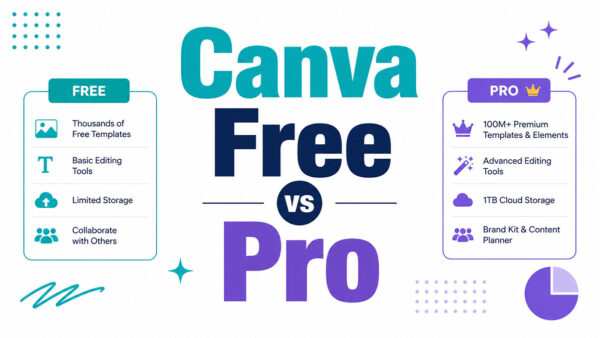
| Free | $0 | Limited (approximately 50 total AI credits) | Not included |
| Pro | $15/month ($10/month with annual billing) | Approximately 500 AI uses per month | Included |
| Teams | $10/user/month (3-user minimum) | Approximately 500 pooled AI uses per month | Included |
| Enterprise | Custom pricing | Higher limits, with optional AI Pass add-ons | Included, plus enterprise-grade indemnification and protections |
Where the Limits Actually Bite
The 500 monthly credits on Pro sound generous. For casual use they are.
Heavy users running image generation, video creation, and Magic Write simultaneously burn through the allowance faster than expected, according to multiple 2025 reviewer reports (aiworthit.com, AI Productivity). Ultra-tier tools like Dream Lab’s advanced models and Canva Code consume significantly more allowance per use than Standard tools.
Key distinction: AI design tools (Background Remover, Magic Resize, Beat Sync, Magic Animate) do not draw from the shared allowance at all on paid plans. Generative tools (Dream Lab, text-to-video, Magic Write, Canva Code) do.
Teams plan credits are pooled, not per-user. A team of 5 sharing 500 monthly credits can create friction if 2 members are heavy AI users. AI Pass is available as a paid add-on if teams hit the ceiling.
Free Plan Ceiling
50 lifetime credits for image generation on Free is a hard ceiling, not a monthly reset.
Magic Write resets monthly on Free (25 uses), but most other generative features are either locked or extremely restricted. The free tier is enough to evaluate Canva AI, not enough to build a production workflow around it.
One genuine advantage of the free plan: K-12 verified teachers and registered nonprofits get Pro-level access at no cost, including full AI allowances (Canva, 2025).
How Does Canva AI Compare to Adobe Express and Microsoft Designer
Three tools dominate accessible AI design in 2025: Canva, Adobe Express, and Microsoft Designer. They have taken different approaches to where AI fits in the workflow.
Canva holds the largest template library at over 600,000 options. Adobe Express offers fewer but more curated outputs. Microsoft Designer has the smallest library of the 3 (The Best AI Tools, 2025).
Canva vs. Adobe Express

Where Canva wins: template volume, workflow breadth, multi-format content production, and the all-in-one editor experience. Magic Switch and Magic Resize have no direct equivalent in Adobe Express.
Where Adobe Express wins:
- Tighter brand consistency through Firefly’s Generative Match feature
- Native Creative Cloud integration (Photoshop, Illustrator, Premiere)
- IP indemnification built into standard plans, not just Enterprise
- Better photorealism from Firefly Image Model 5
Adobe launched an AI Assistant for Express in October 2025 (beta), adding conversational editing via natural language prompts. Canva AI 2.0 already does this. Neither implementation is fully polished yet.
Canva vs. Microsoft Designer
Microsoft Designer integrates directly with Microsoft 365, which matters if your team lives in Teams, Word, and PowerPoint.
Design output quality is weaker than Canva across categories. Template variety is narrower. AI image generation runs through DALL-E, which produces different (often more literal) outputs than Dream Lab’s Phoenix model. For non-Microsoft-first organizations, there is not a strong reason to choose Designer over Canva on AI features alone.
| Feature | Canva AI | Adobe Express | Microsoft Designer |
|---|---|---|---|
| Image generation engine | Leonardo Phoenix (via Dream Lab) | Adobe Firefly | DALL·E |
| Brand kit integration with AI | Partial support through Magic Design and Brand Kit features | Strong support through Generative Match and Adobe brand tools | Basic brand integration capabilities |
| Multi-format resize | Yes (Magic Resize / Magic Switch) | Limited compared to Canva | No dedicated multi-format resize feature |
| IP indemnification | Available primarily through enterprise offerings (Canva Shield) | Included with qualifying Adobe plans and Firefly-generated content protections | Limited protections compared to Adobe and Canva Enterprise |
For most marketing and social media design workflows, Canva AI covers more ground in one place than either competitor. For legal-department-sensitive brand work requiring commercial IP protection, Adobe Express is the safer choice.
What Are the Limitations of Canva AI
Canva AI is described by multiple independent reviewers in 2025 as an “80% solution.” It does 80% of what Photoshop does, 80% of what Premiere does. For most marketers, that is fine. For specialists, it is not enough.
Generation and Editing Gaps
No model fine-tuning. You cannot train Dream Lab on your own brand assets. No LoRA equivalent, no custom model weights. Adobe Firefly’s Generative Match and Leonardo’s native LoRA tools both handle this. Canva does not.
Prompt language performance drops significantly for non-English inputs. English prompts produce noticeably stronger results across Dream Lab and Magic Write (VAIA AI Academy, 2025). For multilingual teams producing AI-generated content, this is a real constraint.
Video generation quality is not competitive. Runway Gen-3 and Pika 1.0 produce better motion coherence and scene continuity. Canva’s text-to-video sits several quality tiers below dedicated video AI tools.
Privacy and Data Handling
AI inputs are processed server-side. Canva’s policy states it does not use your content to train AI features unless consistent with your privacy settings (Canva Trust Center, 2025).
Enterprise customers on Canva Shield get IP indemnification for Magic Studio outputs at no extra cost. Free and Pro users do not have indemnification coverage, which matters for brand-sensitive commercial work.
Practical implication: Teams handling confidential client assets or sensitive brand materials should review Canva’s data processing terms before running those assets through generative AI features. The controls exist. Most users never look at them.
Integration Depth
AI features in Canva are additive, not embedded into the core design logic.
There are no AI layout suggestions as you design. No smart design recommendations based on what you are building. The AI activates when you explicitly click a tool. Compare this to how Figma’s AI features suggest layout adjustments inline, and the difference in workflow depth becomes clear. Canva’s AI layer is wide. It is not yet deep.
Is Canva AI Worth It for Professional Designers
Short answer: it depends entirely on what “professional” means in your context.
Canva AI reached 800 million AI tool uses per month by end-2025, up 700% year-over-year (Sacra). That adoption is not coming from pixel-level Photoshop users. It is coming from marketers, educators, social media teams, and small business owners who need usable output fast.
Who Gets Real Value from Canva AI
The clearest wins are in high-volume, time-sensitive content workflows.
- Social media managers producing multi-format campaigns save 60-70% on resize and adaptation time (SaasCRMReview, 2025)
- Marketing teams using Dream Lab for social image assets eliminate the need for a separate image generation subscription
- Non-designers producing presentations, flyers, and brand assets without design background
More than 90% of Fortune 500 companies use Canva (Canva, 2025). That stat includes marketing departments running high-volume campaign assets, not design studios producing brand identity systems.
Who Should Look Elsewhere
Professional brand designers working on identity systems, campaign art direction, or high-fidelity print production will hit the ceiling fast.
The graphic design principles that govern serious brand work, including precise control over alignment, balance, and contrast, require the kind of pixel-level control that Canva does not offer. Canva outputs do not export to CMYK-ready files suitable for offset print design on the Free plan. SVG export and transparent backgrounds are Pro-only features.
Designers who need typography control at the level of adjusting kerning, leading, and tracking precisely across a typographic hierarchy will find Canva’s text tools frustratingly limited. The controls exist, but they are simplified versions of what professional tools offer.
The Honest Verdict
Canva AI saves real time on real tasks. The AI layer in Pro ($120/year) replaces a stock photo subscription, a background removal tool, a basic video editor, and a social scheduling tool in one package.
AI Productivity data from 2025 puts it plainly: Canva Pro bundles what would cost $50-80/month in separate tools for around $10/month on the annual plan.
For teams where font choices, gradient precision, and brand-level consistency are the job, Canva AI is a starting point. Affinity (now bundled with Canva’s Enterprise tier following the 2024 acquisition) or Adobe Creative Cloud is the finishing environment.
For everyone else building content at volume, the AI tools are good enough to save hours every week. And that, for most teams, is exactly what they need from a design tool.
Want to go deeper on related topics? Check out the Canva vs Adobe Express comparison, the full Canva Free vs Pro breakdown, or the Canva for Teams review if your team is evaluating the collaboration tier.
FAQ on Canva AI Features
What is Canva AI and what does it include?
Canva AI is a suite of over 20 tools grouped under Magic Studio, built directly into the Canva editor. It covers image generation, text writing, video creation, background removal, format conversion, and animation. No separate app required.
Is Canva AI free to use?
The free plan includes limited AI access: 50 lifetime image generation credits and 25 monthly Magic Write uses. Canva Pro unlocks roughly 500 monthly AI uses plus Background Remover. Most production workflows need a paid plan.
How good is Dream Lab for image generation?
Dream Lab, powered by Leonardo’s Phoenix model, handles stylized and graphic outputs well. It produces mid-tier photorealism compared to Midjourney or FLUX. Good enough for social content. Not competitive for high-end creative work.
What does Magic Write actually do?
Magic Write generates copy inside text boxes and Canva Docs. It performs well on short-form content like captions and headlines. Long-form output drops in quality past 300 words and needs heavy editing to sound natural.
Does Canva AI support brand consistency?
Partially. Magic Design applies Brand Kit fonts and colors to generated templates. Dream Lab and Magic Write do not auto-apply brand settings. Teams needing strict brand guardrails will find Adobe Express’s Firefly integration more reliable.
How does Canva AI compare to Adobe Firefly?
Adobe Firefly produces stronger photorealism and offers IP indemnification on standard plans. Canva AI covers more workflow ground in one place. Firefly wins on brand safety and output quality. Canva wins on speed and template volume.
What are the main limitations of Canva AI?
No model fine-tuning on your own assets. Weaker non-English prompt performance. Video generation is behind dedicated tools like Runway Gen-3. AI features activate on demand but do not provide inline design suggestions as you work.
Is Canva Pro worth it for the AI features alone?
At $120 per year, Canva Pro replaces a stock photo subscription, a background removal tool, and a basic social scheduler. For teams producing regular content, the AI tools alone justify the cost through time savings.
How does Magic Switch work?
Magic Switch converts a design into different format sizes and rewrites on-design text to match the new format. Format conversion is reliable. Text rewriting works on short copy and needs editing on longer content blocks.
Who should not use Canva AI?
Professional brand designers needing pixel-level control, precise typography management, or CMYK print output will hit the ceiling fast. Canva AI is built for speed and volume, not for high-fidelity production or complex identity design work.
Conclusion
This conclusion is for an article presenting a full breakdown of Magic Studio and its AI-powered design tools, from Dream Lab image generation to Magic Switch content transformation.
The verdict is straightforward. Canva AI works well for marketers, social media teams, and non-designers producing content at volume.
Background Remover, Magic Resize, and Magic Design deliver real time savings. Magic Write handles short-form copy adequately. Dream Lab produces solid stylized outputs, though photorealism lags behind dedicated generators.
Brand consistency and long-form writing remain weak points. Professional designers needing precise typeface control or production-ready CMYK output will need additional tools.
For most teams, Canva Pro at $120 per year covers enough ground to justify the cost.

Renowned for his expertise in logo design and visual branding, Bogdan has developed a multitude of logos for various clients.
His skills extend to creating posters, vector illustrations, business cards, and brochures. Additionally, Bogdan's UI kits were featured on marketplaces like Visual Hierarchy and UI8.
He also wrote in the past years on sites like Design Your Way, WebDesignerDepot, WPDean, Designmodo, Speckyboy, Slider Revolution, and more.
- Beautiful Fonts Similar to Poppins You Should Try - 22 October 2026
- Website Redesign: How to Improve Your Website without Losing SEO Rankings - 22 October 2026
- The Coda Logo History, Colors, Font, And Meaning - 20 October 2026

Bogdan Sandu is a seasoned designer who has been designing websites since 2008. Renowned for his expertise in logo design and visual branding, Bogdan has developed a multitude of logos for various clients. His skills extend to creating posters, vector illustrations, business cards, and brochures. Additionally, Bogdan's UI kits were featured on marketplaces like Visual Hierarchy and UI8. He also wrote in the past years on sites like Design Your Way, WebDesignerDepot, WPDean, Designmodo, Speckyboy, Slider Revolution, and more.
You Might Also Like