A website redesign can improve clarity and conversion rates, but it can also weaken organic visibility if the project changes signals search engines already understand. The risk is rarely the new color palette or cleaner layout. It usually comes from altered URLs, removed content, weaker internal linking, blocked resources, or templates that change how important pages are crawled.
SEO should therefore enter the redesign before wireframes are approved. A strong project separates visual improvements from structural changes, then identifies which existing pages, links, rankings, and technical signals must survive the move. This matters even when the domain stays the same. A new CMS, navigation system, JavaScript framework, or page template can still change crawlability and content delivery.
No migration can guarantee perfectly stable rankings every day. Google notes that significant site changes can cause temporary ranking fluctuations while pages are recrawled and reindexed. The practical goal is to protect proven assets, reduce unnecessary change, and make it easy for search engines to understand what stayed the same and what moved.
Build an SEO Baseline Before Design Work Starts
Inventory the Pages That Already Produce Value
Start with evidence rather than assumptions about which parts of the old site can be replaced. Export the current URL set, then combine it with Search Console, analytics, backlink, conversion, and crawl data. This shows which pages attract organic clicks, earn external links, support revenue, or act as pathways to important sections.
Flag at least four groups:
- Pages with meaningful organic traffic or impressions.
- URLs with valuable backlinks or strong internal link support.
- Pages that generate leads, sales, signups, or assisted conversions.
- Pages that rank for strategically important topics even if traffic is modest.
That baseline gives you a concrete post-launch comparison point and makes later traffic losses easier to diagnose.
Search visibility now extends beyond traditional results. Teams investing in ChatGPT SEO services should include pages that support entity clarity, expert authority, and citation visibility in the same inventory. However, AI visibility does not replace migration fundamentals. If a redesign makes a strong page harder to crawl or removes the evidence that established its relevance, both conventional search and AI discovery can lose useful signals.
Decide Which Changes Are Necessary
Risk rises when several major changes happen at once. Moving domains, changing the CMS, rebuilding the information architecture, rewriting core pages, and replacing the front end in one launch makes diagnosis much harder if performance drops.
Where possible, separate changes by business need. Keep clean, meaningful URLs and improve proven content before rewriting it. If pages need consolidation, document what each old page contributes and where that value will go.
| Redesign change | Main SEO risk | Safer approach |
| New visual system | Usually low | Keep core content and URLs stable |
| New navigation | Weaker internal discovery | Preserve paths to priority pages |
| URL restructuring | Lost signals or 404 errors | Map old URLs to relevant new pages |
| Content rewrite | Lost relevance | Retain useful topics and search intent |
| New JavaScript framework | Rendering issues | Test rendered HTML and crawlable links |
| Domain migration | Transfer risk | Isolate the move and monitor both properties |
Rebuild the Site Without Breaking Search Signals
Treat URL Changes as a Migration Project
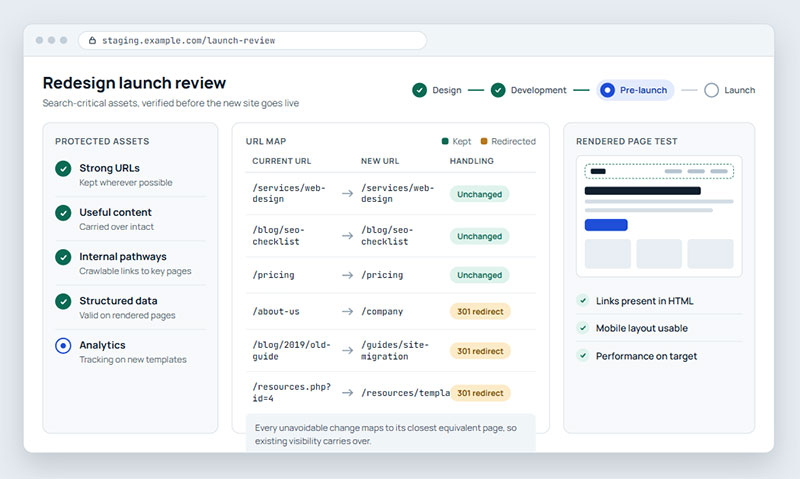
URLs should not change simply because a new CMS prefers a different pattern. Keeping established addresses avoids an unnecessary migration layer. When a URL genuinely must change, map the old page to the most relevant new destination.
Google recommends server-side permanent redirects such as 301 or 308 for moved URLs and advises against redirect chains where possible. It also warns against sending many unrelated old pages to the home page because irrelevant redirects can confuse users and may be treated as soft 404s. The most useful reference for this stage is Google guidance for site moves with URL changes.
Update internal links so the new site points directly to final URLs rather than through redirects. Refresh canonicals, hreflang annotations where relevant, XML sitemaps, and navigation links. If the domain changes, verify the required Search Console properties and follow the appropriate change process.
A redirected page still needs a destination that satisfies roughly the same user need. If several old articles are consolidated into one stronger resource, the new page should genuinely cover the useful subject matter those URLs represented.
Preserve Content That Earned Rankings
Redesign teams often shorten pages to create a cleaner visual experience. That can work for users, but removing substantial content without checking search demand may change what a page can rank for.
Before cutting copy, compare the old and proposed page at the topic level. Keep the core answer, important subtopics, useful examples, service or product details, and evidence that makes the page trustworthy. Titles, main headings, alt text, and internal anchors should remain descriptive rather than becoming vague design labels.
Google Search Essentials emphasizes helpful, reliable, people-first content, words that match how users search, and crawlable links. A redesign should improve presentation without making the page less complete or harder to understand.
This is also the right moment to combine thin pages and fix outdated copy. The key is to distinguish intentional consolidation from accidental deletion. Every removed page should have a reason and, where appropriate, a relevant destination.
Rework Information Architecture for Users and Crawlers
Navigation redesign can improve a site, but it also changes which pages receive internal support. Pages that once sat one click from the home page may end up several levels deeper, while new menus may hide links behind interactions.
Build the new structure around clear categories, descriptive labels, and predictable paths. A useful internal reference on information architecture principles explains how organization, navigation, labeling, and findability work together. Those same choices help search engines understand relationships between sections.
Internal links should use crawlable links, point to canonical URLs, and reflect meaningful relationships between pages. Google can render JavaScript, but its JavaScript SEO guidance still recommends anchor elements with href attributes for link discovery.
Breadcrumbs, contextual links, and hub pages can improve discovery. The goal is a structure that keeps important content easy to reach and clearly connected.
Test the Redesign Before and After Launch
Crawl the Staging Site Like a Search Engine
A staging environment should be tested as a working site, not only as screenshots. Crawl it before launch and compare the results with the production baseline.
Check that priority pages return expected status codes, canonicals are correct, titles and headings survived the template change, and structured data still validates. Confirm that robots.txt rules and noindex directives used to protect staging will not carry into production. Google lists leftover noindex rules, robots blocks, incorrect redirects, and outdated sitemaps among common migration problems.
Inspect the rendered version of key templates as well. This matters when the redesign adds client-side rendering, filters, tabs, accordions, or dynamic navigation. Important text and links should not depend on user actions that prevent discovery.
Test Mobile Experience and Performance
Visual polish is not enough if the new site becomes slower or harder to use on mobile. Google uses the mobile version of content for indexing and ranking and recommends responsive design as the easiest configuration to implement and maintain. It also advises keeping primary content equivalent across desktop and mobile versions.
Measure representative templates rather than only the home page. Product pages, articles, categories, and lead forms often use different code and media. Watch Largest Contentful Paint, Interaction to Next Paint, and Cumulative Layout Shift because they reflect loading, responsiveness, and visual stability.
Oversized hero media, extra font files, third-party scripts, and shifting components can all slow the new site. Performance budgets help keep them under control.
Launch with Monitoring Already in Place
Before launch, save benchmark data for organic clicks, impressions, top landing pages, conversions, indexed URLs, crawl errors, Core Web Vitals, and key server responses.
Immediately after deployment, crawl the live site again. Test important redirects, inspect the XML sitemap, verify canonicals, and confirm analytics and conversion tracking. Then use Search Console to watch indexing, queries, and errors. For URL migrations, Google recommends monitoring old and new URLs as the transition progresses.
Compare results against the prelaunch baseline instead of reacting to one day of movement. A decline concentrated on one template suggests a different problem from a sitewide drop. Stable rankings with falling conversions may point to UX or tracking issues rather than SEO.
A Better Redesign Protects What Already Works
The safest redesign is not the one with the fewest visual changes. It is the one that knows which existing assets carry search value and treats them as requirements during design, development, and launch.
Preserve strong URLs when possible, map unavoidable changes carefully, keep useful content intact, maintain crawlable internal pathways, and test the rendered site before release. Performance, mobile usability, structured data, and analytics should be validated as part of the build rather than added later.
A redesign can then improve more than appearance. It can remove structural debt, strengthen navigation, improve weak pages, and give important content clearer paths to discovery. The result is a site that feels new without forcing search engines to relearn everything that already worked. That discipline lets the new site grow from proven visibility.

Renowned for his expertise in logo design and visual branding, Bogdan has developed a multitude of logos for various clients.
His skills extend to creating posters, vector illustrations, business cards, and brochures. Additionally, Bogdan's UI kits were featured on marketplaces like Visual Hierarchy and UI8.
He also wrote in the past years on sites like Design Your Way, WebDesignerDepot, WPDean, Designmodo, Speckyboy, Slider Revolution, and more.
- Beautiful Fonts Similar to Poppins You Should Try - 22 October 2026
- Website Redesign: How to Improve Your Website without Losing SEO Rankings - 22 October 2026
- The Coda Logo History, Colors, Font, And Meaning - 20 October 2026

Bogdan Sandu is a seasoned designer who has been designing websites since 2008. Renowned for his expertise in logo design and visual branding, Bogdan has developed a multitude of logos for various clients. His skills extend to creating posters, vector illustrations, business cards, and brochures. Additionally, Bogdan's UI kits were featured on marketplaces like Visual Hierarchy and UI8. He also wrote in the past years on sites like Design Your Way, WebDesignerDepot, WPDean, Designmodo, Speckyboy, Slider Revolution, and more.
You Might Also Like