Let’s face it: as a graphic designer, you’ve probably spent countless hours wrestling with clunky selection tools, battling jagged edges, and cursing at stubborn backgrounds that refuse to disappear. Whether you’re a Photoshop pro or a Canva enthusiast, the struggle to achieve clean, precise cutouts is real-and it’s eating into your creative time. But what if there was a way to ditch the manual labor and achieve precise background removal in seconds? Enter Aiarty Image Matting, the AI-powered SOTA-class alpha matting tool that’s redefining what’s possible in image editing.
Forget the days of painstakingly tracing outlines or manually settling for mediocre results. Aiarty Image Matting leverages advanced AI frameworks and edge refinement algorithms to deliver hassle-free AI auto detection, pixel-perfect precision, and edge clearness for the trickiest details like hair, fur, fabrics, or intricate patterns. Meanwhile, it’s further armed with advanced deep convolutional layers to extract intricate details from challenging elements such as wedding dresses, delicate lace, sheer tulle, transparent glass, and reflective water droplets. Seamlessly maintain translucency and refine edge precision, enabling flawless integration into any new background for a perfectly natural result.
Ready to leave the frustrations of traditional background removal behind? Let’s dive into how this AI background remover tool is setting a new standard for designers everywhere.
Highlights
- Remove complex background from images with precision and sharpness both kept
- Erase a background and replace it with a transparent, solid color or personal image.
- 4 Delicate AI models tailored for portraits, photography, product photos, graphic design, etc.
- 4 Drawing tools accessible to anyone (newbies or pros) to adjust transparency via erase/brush/doge/burn options.
- Advance Refinement options let you free balance between smoothness and outline emphasis.
- Upscale image 2X and AI enhance image quality up to 4K, 8K, even 10K high quality.
- Batch processing: feed it with 3000 images and it can trouble-free separate background from images in bulk.
- Ease of use: unlike Photoshop’s steep learning curve, Aiarty is intuitive, no technical skills required.
How to Remove Background for Free with Aiarty Image Matting
Step 1. Import image(s). Tap the “+” icon to load your images, be it hair, fur, semi-transparent images, wedding dress, glass, lace, portraits, animal, product images or graphic design photos.
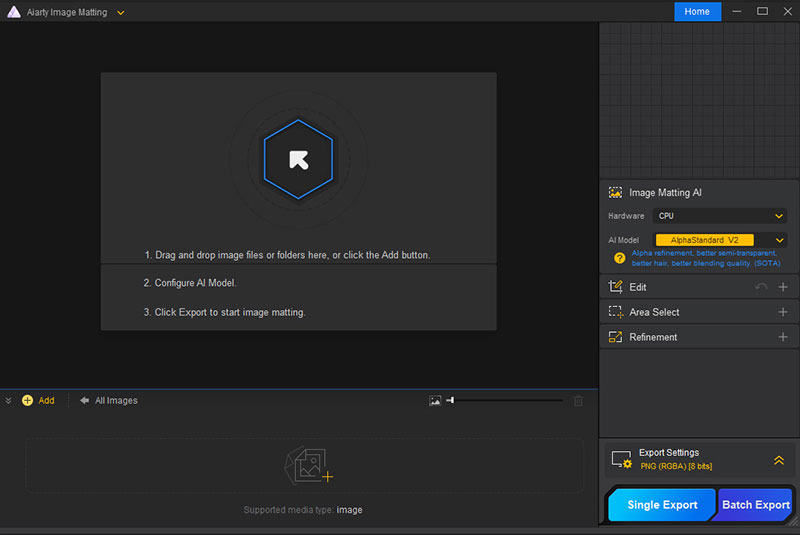
Step 2. Select AI model. For most images, please keep the default AI model AlphaStandard V2, which is suitable for most cases, best for hair, semi-transparent photos with better blending quality.
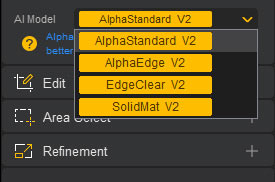
If you care more about edge sharpness and lower transparency, please change AI model to AlphaEdge V2. As for solid images like car, mobile phone, watch, perfume, SolidMat V2 is your best option.
Step 3. Remove background from images. Tap the “Start” orange button to AI automatically erase background from an image. Generally, it will instantly separate the foreground from the background. It will be slower if your computer is running on CPU for bg removal instead of GPU.

Step 4. Optionally, blend image with a new background. Choose “Background” in the Effect list. Afterwards, tick the image icon in the middle of the preview window. Tap “Browse” to load your new background from your local drive.

Then, you can automatically move foreground or background to adjust their size and place to perfect blending them together.
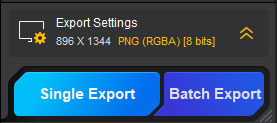
Step 5. Export your masterpieces. Export one or more images after all settings. That’s all. If you’re meant to know more features about Aiarty Image Matting, check its complete user guide here.
In a nutshell, Aiarty Image Matting is not just a background removal tool; it leverages deep learning algorithms to accurately identify the boundaries between subjects and backgrounds in images. Even challenging details like complex hair strands and transparent objects, which are difficult for traditional tools, can be handled effortlessly. Compared to the tedious manual operations in Photoshop and the limited editing capabilities of Canva, Aiarty Image Matting achieves true “one-click background removal,” freeing designers from repetitive tasks and allowing them to focus more on creative ideation.
YouTube Guide


Renowned for his expertise in logo design and visual branding, Bogdan has developed a multitude of logos for various clients.
His skills extend to creating posters, vector illustrations, business cards, and brochures. Additionally, Bogdan's UI kits were featured on marketplaces like Visual Hierarchy and UI8.
He also wrote in the past years on sites like Design Your Way, WebDesignerDepot, WPDean, Designmodo, Speckyboy, Slider Revolution, and more.
- Best Visual Regression Testing Tools for Web and App Design in 2026 - 13 October 2026
- Jujutsu Kaisen Font Generator - 12 October 2026
- The Windsurf Logo History, Colors, Font, And Meaning - 10 October 2026

Bogdan Sandu is a seasoned designer who has been designing websites since 2008. Renowned for his expertise in logo design and visual branding, Bogdan has developed a multitude of logos for various clients. His skills extend to creating posters, vector illustrations, business cards, and brochures. Additionally, Bogdan's UI kits were featured on marketplaces like Visual Hierarchy and UI8. He also wrote in the past years on sites like Design Your Way, WebDesignerDepot, WPDean, Designmodo, Speckyboy, Slider Revolution, and more.
You Might Also Like