Passkeys make frictionless design possible at the point where most sites lose people: signing in. A passkey replaces the password with a cryptographic key stored on the user’s device and unlocked with a fingerprint, a face scan or the device PIN, so there is nothing to remember, type or reset. Frictionless design means removing obstacles between users and their goal, and authentication is often the biggest obstacle. Providers such as OwnID focus on making passkey adoption easier for businesses.
What is frictionless design?
Frictionless design removes the obstacles that stop users from reaching a goal quickly and with minimal effort. It means streamlining processes, simplifying interfaces and creating a flow people barely notice. The less a person has to think about how to get through a site or app, the better the experience.
The aim is minimizing cognitive load, keeping clicks to a minimum and making the journey smooth from start to finish. Authentication has long been one of the worst pain points: long forms, forgotten passwords and complicated recovery flows have irritated users for years. That is where passkeys come in.
What are passkeys and how do they work?
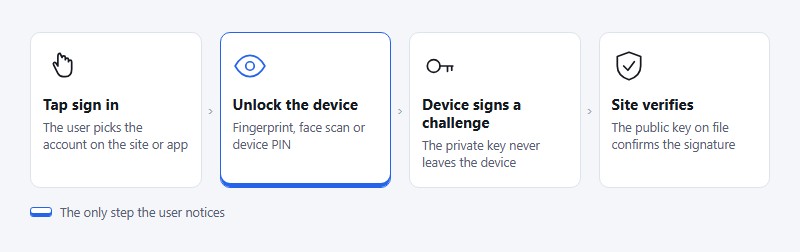
A passkey is a passwordless login credential. It uses public-key cryptography: the site stores a public key, while the matching private key stays on the user’s device. To sign in, the user unlocks the device with a fingerprint, face scan or PIN, the device signs a challenge from the site, and the site checks the signature against the public key. The biometric itself stays on the device and is not sent to the site.
Passkeys address several password problems at once. They cannot be guessed or reused, and because they are tied to the real site, they resist phishing. They shorten login to a single gesture. And they remove the burden of remembering anything, which lets developers build a smoother sign-in. This short video from Google shows what the experience looks like.

How does OwnID approach passkeys?

OwnID is one of the platforms working on frictionless authentication. Its pitch is to integrate passkeys directly into the user experience so that businesses can adopt them with less effort. It is meant to fit with systems a company already runs, whether that is an e-commerce site, a content site or another online service, with minimal disruption.
The result is a stronger security posture and a better user experience at the same time. Privacy matters in this design, and the point to look for in any provider is that sensitive data such as biometrics stays on the user’s device, as the passkey standard intends. You can read more about the platform at ownid.com.
What are the advantages of passkeys in frictionless design?

Passkeys improve security, speed and trust together, which is rare for a single change.
- Improved security: a passkey is far harder to steal or guess than a password, because it depends on a trusted device and, usually, a biometric check.
- Improved user experience: one action, such as a fingerprint scan, completes the login. That saves time and effort and feels more pleasant.
- Lower abandonment: tedious login steps push people away, and this is most visible in e-commerce, where cart abandonment is a constant problem. Fewer sign-in steps should help, though you should measure the effect on your own site.
- More trust: people trust sites that offer secure and easy ways to authenticate, and that reflects well on the brand. This links to the wider relationship between user interface design, usability and customer trust.
How do you implement frictionless design with passkeys?
Choose a provider, find the friction, then communicate clearly. Designers and developers should work through four points.
- Choose the right authentication provider. Look for a solution, such as OwnID, that is flexible and fits your current infrastructure, so the experience works across all devices.
- Map the user journey. Find where friction occurs and remove it. That may mean redesigning sign-up, cutting form fields or allowing automatic authentication through a device.
- Test every touchpoint. Each step in the flow should be tested and smoothed, including account recovery and sign-in on a new device. Small interactions count here, as covered in micro-interactions in e-commerce website design.
- Explain it to users. People need to know how the passkey system works and why it is better. Clear instructions and reassurance about data security reinforce the positive experience.
What is the future of frictionless design?
Passkeys are one step in a longer move toward smoother, more intuitive digital interactions. As technology develops, expect further steps from augmented reality interfaces to voice controls. The objective stays the same: build experiences that are intuitive and enjoyable.
Frictionless design goes hand in hand with the future of UX, since each barrier removed makes interactions feel more natural. Businesses that adopt passkeys early are better placed to meet growing expectations for fast, safe sign-in.
Frequently asked questions
Do passkeys replace passwords completely?
They can, but many sites keep passwords as a fallback during the transition. Offer a passkey as the default path and keep a recovery route for users who lose a device.
Is my fingerprint sent to the website?
No. The biometric only unlocks the key on your device. The site receives a signed response, not your fingerprint or face data.
Do passkeys work across devices?
Yes, passkeys can sync through a platform’s password manager or be used from a nearby phone. Test sign-in on the devices your audience actually uses.
How do you get started with passkeys?
Pick the sign-in flow that loses the most users, such as checkout login or account creation, and add passkey support there first. Measure completion before and after, then extend the change to the rest of the site.

Renowned for his expertise in logo design and visual branding, Bogdan has developed a multitude of logos for various clients.
His skills extend to creating posters, vector illustrations, business cards, and brochures. Additionally, Bogdan's UI kits were featured on marketplaces like Visual Hierarchy and UI8.
He also wrote in the past years on sites like Design Your Way, WebDesignerDepot, WPDean, Designmodo, Speckyboy, Slider Revolution, and more.

Bogdan Sandu is a seasoned designer who has been designing websites since 2008. Renowned for his expertise in logo design and visual branding, Bogdan has developed a multitude of logos for various clients. His skills extend to creating posters, vector illustrations, business cards, and brochures. Additionally, Bogdan's UI kits were featured on marketplaces like Visual Hierarchy and UI8. He also wrote in the past years on sites like Design Your Way, WebDesignerDepot, WPDean, Designmodo, Speckyboy, Slider Revolution, and more.
You Might Also Like