Remote design teams need a way to send large files quickly without losing quality or exposing client work. Email attachments fail at that job, since mainstream providers cap them at around 25 MB, and a single layered PSD or a video export can exceed that. A dedicated transfer service such as Filemail handles the size problem, and a few habits around encryption, access and versioning handle the security problem.
Why do remote design teams need dedicated file transfer tools?
Design files are big and they change constantly. Source files, 4K video, packaging mockups and high-resolution photography routinely run into hundreds of megabytes or more, and people work on them across time zones. Sending them by email or chat leads to compressed images, broken links and several people holding different versions of the same project.
A cloud-based transfer or sharing tool fixes the basics. Files are available from anywhere at any time, everyone downloads the same original, and nobody has to wait for a colleague to come online to get an asset. For more on how distributed teams are set up, see this piece on the rise of remote design teams.
What should a collaboration tool offer a remote design team?
Look for four things. Cloud storage or transfer, so files are reachable by everyone who needs them. Version control, so people know which file is current. Real-time editing for documents and review notes, which shortens revisions and approvals. And permissions, so each person sees only what they should.
Version control deserves the most attention. Most avoidable rework on distributed projects comes from someone editing last week’s file. A clear naming convention, such as project, asset, version and date, combined with one agreed place for the latest files, prevents most of it. This guide to organizing digital files before a client handoff goes deeper on the habit.
Collaboration software also shapes team culture. When feedback and files live in the same few places, people spend less time asking where things are. You can compare options in this overview of online collaboration tools, and if you manage freelancers, managing remote freelance design teams covers the process side.
How do secure file transfers protect design work?
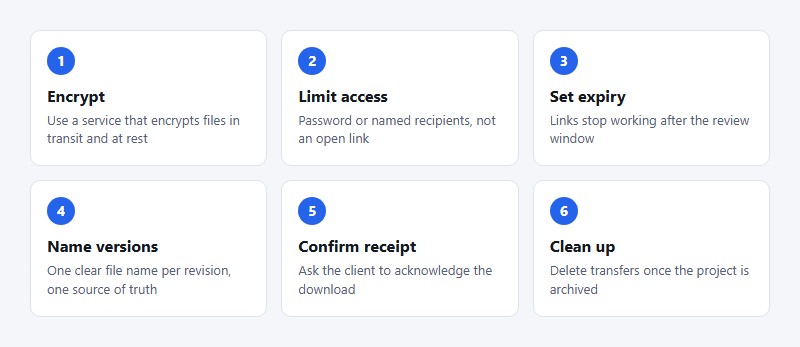
Encryption keeps files unreadable to anyone who intercepts them. Use a service that encrypts files in transit with TLS and, ideally, stores them encrypted as well. Without that, an unreleased campaign or a client’s proprietary data is exposed every time it crosses the internet.
Clients notice. Agencies that handle confidential work, such as product launches or rebrands, are often asked how files are protected, and a good answer helps win and keep them. It is a trust issue as much as a technical one.
A short set of rules covers most risks:
- Send files through links that require a password or are tied to named recipients.
- Set an expiry date so links stop working once the review window closes.
- Do not reuse the same link for several clients or projects.
- Ask for a confirmation when a client has downloaded the files.
- Delete transfers and storage copies when the project is archived.
Cloud security is wider than transfers, and why web designers should care about cloud security explains the rest. A safer digital asset workflow brings the transfer rules together with storage and backups.
How do you simplify feedback loops on shared files?
Keep feedback tied to the file it refers to. When comments arrive in email threads, chat and calls at the same time, someone always misses one. Choose one place for review notes, whether that is comments on the asset itself or a shared document, and tell everyone to use it.
Speed matters too. If a designer has to wait a day for a large file to upload to a client, the feedback cycle stretches by a day, and over a project that adds up. Fast transfers, clear versions and one feedback channel shorten the loop without asking anyone to work faster. The result is fewer misunderstandings, quicker approvals and clients who can see progress without chasing it.
If storage costs are part of the problem, this roundup of cheap cloud storage for designers may help you choose where the files rest between transfers.
Which practices keep a distributed design team efficient?
- Agree on file naming and folder structure on day one.
- Keep source files in shared storage and send client-facing exports through transfer links.
- Put the latest approved version in a single, clearly marked location.
- Write down who may share files externally.
- Review access lists at the end of each project and remove people who no longer need it.
None of this needs heavy process. A one-page document that the whole team reads is usually enough.
What should you check when choosing a transfer service?
Compare file size limits, how long files stay available, whether recipients need an account, and what encryption the provider uses. Look at where data is stored if your clients have regional privacy requirements, and read how the service handles deleted files. A free tier is fine for occasional transfers, but a team that sends client deliverables every week should look at paid plans with admin controls.
Frequently asked questions
How large a file can I send by email?
Gmail limits attachments to around 25 MB, and other providers set similar limits. Anything bigger should go through a transfer service or shared storage, with a link in the email.
Is a transfer link as safe as a password-protected folder?
It can be, if the link is set to expire, protected by a password or limited to named recipients. An open link that never expires is the weak point.
Do I still need version control if I use cloud storage?
Yes. Storage keeps files, but only naming rules or built-in versioning tell people which one is current.
Setting up secure transfers for your team
Pick one transfer tool and one storage location, write the naming and expiry rules on a single page, and share it with the team this week. Test the routine on the next client delivery and adjust it from there.

Renowned for his expertise in logo design and visual branding, Bogdan has developed a multitude of logos for various clients.
His skills extend to creating posters, vector illustrations, business cards, and brochures. Additionally, Bogdan's UI kits were featured on marketplaces like Visual Hierarchy and UI8.
He also wrote in the past years on sites like Design Your Way, WebDesignerDepot, WPDean, Designmodo, Speckyboy, Slider Revolution, and more.

Bogdan Sandu is a seasoned designer who has been designing websites since 2008. Renowned for his expertise in logo design and visual branding, Bogdan has developed a multitude of logos for various clients. His skills extend to creating posters, vector illustrations, business cards, and brochures. Additionally, Bogdan's UI kits were featured on marketplaces like Visual Hierarchy and UI8. He also wrote in the past years on sites like Design Your Way, WebDesignerDepot, WPDean, Designmodo, Speckyboy, Slider Revolution, and more.
You Might Also Like