Here’s the thing about design files: they’re massive, and they multiply fast. You start a project thinking you’ll stay organized this time, and three weeks later you’ve got 20GB of layered PSDs, a million font files, raw photos from that one shoot, and probably seven versions of “final_ACTUAL_final_v3.ai” eating up your hard drive.
And then, because of course, your client from 2022 emails out of nowhere asking for the original source files. You’re stuck digging through external drives or hoping you didn’t delete them to free up space.
I’ve been down the Google Drive road. So has everyone. Same with the usual Dropbox alternatives. They work fine until you hit that storage limit, or you’re paying $10 a month and wondering why you’re essentially renting access to your own files forever.
And honestly?
The privacy thing bothers me. Google can see everything you upload. If you’re designing a rebrand that hasn’t been announced yet, or working on product packaging under an NDA, that’s sketchy. You’re technically violating confidentiality by storing client work where a third party can access it.
But there are actually good alternatives now. Real options for cheap cloud storage for designers that don’t make you pick between affordable pricing and keeping your files private. I spent way too much time testing different services, uploading giant Figma exports, checking if PSDs preview properly, seeing which ones choke on 4K video assets.
This guide covers the eight that actually work for design work, including some with lifetime plans where you pay once and never think about it again.
What to Look For in Cloud Storage as a Designer
Before we get into specific services, let’s talk about what actually matters when you’re storing design files.
File size limits are the big one. Most services quietly limit individual uploads to 2-5GB. That’s useless when your Photoshop file with 47 layers is already 3GB. You need a service that handles 10GB+ files without throwing errors. Some services advertise “unlimited” storage but choke when you actually try uploading a 10GB video file. Look for explicit large file support.
Preview capabilities save time. Being able to see what’s inside a PSD without downloading it is huge. You’re trying to find that one logo variation from six months ago-do you really want to download 30 files just to check? Good services let you preview images, PDFs, and sometimes layered files directly in the browser. This feature alone can save hours per week.
Sharing needs to be secure. Password protection, download limits, expiration dates-these aren’t extras, they’re requirements. You don’t want confidential work floating around forever. When you send a client a link to review mockups, you want control over who can access it and for how long. Some services let you see who downloaded what and when, which is useful for accountability.
Pricing structure matters. Some services charge $10/month forever. Others let you pay once for lifetime access. Over five years, that’s $600 versus a one-time $300 payment. If you’re planning to use cloud storage for more than a few years (and let’s be honest, you are), lifetime plans almost always win. Do the math for your specific situation because this adds up fast.
Privacy is about more than passwords. Zero-knowledge encryption means they literally can’t see your files even if they wanted to. Other services can technically access everything you upload-they promise not to look, but they could if legally required. If you’re working under NDAs or handling sensitive client stuff, this distinction matters. It’s the difference between “we promise we won’t look” and “we mathematically cannot look.”
Okay, now let’s look at the actual services.
1. Internxt Drive – Best for Privacy-Conscious Designers
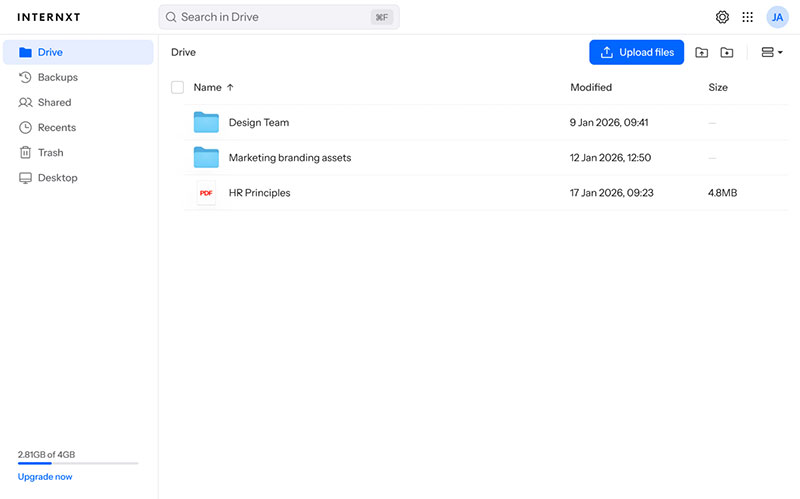
Pricing: €285 (1TB), €435 (3TB), €585 (5TB) lifetime | Free: 1GB
Here’s what sold me on Internxt: you pay once and you’re done. Drop €435 for 3TB and that storage is yours forever. Compare that to Google Drive’s $10/month for 2TB-that’s $600 over five years. Internxt pays for itself in under four years, then it’s free forever.
Internxt uses zero-knowledge encryption, meaning your files get encrypted on your device before they leave. The company literally cannot see what you’re storing-not “we promise not to look,” but mathematically can’t. For designers working on confidential rebrands under NDA, this is huge. Your client work stays private because only you hold the encryption keys.
They’re the first cloud storage provider using post-quantum encryption (Kyber 512), future-proof security for when quantum computers become mainstream. The interface is clean with Windows, Mac, Linux, iOS, and Android apps. The desktop app acts like a virtual drive-files sync automatically, and you can share with password-protected links that expire. Higher-tier plans include VPN, antivirus, and encrypted video calls.
Pros: Lifetime plans • Zero-knowledge encryption • Post-quantum security • Clean apps • Open source
Cons: No Adobe integration • Basic collaboration features • European servers slower for Asia
2. pCloud – Best Lifetime Deal for Large Files
Pricing: $199 (500GB), $399 (2TB), $1,190 (10TB) lifetime | Free: 10GB
pCloud has been around since 2013-trustworthy with over 10 years of track record. Their 2TB lifetime at $399 is competitive. What pCloud does really well is handling large files-individual uploads go up to 50GB, useful for long-form video or massive InDesign files with linked assets.
File versioning is built-in. Every time you modify a file, pCloud keeps the previous version for 30 days. You can rewind your entire account to any point in the last 30 days, which is borderline magical when you accidentally delete the wrong folder. The catch: pCloud’s standard encryption is not zero-knowledge. They offer pCloud Crypto for an extra $150 lifetime that adds client-side encryption to specific folders.
Pros: 10+ year track record • Large file support (50GB) • File versioning • Global servers
Cons: Base plan isn’t zero-knowledge • Crypto costs extra • Small free tier • 10TB expensive
3. Sync.com – Best Google Drive Alternative for Teams
Pricing: $8/month (2TB individual), $6/month per user (teams) | Free: 5GB
If you want “Google Drive but private,” this is it. Sync.com is structured like Drive with files, sharing, and collaboration tools, but with end-to-end encryption built in from the start. Unlike pCloud where encryption is an add-on, Sync.com encrypts everything by default with zero-knowledge architecture.
The team features are genuinely good. You can create team folders where multiple people collaborate, set granular permissions (view-only, edit, can share externally), and use a proper admin console for managing users. File versioning goes back 365 days on paid plans, which is generous. They also have a “vault” feature for extra-sensitive files with an additional password layer.
The catch is pricing-no lifetime option, subscription-only. At $8/month for individuals, that’s $96/year, $480 over five years. More than Internxt’s lifetime 3TB plan. Canadian company under decent privacy laws-not quite GDPR-strong but way better than US regulations.
Pros: Zero-knowledge by default • Team collaboration • 365-day versioning • Canadian privacy
Cons: No lifetime plans • More expensive long-term • Limited free tier • Interface slightly dated
4. Icedrive – Best for Visual File Previews
Pricing: $179 (150GB), $499 (5TB) lifetime | Free: 10GB
Icedrive doesn’t get talked about much, probably because they’re newer (2019). But if you care about previewing files without downloading them, this is the service to beat. Their web interface has a built-in media player that handles video, audio, images, and PDFs smoothly. I’ve previewed 4K video files in-browser without stuttering. The encryption is Twofish, client-side and zero-knowledge.
Lifetime plans exist but pricing is weird. $179 for only 150GB is steep. The 5TB for $499 is more reasonable. One nice touch: mount your cloud storage as a network drive without syncing everything locally. If you’ve got 2TB of archives but only a 256GB laptop, you can access files on-demand without filling your hard drive.
Pros: Excellent media preview • Clean interface • Client-side encryption • Network drive mounting
Cons: Expensive at lower tiers • Limited team features • Newer company • Smaller feature set
5. Filen – Best Open-Source Budget Option
Pricing: $36/year (2TB), lifetime options available | Free: 10GB
German-based, fully open source, genuinely cheap. Their 2TB annual plan is $36/year-that’s $3/month. Being open source means anyone can audit the code to verify encryption works. The interface is functional but basic. Where Filen shines: privacy-conscious on a tight budget. You get GDPR protection, zero-knowledge encryption, and dirt-cheap pricing.
Pros: Extremely affordable • Fully open source • Zero-knowledge encryption Cons: Basic interface • Inconsistent speeds • Limited features
6. Mega – Best Free Storage for Designers
Pricing: Free (20GB), $5.66/month (400GB), $11.32/month (2TB)
Mega gives you 20GB free-genuinely useful, enough to store active projects, your portfolio, and some archives. Most services give 2-10GB and call it done. The service was founded by Kim Dotcom after Megaupload, so they’ve been paranoid about privacy from day one. Everything is end-to-end encrypted with zero-knowledge architecture.
File transfers are fast-really fast. Mega’s infrastructure is built for moving large files quickly. Uploading a 5GB video takes a fraction of the time versus other services. I’ve uploaded 30GB+ files without issues. The paid plans are reasonable but not exceptional. The free tier is generous enough that many freelancers could stay on free forever with disciplined archiving.
Pros: Generous 20GB free • Fast upload speeds • Zero-knowledge encryption • Large file support
Cons: No lifetime plans • Browser throttled on free • Company history might concern some
7. Tresorit – Best for Enterprise-Level Security
Pricing: $10.42/month (500GB), $24/month (2.5TB) | Free: None
Swiss-based, ultra-encrypted, compliance-certified storage that law firms and healthcare companies use. If you’re designing for regulated industries, Tresorit covers all compliance boxes (SOC 2, ISO 27001, HIPAA, GDPR). The practical benefit is client confidence-you can prove your storage meets enterprise standards. The catch is price: $24/month for 2.5TB is expensive-nearly $1,500 over five years.
Pros: Swiss-based • Multiple certifications • Enterprise security Cons: Expensive • No lifetime plans • Overkill for freelancers
8. Box – Best for Creative Team Workflows
Pricing: $10/month (100GB individual), custom enterprise pricing | Free: 10GB
Box has native Adobe Creative Cloud integrations. You can open PSDs directly from Box in Photoshop and save back without downloading. The collaboration features are powerful-file comments, tag team members, review workflows. Security is decent but not zero-knowledge. The pricing is weird: $10/month for only 100GB is laughable for design work. This is for established agencies needing workflow integration.
Pros: Adobe Creative Cloud integration • Powerful collaboration • Version control Cons: Expensive for individuals • Limited storage • Not zero-knowledge
Quick Comparison
| Service | Storage | Price | Lifetime? | Encryption | Best For |
|---|---|---|---|---|---|
| Internxt | 3TB | €435 | ✅ | ✅ | Privacy |
| pCloud | 2TB | $399 | ✅ | ⚠️ Add-on | Large files |
| Sync.com | 2TB | $8/mo | ❌ | ✅ | Teams |
| Icedrive | 5TB | $499 | ✅ | ✅ | Previews |
| Filen | 2TB | $36/yr | ✅ | ✅ | Budget |
| Mega | 20GB | Free | ❌ | ✅ | Free tier |
| Tresorit | 2.5TB | $24/mo | ❌ | ✅ | Enterprise |
| Box | 100GB | $10/mo | ❌ | ❌ | Adobe |
Final Thoughts
Look, Google Drive works fine if you don’t mind Google scanning your files and paying $120/year forever. But over five years, that’s $600-more than Internxt’s lifetime 3TB plan. Over ten years, you’re looking at $1,200 for the privilege of renting storage. If you’re handling client work under NDAs or tired of monthly fees, the alternatives above solve those problems. Privacy-first options with zero-knowledge encryption exist. Lifetime plans exist. You’re not stuck with the mainstream providers anymore.
Here’s how to pick: Figure out your storage needs (check current usage, add 50% for growth over the next couple years). Need privacy for client work? Go zero-knowledge-Internxt, Sync.com, Filen, or Mega. Solo freelancer? Any of these work depending on your budget and priorities. Small team of 2-5 people? Sync.com or Box have the collaboration tools you need. And do the math on lifetime versus subscription, because the numbers add up fast over time.
My recommendation: Start with Internxt’s free 1GB to test your workflow. Upload some actual project files, see how the sync works, test the sharing features. If it works for you, grab the 3TB lifetime plan during a sale. You’ll eliminate a recurring expense forever and get actual file privacy. Or try Mega’s 20GB free tier if you want to ease in without commitment. Either way, you don’t need to keep renting access to your own files. There are better options now, and they don’t cost more, they often cost less.

Renowned for his expertise in logo design and visual branding, Bogdan has developed a multitude of logos for various clients.
His skills extend to creating posters, vector illustrations, business cards, and brochures. Additionally, Bogdan's UI kits were featured on marketplaces like Visual Hierarchy and UI8.
He also wrote in the past years on sites like Design Your Way, WebDesignerDepot, WPDean, Designmodo, Speckyboy, Slider Revolution, and more.
- Canva vs PowerPoint: Which Is Better for Presentations? - 22 September 2026
- How to Install Fonts on Mac (Step-by-Step Guide) - 20 September 2026
- From Mockup to Code: How AI-Augmented Development Speeds Up the Design Handoff - 19 September 2026

Bogdan Sandu is a seasoned designer who has been designing websites since 2008. Renowned for his expertise in logo design and visual branding, Bogdan has developed a multitude of logos for various clients. His skills extend to creating posters, vector illustrations, business cards, and brochures. Additionally, Bogdan's UI kits were featured on marketplaces like Visual Hierarchy and UI8. He also wrote in the past years on sites like Design Your Way, WebDesignerDepot, WPDean, Designmodo, Speckyboy, Slider Revolution, and more.
You Might Also Like