


An online learning website needs six features to work well: a clear course catalog, a simple and accessible interface, interactive learning tools, assessment and feedback, mobile compatibility and a sense of community. Demand for online learning keeps growing, but a site that only hosts courses loses students quickly. What keeps learners enrolled is a balance of functionality, usability and teaching quality, and each feature below covers one part of that balance. Good platforms make learning engaging and productive for students and easier to run for educators.
What should a course catalog include?
A catalog should let visitors find the right course in a few clicks and understand it before they enroll. A broad range of subjects attracts a wider audience, but breadth only helps if each listing is clear.
Every course page should state:
- A detailed description and the learning outcomes
- Prerequisites, so students know whether they are ready
- An estimated completion time
- The instructor’s background
Filtering matters as much as content. Let visitors sort by level, topic or reviews. Seasonal offerings can sit in their own section, for example a summer program for high school students that gives younger learners a way to use their break productively.
Previews raise enrollment. Sample lessons, video clips and instructor credentials help people decide, and they reduce the overwhelmed feeling that makes some visitors leave without choosing anything. Once a learner picks a course, the interface decides whether they stay.
What makes an online learning interface user-friendly?

An intuitive layout with obvious navigation and very little clutter. Crowded pages frustrate students and push them to disengage, while simple, visually pleasant screens guide them through the lesson. The principles in this piece on clean website design apply directly here.
Accessibility is part of usability. Offer adjustable font sizes, screen reader compatibility and color palettes that work for color-blind users. These options help everyone, not only the students who need them. For deeper guidance on the learning side, read about design principles for a learning management experience.
Which interactive tools improve online learning?
Discussion forums, quizzes and interactive modules turn passive reading into active learning. Each does a different job.
Forums and discussion
Forums let students ask questions, share ideas and learn from each other. Peer discussion often clears up problems that a lecture does not.
Quizzes and assessments
Quizzes give instant feedback on progress and reinforce what a lesson taught. Short, frequent quizzes tend to work better than a single exam at the end.
Multimedia and gamification
Videos, infographics and podcasts suit different learning styles. Gamification elements, such as badges or rewards for milestones, motivate students to take part and help them go beyond memorizing.
Tools engage students. To confirm they are learning, you also need a way to measure progress.
How should an online learning platform handle assessment and feedback?
With continuous assessment, useful analytics and regular feedback. Frequent checks show where a student understands the material and where they need more work. Instructors should be able to see progress, attendance and engagement data so they can adjust their teaching.
Feedback keeps learners motivated by acknowledging progress. Peer reviews and self-assessments add to that, because learners reflect on their own development and compare it with others. Clear assessment also builds accountability for both students and instructors.
Why does an online learning website need mobile compatibility?
Because many students study on phones and tablets, often between work and family commitments. A responsive design lets them engage with courses anywhere. Check your layouts against current responsive website dimensions so pages work on small screens.
The mobile version should match the desktop experience, including multimedia, assignments and interaction tools. Downloadable materials or offline access help learners with unreliable connections and make studying on the go easier. Better convenience tends to improve satisfaction and retention.
How can a learning platform build community?
By giving students places and reasons to connect. Without a sense of belonging, learners feel isolated and lose motivation. Group projects, social media integration and alumni networks all help, as do student-led groups or forums where people talk about coursework, careers and interests.
Connections can reach beyond the platform too. Webinars and live Q&A sessions bring industry experts into the discussion and give real-world context, and networking can put students in touch with mentors and professionals in their field. If you are planning a platform for a specific audience, this guide to building an eLearning platform for designers shows how these features come together.
Which features should you build first?
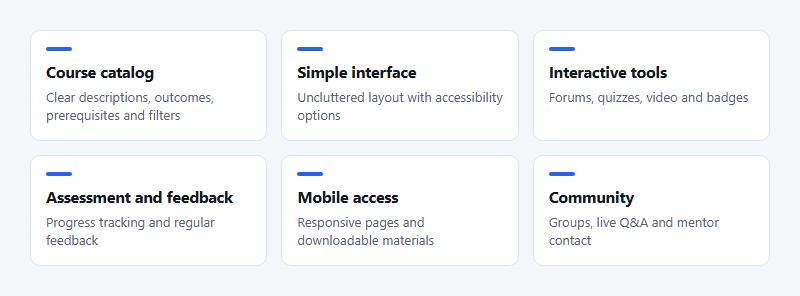
Start with a clear catalog and a clean interface, because nothing else matters if students cannot find and use the courses. Add assessment and feedback next, since they show whether the teaching works, then interactive tools and mobile access. Community features can follow once you have an active student base.
If you are deciding between building your own system or buying one, compare a custom LMS and an off-the-shelf one. Companies training staff have different needs again, covered in this overview of online learning platforms for corporate learning.
How do you test an online learning website before launch?
Ask a few real learners to enroll in a course, watch a lesson, take a quiz and use the site on their phone, while you watch without helping. Note where they hesitate, then fix those points first. Include at least one learner who uses a screen reader or larger text, since accessibility problems are easy to miss when you build the site yourself.
Frequently asked questions
What is the most important feature of an online learning website?
A clear course catalog with good previews, because it decides whether visitors enroll at all. After that, an interface that does not get in the way of learning.
Do online courses need quizzes?
Yes, in most cases. Quizzes give students immediate feedback and give instructors a view of where learners struggle.
Is a mobile app necessary?
Not always. A responsive website covers most needs. An app becomes worthwhile if learners need offline access or push reminders regularly.
How do you plan an online learning website?
List the six features above, mark which ones your first group of students needs most and build those first. Test with a handful of real learners before launch and keep gathering feedback afterwards. A thoughtful platform grows with its audience and keeps learners coming back.

Renowned for his expertise in logo design and visual branding, Bogdan has developed a multitude of logos for various clients.
His skills extend to creating posters, vector illustrations, business cards, and brochures. Additionally, Bogdan's UI kits were featured on marketplaces like Visual Hierarchy and UI8.
He also wrote in the past years on sites like Design Your Way, WebDesignerDepot, WPDean, Designmodo, Speckyboy, Slider Revolution, and more.

Bogdan Sandu is a seasoned designer who has been designing websites since 2008. Renowned for his expertise in logo design and visual branding, Bogdan has developed a multitude of logos for various clients. His skills extend to creating posters, vector illustrations, business cards, and brochures. Additionally, Bogdan's UI kits were featured on marketplaces like Visual Hierarchy and UI8. He also wrote in the past years on sites like Design Your Way, WebDesignerDepot, WPDean, Designmodo, Speckyboy, Slider Revolution, and more.
You Might Also Like


