Choose an off-the-shelf LMS if you need training live quickly, your budget is limited and your needs are basic: videos, quizzes, progress tracking and simple reports. Choose a custom LMS if your workflows are complex, you need deep integrations with other systems, or you want full control over features, data and security. Companies are spending more on digital learning for onboarding, upskilling and certification, so the choice is worth making deliberately instead of buying whatever demo looks best.
What is the difference between a custom LMS and an off-the-shelf LMS?
An off-the-shelf learning management system is a ready-made product. Its features are set, and it serves many industries. You create an account, adjust the basic settings, upload content and start. Moodle, TalentLMS and Docebo are common examples.
A custom LMS is built from scratch around your organization’s goals. Each module, feature and workflow is designed to match your training objectives, internal processes and long-term digital plans. One route is faster and usually cheaper at the start. The other is more flexible and can fit your business closely. The right pick depends on what matters most to your team.
When does an off-the-shelf LMS work best?
A plug-and-play platform is often the better choice, not only the convenient one. It fits when these conditions describe you:
- You need fast deployment. If training has to roll out within a week, a generic platform wins. There is almost no development time. You configure the settings, upload courses and invite learners.
- The budget is tight. A subscription fee applies, but you avoid a large upfront development cost. That suits small companies, NGOs and teams with limited budgets.
- Your training needs are basic. Prebuilt platforms handle video lessons, progress monitoring, quizzes and simple reports well.
- You do not need deep integrations. Connections to tools such as Zoom or Google Workspace are enough for many firms, and these are simple to set up on off-the-shelf platforms.
In short, off-the-shelf tools suit companies that want simple, fast and dependable training with little customization.
When is a custom LMS the right choice?
A custom system makes sense for growing organizations and those with specific workflows. It lets you build the training environment you want instead of working around the limits of a generic product.
You want personalized learning experiences
Professionals expect training that matches their job, skill level and ambition. A custom LMS can support learning paths, skill-based recommendations and assessments based on actual performance instead of one standard course for everyone.
Your training workflows are complex
Compliance training, multi-branch organizations, multilingual needs and detailed certification processes are hard for generic software to handle. With a custom build, internal processes can be modeled directly in the system.
You need deep system integrations
Companies with HR platforms, CRMs, ERPs, project management tools and analytics dashboards often need real-time data syncing. A custom LMS can be built to connect safely with the systems you already run. If you are weighing outside help for that kind of build, this page on custom software development services from Inoxoft shows how one development company describes its offering.
You want ownership of the platform
On a custom platform you decide on the features, UI and UX, data storage, security standards, scalability and future enhancements. You are not tied to a vendor’s roadmap or forced into updates that disrupt your workflow, and licensing limits do not apply.
How do the costs compare over time?
Off-the-shelf looks cheaper up front, and in the short term it is. The picture shifts as the company grows. The table sets out the main cost items. Keep in mind that a custom system is not free of ongoing cost, since hosting, maintenance and updates still need a budget.
| Cost factor | Off-the-shelf LMS | Custom LMS |
| Start-up | Low, mostly setup and content upload | Higher, because development comes first |
| Recurring fees | Monthly or annual subscriptions, often per user | No per-user license, but hosting and maintenance costs apply |
| Extras | Add-ons and premium features can cost more | New features are built when you need them |
| Flexibility | Limited by what the vendor offers | Shaped to your processes |
| Growth | Per-user fees grow with headcount, and you may face a migration if you outgrow the platform | Cost per learner can fall as the user base grows |
For large employee bases or fast-growing user pools, the savings from avoiding per-user fees can add up over time. For a small team with simple needs, they rarely outweigh the development bill.
How do you decide which one fits your training goals?
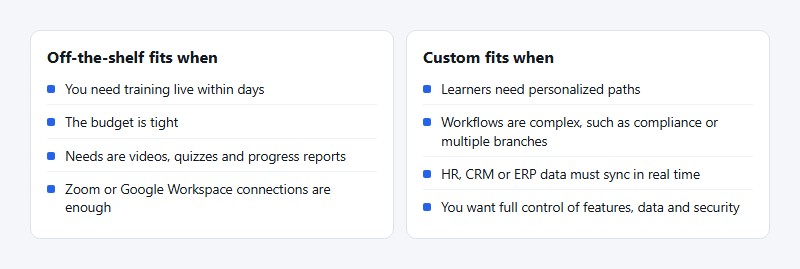
Base the decision on what you need now and where you want to be in two years. Go through the checklist: if the left column describes you, an off-the-shelf platform is probably enough. If most of the right column does, start scoping a custom build.
A few questions sharpen the choice. How many learners will you have next year? Which systems must the LMS talk to? Do you need learning paths that change based on performance? Is the training tied to compliance or certifications that need exact tracking? If the answers are “a few hundred”, “none” and “no”, a ready-made platform will serve you well.
It also helps to know what good looks like. These guides on the key features every online learning website needs and on how the best online learning platforms support corporate learning can serve as a requirements list for either route. Interface quality matters too, so see the design principles for a learning management experience.
Is there a middle option between custom and off-the-shelf?
Yes. Open-source platforms such as Moodle can be extended with plugins and custom development, which gives more control than a closed subscription product without the cost of starting from nothing. Many organizations begin with a ready-made platform, learn what their learners and trainers actually need, and move to a custom build only when the limits become clear.
Frequently asked questions
Is a custom LMS always more expensive?
Upfront, yes. Over several years it can cost less for large user bases because you avoid per-user fees, but you still pay for hosting, maintenance and updates.
How long does it take to launch each option?
An off-the-shelf LMS can be running within days. A custom LMS takes as long as the development project, which depends on scope and the number of integrations.
Can I switch from off-the-shelf to custom later?
Yes, though migration has a cost. Export your content and learner data in standard formats from the start so a move later is easier.
What should you do before choosing an LMS?
Write down your requirements for the next two years, mark which ones a standard platform already covers, and shortlist two or three off-the-shelf options to test with real content. If the gaps are in integrations, workflows or data control, that is the point at which a custom build is worth pricing.

Renowned for his expertise in logo design and visual branding, Bogdan has developed a multitude of logos for various clients.
His skills extend to creating posters, vector illustrations, business cards, and brochures. Additionally, Bogdan's UI kits were featured on marketplaces like Visual Hierarchy and UI8.
He also wrote in the past years on sites like Design Your Way, WebDesignerDepot, WPDean, Designmodo, Speckyboy, Slider Revolution, and more.

Bogdan Sandu is a seasoned designer who has been designing websites since 2008. Renowned for his expertise in logo design and visual branding, Bogdan has developed a multitude of logos for various clients. His skills extend to creating posters, vector illustrations, business cards, and brochures. Additionally, Bogdan's UI kits were featured on marketplaces like Visual Hierarchy and UI8. He also wrote in the past years on sites like Design Your Way, WebDesignerDepot, WPDean, Designmodo, Speckyboy, Slider Revolution, and more.
You Might Also Like