A WordPress appointment plugin lets customers book, change and cancel appointments on your website, while the plugin handles confirmations, reminders and calendar updates for you. That removes most of the back-and-forth by phone and email that eats a front desk’s day. Extensions such as the one from MotoPress add real-time availability and automatic confirmations on top, which makes booking easier for clients and cuts routine admin for staff.
What does a WordPress appointment booking plugin do?
It turns your site into a scheduling system. Visitors see which services and time slots are open, pick one and get an instant confirmation, and the booking lands in your calendar without anyone typing it in. Most plugins also send reminders, which is where a lot of the time savings and fewer no-shows come from.
The practical gains are small things repeated many times a week: no double bookings, no missed calls turning into lost customers, and no one retyping details from an email into a spreadsheet. Staff spend the saved time on the service itself. If you also bill clients, automated invoicing follows the same logic and pairs well with online booking.
The next section shows how that plays out in different kinds of businesses.
Which businesses benefit from appointment booking plugins?

Any business that sells time can use one. The use cases below follow the same pattern: customers book online, and the plugin handles the logistics. The details of WordPress appointment booking vary by plugin, so check that a tool supports the features your niche needs before you commit.
Healthcare clinics
Clinics can offer booking for general appointments and specialized consultations, with service-specific options and patient profiles. The benefits are shorter waits, fewer administrative errors and an easier time scheduling follow-up visits. If you handle patient data, confirm how the plugin stores it and whether that meets your local rules.
Beauty salons and spas
Clients can choose a service, a specific professional, add-ons and package deals. That personal control builds loyalty, helps managers balance staff schedules and creates natural chances to offer extra services. Automated reminders and feedback requests keep clients engaged between visits.
Consulting firms
Consultants can offer different session types (in person, phone or video), different lengths and specialties, so clients are matched with the right person up front. Linking the booking to a payment system makes it easier to invoice immediately or after the session.
Fitness centers and gyms
Gyms can manage class schedules, personal training slots and even equipment reservations. Members book, reschedule or cancel on their own and sign up for recurring classes or one-off events. Capacity limits keep class sizes under control, and reminders reduce no-shows.
Real estate agencies
Agents can schedule property viewings, valuations and open houses without trading messages. Clients can filter by property features and book directly, and the agency keeps a record of what each client asked for, which helps with follow-up.
Restaurants
Online table reservations can include special requests, such as dietary needs or a birthday. That helps the kitchen and floor staff prepare, supports table turnover planning and leaves a data trail you can use for menu and marketing decisions.
How do you choose a WordPress appointment plugin?
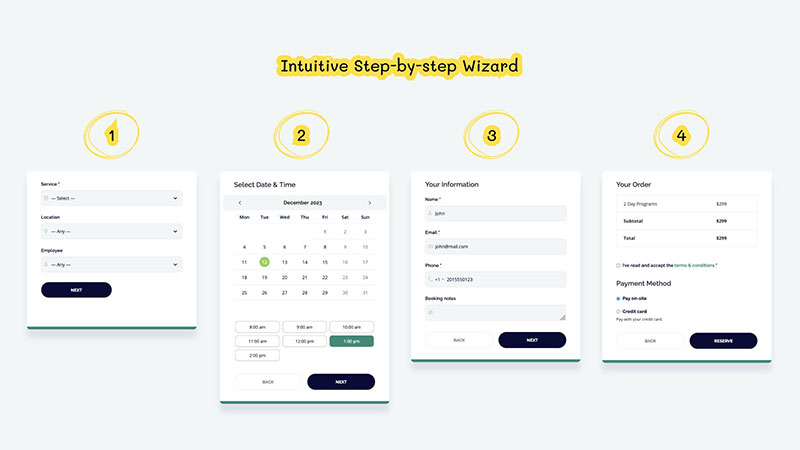
Choose by fit with your existing tools, how far you can customize it, whether it can grow with you, and how well it is supported. Weigh these five points before installing anything.
- Integration with existing systems. The plugin should work with the CRM, payment gateway and record-keeping tools you already use, so data stays consistent and nobody has to enter it twice.
- Customization. You should be able to match your branding and adjust how the booking flow works. Some of the best Elementor appointment booking plugins from MotoPress, for example, let you style the booking form inside the page builder.
- Scalability. Check that it handles more appointments, staff and users without slowing down, so you are not forced to switch plugins in a year.
- Support and maintenance. Look for prompt support and regular updates. Updates fix bugs and security issues, which matters for any plugin that collects customer details.
- Modern features. Mobile-friendly layouts, cloud-based tools and smart scheduling options are worth having if you expect your needs to change.
If you want to see a plugin set up from scratch before deciding, this walkthrough from MotoPress covers building a booking site on WordPress.

How do you set up automated appointments on WordPress?
The setup follows the same order for most plugins. First, list your services, their durations and prices. Second, add staff members and their working hours. Third, set booking rules such as minimum notice and cancellation windows. Fourth, turn on confirmation and reminder emails. Finally, add the booking form to a page and test it as a customer from your phone.
Test the payment step and the reminder timing before you announce it. Most problems come from time zones, overlapping slots or emails landing in spam, and they are much easier to fix before real customers arrive. A faster process also depends on a quick site, so if your pages are sluggish, fix that first with the advice in why your website is slow.
Frequently asked questions
Do I need a developer to add booking to my WordPress site?
Usually not. Most plugins install like any other and use a form or block you place on a page. A developer helps only if you need custom integrations or a heavily customized design.
Can a booking plugin take payments?
Many can connect to payment gateways so clients pay when they book or after the session. Check which gateways a plugin supports before choosing it.
Will reminders really reduce no-shows?
They help, because clients are reminded and can cancel or reschedule instead of simply not turning up. Results vary by business, so track your own no-show rate before and after.
Is it safe to store client details in a WordPress plugin?
It can be, if you keep WordPress and the plugin updated, use strong admin passwords and collect only the details you need. Businesses handling health data should also check their local privacy rules.
Which plugin should you test first?
Pick the two or three plugins that match your industry and your existing tools, install them on a staging copy of your site and run a few test bookings. The one that handles your real services, staff schedules and payment flow with the least workaround is the one to keep.

Renowned for his expertise in logo design and visual branding, Bogdan has developed a multitude of logos for various clients.
His skills extend to creating posters, vector illustrations, business cards, and brochures. Additionally, Bogdan's UI kits were featured on marketplaces like Visual Hierarchy and UI8.
He also wrote in the past years on sites like Design Your Way, WebDesignerDepot, WPDean, Designmodo, Speckyboy, Slider Revolution, and more.

Bogdan Sandu is a seasoned designer who has been designing websites since 2008. Renowned for his expertise in logo design and visual branding, Bogdan has developed a multitude of logos for various clients. His skills extend to creating posters, vector illustrations, business cards, and brochures. Additionally, Bogdan's UI kits were featured on marketplaces like Visual Hierarchy and UI8. He also wrote in the past years on sites like Design Your Way, WebDesignerDepot, WPDean, Designmodo, Speckyboy, Slider Revolution, and more.
You Might Also Like