Canva Pro is free for some people and a paid subscription for everyone else, and which group you land in depends mostly on your job or your school. The free trial, Canva Education for K-12 teachers and their students, Canva Nonprofits for registered charities, and Canva Campus for students at licensed universities are the official ways in. Only the trial is open to anyone, and it turns into a paid plan unless you cancel.
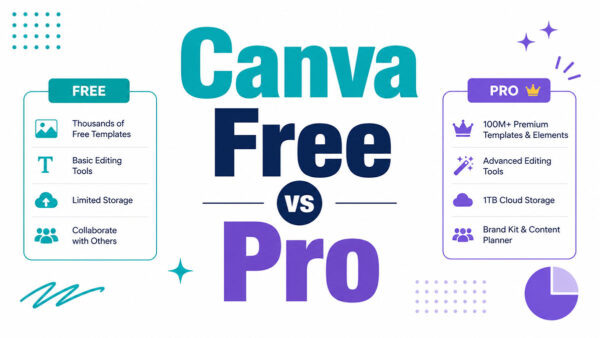
Pro is the paid tier of Canva’s design platform. On top of Canva Free it adds Magic Resize, Background Remover and five Brand Kits (Free includes one).
Canva’s own Pro page (2026) states that Canva Education is unavailable to college and university students. They get Pro for free only when their university licenses Canva Campus. Otherwise it’s Canva Free, or paying for Pro.
Which official routes give you Canva Pro for free?
Only the free trial is open to anyone who hasn’t used one before, and it ends. The other routes depend on your job, your organization or your university.
| Route | Who qualifies | How long it lasts | What Canva checks |
|---|---|---|---|
| Free trial | Anyone without a past Pro trial | 30 days | Payment method on file |
| Canva Education | K-12 teachers and the students they invite | While the teacher stays eligible | Teaching credentials or school email domain |
| Canva Nonprofits | Registered charities | Ongoing, at Canva’s discretion | Registration and governing documents |
| Canva Campus | Students at licensed universities | Set by the university | School sign-in, no individual application |
Everyone else lands on Canva Free, which Canva’s Pro page says stays free for every individual, or on a paid plan.
Plenty of guides also push referral credits and design contests. Canva’s pricing and program pages mention neither. The GitHub student pack comes up a lot too, and it gets its own check in the student section below.
How to start the Canva Pro free trial
Canva asks for a payment method before the trial activates, so the steps below end with a cancellation reminder.
- Log in to Canva, or create a free account first.
- Open the Canva Pro page or the pricing page and select Start a free trial on the Pro card.
- Choose monthly or yearly billing.
- Add a card, PayPal or another supported payment method.
- Confirm, and the Pro tools unlock.
- Put a calendar reminder in a few days before the trial ends.

The AI allowance is the part that surprised me. Canva’s Pro page states that the allowance during the trial matches Canva Free, and the full allowance, 10x higher, starts on the paid plan. If AI tools are the reason you want Pro, the trial undersells them.
Length is murkier than most guides admit. Style Factory Productions (2026) and a Smartmockups help page describe a 30-day trial, but Canva’s Pro page does not state the length, so read the checkout screen before confirming.
On billing, trial walkthroughs and a Handbell Musicians of America guide (2026) agree that the account converts to a paid plan on the cycle chosen at sign-up unless you cancel. Existing free users can still start a trial, though an earlier Pro trial or a recent Pro subscription can block it.
Canva Education: who qualifies and how verification works
Certified K-12 teachers get Pro features at no cost through Canva Education, and so do the students they invite, for as long as the teacher stays eligible. College teachers and university students sit outside the program.
Canva’s eligibility guidelines (checked October 15, 2026) accept the following roles, as long as the person is currently active in them:
- Certified teachers at accredited K-12 schools, in a current teaching position
- School librarians
- Learning support assistants and teachers
- Curriculum specialists
- Certified teachers at technical or vocational schools serving primary or secondary students
Accredited schools can enroll as organizations, and so can school districts and departments of education.
If you sign up with a verified education email domain, access starts right away. Without one, you upload a photo or scan of teacher ID, a license, school ID or proof of employment, and Canva reviews it within 48 hours. Teachers in Australia, Canada, Japan, New Zealand, South Korea, the United Kingdom and the United States only need a copy of their teaching license.
Access lasts while you stay an active, eligible teacher, and Canva prompts re-verification every 3 years.
One caveat sits in Canva’s own pages. The pricing page says K-12 organizations get most premium features free, and the students page adds that school administrators can switch features off. So “free Pro” in a classroom can mean a trimmed version of it.
Who Canva Education excludes
This list is where most guides go wrong.
- Certified teachers not currently in a teaching position
- Public librarians
- Preschool and daycare assistants
- Homeschool educators without a license or a K-12 employer
- Private, volunteer and online tutors
- Colleges, universities, their staff and their students
- Parents of K-12 children
Canva points excluded colleges to Canva Campus and non-teaching nonprofits to its nonprofit program.
How students get access
Students can’t apply on their own. The teacher invites them from Canva Education by email address, invite link, invite code or Google Classroom import.
A student who signs up with a school address that matches a district gets in right away. If nothing matches, Canva asks for the teacher’s email so the teacher is notified.
How nonprofits get Canva Pro for free
Canva’s Nonprofits page (2026) promises every Pro feature plus collaboration tools to one team of up to 50 users, free of charge. Organizations that outgrow the cap can add seats through Canva Enterprise at 50% off.
To qualify, an organization has to be officially registered as a charitable nonprofit (a 501(c)(3) in the US). It also has to be independent from government affiliation and direct government appropriations, and it can’t operate for commercial profit.
Canva’s guidelines rule out a long list of groups:
- Government bodies, political groups and public hospitals
- Other 501(c) types, trade associations and membership clubs
- Private and grantmaking foundations
- For-profits, including B-Corps and social enterprises
- Schools and universities, which route to Education or Campus
Meeting every criterion still doesn’t guarantee approval. Canva reviews each application and decides at its own discretion.
Applications go through the Nonprofits sign-up page, or you can choose Upgrade to Canva for Nonprofits under Billing in Settings. You need an existing Canva account first.
Send proof of official registration and governing documents that show your structure and charitable purpose. Canva verifies eligibility through its partner Goodstack, and the accepted documents vary by country.
The trial is a trap here. A nonprofit that starts the Pro trial while its application is pending gets billed if approval lands after the trial ends. Handbell Musicians of America (2026) advises cancelling the trial and staying on Canva Free until approval, and Canva’s help page confirms Free keeps working during review.
Approval unlocks Brand Kits, so volunteers can set up a Brand Kit with the organization’s colors and fonts, logo included, and stop guessing at hex codes.
Can college students get Canva Pro for free?
Only when the university pays for it. Canva Education is K-12 only, and college students can’t apply individually. Without a Campus license, they use Canva Free or pay for Pro.
How Canva Campus works
Canva now calls the program Canva Campus, formerly Canva for Campus (Canva higher education page, as of October 15, 2026). It bundles Canva Enterprise with free premium access for enrolled students.

Student access unlocks once the institution buys a minimum number of staff and faculty licenses, and that minimum is set by its full-time student body. Staff and students sit in separate teams, so collaboration runs through LMS integrations or shared links.
To check your school, sign in to Canva with your university email, or ask student services or IT.
Eastern Connecticut State University gives every student a personal Canva Pro account and keeps it active for 30 days after graduation. Linfield University offered a prorated refund to students who had paid for Pro with their student email before the school licensed Canva.
Grace periods vary by school. Canva’s students page warns that graduates may lose their school email and the account with it, and suggests copying designs to a personal account.
Does the GitHub Student Developer Pack still include Canva Pro?
Older guides list a free 12-month Canva Pro subscription inside the pack, and archived copies of GitHub’s pack page from 2020 show that offer.
The current page tells a different story. GitHub’s Student Developer Pack page, checked October 15, 2026, does not list Canva among its offers, while other design offers such as Visme and Bootstrap Studio appear.
Treat the Canva offer as not currently listed. A verified pack member can still check the benefits page, but planning around it is a mistake.
What happens when free access ends, and how do you cancel?
Unless you cancel before the trial ends, Canva charges the next billing cycle to your payment method, according to its Terms of Use (effective August 19, 2026).
Cancelling stops future payments and keeps paid features until the current billing period closes. Every design stays accessible on Canva Free, per Canva’s Help Center (accessed October 15, 2026).
Refunds are where guides and Canva disagree. Several guides promise a money-back guarantee, while the Terms of Use say fees already paid are not refunded except where law requires it.
Plan on the Terms. Cancel before the charge instead of counting on a refund.
Where to cancel depends on who bills you
Check the billing email or bank statement first. The sender (Canva, Apple, Google or PayPal) decides the route.
| Billed by | Where to cancel | Catch |
|---|---|---|
| Canva (web or desktop) | Settings, then Billing, then Cancel plan | Confirm on the Billing page that the plan shows as cancelled. A Stay on Canva Pro button means the cancellation went through |
| Apple App Store | Apple subscription settings | The Canva app cannot cancel it, and uninstalling does nothing |
| Google Play | Google Play subscriptions | A different Google account hides the Canva subscription |
A separate walkthrough on cancelling a Canva subscription goes deeper if the steps above do not match your screen.
If you’d rather not cancel outright, paid plans can pause for up to 3 months with no charges. The pause starts when the current billing period ends, and the plan resumes automatically after an email reminder. Annual plans can pause only if less than two months remain before renewal, and plans bought through the iOS App Store cannot be paused.
Canva’s billing runs on UTC, so a trial charge can land a day early in some time zones. Cancel at least a day before the date your account shows. And if you change your mind, the Billing page offers a Stay on Canva Pro option until the period ends.
How much does Canva Pro cost after free access?
Yearly billing brings the monthly cost down, and Pro is sold as a one-person subscription either way.
Canva’s pricing page as displayed on October 15, 2026 shows Pro at US$144 per year for one person and Business at US$250 per year per person. Cloud storage is 100GB on Pro and 5GB on Free. The plans listed are Free, Pro, Business and Enterprise.
The Pro price you see depends on the date. Moda read Canva’s pricing page on September 8, 2026 and recorded US$180 per year (US$18 per month). Price trackers show Pro moving from US$120 to US$144 per year in February 2026, up to US$180 in late July or early August 2026, and back to US$144 around September 10 to 11, 2026. Older guides still quote US$120 per year or US$15 per month from earlier pricing rounds.
Prices shift with region and tax, so the checkout screen outranks any guide, this one included. More detail on what Canva Pro costs sits in a dedicated breakdown.
Pro renews automatically every billing cycle. Under Canva’s Terms, a price rise applies at the next renewal or 30 days after Canva gives notice, whichever is later.
Anyone who needs a second seat moves to Business, which is billed per person.
Do you need Canva Pro, or is Canva Free enough?
Occasional designers do fine on Canva Free. Pro earns its fee when brand consistency, resizing or background removal come up every week.
Free is enough if you design a few posts or slides a month, the free templates and stock already cover what you need, and you work alone with no brand rules to enforce.
Pro starts making sense when you reuse a palette, fonts and logos across designs (Brand Kit), or when one design has to ship in many sizes (Magic Resize). The same goes if you cut out product photos or headshots often (Background Remover), schedule social posts from the editor (Social Content Planner), or lean on the premium stock library.
Canva’s Pro page names Magic Resize and Brand Kit as its headline upgrade reasons, and the Free plan limits the Brand Kit to one kit with a three-color palette. A side-by-side comparison of Canva Free and Pro lines up the remaining differences.
Pro does not add seats. It stays a single-person plan, and Canva points teams that need shared workspaces and approval workflows to Business.
Why mod APKs, cracked accounts and cheap resellers fail
Every shortcut breaks Canva’s Terms of Use, carries malware risk, or both. None of them produces a plan Canva recognizes.
Mod APKs mean malware exposure on top of a Terms violation. Shared logins breach the one-person-per-account rule. Resellers give you no refunds and the account can be banned. VPN price tricks are out too, since the Terms prohibit using a VPN to get regional pricing.
Mod APKs and cracked apps
Across modded Android apps in general, nearly 9% were flagged malicious by VirusTotal, about ten times the rate for Google Play versions, according to the ModZoo study (arXiv, 2024).
The study covers modded apps broadly, so treat it as the baseline risk, not a Canva-specific measurement. A mod that unlocks Pro tools also falls under the Terms’ ban on bypassing the measures that enforce plan limits.
If Canva finds a violation, the Terms (effective August 19, 2026) let it delete or restrict the content involved, suspend access, or terminate the account and delete its designs and uploads. A permanent ban is on the table as well, with no new account allowed without written permission.
Shared accounts and cookie logins
One account, one person.
Canva’s Terms require a unique account for each person and bar you from letting anyone else use your username, password or other security code.
That covers a group-chat Pro login and any other credential handoff. The risk runs both ways. A terminated account takes its designs with it, and everyone borrowing the login loses access at the same moment.
Resellers and lifetime deals
Canva’s Help Center lists what counts as an official plan:
- Bought through Canva’s own websites, apps and authorized sellers
- An Education plan Canva granted through your application
- A student seat added by your teacher
- Promotions and offers announced on Canva’s official channels
Canva does not offer lifetime plans, and it says any such offer from an individual for a minimal price is not legitimate.
Being wrong here is expensive. Canva cannot refund purchases from unauthorized sellers, plans from unauthorized sources can be downgraded, suspended or terminated, and accounts found fraudulent or promoting fraud are subject to a permanent ban.
Canva Pro Free Access FAQ
Does Canva give free Pro time for referrals or promo codes?
No. Canva’s pricing, Pro, Nonprofits and Campus pages list no referral credits or promo codes as a route to Pro.
Treat any code or credit from a third party as unofficial, and confirm it on canva.com before entering account or payment details.
Which free design tools can replace Canva Pro?
Adobe Express, Figma and Visme each have a free tier, and Canva Free costs nothing either.
Test your usual design type before switching, because template styles and export options differ by tool. A roundup of Canva alternatives compares more options.
Is Canva’s AI included in Education and Nonprofits accounts?
Education includes Magic Studio, but students and teachers get limited or restricted access, and school districts choose which features to switch on, per Canva’s classroom AI guides.
Nonprofit teams receive the full Pro feature set, AI tools included.
What happens to designs that use Pro elements once Pro ends?
The designs stay saved, but Pro elements appear watermarked on the Free plan, according to Canva’s Help Center.
Swap premium photos, fonts and graphics for free alternatives before you download.
Which Canva Pro Route to Try First
Canva Pro access should follow the order of risk. Programs that need no payment method come first, and the one-time trial comes last.
- Education, Nonprofits or Campus eligibility check
- Canva Free while a verification is pending
- The trial, with a cancellation reminder set at sign-up
The trial goes last because it bills automatically and cannot be repeated, so a rejected application should never follow it. The cost of this order is time, since an account stays on Canva Free until verification clears.
Set the reminder the day the trial starts, two days before the end date shown. Because that clock runs from sign-up, a Canva cheat sheet helps spend the days on the tools worth learning first.
This sequence holds as of October 15, 2026. It changes if Canva opens individual student sign-up, raises the trial AI allowance, or GitHub lists Canva in the Student Developer Pack again.

Renowned for his expertise in logo design and visual branding, Bogdan has developed a multitude of logos for various clients.
His skills extend to creating posters, vector illustrations, business cards, and brochures. Additionally, Bogdan's UI kits were featured on marketplaces like Visual Hierarchy and UI8.
He also wrote in the past years on sites like Design Your Way, WebDesignerDepot, WPDean, Designmodo, Speckyboy, Slider Revolution, and more.
- How to Get Canva Pro for Free (Legit Ways) - 18 November 2026
- Why Website, SEO, and Advertising Work Better as One Growth System - 18 November 2026
- 5 US Ecommerce Migration Companies for Complex Replatforming in 2026 - 17 November 2026

Bogdan Sandu is a seasoned designer who has been designing websites since 2008. Renowned for his expertise in logo design and visual branding, Bogdan has developed a multitude of logos for various clients. His skills extend to creating posters, vector illustrations, business cards, and brochures. Additionally, Bogdan's UI kits were featured on marketplaces like Visual Hierarchy and UI8. He also wrote in the past years on sites like Design Your Way, WebDesignerDepot, WPDean, Designmodo, Speckyboy, Slider Revolution, and more.
You Might Also Like