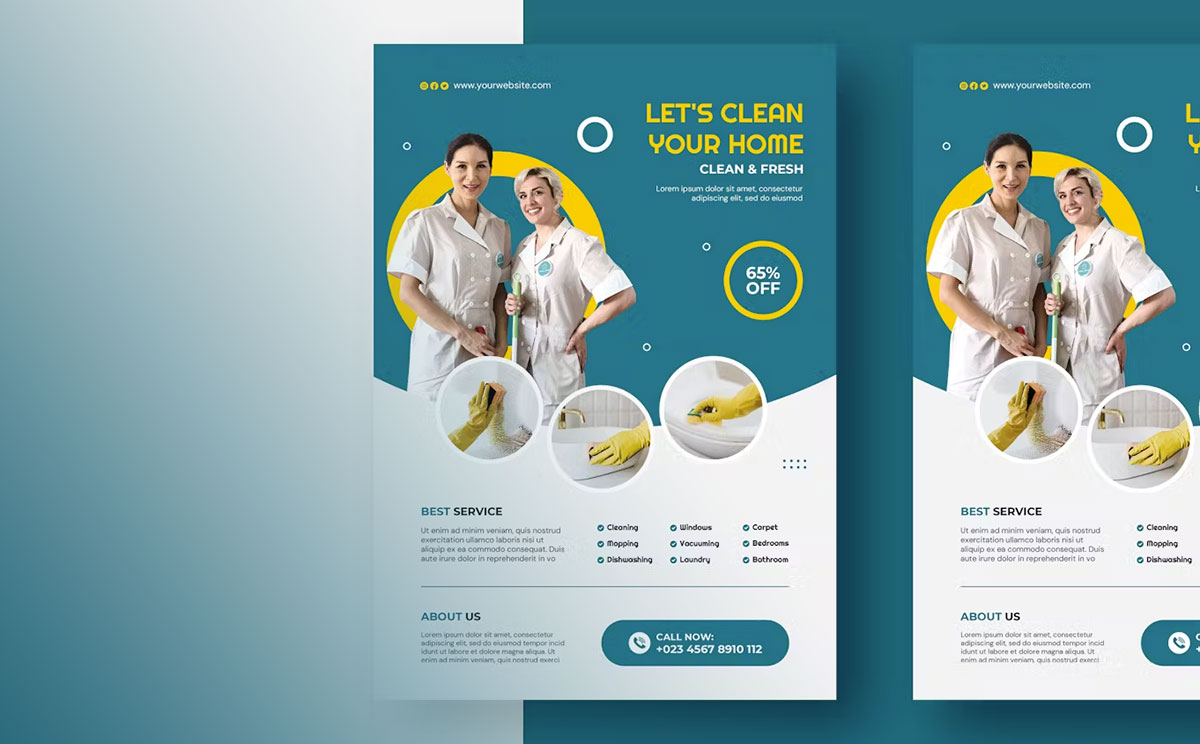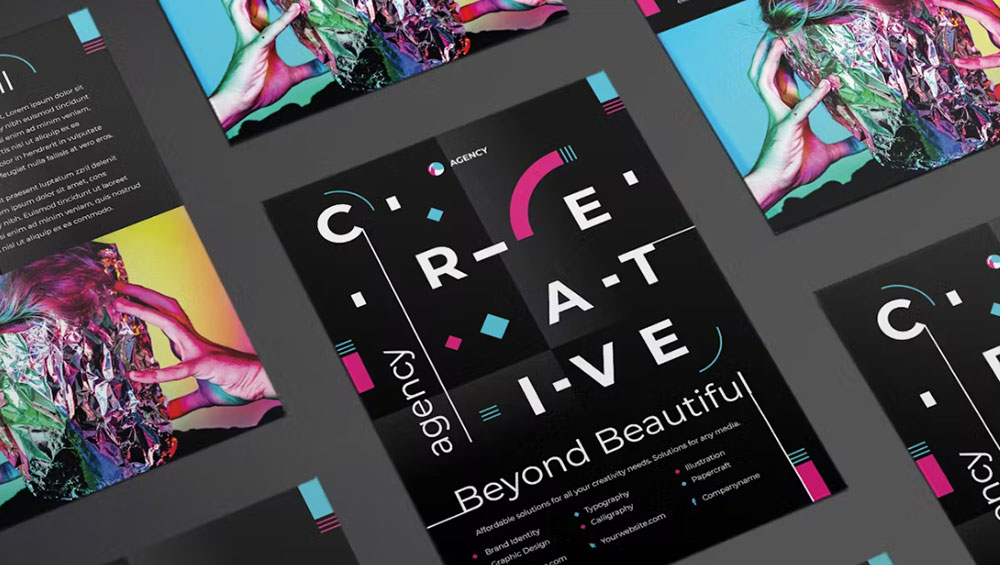
Most flyers land somewhere between the 4.25 x 5.5 in quarter sheet and the 11 x 17 in Tabloid in North America. Elsewhere the range runs from A7 up to A3 under the ISO 216 series.
Printers cut these formats as fractions of a standard sheet, so the size you pick mostly depends on how the flyer gets handed out. A pocket handout, a counter stack, a bulletin board and a window display all want something different.
Size tables tend to blur DL. The flyer trims to 99 x 210 mm (MOO UK template, as of September 2026), and the DL envelope defined under ISO 269 is a separate thing at 110 x 220 mm (Papersizes.io).
Which flyer sizes are standard in the US and Canada?
North American printers mostly work with 8.5 x 11 in, 5.5 x 8.5 in, 4.25 x 5.5 in, 4 x 6 in and 11 x 17 in.
The full sheet is US Letter, which ANSI/ASME Y14.1 labels ANSI A. Tabloid is ANSI B at 11 x 17 in, and the same sheet turned to landscape (17 x 11 in) goes by Ledger.
- The full sheet, 8.5 x 11 in, is plain office printer paper. It handles bulletin boards, menus and anything detail-heavy.
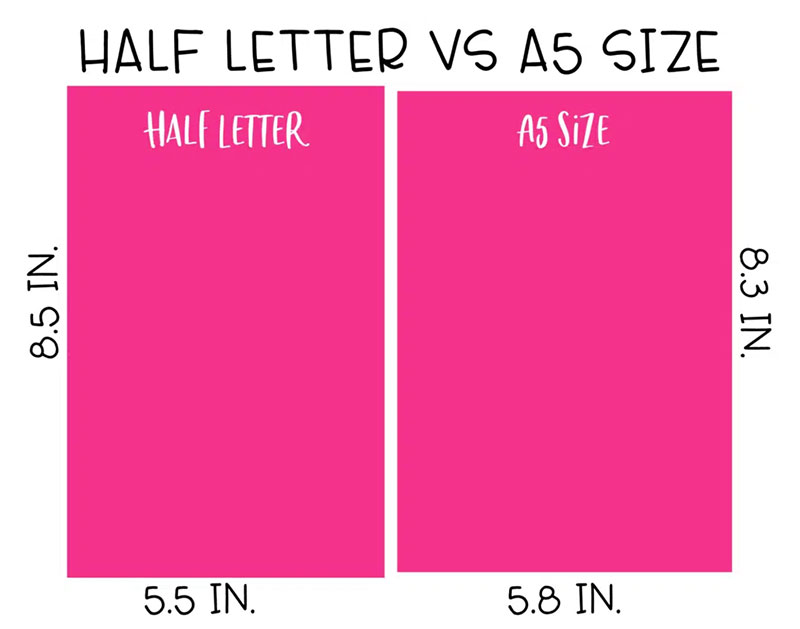
- Half sheet, 5.5 x 8.5 in, is half of Letter and also called Half Letter.
- Four quarter sheets, each 4.25 x 5.5 in, fit on one Letter sheet, which is why it’s a common handbill format.
- 4 x 6 in is the pocket format for events and venues.
- Tabloid, 11 x 17 in, suits window, wall and rack displays.
Cutting Letter in half changes its shape. Letter has an aspect ratio of 1.294 and the half sheet has 1.545, so a design can’t scale from one to the other without picking up extra margin (Designing Buildings makes this point about the US series).
Longer formats exist too. Legal runs 8.5 x 14 in, and slim pieces come in at 3.67 x 8.5 in (MOO) or 3.75 x 8.25 in (Vistaprint, which sells clear display holders for that size).
Printer catalogs don’t match each other. As of September 2026, MOO’s Canadian page lists 5 flyer sizes and Vistaprint’s US page lists 11. 4OVER4 sits between them with nine standard sizes plus custom formats up to 11 x 25.5 in.
Treat any size chart as a starting point, then confirm the trim size in the printer’s own order form.
Which flyer sizes are standard internationally?
Flyers outside North America follow the ISO 216 A-series, where A4, A5 and A6 are the working sizes. DL is the slim exception.
Each step down the series halves the sheet, so A5 is half of A4 and A6 is half of A5. That halving is also why international paper sizes scale without the leftover margins the US series produces.
A-series flyer sizes
- A3, 297 x 420 mm, gets used for menus and community event notices (Snap Printing).
- A4, 210 x 297 mm, is the everyday sheet for text-heavy and image-heavy pieces.
- Helloprint recommends A5, 148 x 210 mm, as its most popular size.
- A6, 105 x 148 mm, suits event and fair handouts and doubles as the standard international postcard size.
- A7, 74 x 105 mm, is pocket size and the smallest flyer Helloprint prints.
Canva’s UK print page opens on 14.8 x 21 cm, which is A5 in portrait. Vistaprint’s New Zealand page calls A5 and A6 the popular options.
A4 versus US Letter
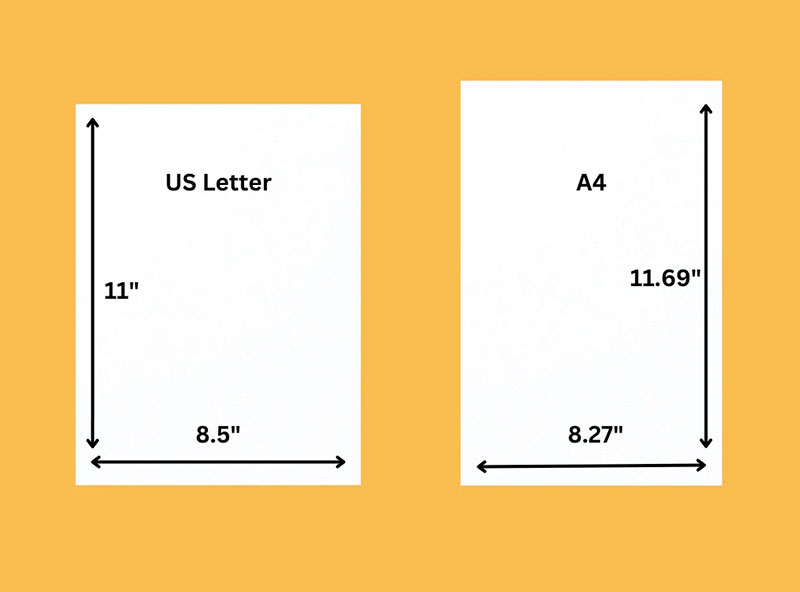
A4 is narrower and taller than Letter. The gap looks small on paper and causes real trouble in files.
A4 measures 210 x 297 mm (8.27 x 11.69 in), while US Letter comes to 215.9 x 279.4 mm (8.5 x 11 in).
Because an A4 sheet is 5.9 mm narrower and 17.6 mm taller, a file built for one gets cropped or gains blank strips on the other. Set the document to the printer’s region, not to whatever the design tool defaults to.
DL and square flyers
DL flyers trim to 99 x 210 mm, not 110 x 220 mm.
The 110 x 220 mm figure belongs to the DL envelope defined under ISO 269. DL sits outside the C-series because its aspect ratio differs. Papersizes.io says DL was known as DIN Lang in Germany, where it originated in the 1920s, and the name is now expanded as “Dimension Lengthwise”.
The flyer sources agree with each other. MOO’s UK page and ManyPixels both give 99 x 210 mm, and so does DesignWiz. Only the envelope is 110 x 220 mm.
The 99 comes from cutting A4’s 297 mm side into thirds, which also lets the flyer slide into the 110 x 220 mm envelope.
Squares have no ISO standard. Helloprint’s small square is 105 x 105 mm and MOO’s is 120 x 120 mm.
Flyer size chart in inches, millimeters and pixels
Trim sizes for the common flyer formats are below, with pixel dimensions at 300 dpi.
| Format | Inches | Millimeters | Pixels at 300 dpi |
|---|---|---|---|
| Tabloid (ANSI B) | 11 x 17 | 279 x 432 | 3300 x 5100 |
| Letter (ANSI A) | 8.5 x 11 | 216 x 279 | 2550 x 3300 |
| A4 | 8.27 x 11.69 | 210 x 297 | 2480 x 3508 |
| A5 | 5.83 x 8.27 | 148 x 210 | 1748 x 2480 |
| Half sheet | 5.5 x 8.5 | 140 x 216 | 1650 x 2550 |
| A6 | 4.13 x 5.83 | 105 x 148 | 1240 x 1748 |
| Quarter sheet | 4.25 x 5.5 | 108 x 140 | 1275 x 1650 |
| 4 x 6 | 4 x 6 | 102 x 152 | 1200 x 1800 |
| DL | 3.90 x 8.27 | 99 x 210 | 1169 x 2480 |
A-series pixel values are 300 dpi conversions, matching Graphic Design Employment’s A4 figure of 2480 x 3508 px. Half and quarter sheet values follow Figma’s resource library, and the DL row is converted from 99 x 210 mm.
Sources round A4 differently (8.2, 8.27 and 8.3 in all appear online). Use the millimeter values when a printer asks for exact trim.
Pixels and resolution
Print files use 300 pixels per inch. Screen files carry far less. Moda lists a Letter flyer at 2550 x 3300 px at 300 dpi and 612 x 792 px at 72 dpi, which is under 6 percent of the pixels.
Print resolution is measured in dots per inch, and a 72 dpi image stretched to Letter size prints soft.
Portrait and landscape
Landscape swaps width and height and leaves the trim size unchanged.
An 11 x 17 in portrait sheet becomes 17 x 11 in landscape, which US references list as Ledger (Papersizes.io). GotPrint offers horizontal and vertical versions of its sizes, and Canva’s print flow offers both portrait and landscape.
For a custom size not in the table, an inch to pixel converter applies the same multiplication.
Which flyer size should you choose?
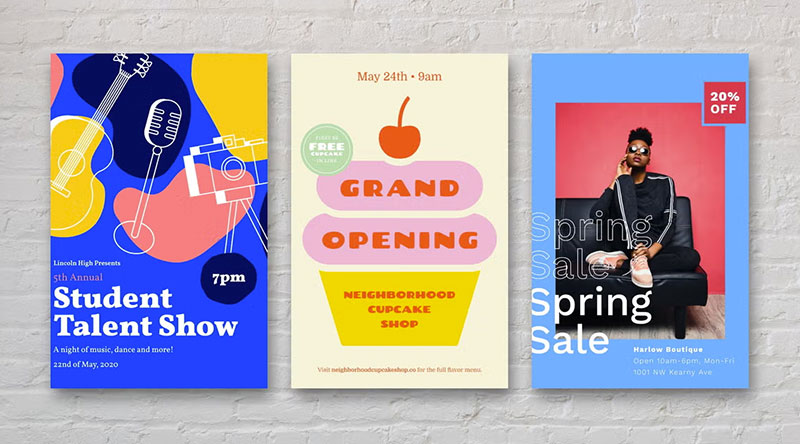
Distribution method comes before anything else. 4OVER4 states that no universal best flyer size exists, only the best size for how the piece gets distributed.
- A pocket handout suits a quarter sheet, 4 x 6 in or A6.
- Street handouts and counter stacks work with a half sheet or A5.
- Letter or A4 covers bulletin boards, menus and dense content.
- Tabloid or A3 belongs in windows and on walls.
- For direct mail, pick the format around the mailing method. Flyers that go inside an envelope need to fit it first, while professional direct mail postcards can be designed as standalone mail pieces without an envelope.
Standard versus most common
Sources name different “most common” sizes because they measure different things.
OVER4 calls the 5.5 x 8.5 in half sheet its most common flyer size, and Helloprint names A5 its most popular. Canva and DesignWiz treat the full sheet (8.5 x 11 in or A4) as the standard.
The full sheet is the standard paper. The half page is what printers report as most common. Outside North America, the half-sheet role belongs to the A5 sheet.
Full sheet (8.5 x 11 in or A4)
The full sheet fits bulletin boards, menus and mailings (4OVER4), prints on ordinary office paper, and folds into half-fold, tri-fold, gate-fold, Z-fold or accordion layouts (ManyPixels). Against that, it uses more paper per piece, so the unit cost is higher, and it gives a single offer far too much room.
It’s the default choice and rarely the right one for a one-offer handout.
Half sheet (5.5 x 8.5 in or A5)
| Works well | Falls short |
|---|---|
| Half of Letter, an economical format (Figma) | Little room for schedules or full menus |
| Fits inserts and brochure racks | Long copy forces small type |
| Easy to carry, suits high-volume handouts | Less presence on a wall |
Quarter sheet and A6
One Letter sheet yields four quarter sheets, according to Swift Publisher’s flyer guide. That keeps unit cost low for coupon runs and street handouts.
Space is the drawback, since the message has to stay short and the imagery limited.
OVER4 notes the 4.25 x 5.5 in club format is especially popular for nightlife and music promotions.
DL
DL suits handouts and countertop displays (Vistaprint), and Vistaprint’s UK and Irish sites sell clear holders for A4 and DL flyers. North America has no standard for it, so US printers offer nearby formats such as 3.67 x 8.5 in or 3.75 x 8.25 in, and the narrow panel forces a vertical layout.
Tabloid and A3
GotPrint pitches 4 x 6 in for mass distribution and 11 x 17 in for window and wall displays, which marks both ends of the range. Newspaper inserts are the other traditional use for 11 x 17 in (ManyPixels).
The sheet needs a printer that takes 11 x 17 in stock, and it’s too bulky to hand out. At this scale a flyer edges into standard poster sizes.
How do flyer size and folding affect printing cost?
Larger sheets usually cost more, but the price ladder differs by printer and by quantity.
At 50 flyers, MOO’s prices as of September 2026 run like this.
- Canada, 4.13 x 5.83 in, from CDN$ 40
- Canada, 5.5 x 8.5 in half page, from CDN$ 45
- Canada, 8.5 x 11 in Letter, from CDN$ 62
- UK, A6, from GBP 23
- UK, DL, from GBP 26
- UK, A5, from GBP 32
- UK, A4, from GBP 50
Moving from half page to Letter at MOO Canada adds about 38 percent, and the jump from A5 to A4 at MOO UK adds about 56 percent.
Volume changes the picture more than size does. MOO’s UK A4 flyer costs GBP 0.83 each at 50 copies and GBP 0.14 each at 1,000, so compare the exact size and quantity in the printer’s configurator before ruling a format out.
Stock, finish and sides printed move the price alongside size, and this breakdown of what it costs to print a flyer covers those extras.
How folding changes the finished size
A fold turns one sheet into a smaller finished piece, and the sheet size decides the result.
| Sheet | Half-fold | Tri-fold panel |
|---|---|---|
| Letter, 8.5 x 11 in | 5.5 x 8.5 in | 3.67 x 8.5 in |
| A4, 210 x 297 mm | 148 x 210 mm (A5) | 99 x 210 mm (DL) |
| Tabloid, 11 x 17 in | 8.5 x 11 in | 5.67 x 11 in |
The 3.67 x 8.5 in panel matches the “Long” flyer MOO sells, which suggests that format follows a Letter tri-fold.
Leave 1/8 in on each side of a fold line so the crease does not cut into type, according to ManyPixels’ print guide.
Once a sheet is folded, the flat price stops applying, because a folded piece is a brochure product. MOO’s UK catalogue lists Folded Brochures as a separate line from flat flyers.
What paper weight and finish suit each flyer size?

100 lb gloss text, about 150 gsm, is the default flyer stock at 4OVER4, with 80 lb text (120 gsm) for bulk mail and cover stocks above 200 gsm for display racks.
| Stock | Weight | Best for |
|---|---|---|
| 80 lb text | About 120 gsm | Bulk mailings, high-volume handouts |
| 100 lb gloss text | About 150 gsm | Everyday flyers |
| MOO Premium (matte, gloss) | 225 gsm, 250 gsm | Flyers that need a substantial feel |
| 14 pt cardstock | About 300 to 350 gsm | Display racks, leave-behinds |
OVER4 notes that larger flyers, up to 11 x 17 in, benefit from more body than small ones.
Why one pound number names different stocks
The same pound rating can describe different papers. 4OVER4’s paper weight guide puts 80 lb text near 120 gsm and 80 lb cover near 250 gsm, although the usual conversion for 80 lb cover is about 216 gsm.
MOO quotes its matte flyer stock as 80 lb in North America and 225 gsm in the UK, so the stated conversion shifts from printer to printer.
The same gap explains a puzzle in one printer’s own material. A 4OVER4 article places glossy flyer paper at 200 to 300 gsm, while its guide names 150 gsm as the default, and the difference tracks text stock versus cover stock.
Compare stocks in gsm, and read this explainer on paper weight versus thickness to see why caliper in points measures something else.
Gloss, matte and uncoated finishes
If people will write on the flyer, go uncoated. 4OVER4 suggests 70 lb uncoated text, and MOO’s UK Essential stock is uncoated 160 gsm recycled paper.
Gloss makes colors and photos more vibrant, and the coating adds some water resistance (MOO, 4OVER4). Glare and fingerprints hurt small type and writing, though. Matte has no shine at all, and MOO lists its Premium matte at 225 gsm.
For a side-by-side of the two coated looks, see matte versus glossy paper.
Print shops write front-only color as 4/0 and both sides as 4/4. MOO’s UK Essential flyer is uncoated on both sides, so it takes writing on the front and the back.
Go lighter only when postage is the priority, since every gram counts on a large mailing (4OVER4).
How to set up a print-ready flyer file
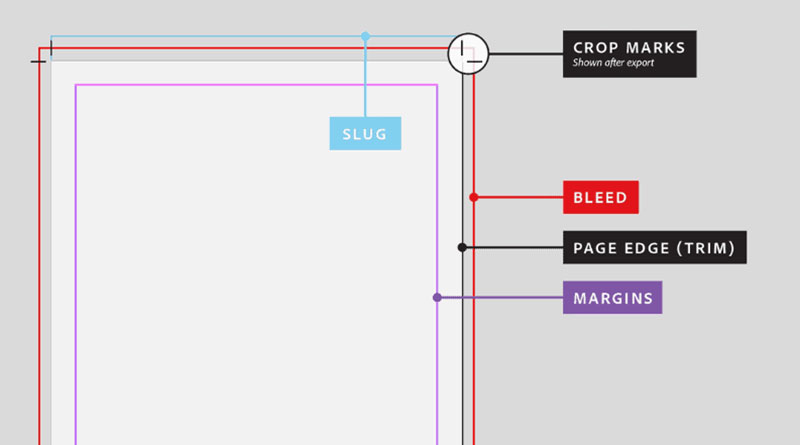
Build the file at trim size plus bleed on every edge, keep text inside a safe margin, work in CMYK and export a print PDF.
Bleed and safe zone values
Adobe’s InDesign help calls 0.125 in (3 mm) the standard bleed and warns that some providers require more.
- 4OVER4 asks for 0.125 in of bleed on flyers, with text at least 0.125 in inside the trim.
- For EDDM postcards it also wants 0.125 in of bleed, but text sits 0.25 in inside the trim in its postcard sizing guide and 0.125 in in its EDDM file-setup guide.
- Paperlust (Australia) wants a 3 mm bleed and a 3 mm safe area.
- MOO’s A4 template puts the bleed area at 214 x 301 mm and the safe area at 206 x 293 mm, which is 2 mm each side.
- ManyPixels sets a 0.25 in minimum margin.
The margin varies even inside one printer’s catalog, by product. Use the template the printer publishes for the exact size ordered.
An edge-to-edge background must reach the far edge of the bleed area, or a white strip appears after trimming.
Vistaprint’s customer care team traced a 2026 complaint about white stripes on both sides to a design that stopped short of the bleed line.
Resolution and color mode
Send flyer files in CMYK, not RGB.
Presses print with the four-ink CMYK model, and screens use RGB.
Prontaprint accepts RGB but converts it before print and cannot guarantee a brand color match. Its Canva guide adds that a CMYK PDF export requires a Canva Pro account.
Canva’s own print page says its Auto-Proofing checks that elements sit inside the bleed zone and that resolution holds up.
Paperlust lists low-resolution images placed at final size among the common reasons files get rejected.
Bleed setup by design tool
| Tool | Where bleed is set | Detail |
|---|---|---|
| InDesign | File > Document Setup > Bleed and Slug | 0.125 in on all sides |
| Illustrator | File > Document Setup > Bleed | 0.125 in on all sides |
| Photoshop | Canvas size | Add 0.25 in to width and height, guides at 0.125 in |
| Canva | File > Settings > Show print bleed | Download as PDF Print with Crop marks and bleed |
The University of Minnesota’s print services give the Photoshop example: a 5 x 7 in card becomes a 5.25 x 7.25 in file.
Print-ready setup step by step
- Set the document to the printer’s trim size for the chosen format.
- Add bleed on all four sides, 0.125 in (3 mm) unless the printer’s template says otherwise.
- Extend backgrounds and edge images to the bleed line.
- Hold text and logos inside the printer’s safe margin.
- Convert the file to CMYK and check that photos keep their resolution at final size.
- Export a print PDF, with crop marks and bleed if the printer asks for them, and review the printer’s proof before approving.
When does a standard flyer size not fit?
Standard sizes stop working for mailing, large formats, home printing, custom formats and digital-only use. Each breaks in its own way.
Mailing limits
USPS separates letters from flats, and 4OVER4’s EDDM guide gives the thresholds as 6.125 in tall and 11.5 in long. A piece qualifies as a flat by exceeding at least one of them (or 0.25 in thickness), up to 12 x 15 in, and EDDM Retail pieces must weigh under 3.3 oz.
A 4 x 6 in card mails as a letter and does not qualify for EDDM Retail. By the same rule, a 5.5 x 8.5 in half sheet stays under the threshold, since its short side is 5.5 in, while 6.5 x 9 in and 8.5 x 11 in clear it.
OVER4’s own guides disagree here. One says EDDM postcards run from a 6.125 x 11 in minimum to 12 x 15 in, yet another lists 6.5 x 9 in among its most commonly ordered sizes, so confirm the limits with USPS before printing.
Postage is the other cost, and this guide to what a 1,000-flyer mailing costs shows how it stacks up against printing.
Outside North America, an A4 flyer fits a C4 envelope flat and a C5 envelope folded once (Papersizes.org). 4OVER4 recommends 14 pt or heavier stock so a mailed piece survives sorting.
Large formats, home printers and custom sizes
Bleed scales up with the sheet. ManyPixels advises up to 1/2 in (12.7 mm) for medium posters, and Paperlust cites 5 mm for large-format items above A2.
Adobe’s help page warns that some desktop printers cannot print to the page edge. The workaround is a document smaller than the paper, trimmed along crop marks after printing.
Custom formats have limits too. MOO’s 2023 UK catalogue capped custom flyer sizes between 28 x 70 mm and 297 x 420 mm, though its current UK pages list only five standard sizes.
Digital-only flyers for email or social feeds follow pixel dimensions, and resolution for print versus screen works on different rules than the trim sizes above.
Flyer Sizes FAQ
How is a flyer different from a brochure in size?
Flyers stay flat, while a brochure folds into panels. The sizes overlap, since a Letter sheet tri-folded finishes at 3.67 x 8.5 in.
Vistaprint’s UK page notes that folded leaflets are sturdier versions of flyers, and the terms are mostly used interchangeably.
Is a postcard the same as a flyer?
No. An A6 flyer (105 x 148 mm) matches the standard international postcard size (Papersizes.org), but postcards run on heavier stock.
OVER4’s paper weight guide lists 250 to 350 gsm for postcards against 120 to 170 gsm for flyers.
What size is a handbill?
Handbill has no fixed size. 4OVER4 uses the word for the 4.25 x 5.5 in quarter sheet, while Overnight Prints applies it to large promotional pieces at 11 x 17 in.
Order by trim size, not by the label.
Can I print flyers at home on Letter or A4 paper?
Yes, a full sheet feeds through most home printers. Canva points out that quality paper, ink and print time add up on bulk runs, so professional printing suits larger quantities.
Expect a white border unless the printer supports borderless output.
Why did my flyers arrive smaller than I expected?
The size label names the trim size, and small formats look bigger on screen than in hand. A 2026 Vistaprint review complaint about undersized flyers traced back to an A6 order (105 x 148 mm), roughly postcard size.
Hold a ruler against the printer’s stated trim size before ordering.
Verifying Flyer Sizes Before a Full Print Run
Check the size against the printer’s own template for the exact format, then against a physical proof, before approving a full run. The template, not a general chart, sets the trim, bleed and safe margin the file must match.
The order that catches the most errors is simple. Download the template for the exact size and build the file inside its guides. Then order a small proof run first.
The template comes first because every later check depends on its trim and bleed values. A proof of the wrong size proves nothing.
The cost is a few days and a small extra charge. Vistaprint’s US page accepts runs from 25 flyers (as of September 2026), and the approach only stays cheap where the minimum run is that low.
Once the size is settled, this walkthrough for building the flyer in Canva covers the design itself.

Renowned for his expertise in logo design and visual branding, Bogdan has developed a multitude of logos for various clients.
His skills extend to creating posters, vector illustrations, business cards, and brochures. Additionally, Bogdan's UI kits were featured on marketplaces like Visual Hierarchy and UI8.
He also wrote in the past years on sites like Design Your Way, WebDesignerDepot, WPDean, Designmodo, Speckyboy, Slider Revolution, and more.
- The Windsurf Logo History, Colors, Font, And Meaning - 10 October 2026
- How to Remove Background From Product Photos (No Photoshop) - 10 October 2026
- How Designers can Build a Stronger Online Creative Identity - 9 October 2026

Bogdan Sandu is a seasoned designer who has been designing websites since 2008. Renowned for his expertise in logo design and visual branding, Bogdan has developed a multitude of logos for various clients. His skills extend to creating posters, vector illustrations, business cards, and brochures. Additionally, Bogdan's UI kits were featured on marketplaces like Visual Hierarchy and UI8. He also wrote in the past years on sites like Design Your Way, WebDesignerDepot, WPDean, Designmodo, Speckyboy, Slider Revolution, and more.
You Might Also Like