The wrong font on a sign doesn’t just look bad. It fails to communicate.
Choosing the best fonts for signs comes down to one thing: legibility at distance, across materials, and under real lighting conditions. Font psychology, stroke weight, x-height, and aperture width all determine whether your sign gets read or ignored.
This guide covers the typefaces that consistently perform across outdoor signage, retail storefronts, wayfinding systems, and architectural applications. You’ll find out which fonts work at distance, which suit specific sign types, and how to match typeface structure to your substrate and viewing context.
No guesswork. Just clear, practical guidance on sign lettering that actually works.
The Best Fonts For Signs
Picking the right font for a sign is not about style preference. It is about legibility at distance, stroke contrast under different lighting, and whether the letterforms hold up when cut in vinyl, routed in metal, or lit from behind.
The fonts below are ranked because they consistently perform in real-world sign conditions. Each entry includes structural data, licensing details, pairing notes, and honest limitations.
—
Helvetica
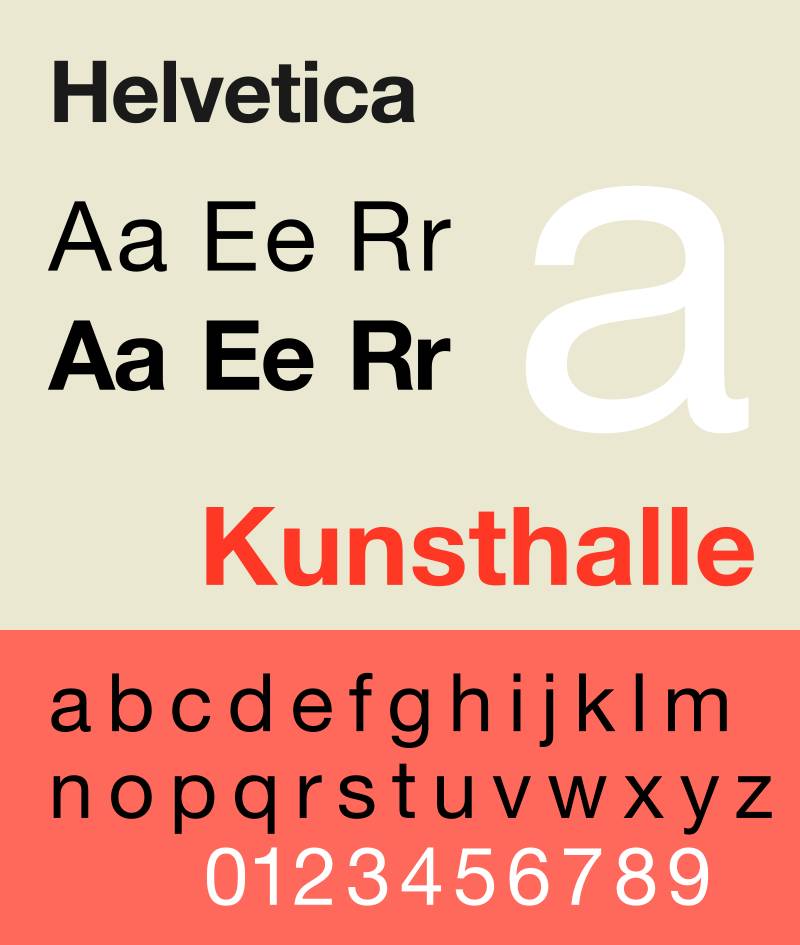
Helvetica is a neo-grotesque sans-serif font designed by Max Miedinger and Eduard Hoffmann in 1957, released by the Haas Type Foundry in Switzerland. It delivers neutral, high-legibility letterforms for wayfinding and outdoor signage.
Helvetica suits transit and institutional signage because its tall x-height and tight, uniform letter spacing produce dense, solid text that reads clearly at distance. The New York City Metropolitan Transportation Authority adopted it for all subway signage in 1989, where it has remained in use for over 35 years.
—
What makes Helvetica suitable for signs?
Helvetica has a tall x-height that increases the visible size of lowercase letters relative to the cap height, improving legibility at medium to long viewing distances. Its stroke weight is consistent across letterforms, reducing visual noise in low-contrast environments such as overhead indoor signs or backlit panels. The closed apertures on letters like “c,” “e,” and “a” can reduce legibility at very small sizes or on low-contrast surfaces.
Key attributes:
| Attribute | Value |
| Classification | Neo-grotesque sans-serif |
| Designer | Max Miedinger, Eduard Hoffmann, 1957 |
| Weight range | 34 weights (Thin to Black, Compressed variants) |
| Variable font | No (Neue Helvetica Neue has variable version via Monotype) |
| Optical sizes | No |
| Recommended sizes | 48pt+ for primary signage headings; 24pt+ for secondary text |
| Letter-spacing default | Tight (negative tracking recommended avoided) |
| License | Commercial (Monotype); bundled with some Adobe/Apple products |
| Available on | Monotype, Adobe Fonts (subscription), Apple system font |
| Price | Subscription via Monotype or Adobe Fonts; individual license from ~$35/style |
—
How does Helvetica perform at outdoor sign distances?
Helvetica renders clearly at distances up to 50 meters when set at 100mm cap height or larger. Its consistent stroke weight prevents thin strokes from disappearing in glare or low light. However, at very long viewing distances, the closed apertures reduce character differentiation compared to typefaces with more open letterforms such as Frutiger or Clearview.
—
What are the best pairings for Helvetica in signs?
Helvetica pairs with serif typefaces like Times New Roman for contrast on multi-panel informational signs where hierarchy between heading and body copy is needed. For strictly sans-serif sign systems, pairing Helvetica Bold (700) with Helvetica Light (300) in the same family creates weight contrast without introducing a second typeface. See more Helvetica font pairing options.
—
What are the limitations of Helvetica for signs?
Helvetica’s narrow apertures reduce legibility at very small print sizes (below 18pt on matte or textured substrates) and at extreme viewing distances in bright sunlight. The commercial license cost adds up for small signage studios producing multiple sign types. A free alternative, Nimbus Sans, is structurally similar but lacks the same hinting quality for print.
—
Helvetica – Recommended Use Cases Within Sign Design
- Best for: Transit wayfinding, government signage, corporate building directories, ADA-compliant indoor signs
- Avoid for: Small-format retail shelf labels below 14pt; reversed-out text on textured or rough substrates
- Optimal weight: Medium 500 or Bold 700 for primary sign text; Light 300 for supplementary information
- Optimal size range: 48pt–200pt for storefront lettering; 24pt–48pt for directional panels
—
Futura
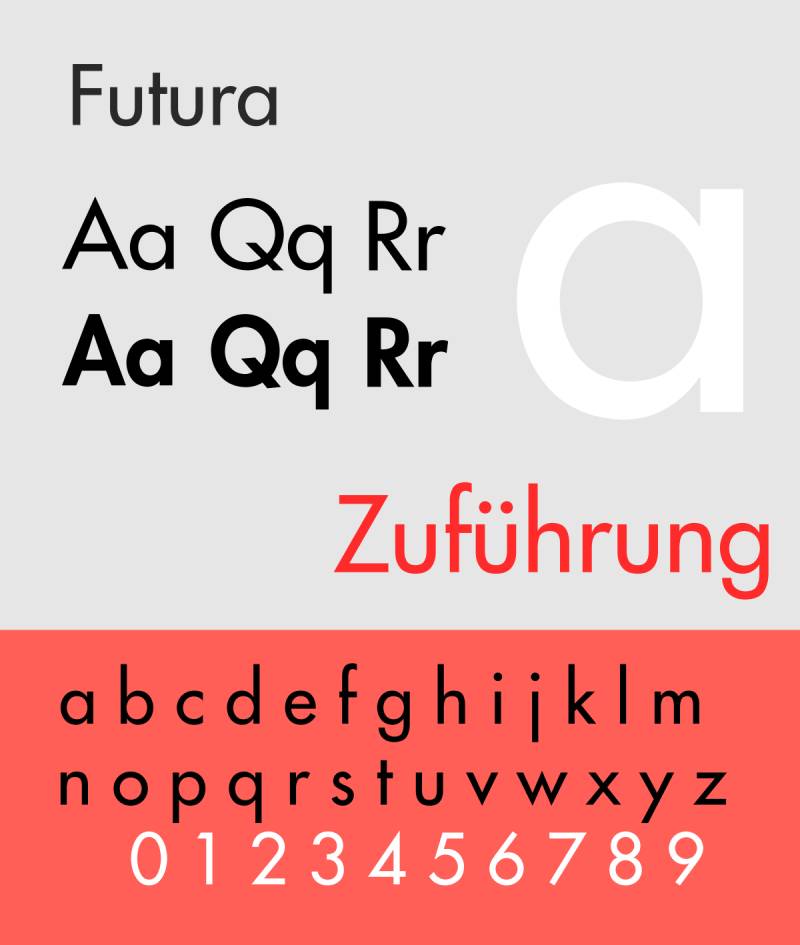
Futura is a geometric sans-serif font designed by Paul Renner in 1927, released by the Bauer Type Foundry in Frankfurt, Germany. It renders clean, architecturally precise letterforms suited to display-scale and monument sign applications.
Futura works well for retail storefront signs and monument signage because its geometry-based letterforms (near-perfect circles in “O,” “C,” and “G”) scale without distortion to very large format, and its consistent stroke weight maintains clarity across wide viewing angles. The Apollo 11 moon landing plaque was set in Futura, demonstrating its legibility in extreme conditions.
—
What makes Futura suitable for signs?
Futura has a low x-height relative to its cap height, which makes its uppercase letterforms appear larger and more dominant at sign scale. Its stroke weight is nearly uniform throughout, which means thin strokes do not disappear when the sign is viewed at an angle or in harsh lighting. The geometric structure also cuts cleanly in materials like acrylic, aluminum, and wood, making it a practical choice for laser-cut sign lettering.
Key attributes:
| Attribute | Value |
| Classification | Geometric sans-serif |
| Designer | Paul Renner, 1927 |
| Weight range | Light to ExtraBold (6 core weights); Futura Now expands to 10 weights |
| Variable font | Yes (Futura Now via Monotype) |
| Optical sizes | No |
| Recommended sizes | 36pt+ for sign headings; 100pt+ for monument lettering |
| Letter-spacing default | Normal to slightly wide |
| License | Commercial (Bauer Types / Monotype) |
| Available on | Monotype, Adobe Fonts, MyFonts |
| Price | Individual style from ~$29; Futura Now family via Monotype subscription |
—
How does Futura perform at sign scale?
Futura’s uniform stroke weight and geometric letter construction retain visual sharpness at large format sizes, from 300mm to 1500mm cap height on building signs. Its low x-height means body text in Futura reads smaller than equivalently sized Helvetica at the same point size, so sizing up by 10–15% is standard practice for secondary sign text. The pointed apexes in letters like “A,” “M,” and “N” add precision that reads as architectural on monument signs.
—
What are the best pairings for Futura in signs?
Futura pairs with Bodoni or Garamond when a sign system needs a serif contrast for body copy panels. The geometric structure of Futura against Bodoni’s high stroke contrast creates a strong visual hierarchy. For a fully sans-serif sign system, pairing Futura Book with Futura Heavy in the same family covers heading and subheading without introducing a second typeface.
—
What are the limitations of Futura for signs?
Futura’s low x-height reduces legibility of lowercase text at small sizes (below 20pt) compared to high-x-height typefaces like Helvetica or Open Sans. The similar letterforms for “I,” “l,” and “1” can cause misreads on wayfinding signs with alphanumeric codes, such as parking levels or room numbers.
—
Futura – Recommended Use Cases Within Sign Design
- Best for: Retail storefront signs, monument signs, architectural signage, vinyl lettering on vehicles and windows
- Avoid for: Alphanumeric wayfinding codes; body text below 20pt on outdoor signs
- Optimal weight: Book for secondary text; Heavy or ExtraBold for primary headings
- Optimal size range: 60pt–300pt for storefront; 200pt+ for monument or building identification
—
Gotham
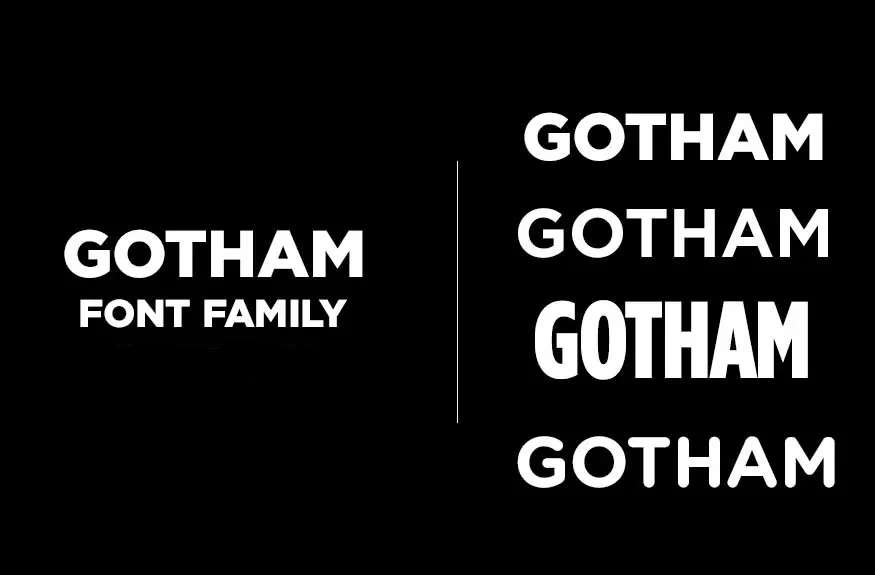
Gotham is a geometric sans-serif typeface designed by Tobias Frere-Jones in 2000, released by Hoefler & Co. (now owned by Monotype) in 2002. It delivers legible, structurally clean letterforms directly modeled on mid-century American architectural signage.
Gotham suits storefront, retail, and branding-led signage because it has a relatively high x-height and wide apertures, producing clear character differentiation at medium viewing distances. It was literally designed by studying building signage in New York City, specifically the lettering at the Port Authority Bus Terminal, which gives it unusually strong DNA for sign applications. Barack Obama’s 2008 presidential campaign used it as the primary campaign typeface at large outdoor scale.
—
What makes Gotham suitable for signs?
Gotham has a high x-height and open apertures in letters like “c,” “e,” and “a,” which improve character recognition at distances of 10–30 meters. It supports 4 widths (Narrow, Condensed, Regular, Wide) and 8 weights, giving sign designers specific options for space-constrained channel lettering or bold headline treatments. The condensed variants are particularly practical for long sign names on narrow storefront fascias.
Key attributes:
| Attribute | Value |
| Classification | Geometric sans-serif |
| Designer | Tobias Frere-Jones, Jesse Ragan, 2000 |
| Weight range | Thin to Ultra (8 weights); 4 widths; 33 total styles |
| Variable font | No |
| Optical sizes | No |
| Recommended sizes | 36pt+ for signage headings; Condensed variants at 24pt+ for constrained layouts |
| Letter-spacing default | Normal (0); slight positive tracking at large sizes recommended |
| License | Commercial (Hoefler & Co. / Monotype) |
| Available on | Hoefler & Co., Monotype, Cloud.typography for web |
| Price | Desktop license from ~$99/style; full family from ~$599 |
—
How does Gotham perform at outdoor sign distances?
Gotham’s high x-height and open apertures deliver strong character legibility from 5 to 40 meters at standard sign sizes. The Bold (700) and Black weights hold up well at extreme outdoor scale without stroke thickening appearing blocky. It performs better than Helvetica in mixed uppercase/lowercase text on outdoor signs because its more open “c” and “e” forms reduce confusion between similar characters.
—
What are the best pairings for Gotham in signs?
Gotham pairs with Mercury Text or Archer for mixed-weight sign systems where a serif typeface handles address or body copy. For a fully geometric sign system, pairing Gotham Book with Gotham Bold maintains visual consistency while creating clear hierarchy between panel sections. See also fonts similar to Gotham if licensing costs are a constraint.
—
What are the limitations of Gotham for signs?
Gotham’s licensing cost is high for small sign studios producing custom one-off pieces; Netflix was paying millions annually before switching to a custom typeface in 2018. The lack of a variable font version means loading multiple style files for multi-weight sign systems, which increases file management complexity in design software.
—
Gotham – Recommended Use Cases Within Sign Design
- Best for: Retail brand signage, banner signs, corporate campus wayfinding, channel letter installations
- Avoid for: Budget signage projects requiring a single commercial license across many uses; very small informational panels below 18pt
- Optimal weight: Book for secondary text; Bold 700 for primary headings; Black for monument display
- Optimal size range: 48pt–300pt for storefront; Condensed at 28pt+ for constrained fascia layouts
—
Franklin Gothic
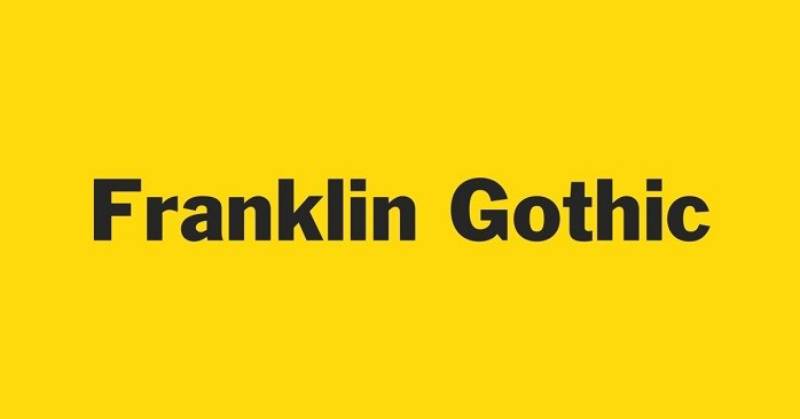
Franklin Gothic is a grotesque sans-serif typeface designed by Morris Fuller Benton around 1902, first released by American Type Founders (ATF) in 1905. It produces bold, high-contrast letterforms built for attention-grabbing headline and display signage.
Franklin Gothic works well for bold retail signs and promotional banners because its wide capitals and subtle thick-thin stroke contrast create visual weight without sacrificing legibility. The Museum of Modern Art (MoMA) has used a custom version of Franklin Gothic for wall labels and promotional materials since the 1930s, which is a strong real-world validation of its staying power in display contexts.
—
What makes Franklin Gothic suitable for signs?
Franklin Gothic’s wide capitals (typographers describe them as “square”) and moderate thick-thin stroke contrast produce highly legible text at large display sizes. Its two-story lowercase “a” and “g” improve character differentiation compared to single-story grotesques, reducing misread characters on signage with mixed case text. The ITC Franklin Gothic expansion (1980) added Book, Medium, Demi, and Heavy weights specifically for display use, and the Heavy weight is the one most sign designers reach for first.
Key attributes:
| Attribute | Value |
| Classification | Grotesque sans-serif |
| Designer | Morris Fuller Benton, 1902/1905 (ATF) |
| Weight range | Book to Heavy (4 core weights + condensed variants) |
| Variable font | No |
| Optical sizes | No |
| Recommended sizes | 36pt+ for primary sign text; 72pt+ for headline panels |
| Letter-spacing default | Tight; tight letterspacing optimized for display contexts |
| License | Commercial (ITC / Monotype); Libre Franklin available as OFL free alternative |
| Available on | Adobe Fonts, Monotype, MyFonts; Libre Franklin on Google Fonts (free) |
| Price | From ~$29/style commercial; Libre Franklin free under OFL |
—
How does Franklin Gothic perform at sign scale?
Franklin Gothic Heavy renders with strong visual weight at sizes from 60pt to 1500mm cap height, with high contrast between the dark letterforms and any background. Its wide caps fill the visual field efficiently, meaning fewer letters are needed to cover the same horizontal space compared to condensed grotesques. The tight default letterspacing suits this typeface when used at large scale but should be opened up slightly (positive tracking of 20–40 units) for secondary text panels.
—
What are the best pairings for Franklin Gothic in signs?
Franklin Gothic pairs with Garamond or Caslon for multi-panel signs that need a classical serif for body copy contrast. For all-sans sign systems, combining Franklin Gothic Heavy for the headline with a lighter grotesque like Open Sans Regular for sub-information creates a workable hierarchy without visual clutter.
—
What are the limitations of Franklin Gothic for signs?
Franklin Gothic’s tight default letter spacing can cause legibility issues in reversed-out white text on dark backgrounds at small sizes (below 24pt), where ink trap effects can close up counters. The limited weight range in the original ATF version means jumping from condensed to extra condensed can produce an inconsistent visual rhythm in multi-line sign layouts.
—
Franklin Gothic – Recommended Use Cases Within Sign Design
- Best for: Promotional retail signs, billboard lettering, trade show display headers, high-impact event signage
- Avoid for: Small-format directory text below 18pt; reversed-out body copy on textured substrates
- Optimal weight: Heavy for primary headings; Demi or Medium for subheadings
- Optimal size range: 72pt–500pt for headline signs; 36pt–60pt for promotional sub-text
—
Bodoni
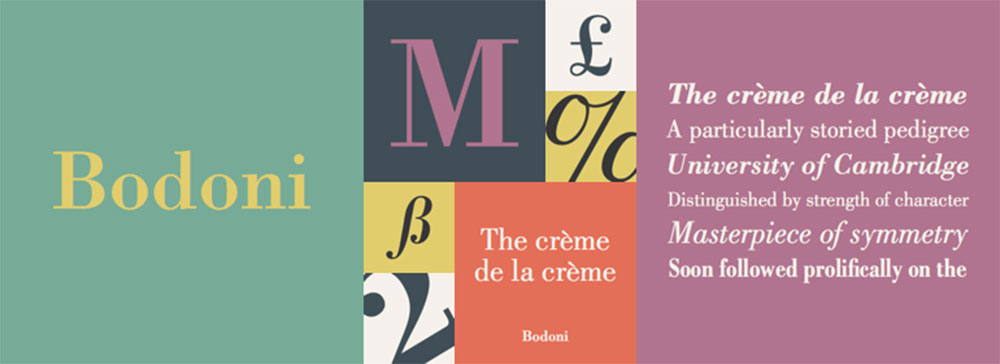
Bodoni is a Didone (modern) serif typeface first designed by Giambattista Bodoni in 1798, with major digital revivals published by Bauer Types and ITC / Monotype. It delivers extreme thick-thin stroke contrast suited to luxury and fashion-oriented sign contexts.
Bodoni works best for luxury retail signs, fashion brand signage, and high-end boutique storefronts because its dramatic stroke contrast communicates prestige at display scale. Vogue magazine, Calvin Klein, and Zara all use Bodoni-derived typefaces in their branding and in-store signage systems.
—
What makes Bodoni suitable for signs?
Bodoni’s strong vertical stress and extreme contrast between thick stems and hairline strokes creates a high-impact visual at large display sizes (100pt and above). Its flat, unbracketed serifs cut cleanly in materials like laser-etched metal and engraved acrylic. The contrast ratio between thick and thin strokes exceeds 8:1 in some weights, which makes it visually striking at distances of 5–15 meters in controlled lighting.
Key attributes:
| Attribute | Value |
| Classification | Didone modern serif |
| Designer | Giambattista Bodoni, 1798; digital revivals by Bauer (1926), ITC (1994), others |
| Weight range | Regular to Bold in most digital versions; ITC Bodoni has 3 optical sizes |
| Variable font | Yes (Bodoni Moda on Google Fonts) |
| Optical sizes | Yes (ITC Bodoni: 6pt, 12pt, 72pt optical sizes) |
| Recommended sizes | 72pt+ for sign headings; 100pt+ recommended for hairline strokes to hold |
| Letter-spacing default | Normal; slight positive tracking at display sizes recommended |
| License | Commercial (ITC / Monotype, Bauer); Bodoni Moda free under OFL |
| Available on | Monotype, Adobe Fonts, Google Fonts (Bodoni Moda) |
| Price | Bodoni Moda free; ITC Bodoni commercial from ~$35/style |
—
How does Bodoni perform at sign scale?
Bodoni’s hairline strokes require a minimum cap height of 80–100mm for outdoor signs to prevent thin elements from visually disappearing at viewing distances beyond 10 meters. On high-gloss substrates (acrylic, polished metal) the hairlines retain definition. On matte or sandblasted materials, the fine strokes can fill in and reduce legibility. This is why Bodoni performs better on indoor luxury retail signs than outdoor display banners.
—
What are the best pairings for Bodoni in signs?
Bodoni pairs with Futura or Gotham for sign systems where the serif headline needs a clean sans-serif for address or supporting information. The contrast between Bodoni’s high stroke variation and Futura’s uniform geometry creates a clear typographic hierarchy. See additional Bodoni font pairing options for multi-level sign systems.
—
What are the limitations of Bodoni for signs?
Bodoni’s hairline strokes fail at small sizes below 48pt on outdoor signs, where thin strokes become invisible in bright sunlight or at viewing distances beyond 15 meters. The “dazzle” effect produced by the extreme thick-thin contrast can make body copy difficult to read in paragraph-length sign text.
—
Bodoni – Recommended Use Cases Within Sign Design
- Best for: Luxury retail window signs, boutique storefront fascia, hotel lobby signage, fashion brand identification panels
- Avoid for: Outdoor banners in direct sunlight; directional or wayfinding text panels; any sign text below 48pt
- Optimal weight: Regular for primary display at large sizes; Bold for secondary emphasis only
- Optimal size range: 100pt–400pt for brand identity signs; 72pt minimum for secondary text
—
Garamond
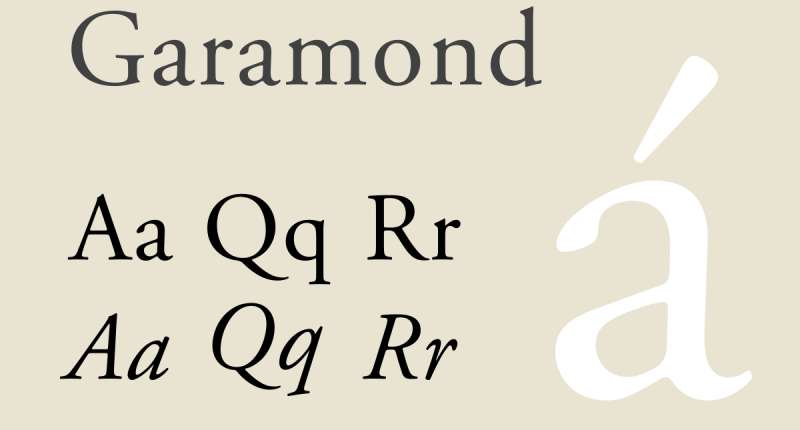
Garamond is an old-style humanist serif typeface originating with 16th-century Parisian engraver Claude Garamond, with major digital revivals including Adobe Garamond (Robert Slimbach, 1989) and EB Garamond (Georg Duffner, 2011). It renders refined, classically structured letterforms suited to formal institutional and heritage sign contexts.
Garamond works well for institutional, legal, and heritage signage because its old-style proportions and moderate stroke contrast communicate authority without aggression. Many university campuses, museums, and law firms use Garamond-based typefaces across their signage systems for exactly this reason.
—
What makes Garamond suitable for signs?
Garamond has moderate stroke contrast (thicker stems to thinner hairlines at roughly a 3:1 ratio) and bracketed serifs that hold up better at medium sign sizes than Bodoni’s hairline strokes. Its humanist proportions produce natural letter spacing that makes mixed-case text easy to read at distances of 5–20 meters. The wide spacing and open counters in the lowercase support legibility in formal context signage where readers approach at walking speed.
Key attributes:
| Attribute | Value |
| Classification | Old-style humanist serif |
| Designer | Claude Garamond, 16th century; Adobe Garamond by Robert Slimbach, 1989 |
| Weight range | Regular to Bold (Adobe Garamond); EB Garamond: Regular, Medium, SemiBold, Bold, ExtraBold |
| Variable font | Yes (EB Garamond on Google Fonts) |
| Optical sizes | Yes (Adobe Garamond has display and text optical sizes) |
| Recommended sizes | 48pt+ for sign headings; 30pt+ for institutional name plates |
| Letter-spacing default | Normal to slightly wide |
| License | Commercial (Adobe Garamond via Adobe Fonts); EB Garamond free under OFL |
| Available on | Adobe Fonts (Adobe Garamond); Google Fonts (EB Garamond, free) |
| Price | EB Garamond free; Adobe Garamond via Adobe Fonts subscription |
—
How does Garamond perform at sign-specific contexts?
Garamond performs well on indoor institutional signs (plaques, directory boards, museum labels) where viewing distance is typically 1–5 meters and lighting is controlled. At outdoor distances beyond 10 meters, the moderate stroke contrast and finer serifs reduce character definition compared to heavier grotesque sans-serifs. It performs best on engraved or cast metal signs where the physical depth of the letterforms adds contrast that the ink contrast alone cannot provide.
—
What are the best pairings for Garamond in signs?
Garamond pairs with Futura or Gotham when a sign system needs classical serif authority in the headline and modern sans-serif clarity in directional sub-text. See Garamond font pairing options for multi-level institutional sign systems. Combining Garamond Bold with a narrow grotesque like Franklin Gothic Condensed for map references or room numbers creates a clear information hierarchy.
—
What are the limitations of Garamond for signs?
Garamond’s serifs and moderate stroke contrast are not suited to outdoor signs viewed at distances beyond 15 meters or in direct sunlight, where fine stroke details become invisible. It is not an appropriate choice for safety, wayfinding, or emergency signage where maximum legibility at distance is required.
—
Garamond – Recommended Use Cases Within Sign Design
- Best for: Institutional name plates, museum exhibit labels, university building plaques, law firm entry signs, engraved sign lettering
- Avoid for: Outdoor directional signs; safety or emergency signage; backlit or neon sign applications
- Optimal weight: Regular for body panels; Bold for headline identification
- Optimal size range: 48pt–150pt for institutional signs; 30pt–60pt for name plates at 1–3 meter viewing distance
—
Open Sans
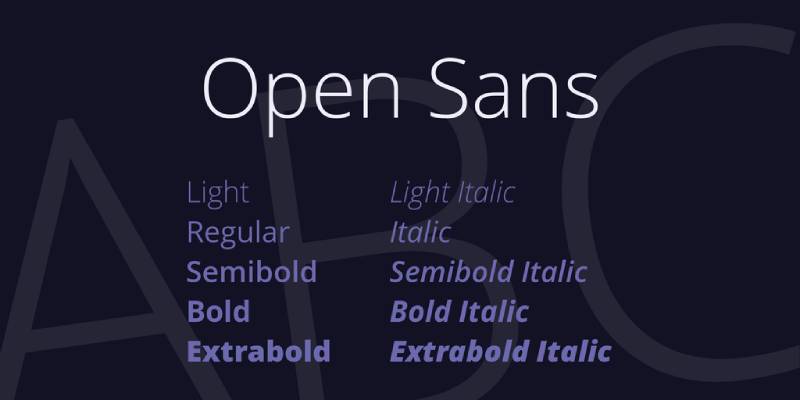
Open Sans is a humanist sans-serif font designed by Steve Matteson and released by Google in 2011. It delivers neutral, highly legible letterforms specifically built for cross-medium readability across print, screen, and signage.
Open Sans suits retail and commercial signage that also appears in digital and print contexts because its letterforms are consistent across substrates. As of 2018, it was serving over 4 billion views per day, which confirms its rendering reliability across a wide range of output environments. It is the right choice when the same type system needs to cover both physical sign production and web or app use.
—
What makes Open Sans suitable for signs?
Open Sans has a large x-height and wide apertures in “c,” “e,” “a,” and “s,” which produce clear character differentiation at sign sizes from 24pt upward. It supports 6 weights (Light 300 to ExtraBold 800) with 12 total styles including italics, giving sign designers enough range to build a full typographic hierarchy from a single typeface family. The 2021 update added a variable font version, which is practical for digital sign systems that serve responsive display environments.
Key attributes:
| Attribute | Value |
| Classification | Humanist sans-serif |
| Designer | Steve Matteson, 2011 |
| Weight range | Light 300 to ExtraBold 800 (6 weights, 12 styles with italics) |
| Variable font | Yes (updated 2021, available on Google Fonts) |
| Optical sizes | No |
| Recommended sizes | 24pt+ for secondary sign text; 48pt+ for primary headings |
| Letter-spacing default | Normal (0 to slightly open); open apertures support wider tracking |
| License | OFL (Open Font License) — free for commercial use |
| Available on | Google Fonts (free), Adobe Fonts |
| Price | Free |
—
How does Open Sans perform at sign contexts?
Open Sans renders clearly at sizes from 24pt on indoor wayfinding panels to 200mm cap height on outdoor retail signs. Its wide apertures reduce character misread rates in mixed-case directional text. At very large outdoor scales (above 500mm cap height), its stroke weight appears relatively light, so the Bold 700 or ExtraBold 800 weights should be used for primary sign headings to maintain visual weight at distance.
—
What are the best pairings for Open Sans in signs?
Open Sans pairs with Playfair Display or Lora for sign systems that need a decorative serif heading above a readable sans-serif body. For a fully sans-serif system, Open Sans Bold for headings with Open Sans Light for supplementary information creates a clean hierarchy. See Open Sans font pairing options across different sign contexts.
—
What are the limitations of Open Sans for signs?
Open Sans lacks the visual authority of purpose-built display typefaces like Gotham or Franklin Gothic for large-format headline signage, where its humanist structure can appear understated rather than commanding. Its free license, while practical, means it appears on a very high volume of signage, which can reduce distinctiveness for brand-led sign systems.
—
Open Sans – Recommended Use Cases Within Sign Design
- Best for: Indoor wayfinding, retail shelf labels, ADA-compliant interior signage, digital signage systems that also serve web interfaces
- Avoid for: Large-format outdoor billboards where visual weight needs to dominate; luxury brand sign systems requiring typographic distinctiveness
- Optimal weight: Regular 400 for body panels; Bold 700 for primary headings; ExtraBold 800 for outdoor headline text
- Optimal size range: 24pt–100pt for indoor directional signs; 60pt–200pt for outdoor retail signage
—
Arial

Arial is a neo-grotesque sans-serif font designed by Robin Nicholas and Patricia Saunders for Monotype Typography in 1982, released as a core Windows font in 1992. It delivers reliable, metrically stable letterforms across a wide range of output environments with no licensing cost.
Arial suits public-access and municipal signage because it is universally available on all major operating systems and design applications, eliminating font-missing errors in sign production workflows. Its diagonal stroke terminals (cut at an angle rather than perpendicular) give it slightly more warmth than Helvetica, which can be appropriate for community-facing public information signs.
—
What makes Arial suitable for signs?
Arial has open counters and softer curves than Helvetica, which Monotype’s Allan Haley described as “softer and fuller” than comparable grotesque designs. Its tall x-height supports legibility at distances of 10–30 meters when set at appropriate sign sizes. The metrically compatibility with Helvetica means sign files can swap between the two typefaces without layout changes, which is useful in multi-vendor sign production environments.
Key attributes:
| Attribute | Value |
| Classification | Neo-grotesque sans-serif |
| Designer | Robin Nicholas, Patricia Saunders, 1982 (Monotype) |
| Weight range | Light to Black (4 core weights + Narrow, Rounded, Condensed variants) |
| Variable font | No |
| Optical sizes | No |
| Recommended sizes | 24pt+ for indoor signs; 48pt+ for outdoor signage |
| Letter-spacing default | Normal (0); metrically matches Helvetica spacing |
| License | Bundled with Windows and macOS; free for use in documents and print |
| Available on | All Windows and macOS systems (pre-installed); Adobe Fonts |
| Price | Free (bundled); commercial expanded versions via Monotype from ~$29/style |
—
How does Arial perform at sign-specific contexts?
Arial’s neo-grotesque structure performs consistently at sizes from 24pt on indoor information panels to 200mm cap height on outdoor community signs. Its Bold weight renders clearly at distances up to 30 meters in standard lighting conditions. Arial performs well in ADA-compliant sign production because its open counters and clear character differentiation meet WCAG 2.1 contrast legibility requirements at standard sign sizes.
—
What are the best pairings for Arial in signs?
Arial pairs with Times New Roman for institutional sign systems that need sans-serif navigation text and serif body copy, as both are universally available with no licensing cost. For brand-led sign systems, pairing Arial with a distinctive display font for the headline while using Arial for all secondary text keeps production costs low.
—
What are the limitations of Arial for signs?
Arial’s ubiquity makes it visually anonymous for brand-led retail sign systems where typographic distinctiveness is a design goal. Robin Nicholas himself described it in 2005 as “a generic sans serif; almost a bland sans serif,” which is accurate. It is not the best choice when the sign needs to communicate a specific brand personality.
—
Arial – Recommended Use Cases Within Sign Design
- Best for: Municipal public information signs, accessibility-focused signage, ADA-compliant indoor panels, community notice boards
- Avoid for: Luxury or brand-led retail signage; any sign system where typographic personality matters
- Optimal weight: Regular for body text panels; Bold for primary headings; Black for outdoor display
- Optimal size range: 24pt–100pt for indoor directional; 60pt–200pt for outdoor community signs
—
Trajan
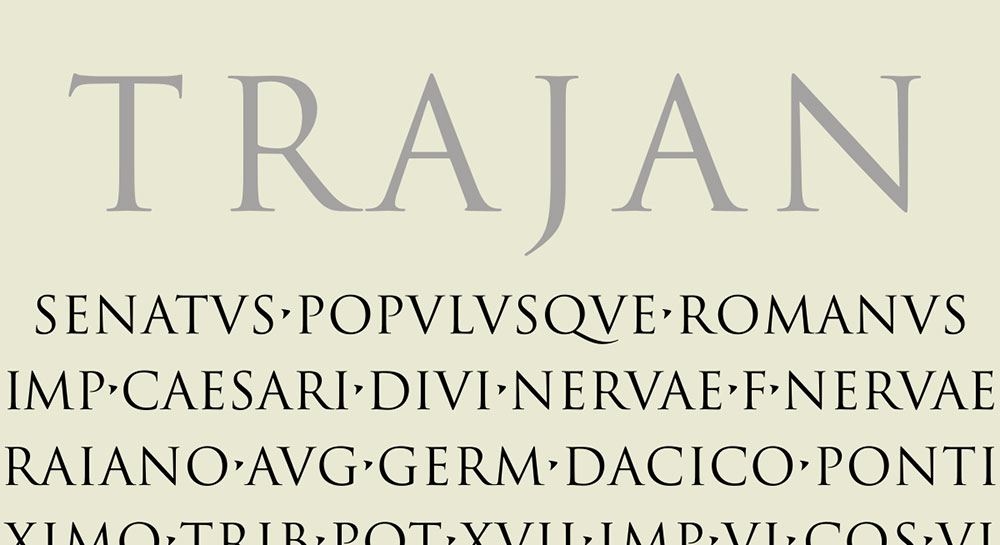
Trajan is an all-capitals display serif typeface designed by Carol Twombly in 1989, released by Adobe as part of the Adobe Originals program. It translates the Roman square capitals (capitalis monumentalis) from Trajan’s Column in Rome into a typeface that delivers formal authority at large display sizes.
Trajan works best for formal institutional, legal, and architectural sign applications because its classical Roman proportions communicate permanence and authority. It is widely used on building identification signs, institutional entrance signs, and commemorative plaques. Trajan has become the default choice for film poster typography because of its authority at very large scale.
—
What makes Trajan suitable for signs?
Trajan is an all-capitals typeface, which makes it most appropriate for short sign text (name identification, institutional titles, building names) rather than multi-line directional content. Its balanced geometric proportions, derived directly from first-century Roman stone inscriptions, produce visually stable letterforms at cap heights from 50mm to 2000mm. Trajan Pro 3 (2012) expanded the family to 6 weights (Thin to Black) and added Cyrillic and Greek support, making it suitable for multilingual institutional signage.
Key attributes:
| Attribute | Value |
| Classification | Classical Roman capitals (display serif) |
| Designer | Carol Twombly, 1989 (Adobe); expanded by Robert Slimbach, 2012 |
| Weight range | Trajan Pro 3: Thin to Black (6 weights) |
| Variable font | No |
| Optical sizes | No |
| Recommended sizes | 48pt+ for sign applications; 100mm+ cap height for building identification |
| Letter-spacing default | Normal; positive tracking standard practice for all-caps display text |
| License | Commercial (Adobe); included in Adobe Fonts subscription |
| Available on | Adobe Fonts (subscription), MyFonts (purchase) |
| Price | Via Adobe Fonts subscription; Trajan Pro 3 from ~$35/style on MyFonts |
—
How does Trajan perform at sign-specific contexts?
Trajan’s classical proportions deliver high visual impact at large scale (200mm–2000mm cap height) on building identification signs, monument bases, and commemorative plaques. Its thin serifs and moderate stroke contrast perform well in controlled indoor lighting or on polished stone and metal substrates where physical depth enhances detail. At very small sizes below 36pt outdoors, fine serif details reduce legibility in direct sunlight.
—
What are the best pairings for Trajan in signs?
Trajan pairs with a clean sans-serif like Optima or Gill Sans for multi-panel sign systems where the Trajan headline needs a complementary secondary typeface for address or directional text. The combination of Trajan’s classical authority with Optima’s humanist structure is a standard practice in institutional and governmental sign design.
—
What are the limitations of Trajan for signs?
Trajan has no native lowercase letters — the lowercase slots in the font contain small capitals, which limits its use to all-caps sign text only. This makes it unsuitable for any sign application requiring mixed-case body copy, directional text, or address information.
—
Trajan – Recommended Use Cases Within Sign Design
- Best for: Building identification signs, institutional entrance panels, commemorative plaques, law firm and government building name signs
- Avoid for: Any sign requiring lowercase body text; directional or wayfinding signage with mixed case; retail or promotional signs
- Optimal weight: Regular for formal name identification; Bold for high-contrast outdoor applications
- Optimal size range: 100mm–2000mm cap height for building identification; 48pt–120pt for indoor institutional panels
—
Optima
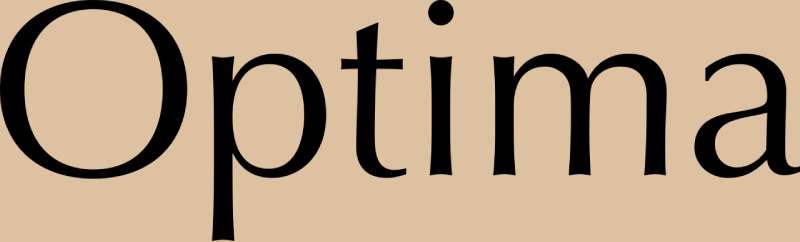
Optima is a humanist sans-serif with flared stroke terminals designed by Hermann Zapf in 1958, released by Stempel and later Linotype. It sits between pure sans-serif and serif classifications, producing refined letterforms that suit formal professional signage without requiring full serif weight contrast.
Optima works well for medical, professional, and high-end service industry signage because its slightly flared terminals add a formal quality that standard grotesque sans-serifs lack, while its clean structure remains more legible at smaller sign sizes than a full serif like Garamond or Bodoni. The Vietnam Veterans Memorial in Washington D.C. uses Optima for all its inscriptions, which demonstrates its capacity for dignified, large-scale letter application.
—
What makes Optima suitable for signs?
Optima’s moderate stroke contrast (thicker at the center of strokes, thinner at terminals) is more subtle than Bodoni but more pronounced than Helvetica, placing it in a visual middle ground that reads as professional rather than either corporate or classical. Its tall x-height improves lowercase legibility at sign distances of 5–20 meters. The flared terminals on vertical strokes act as visual anchors that help letterforms register clearly against complex backgrounds.
Key attributes:
| Attribute | Value |
| Classification | Humanist sans-serif with flared terminals (semi-serif) |
| Designer | Hermann Zapf, 1958 (Stempel / Linotype) |
| Weight range | Regular to Black (Optima Nova by Akira Kobayashi, 2002, expands to 5 weights) |
| Variable font | No |
| Optical sizes | No |
| Recommended sizes | 36pt+ for indoor professional signs; 72pt+ for outdoor applications |
| Letter-spacing default | Slightly wide; positive tracking standard for display use |
| License | Commercial (Linotype / Monotype) |
| Available on | Monotype, Adobe Fonts, MyFonts |
| Price | Optima from ~$29/style; Optima Nova family packages from ~$149 |
—
How does Optima perform at sign-specific contexts?
Optima’s flared terminals and moderate stroke contrast perform well in indoor professional environments (medical clinics, law offices, spas, hotels) where signage is read at 2–10 meters and lighting is controlled. Outdoors in direct sunlight, the subtle stroke variation can reduce character definition compared to high-contrast grotesque sans-serifs. Optima Nova (the 2002 update by Akira Kobayashi) improves on the original’s legibility at smaller sizes and in heavier weights.
—
What are the best pairings for Optima in signs?
Optima pairs with Trajan for formal institutional sign systems where the Roman capitals of Trajan handle primary identification and Optima provides secondary information text. It also works alongside Palatino, another Zapf design, for sign systems that need a full serif companion typeface. See fonts similar to Optima for budget alternatives that approximate its semi-serif quality.
—
What are the limitations of Optima for signs?
Optima’s subtle stroke variation can appear visually ambiguous on screen-printed or low-resolution vinyl cut signs, where fine terminal details may not reproduce cleanly. It is not suitable for large-format outdoor signage in high-contrast environments because its stroke weight appears lighter than equivalent grotesque sans-serifs at the same point size.
—
Optima – Recommended Use Cases Within Sign Design
- Best for: Medical and professional services signage, hotel and hospitality interior panels, commemorative and memorial signage, high-end spa or salon entrance signs
- Avoid for: Large-format outdoor signage in direct sunlight; vinyl-cut signs at small sizes; any sign requiring aggressive visual weight at distance
- Optimal weight: Regular for professional body text panels; Bold for primary headings; Black (Optima Nova) for outdoor display
- Optimal size range: 36pt–120pt for indoor professional signs; 72pt+ for outdoor applications
—
How to Choose the Right Font for Your Sign
No single typeface covers every sign situation. The choice depends on four concrete variables: viewing distance, substrate material, sign purpose, and brand identity requirements.
| Use Case | Best Font | Key Reason |
| Transit / Wayfinding | Frutiger, Helvetica | Designed with open apertures and high x-heights to remain legible at high speeds and from extreme angles. |
| Luxury / Fashion Retail | Optima, Futura | Optima provides a “serif-less serif” elegance, while Futura offers the geometric precision used by brands like Louis Vuitton. |
| Architectural / Monument | Trajan, Gotham | Trajan is based on Roman square capitals (ideal for stone); Gotham was inspired by NYC architectural signage. |
| Institutional / Formal | Garamond, Univers | Garamond suggests historical authority; Univers offers a disciplined, mathematical structure for large campuses. |
| Retail / Brand Promotion | Montserrat, Poppins | Geometric and friendly with “wide” personalities that stand out on storefronts and lightboxes. |
| Municipal / ADA-Compliant | Arial, Verdana | Standardized sans-serifs with generous spacing; Verdana is specifically optimized for low-vision clarity. |
Understanding font psychology helps when making brand-driven sign decisions. Beyond legibility, the typeface you choose communicates something about the organization behind the sign, even before anyone reads the words.
When combining typefaces on a multi-panel sign, the principles of pairing fonts apply directly. Lead with the typeface that carries the most visual weight, and support it with a secondary face that contrasts in structure without competing for attention. Keep font spacing consistent across all panels in the sign system, and always test legibility at the actual intended viewing distance before finalizing production.
For neon sign applications specifically, the considerations around stroke width and letter separation are different from standard outdoor signage. See the dedicated guide on fonts for neon signs for more detail.
FAQ on The Best Fonts For Signs
What is the best font for outdoor signs?
Helvetica and Gotham are the top choices for outdoor signage. Both have high x-heights and open apertures that maintain legibility at distance. Gotham performs slightly better in mixed-case directional text because its wider apertures reduce character misread rates at 10–30 meters.
What font is used on street signs?
Most U.S. street signs use Highway Gothic, the typeface specified by the Federal Highway Administration’s Manual on Uniform Traffic Control Devices. Clearview was approved as an alternative in 2004 for improved legibility, then reinstated as optional in 2016.
What font is easiest to read on a sign?
Sans-serif fonts with high x-heights and wide apertures read most easily on signs. Open Sans, Helvetica, and Gotham consistently rank highest for sign legibility. Stroke weight and letter spacing matter as much as typeface choice at standard viewing distances.
Should signs use serif or sans-serif fonts?
Sans-serif fonts perform better on most signs, especially outdoors. Their uniform stroke weight holds up on textured substrates and in direct sunlight. Serif fonts work well for indoor institutional signs, engraved plaques, and luxury retail contexts where viewing distance is short and lighting is controlled.
What font is used for ADA-compliant signs?
ADA signage requires sans-serif fonts with high contrast and clear character differentiation. Helvetica, Arial, and Open Sans meet WCAG 2.1 legibility requirements at standard sign sizes. The ADA does not mandate a specific typeface but requires non-italic, non-decorative letterforms with a minimum character height.
What font size is needed for signs to be readable at distance?
As a general rule, 25mm of letter height provides legibility at approximately 10 meters. For vehicle-speed outdoor signs, cap heights of 100mm or larger are standard. Bold weights improve visibility and should be used for primary sign text at any distance beyond 15 meters.
Can I use Google Fonts for commercial sign production?
Yes. Fonts released under the Open Font License on Google Fonts, including Open Sans, Montserrat, and EB Garamond, are free for commercial use in sign production. Always verify the individual font license before using it in client work, as terms occasionally differ.
What fonts work best for neon signs?
Neon signs require fonts with thick, continuous strokes and open counters. Thin hairline strokes glow together and lose definition. Script fonts and bold sans-serifs like Franklin Gothic Heavy perform well. Avoid Bodoni and other high-contrast Didone typefaces where hairlines would disappear in glow.
What is the best font for vinyl lettering on signs?
Futura, Helvetica, and Gotham cut cleanly in vinyl because their geometric letterforms have smooth curves and no hairline serifs to lift or tear. Bold weights are recommended for outdoor vinyl applications. Avoid delicate script fonts, which are prone to peeling at fine stroke intersections.
How many fonts should a sign use?
A sign should use a maximum of two typeface families and three weights. More than that creates visual clutter and reduces legibility. In practice, most effective sign systems use one family with weight variation, such as Futura Book for secondary text and Futura Heavy for the primary heading.
Conclusion
This conclusion is for an article presenting the best fonts for signs, and the core takeaway is straightforward: typeface selection determines whether a sign communicates or fails.
Stroke weight, x-height, and aperture width are not secondary concerns. They define legibility across substrates, viewing distances, and lighting conditions.
Geometric sans-serifs like Futura and Gotham dominate storefronts and monument signs. Didone typefaces like Bodoni belong in luxury retail interiors, not outdoor banners. Institutional applications call for classical letterforms, while wayfinding systems demand ADA-compliant, high-contrast choices.
Match your font to the sign type, the material, and the viewing context. Check your font licensing before production. Limit your sign system to two families and three weights.
The right typeface does not just look right. It gets read.

Renowned for his expertise in logo design and visual branding, Bogdan has developed a multitude of logos for various clients.
His skills extend to creating posters, vector illustrations, business cards, and brochures. Additionally, Bogdan's UI kits were featured on marketplaces like Visual Hierarchy and UI8.
He also wrote in the past years on sites like Design Your Way, WebDesignerDepot, WPDean, Designmodo, Speckyboy, Slider Revolution, and more.
- The Substack Logo History, Colors, Font, And Meaning - 2 October 2026
- How UX Design Impacts SaaS User Retention and Churn - 1 October 2026
- How to Embed Fonts in PDF for Reliable Printing - 30 September 2026

Bogdan Sandu is a seasoned designer who has been designing websites since 2008. Renowned for his expertise in logo design and visual branding, Bogdan has developed a multitude of logos for various clients. His skills extend to creating posters, vector illustrations, business cards, and brochures. Additionally, Bogdan's UI kits were featured on marketplaces like Visual Hierarchy and UI8. He also wrote in the past years on sites like Design Your Way, WebDesignerDepot, WPDean, Designmodo, Speckyboy, Slider Revolution, and more.
You Might Also Like