The font you’re reading right now is either helping your brain or working against it.
For people with ADHD, font choice directly affects reading speed, comprehension, and focus. It’s not a minor detail. Letter spacing, x-height, and character distinctiveness all influence how much cognitive effort it takes to decode text before meaning even registers.
Most people pick a font based on how it looks. That’s the wrong starting point if you’re dealing with attention difficulties, visual crowding, or the kind of reading fatigue that hits after two paragraphs.
This guide covers the best fonts for ADHD based on measurable typographic attributes, not opinions. You’ll learn which typefaces reduce visual stress, why sans-serif fonts tend to outperform serif options on screens, and how spacing and size decisions matter as much as the font itself.
The Best Fonts For ADHD
Font choice directly affects how much cognitive effort it takes to read. For people with ADHD, that effort compounds fast. Letters that look too similar, tight spacing, and high visual noise all increase the mental load of decoding text before the brain even gets to process meaning.
The fonts below reduce that friction. Each one was selected based on structural attributes: x-height, letter spacing, stroke consistency, and character distinctiveness. Not aesthetics.
| Font | Classification | Key ADHD Benefit | License |
| OpenDyslexic | Weighted sans-serif | Bottom-heavy letters reduce rotation confusion | OFL (Free) |
| Lexend | Humanist sans-serif | Research-backed spacing for reading fluency | OFL (Free) |
| Atkinson Hyperlegible | Grotesque sans-serif | Each glyph uniquely shaped to prevent confusion | OFL (Free) |
| Verdana | Humanist sans-serif | Wide proportions and loose spacing for screens | Proprietary (Bundled) |
| Arial | Neo-grotesque sans-serif | Open counters, soft curves, high availability | Proprietary (Bundled) |
| Trebuchet MS | Humanist sans-serif | Distinct letterforms, large x-height | Free (Web) |
| Comic Sans MS | Informal sans-serif | Irregular shapes prevent b/d/p/q mirroring | Proprietary (Bundled) |
| Century Gothic | Geometric sans-serif | Wide, round characters with consistent spacing | Proprietary (MS Office) |
| Georgia | Transitional serif | Screen-optimized serif with high x-height | Proprietary (Bundled) |
| Tahoma | Humanist sans-serif | Narrow but clear, designed for UI legibility | Proprietary (Bundled) |
—
OpenDyslexic
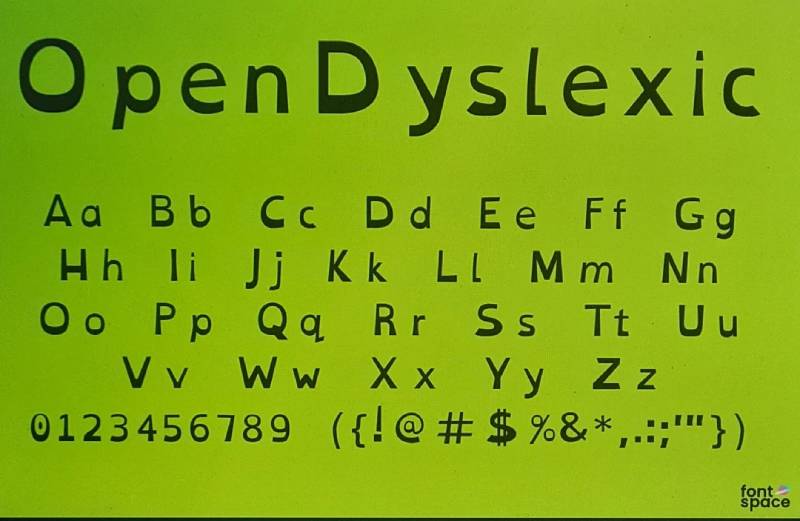
OpenDyslexic is a weighted sans-serif typeface designed by Abelardo Gonzalez in 2011, available through opendyslexic.org and Itch.io. It adds heavy, bottom-weighted strokes to each character to reduce letter rotation and mirroring.
OpenDyslexic works best for readers who frequently lose their place or confuse letters because the weighted base acts as a constant visual anchor, making letters harder to mentally flip or swap.
Amazon Kindle, Kobo eReader, and Instapaper all include OpenDyslexic as a toggle option, which signals real-world adoption beyond niche accessibility tools.
What makes OpenDyslexic suitable for ADHD readers?
Each character has a thicker bottom stroke, which orients the letter on the baseline and reduces the perceptual cost of re-reading. Letters like b, d, p, and q carry distinct weights that make rotation harder to miss. Unique letterform shapes across the alphabet reduce the chance of characters blending together mid-word.
Key attributes:
| Attribute | Value |
| Classification | Weighted sans-serif |
| Designer | Abelardo Gonzalez, 2011 |
| Weight range | Regular, Bold, Italic, Bold Italic |
| Variable font | No |
| Recommended sizes | 14px+ for body text |
| Letter-spacing default | Wide |
| License | OFL (free for personal and commercial use) |
| Available on | opendyslexic.org, Itch.io |
| Price | Free (pay-what-you-want optional) |
How does OpenDyslexic perform for ADHD reading?
A 2023 study by Liz Broadbent comparing Arial and OpenDyslexic found that 58% of participants who expressed a preference chose OpenDyslexic. The wide inter-letter spacing reduces visual crowding, which lowers the cognitive effort needed to separate adjacent characters.
At small screen sizes (below 12px), the distinctive stroke weights become less pronounced. Best results appear at 14px and above, especially on lower-DPI displays.
What are the best pairings for OpenDyslexic in ADHD reading?
OpenDyslexic pairs with Arial for headings when a neutral, high-contrast top layer is needed above accessible body text. It pairs with Lexend when maximum spacing consistency across heading and body is the priority.
What are the limitations of OpenDyslexic for ADHD readers?
Scientific evidence for its superiority over standard fonts like Arial is mixed. Multiple studies found no significant improvement in reading speed, and the distinctive letterforms can feel distracting to readers who do not have letter-confusion issues.
OpenDyslexic – Recommended Use Cases Within ADHD Reading
- Best for: Body text in educational apps, e-readers, and reading tools where letter confusion is a primary complaint
- Avoid for: UI labels below 12px, reversed text on dark backgrounds, dense data tables
- Optimal weight: Regular for body; Bold for headings only
- Optimal size range: 14px–20px for body text
—
Lexend
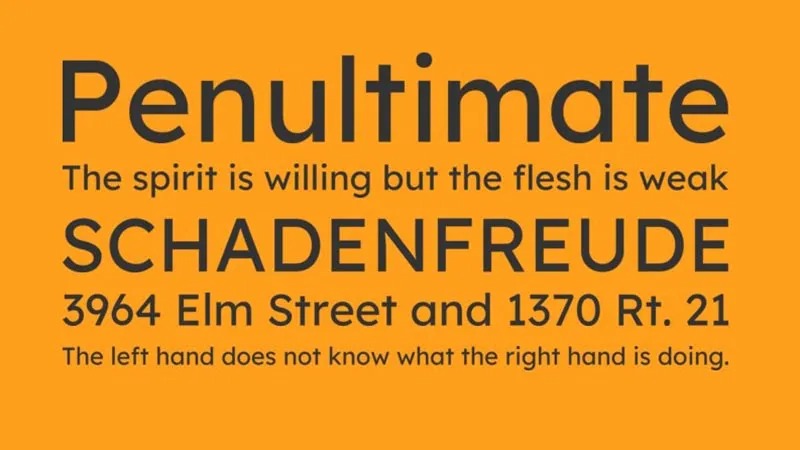
Lexend is a humanist sans-serif font created by educational therapist Dr. Bonnie Shaver-Troup in the early 2000s, digitized with Google Fonts support in 2019. It targets visual crowding and masking, the two main perceptual barriers in reading fluency.
A study conducted by Shaver-Troup with 20 third graders found that reading speed improved across all four Lexend variants tested, even when materials were set two grade levels above each student’s reading level.
What makes Lexend suitable for ADHD readers?
Lexend uses expanded letter spacing calibrated to reduce the “crowding effect,” where nearby characters interfere with recognition of a target letter. Its large x-height (the height of lowercase letters relative to capitals) improves legibility at smaller display sizes. Open letterforms on characters like c, e, and a reduce the chance of misreading in fast horizontal scanning.
It exists as a variable font, which means a single file can adjust spacing based on a reader’s individual fluency needs.
Key attributes:
| Attribute | Value |
| Classification | Humanist sans-serif |
| Designer | Dr. Bonnie Shaver-Troup, Thomas Jockin (digitization), 2004/2019 |
| Weight range | Thin 100 to Black 900 (9 weights) |
| Variable font | Yes |
| Recommended sizes | 16px+ for body; 24px+ for headings |
| Letter-spacing default | Wide (expanded) |
| License | OFL (free) |
| Available on | Google Fonts |
| Price | Free |
How does Lexend perform for ADHD reading?
Recite Me, an accessibility platform, uses Lexend as its default interface font for neurodivergent users. The expanded spacing reduces visual crowding on long paragraphs and performs well in responsive web layouts because the variable axis lets developers fine-tune spacing without switching font files.
At sizes below 14px, the spacing benefit diminishes, and the font can appear overly spread out in dense UI contexts like data tables or sidebars.
What are the best pairings for Lexend in ADHD reading?
Lexend pairs with Georgia for documents that mix long body text with print-style headings, because Georgia’s high x-height matches Lexend’s proportions without visual jarring. It also pairs well with Atkinson Hyperlegible when both heading and body text need to prioritize character distinction over stylistic contrast.
What are the limitations of Lexend for ADHD readers?
The expanded spacing can increase line length significantly, requiring wider containers or more frequent line breaks in mobile layouts. Lexend’s italic variant was not available until 2022, limiting typographic hierarchy options in older implementations.
Lexend – Recommended Use Cases Within ADHD Reading
- Best for: Web body text, educational platforms, reading apps with variable font support
- Avoid for: Narrow column layouts, UI labels below 13px, data-dense interfaces
- Optimal weight: Regular 400 for body; SemiBold 600 for subheadings
- Optimal size range: 16px–22px for body; 28px+ for headings
—
Atkinson Hyperlegible
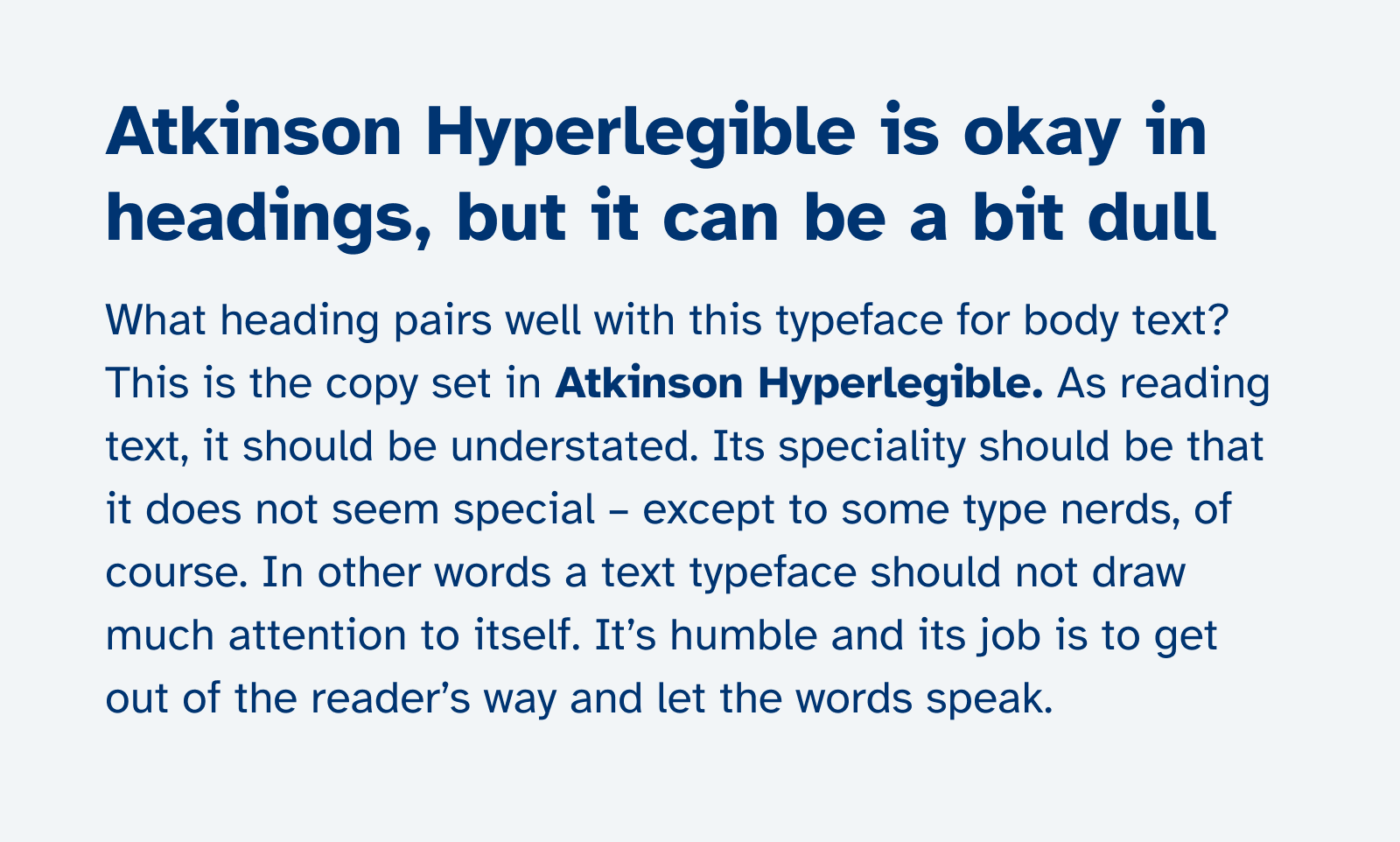
Atkinson Hyperlegible is a grotesque sans-serif typeface developed by the Braille Institute of America in collaboration with Applied Design Works in 2019. It focuses specifically on letterform distinction: every glyph is designed to be unambiguous, not just readable.
It won Fast Company’s Innovation by Design Award in 2019 and is now part of the permanent collection at the Smithsonian. Over 12,000 websites use it, and it has been downloaded more than 150,000 times directly from the Braille Institute’s site.
What makes Atkinson Hyperlegible suitable for ADHD readers?
The typeface uses deliberate rule-breaking: it adds serifs to the uppercase I but not the uppercase T, and gives the uppercase F a significantly longer middle bar than the uppercase E. These choices make commonly confused characters immediately distinguishable without requiring the reader to slow down. Open counters on letters like O, C, G, and e maintain visual clarity at small sizes. Angled spurs and longer tails on characters like j, y, and g increase differentiation between descenders.
Key attributes:
| Attribute | Value |
| Classification | Grotesque sans-serif |
| Designer | Elliott Scott / Applied Design Works for Braille Institute, 2019 |
| Weight range | Regular and Bold (4 styles); Atkinson Hyperlegible Next: Light to Extrabold (7 weights) |
| Variable font | Yes (Atkinson Hyperlegible Next, 2025) |
| Recommended sizes | 14px–20px for body; 24px+ for headings |
| Letter-spacing default | Standard (0) |
| License | OFL (free for personal and commercial use) |
| Available on | Google Fonts, Braille Institute website, Canva |
| Price | Free |
How does Atkinson Hyperlegible perform for ADHD reading?
Character recognition is the core strength. Pairs like B/8, I/l/1, and O/0 are uniquely shaped, which reduces the time spent re-reading ambiguous characters. Munich’s U-Bahn transit system adopted it for platform displays in 2025, confirming its readability performance under fast-reading, high-stress conditions.
The original version supports only 27 languages. For multilingual content, the 2025 Atkinson Hyperlegible Next release expands support to over 150 languages.
What are the best pairings for Atkinson Hyperlegible in ADHD reading?
It pairs with Lato for heading-body combinations that need a warmer tone in body copy, since Lato’s humanist letterforms soften Atkinson’s more clinical character shapes. It pairs with Merriweather when print-style documents need a serif body with an accessible heading layer on screen.
What are the limitations of Atkinson Hyperlegible for ADHD readers?
The original version offers only Regular and Bold weights (no Light, Medium, or SemiBold), which limits typographic hierarchy in complex layouts. The 2025 Next version addresses this but is a separate font file.
Atkinson Hyperlegible – Recommended Use Cases Within ADHD Reading
- Best for: Educational documents, signage, UI interfaces, any context where character misreading is the primary concern
- Avoid for: Dense body text requiring multiple weight levels (use Next instead), print layouts requiring italic body text in the original version
- Optimal weight: Regular 400 for body; Bold for headings and key labels
- Optimal size range: 14px–20px for body; 24px+ for display
—
Verdana
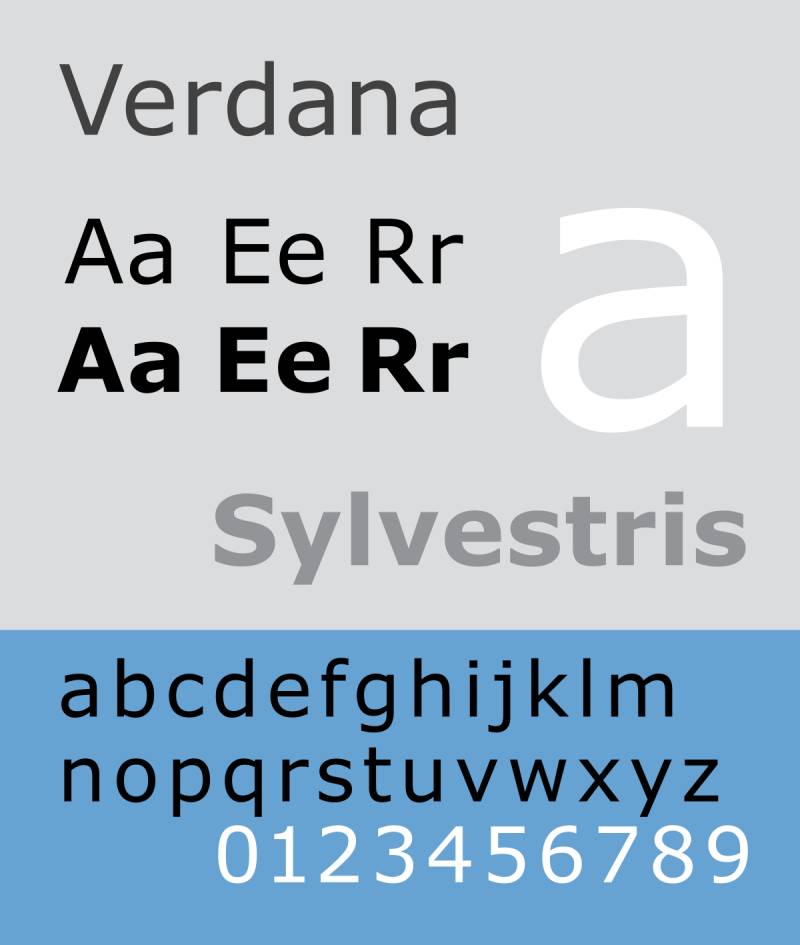
Verdana is a humanist sans-serif typeface designed by Matthew Carter in 1996 for Microsoft. Carter built it specifically for screen legibility, designing every character decision around low-resolution pixel rendering rather than print conventions. It remains one of the most widely used fonts for reading on screens.
What makes Verdana suitable for ADHD readers?
Verdana has one of the largest x-heights among system fonts, which means lowercase letters are tall relative to capitals. Wide character proportions and generous default letter-spacing reduce the chance of adjacent characters clashing on low-resolution displays. Commonly confused characters like lowercase i, j, and l, and numeral 1, were specifically drawn for maximum visual distinction.
Microsoft’s own documentation notes that at low resolutions, tight spacing can turn “rn” into “m.” Verdana’s wide proportions directly prevent this class of reading error.
Key attributes:
| Attribute | Value |
| Classification | Humanist sans-serif |
| Designer | Matthew Carter, 1996 |
| Weight range | Regular and Bold (4 styles); Verdana Pro adds additional weights |
| Variable font | No |
| Recommended sizes | 12px–18px for body text on screen |
| Letter-spacing default | Wide (loose) |
| License | Proprietary (bundled with Windows and Mac) |
| Available on | Pre-installed on Windows and macOS; Microsoft fonts package |
| Price | Free (bundled) |
How does Verdana perform for ADHD reading?
A 2013 Spanish study ranked Verdana alongside Helvetica, Courier, and Arial as one of the best fonts for readers with dyslexia. Its bold weight is unusually heavy (heavier than conventional print bolds) because Carter designed it around the binary on/off pixel constraint of mid-1990s screens. This means bold Verdana creates strong visual contrast for emphasis without switching to a different typeface.
On high-DPI screens or in print, the wide spacing can make text look sparse and inefficient.
What are the best pairings for Verdana in ADHD reading?
Verdana pairs with Georgia for combined screen reading environments, as both fonts were designed by Carter for the same screen constraints and share compatible proportions. It pairs with Trebuchet MS when a slightly more distinctive heading layer is needed above neutral body text.
What are the limitations of Verdana for ADHD readers?
The standard version ships with only Regular and Bold (plus their italics). The expanded Verdana Pro requires a separate license. The wide spacing that benefits screen reading creates awkward text blocks in print layouts or narrow containers.
Verdana – Recommended Use Cases Within ADHD Reading
- Best for: Screen-based body text, web content, email body text, word processing documents
- Avoid for: Print at small sizes, narrow column layouts, dense UI labels
- Optimal weight: Regular for body; Bold for headings (unusually bold, use with restraint)
- Optimal size range: 14px–18px for body; 22px+ for headings
—
Arial
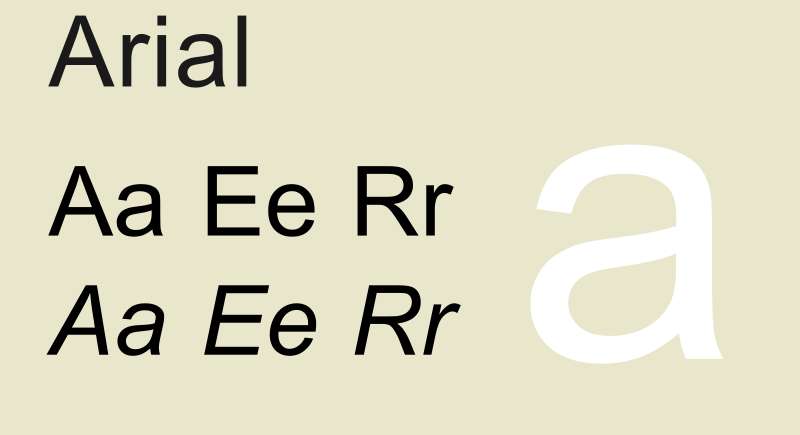
Arial is a neo-grotesque sans-serif font designed by Robin Nicholas and Patricia Saunders in 1982 for Monotype Typography. Originally built as a bitmap font for IBM laser printers, it became one of Microsoft’s four core TrueType fonts in Windows 3.1 (1992). The psychology of fonts consistently places Arial in the “neutral and accessible” category, which is exactly why it works for readers who are easily distracted by stylistic noise.
The 2016 Kuster et al. study found that when given a choice between Arial, Times New Roman, and a dyslexia-specific font, people with dyslexia preferred Arial.
What makes Arial suitable for ADHD readers?
Arial’s letterforms are softer and more rounded than Helvetica, with open counters and diagonally cut terminal strokes. This reduces visual “sharpness” in dense text blocks, lowering perceived crowding. Its curves are fuller than most industrial sans-serifs, and the open apertures on c, e, and s maintain character distinction at small sizes. The font is available on virtually every device without a web request, which also means no rendering inconsistency.
Key attributes:
| Attribute | Value |
| Classification | Neo-grotesque sans-serif |
| Designer | Robin Nicholas and Patricia Saunders, 1982 |
| Weight range | Regular, Bold, Black, Narrow, Rounded (20+ styles in full family) |
| Variable font | No |
| Recommended sizes | 14px+ for body; best at 16px–20px |
| Letter-spacing default | Standard (0) |
| License | Proprietary (bundled with Windows and macOS) |
| Available on | Pre-installed on Windows and macOS |
| Price | Free (bundled) |
How does Arial perform for ADHD reading?
Neutrality is Arial’s real advantage. Its lack of stylistic personality means there is less visual distraction per character, which reduces the cognitive cost of decoding individual letters. It renders consistently across browsers and operating systems, which matters for web-based reading tools used by students or adults with ADHD.
Arial does not differentiate I (uppercase i) from l (lowercase L) in its standard weight, which is a documented legibility issue for readers who already struggle with similar characters.
What are the best pairings for Arial in ADHD reading?
Arial pairs with Georgia for documents that combine web-safe body text with a screen-optimized serif heading. It pairs with Verdana when both heading and body text need to stay within bundled system fonts, as both share similar proportional logic.
What are the limitations of Arial for ADHD readers?
The standard version does not distinguish uppercase I from lowercase l. At body sizes below 13px, this ambiguity increases reading errors for users who already have letter-confusion tendencies.
Arial – Recommended Use Cases Within ADHD Reading
- Best for: Web interfaces requiring guaranteed system font rendering, email formatting, fallback font in reading tools
- Avoid for: Contexts where I/l/1 confusion is a documented problem; replace with Atkinson Hyperlegible or Verdana
- Optimal weight: Regular 400 for body; Bold for labels and headings
- Optimal size range: 16px–20px for body; 24px+ for headings
—
Trebuchet MS
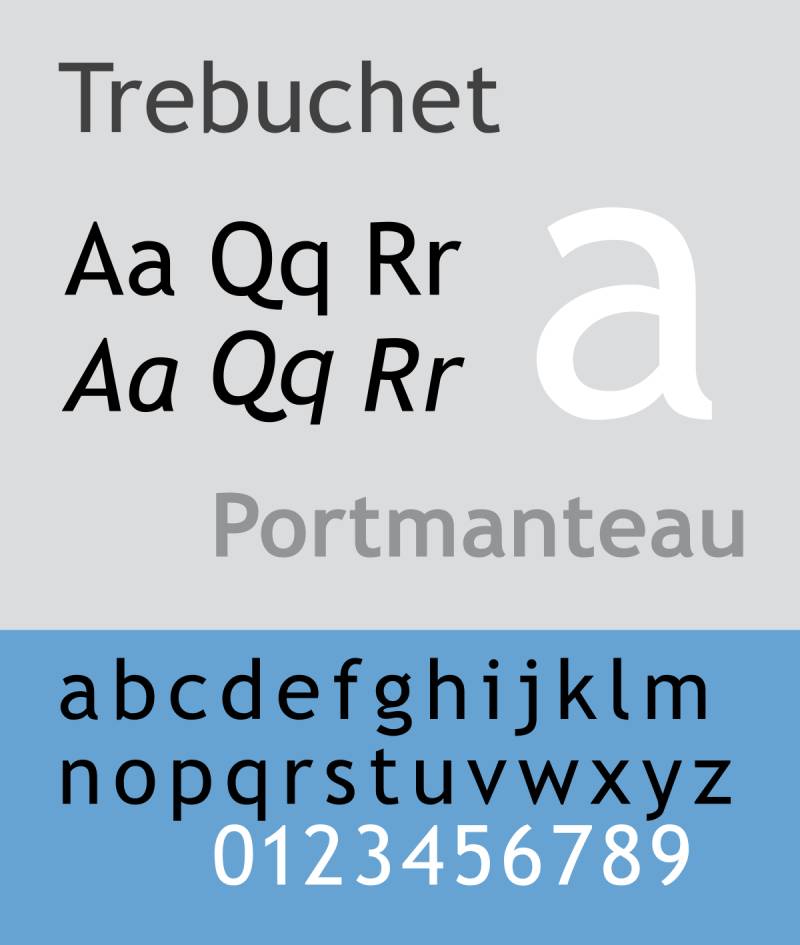
Trebuchet MS is a humanist sans-serif font designed by Vincent Connare for Microsoft in 1996. It was released as part of Microsoft’s Core Fonts for the Web package and remained one of the most commonly used body text fonts on webpages as of 2009. Connare drew from 1930s signage typography and US motorway lettering, both of which prioritize fast recognition at distance or speed.
What makes Trebuchet MS suitable for ADHD readers?
Trebuchet carries a large x-height and clean lines specifically engineered for screen readability at small sizes. Its letterforms include serif-like bars on the lowercase i and j, and a curled stem on the lowercase l, which makes these frequently confused characters visually distinct. The font’s lowercase g uses an unusual double-story design that differentiates it from q at a glance.
Key attributes:
| Attribute | Value |
| Classification | Humanist sans-serif |
| Designer | Vincent Connare, 1996 |
| Weight range | Regular, Bold (4 styles); Trebuchet 2010 adds Black weight |
| Variable font | No |
| Recommended sizes | 13px–18px for body; 20px+ for headings |
| Letter-spacing default | Standard (0) |
| License | Free (released as part of Core Fonts for the Web) |
| Available on | Pre-installed on Windows and macOS |
| Price | Free |
How does Trebuchet MS perform for ADHD reading?
Microsoft’s documentation notes Trebuchet works well for extended texts and UI scenarios because its narrow letterforms allow more characters per line without sacrificing legibility. That narrowness does slightly reduce the inter-character spacing advantage that Verdana or Lexend offer, but the character distinction features compensate effectively for average-length reading sessions.
What are the best pairings for Trebuchet MS in ADHD reading?
Trebuchet MS pairs with Verdana for body text when a more energetic heading layer is needed without loading an external font. It pairs with Georgia when the document calls for a serif body and a clean, web-safe sans-serif heading.
What are the limitations of Trebuchet MS for ADHD readers?
The standard release ships with only Regular and Bold, and the Trebuchet 2010 Black weight requires a separate download. Its narrower proportions compared to Verdana make it less suitable as a first choice for readers with severe visual crowding issues.
Trebuchet MS – Recommended Use Cases Within ADHD Reading
- Best for: Headings in web content, UI text, body text in moderately wide column layouts
- Avoid for: Very narrow mobile columns, body text below 13px
- Optimal weight: Regular for body; Bold for subheadings and key terms
- Optimal size range: 14px–18px for body; 22px–32px for headings
—
Comic Sans MS

Comic Sans MS is an informal sans-serif typeface designed by Vincent Connare for Microsoft in 1994, inspired by the hand-lettering in DC and Marvel comics. It shipped with Windows 95. Design communities have mocked it for decades, but the research behind its readability for neurodivergent readers is more solid than the contempt would suggest.
Usability research consistently finds Comic Sans more readable for people with dyslexia. ADHD readers report similar patterns, largely because its hand-drawn irregularity prevents the b/d/p/q mirroring that geometric fonts enable.
What makes Comic Sans MS suitable for ADHD readers?
Comic Sans uses irregular letterforms by design. Its characters do not share the geometric symmetry found in most sans-serif fonts, which means letters like b and d cannot be mistaken for each other by simple rotation. The rounded, uneven strokes reduce visual uniformity across a text block, giving each word a slightly different visual “shape” that aids word recognition. Letter-spacing is naturally wider than average, which reduces crowding in longer paragraphs. The font structure is closer to handwriting than typographic convention, which some readers find lowers the psychological barrier to starting a reading session.
Key attributes:
| Attribute | Value |
| Classification | Informal sans-serif |
| Designer | Vincent Connare, 1994 |
| Weight range | Regular and Bold |
| Variable font | No |
| Recommended sizes | 14px–18px for body text |
| Letter-spacing default | Wide |
| License | Proprietary (bundled with Windows and macOS) |
| Available on | Pre-installed on Windows and macOS |
| Price | Free (bundled) |
How does Comic Sans MS perform for ADHD reading?
The irregularity is the feature, not the flaw. In contexts where letter confusion is the dominant reading barrier, Comic Sans outperforms visually “cleaner” geometric fonts precisely because it does not follow the geometric rules that make letters mirror each other. This is not aesthetics. It is structural. The design community’s objections to it are a separate conversation from its functional performance for neurodivergent readers.
What are the best pairings for Comic Sans MS in ADHD reading?
Comic Sans MS pairs with Arial for documents that use Comic Sans only in body text and need a more neutral, professional heading layer. It is rarely paired in professional publishing contexts; its practical use case is personal reading environments, study notes, and assistive software rather than designed documents.
What are the limitations of Comic Sans MS for ADHD readers?
Comic Sans ships with only two weights (Regular and Bold), offering no intermediate options for hierarchy. Its strong visual personality makes it unsuitable for professional documents, and many readers find its associations distracting rather than helpful.
Comic Sans MS – Recommended Use Cases Within ADHD Reading
- Best for: Personal study notes, private reading documents, assistive reading tools where the reader controls font selection
- Avoid for: Professional or formal documents, multi-level typographic hierarchy, presentations
- Optimal weight: Regular for all body text
- Optimal size range: 14px–18px
—
Century Gothic
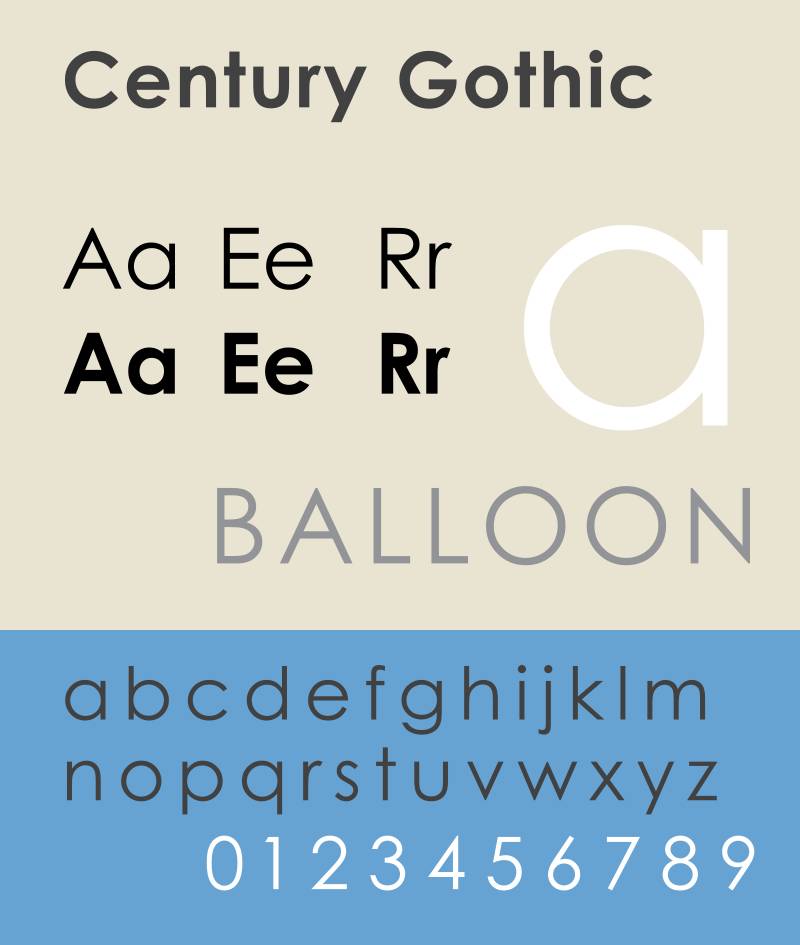
Century Gothic is a geometric sans-serif typeface released by Monotype Imaging in 1991, based on Sol Hess’s Monotype 20th Century (designed 1936–1947). It was built as a digital update of that earlier design, with an enlarged x-height and modifications for digital output. It ships with Microsoft Office.
What makes Century Gothic suitable for ADHD readers?
Century Gothic’s geometric construction produces perfectly circular letter shapes for O, C, G, and Q, which makes them visually distinct from each other despite structural similarity. Its enlarged x-height relative to the original 20th Century design improves legibility in body text. The uniform stroke weight across all characters reduces visual noise in dense text blocks, giving the eye a consistent baseline to track.
Wide letter spacing is a default characteristic of the geometric style, which directly benefits readers with visual crowding sensitivity.
Key attributes:
| Attribute | Value |
| Classification | Geometric sans-serif |
| Designer | Sol Hess (original), Monotype Design Studio, 1991 |
| Weight range | Regular to Black, 14 styles (Pan-European version) |
| Variable font | No |
| Recommended sizes | 12px–18px for body; 20px+ for headings |
| Letter-spacing default | Wide |
| License | Proprietary (included in Microsoft Office; separate webfont license required for web use) |
| Available on | Microsoft Office, Monotype direct |
| Price | Included with MS Office; commercial license via Monotype |
How does Century Gothic perform for ADHD reading?
At body sizes of 12pt and above with 1.5 line spacing or greater, Century Gothic performs well in short-to-medium reading sessions. Below 12pt, the thin geometric strokes lose definition, and the uniform stroke weight (no thick-thin variation) causes letter shapes to blur together. The University of Wisconsin-Green Bay found Century Gothic uses significantly less ink than comparable sans-serifs, which also points to its lighter stroke density.
What are the best pairings for Century Gothic in ADHD reading?
Century Gothic pairs with Georgia for web-safe, zero-load combinations. Georgia’s screen-optimized serifs provide clear reading guidance in body text, while Century Gothic’s clean geometry works at heading sizes. It pairs with Baskerville in print documents when a higher-contrast serif is needed for body copy.
What are the limitations of Century Gothic for ADHD readers?
The webfont license is separate from the desktop license, which creates a deployment barrier for web-based reading tools. Thin strokes degrade below 12pt, making it a poor choice for small-text UI components or footnotes.
Century Gothic – Recommended Use Cases Within ADHD Reading
- Best for: Headings and subheadings in Word documents, presentations, printed study sheets
- Avoid for: Body text below 12pt, web deployment without a webfont license, dense UI labels
- Optimal weight: Regular for body; Bold for headings
- Optimal size range: 14px–20px for body; 24px+ for headings
—
Georgia
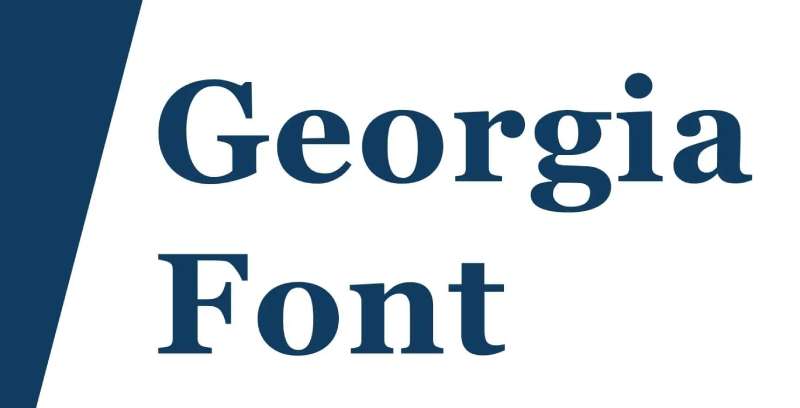
Georgia is a transitional serif font designed by Matthew Carter in 1993 for Microsoft, publicly released in 1996. Carter designed it to appear elegant but legible specifically at small sizes and on low-resolution screens, a design brief that makes it relevant for reading tools used by ADHD readers.
The New York Times switched from Times New Roman to Georgia in 2007 for its web editions, signaling real-world validation of its screen-reading performance.
What makes Georgia suitable for ADHD readers?
Georgia has a larger x-height than most traditional serif fonts, and its serifs are wider and more pronounced than older designs like Times New Roman. These serifs create visible horizontal guides along each line of text, which helps readers track their position and reduces the tendency to lose place mid-paragraph. Wide character proportions and generous spacing between letters reduce visual crowding. Georgia was designed around binary bitmap rendering, meaning its forms remain clear even at sizes where other serifs break down into visual noise.
Key attributes:
| Attribute | Value |
| Classification | Transitional serif |
| Designer | Matthew Carter, 1993/1996 |
| Weight range | Regular and Bold (4 styles); Georgia Pro adds more weights |
| Variable font | No |
| Recommended sizes | 14px–20px for body; 24px+ for headings |
| Letter-spacing default | Standard (0) |
| License | Proprietary (bundled with Windows and macOS; Georgia Pro free via Windows 10 optional features) |
| Available on | Pre-installed on Windows and macOS |
| Price | Free (bundled) |
How does Georgia perform for ADHD reading?
Georgia is the preferred choice for readers who find sans-serif text too stark or tiring over long sessions. The serif vs. sans-serif debate in accessibility research does not produce a universal winner. Georgia works for ADHD readers who need line-tracking help more than character-distinctiveness help. Its bold weight is unusually heavy (a deliberate Carter decision based on screen pixel constraints), providing strong visual contrast without switching typeface families.
What are the best pairings for Georgia in ADHD reading?
Georgia pairs with Verdana as a heading-body combination where both fonts share screen-optimized origins and compatible proportions. It also pairs naturally with Arial for documents that need a neutral sans heading above a readable serif body.
What are the limitations of Georgia for ADHD readers?
The standard bundled version ships with only Regular and Bold. On high-DPI displays, the bold weight can appear almost black compared to surrounding text, which may feel visually jarring in documents with frequent bolded terms. Georgia is not recommended for readers whose primary challenge is letter confusion rather than line tracking, since its serif details add visual complexity per character.
Georgia – Recommended Use Cases Within ADHD Reading
- Best for: Long-form reading, printed study materials, ebooks, web articles where line tracking is the primary concern
- Avoid for: Readers with letter-confusion issues (b/d/p/q); UI labels and small-text contexts
- Optimal weight: Regular for body; Bold sparingly for headings only
- Optimal size range: 16px–20px for screen body text; 11pt–12pt for print
—
Tahoma
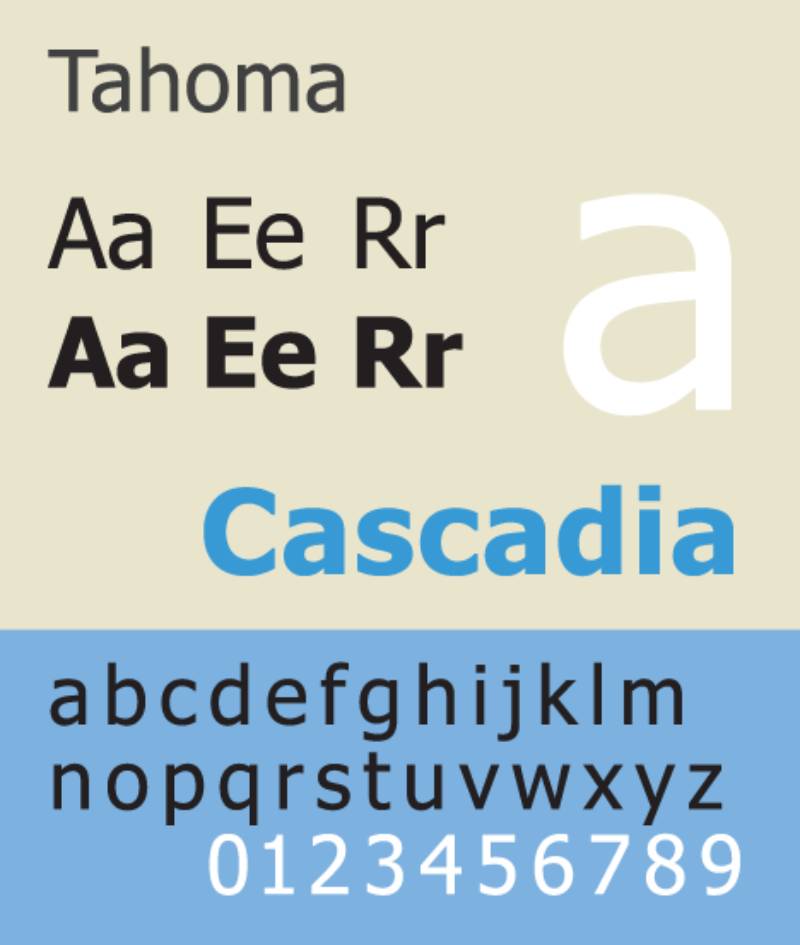
Tahoma is a humanist sans-serif font designed by Matthew Carter for Microsoft, released in 1994 and re-released in 2006 with updates. It was built to address on-screen legibility challenges specifically in small UI contexts: dialog boxes, menus, and system interfaces. Similar to Verdana in overall approach, Tahoma uses narrower character proportions, which makes it efficient in tight spaces without sacrificing clarity.
What makes Tahoma suitable for ADHD readers?
Tahoma shares Verdana’s core design logic but applies narrower letter widths, which produces taller-appearing text at the same point size. This height increase benefits character recognition without requiring larger font sizes. Clear character spacing and clean, open letterforms reduce visual crowding in compact text areas. Like Verdana, Tahoma was specifically designed to avoid the “rn/m confusion” problem on low-resolution screens by keeping characters visually distinct at small sizes.
Key attributes:
| Attribute | Value |
| Classification | Humanist sans-serif |
| Designer | Matthew Carter, 1994 |
| Weight range | Regular and Bold (4 styles) |
| Variable font | No |
| Recommended sizes | 12px–18px for body; 20px+ for headings |
| Letter-spacing default | Standard, slightly tight compared to Verdana |
| License | Proprietary (bundled with Windows and macOS) |
| Available on | Pre-installed on Windows and macOS |
| Price | Free (bundled) |
How does Tahoma perform for ADHD reading?
Tahoma was the default Windows XP system font predecessor and remained the Windows interface font for years. Its legibility in UI contexts (menus, dialog boxes, form labels) is well-established through years of real-world screen deployment. For reading comprehension in ADHD users, it works best in structured contexts like navigation labels, form instructions, and tool interfaces rather than long-form body text, where Verdana or Lexend offer better spacing advantages.
What are the best pairings for Tahoma in ADHD reading?
Tahoma pairs with Georgia for mixed-content documents that need a clean system sans for UI elements and a screen-readable serif for body copy. It pairs with Verdana when a narrower heading version of the same design family is needed above Verdana body text.
What are the limitations of Tahoma for ADHD readers?
Tahoma ships with only Regular and Bold, offering no weight range for typographic hierarchy. Its narrower proportions provide less inter-character spacing than Verdana, making it a weaker choice for readers with moderate to severe visual crowding sensitivity.
Tahoma – Recommended Use Cases Within ADHD Reading
- Best for: UI labels, navigation text, form instructions, short-form reading in structured interfaces
- Avoid for: Long-form body text above 200 words; readers with visual crowding as their primary reading barrier
- Optimal weight: Regular for body; Bold for labels and headings
- Optimal size range: 13px–17px for UI text; 20px+ for headings
FAQ on The Best Fonts For ADHD
What is the best font for ADHD?
Lexend and Atkinson Hyperlegible consistently rank as top choices. Both use wide letter spacing and distinct character shapes that reduce visual crowding. Verdana is the best system font option, available on every device without installation.
Does font choice really affect ADHD reading performance?
Yes. Typography directly affects cognitive load. Tight spacing forces the brain to spend extra effort separating characters before processing meaning. Studies show wider letter spacing improves reading speed and accuracy in readers with attention and learning difficulties.
Are sans-serif fonts better than serif fonts for ADHD?
Generally yes for screen reading. Sans-serif fonts like Verdana and Lexend have cleaner strokes that reduce visual noise. Georgia is the exception: its screen-optimized serif design helps some ADHD readers track lines in longer documents.
Is OpenDyslexic good for ADHD?
It helps some readers, not all. OpenDyslexic uses bottom-weighted letterforms to reduce b/d/p/q confusion. Research results are mixed, but platforms like Kindle and Kobo include it as an option because enough users report genuine benefit.
What font size is best for ADHD readers?
px minimum for body text on screen. Print materials work best at 11pt–12pt with 1.5 line spacing. Smaller sizes increase visual stress and speed up reading fatigue, especially for neurodivergent readers sensitive to crowded text.
Is Comic Sans actually good for ADHD?
Functionally, yes. Its hand-drawn irregularity prevents letter mirroring, which reduces character confusion in readers who struggle with b/d/p/q swaps. The design community’s dislike of it is irrelevant to how it performs as a readability tool.
What is the most readable font for ADHD kids?
Lexend and OpenDyslexic are widely used in educational settings. Both appear in reading apps and assistive tools aimed at children with dyslexia and ADHD. Andika is another option, designed specifically for early literacy use with clear, open letterforms.
Does letter spacing matter more than font choice for ADHD?
Often yes. Research consistently shows that wider letter spacing improves reading speed more reliably than switching font families. Lexend was built around this principle. Increasing tracking by 0.5px in any standard font can meaningfully reduce visual crowding on screen.
What fonts are used in ADHD-friendly apps and tools?
Recite Me uses Lexend as its default. Nook and Instapaper let users switch to OpenDyslexic or custom fonts. Kindle and Kobo both support OpenDyslexic as a toggle. Font accessibility is now a standard feature in most serious reading tools.
Are there free ADHD-friendly fonts available?
Yes. Lexend and Atkinson Hyperlegible are both free under the SIL Open Font License and available on Google Fonts. OpenDyslexic is free via opendyslexic.org. Verdana, Arial, and Georgia come pre-installed on Windows and macOS at no cost.
Conclusion
This conclusion is for an article presenting the best fonts for ADHD, and the core takeaway is straightforward: typeface structure matters more than style.
Letter spacing, x-height, and open letterforms are the three attributes that consistently separate readable fonts from problematic ones for neurodivergent readers.
Lexend reduces visual crowding through engineered spacing. Atkinson Hyperlegible eliminates character confusion through distinct glyph shapes. Verdana and Georgia hold up because they were built for screen rendering from the start.
No single typeface works for every ADHD brain. Test a few options at 16px with 1.5 line height before committing.
Typography is one of the lowest-effort, highest-impact accessibility adjustments you can make for any reading environment.

Renowned for his expertise in logo design and visual branding, Bogdan has developed a multitude of logos for various clients.
His skills extend to creating posters, vector illustrations, business cards, and brochures. Additionally, Bogdan's UI kits were featured on marketplaces like Visual Hierarchy and UI8.
He also wrote in the past years on sites like Design Your Way, WebDesignerDepot, WPDean, Designmodo, Speckyboy, Slider Revolution, and more.
- The Windsurf Logo History, Colors, Font, And Meaning - 10 October 2026
- How to Remove Background From Product Photos (No Photoshop) - 10 October 2026
- How Designers can Build a Stronger Online Creative Identity - 9 October 2026

Bogdan Sandu is a seasoned designer who has been designing websites since 2008. Renowned for his expertise in logo design and visual branding, Bogdan has developed a multitude of logos for various clients. His skills extend to creating posters, vector illustrations, business cards, and brochures. Additionally, Bogdan's UI kits were featured on marketplaces like Visual Hierarchy and UI8. He also wrote in the past years on sites like Design Your Way, WebDesignerDepot, WPDean, Designmodo, Speckyboy, Slider Revolution, and more.
You Might Also Like