


The A6 paper size is 105 x 148 mm (10.5 x 14.8 cm, 4.13 x 5.83 in), exactly one quarter of an A4 sheet.
ISO 216:2007 defines it, and ISO last confirmed the standard in 2021. Printers lean on A6 for postcards, invitations, pocket notebooks and small flyers.
It gets mistaken for the 4 x 6 inch photo size (101.6 x 152.4 mm), which is 3.4 mm narrower and 4.4 mm taller.
What size is A6 paper in mm, inches and pixels?
In portrait, A6 comes to 105 x 148 mm (10.5 x 14.8 cm, 4.13 x 5.83 in), or 1240 x 1748 pixels at 300 ppi.
The 2007 edition of ISO 216 is still the current one, so the numbers haven’t moved in years.
Millimetres, centimetres and inches
| Unit | A6 size (width x height) | Where it shows up |
|---|---|---|
| Millimetres | 105 x 148 mm | Print specs, ISO tables, printer dialogs |
| Centimetres | 10.5 x 14.8 cm | Notebook and card listings |
| Inches | 4.13 x 5.83 in | Page setup in US-region software |
| Points | 298 x 420 pt | PDF page boxes, InDesign |
| Picas | 24.8 x 35 pc | Layout software rulers |
Landscape just swaps the pair to 148 x 105 mm. The short edge stays 105 mm either way.
Pixels and points by resolution
Points follow the 72 per inch rule, so A6 is 298 x 420 pt, the same numbers as the 72 ppi entry below.
- 72 ppi gives 298 x 420 px, which only really suits screen previews
- The Windows default of 96 ppi works out to 397 x 559 px
- 150 ppi is 620 x 874 px, fine for drafts and proofs
- Final print files should be 300 ppi, or 1240 x 1748 px
All of these come from 25.4 mm per inch, rounded to whole pixels.
Printer spec sheets say DPI while screens say ppi, and people swap the two terms constantly when they set up files. Match whatever the printer’s sheet uses. If the difference is still fuzzy, dots per inch is worth a read.
The same math works for any size. Divide the millimetres by 25.4, then multiply by ppi. Or skip it and use a millimetre-to-pixel converter.
Why sources list different A6 values
Sources disagree on A6 by half a millimetre.
ISO 216 lists 148 mm for the long edge. Multiply the 105 mm edge by the square root of 2 and you get 148.5 mm, which is what some manufacturers work from. Adobe’s A6 guide lists 1241 x 1754 px at 300 dpi, and a 1754 px height only works with a 148.5 mm edge.
If the file is going to a printer, use the trim size on that printer’s template. Otherwise 105 x 148 mm is the ISO value, and the extra 0.5 mm vanishes into ordinary cutting variation at the print shop.
How A6 fits into the ISO 216 A series
Halve A0, which covers almost exactly one square metre, six times and you land on A6. So it’s half an A5 and a quarter of an A4.
Where the 1:1.414 ratio comes from
Georg Christoph Lichtenberg described the ratio in a letter to Johann Beckmann dated 25 October 1786. A sheet with sides in the proportion 1 to the square root of 2 keeps its shape when cut in half, which was his whole point.
DIN 476 turned the idea into a system on 18 August 1922, according to the paper maker STP. The A and B series were designated ISO 216 in 1975.
People mix the ratio up with the golden ratio, which is 1:1.618. The golden ratio keeps its shape when a square is cut off one end, while the A-series ratio keeps it when the sheet is halved. Only the second one is any use for paper.
A6 as a fraction of its neighbours
Cut an A5 sheet across the middle and you get two A6 cards. Fold an A4 sheet twice and the result is A6, since A6 is a quarter of it. Going the other way, A6 is double an A7, and A6’s 105 mm width equals A7’s long edge. Against A0 it comes to 1/64, because A4 is a sixteenth of a square metre (STP).
In rounded millimetres, 105 x 148 gives an area of 155.4 cm2. The unrounded figure is 156.25 cm2.
Charts of international paper sizes list every format with these same halving relations. That’s why one fold or one cut always lands on the next number up or down.
A6 uses: postcards, notepads, flyers and cards
Anything held in one hand or pushed through a letterbox tends to end up A6.
Products that fit A6
- Postcards
- Invitations and save-the-dates
- Flashcards and index cards
- Pocket notebooks and planners
- Small flyers and promotional handouts
- Stapled booklets
Printers in the UK and Australia, including Printed.com and Snap Printing, treat A6 as their default postcard.
A6 sits at the small end of common flyer sizes. It works when the page carries a single offer and a date, or just one code.
When a product is called A6 but is not
Leuchtturm1917 sells a Pocket (A6) notebook that the retailer Galaxus lists at 9 x 15 cm. That is 15 mm narrower than an A6 sheet.
Shipping labels have the same naming habit. Starshipit’s label-size guide (updated May 2026) says most shipping labels use 100 x 150 mm stock, and it lists that size as A6.
Sheet labels at 105 x 148 mm do exist, so check the millimetres and ignore the name.
Where A6 runs out of room
Dense paragraphs, tables and multi-panel layouts don’t survive at 105 x 148 mm. A single column is about the practical limit.
Small pages also punish the wrong typeface, so choosing from fonts built for small text matters more here than it does on A5.
If you need more than a headline, a few short lines and a call to action, move up to A5. Reference tables or long terms are the wrong job for A6 entirely.
A6 compared with A5, A7, A4 and B6
A6 sits between A5 (148 x 210 mm) and A7 (74 x 105 mm). B6 (125 x 176 mm) belongs to a different series and has about 1.4 times the area of A6.
| Size | Width x height | Area vs A6 | Best fit |
|---|---|---|---|
| A4 | 210 x 297 mm | 4x | Office documents |
| A5 | 148 x 210 mm | 2x | Larger flyers and postcards |
| A6 | 105 x 148 mm | 1x | Postcards, cards, pocket pieces |
| A7 | 74 x 105 mm | 0.5x | Compact cards, minimalist prints |
| B6 | 125 x 176 mm | about 1.4x | Small diaries and books |
An A5 sheet gives exactly double the area at the same proportions. A4 is four times A6, so four A6 cards come out of one A4 sheet before bleed is counted.
Drop down to an A7 card and the area halves again. It holds a logo and a line of text, and not much else.
B sizes are the geometric mean of two neighbouring A sizes, which puts B6 between A6 and A5. It is 20 mm wider and 28 mm taller than A6, and Norway’s Store norske leksikon lists pocket calendars and small diaries among its uses.
A6 is the middle option. It holds a short message and still posts easily.
Is A6 the same as 4 x 6 inches?
No. A6 is 105 x 148 mm, while a 4 x 6 inch print is 101.6 x 152.4 mm, which makes the print 3.4 mm narrower and 4.4 mm taller.
| Attribute | A6 | 4 x 6 in |
|---|---|---|
| Size in mm | 105 x 148 | 101.6 x 152.4 |
| Size in inches | 4.13 x 5.83 | 4 x 6 |
| Aspect ratio | 1:1.414 | 1:1.5 (3:2) |
| Where it lives | ISO postcards, flyers, sheet labels | Photo prints, thermal label rolls |
Where the two sizes drift apart
The gap is small enough to hide, which is why the names get swapped. One design-software size guide states that A6 measures 4 x 6 inches, and a UK frame retailer sells 6 x 4 inch frames as A6 size.
Both are rounding. 4.13 x 5.83 in rounds to 4 x 6, but the ISO value in millimetres stays the reference.
The ratio matters more than the 3 mm. Photo prints at 4 x 6 follow the 3:2 shape of camera sensors, according to Shotkit, while A6 keeps the 1:1.414 ratio of the A series.
Type both into an aspect ratio calculator and the mismatch shows at once, 1.5 against 1.414.
What happens when one is printed as the other
Put an A6 design on 4 x 6 paper and scale it to fit, and you get about 9 mm of white across the height. Scale the same design to fill instead and it loses about 6.5 mm across the width. Both figures come from simple scaling arithmetic, not from a printer test.
Phone photos run into the same problem in reverse. 4:3 shots lose their edges on a 4 x 6 print (Shotkit).
Labels are a separate mess. Paperlust names 100 x 150 mm, the 4 x 6 inch thermal format, as the most common shipping label size in Australia, with A6 at 105 x 148 mm as the sheet alternative for A4 printers.
When A6 is the wrong order
Skip A6 for photo frames, album sleeves and lab prints sold as 4 x 6. The same goes for thermal label rolls cut at 100 x 150 mm, and for any artwork already built at 3:2.
A6 makes sense for ISO postcards, flyers and A4 sheet labels. Photo prints and thermal rolls are a 4 x 6 job.
Postal size limits don’t separate the two. The USPS Domestic Mail Manual lists postcards at card prices up to 6 x 9 inches for presorted and automation First-Class Mail, in effect since 13 August 2021. The earlier limit was 4.25 x 6 inches, and both A6 and 4 x 6 clear either one.
Which envelope fits A6 paper?
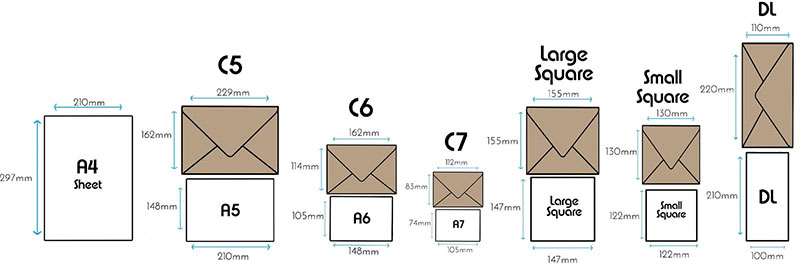
A C6 envelope, 114 x 162 mm, is the standard fit for a flat A6 card.
ISO envelope fit for A6
The C series comes from ISO 269, which ISO withdrew in 2009, and papersizes.io lists C6 and DL among the standard sizes. The numbers below are calculated from those listings.
| Envelope | Size | Flat A6 card |
|---|---|---|
| C6 | 114 x 162 mm | Snug, 9 mm and 14 mm spare |
| DL | 110 x 220 mm | Fits, 5 mm spare on the short side |
| US A6 envelope | 121 x 165 mm | Loose, about 16 mm and 17 mm spare |
An A5 sheet folded once is A6, so it travels in a C6 envelope too.
DL works on paper but lets the card slide lengthwise. For anything with a stiff edge or a printed border, C6 is the better pick.
The US A6 envelope name
In the US, “A6 envelope” means something else.
American stationers use the name for a 4.75 x 6.5 inch envelope, which papersizes.io lists as the A6 Thompson’s Standard at 165 x 121 mm. StationeryHQ pairs its A6 cards with that envelope.
ISO C6 is 114 x 162 mm and was built around the A6 sheet. The US A6 envelope runs about 7 mm wider and 3 mm longer, since it was sized around US card formats.
A6 cards from an ISO printer fit the US envelope with room to spare. US-sized cards will not necessarily fit a C6.
How to prepare an A6 file for print
Build the A6 file at trim size plus the printer’s bleed, which runs between 1.5 and 3 mm per side, and keep text inside a safe margin of 1.5 to 5 mm. No single number is universal, so take both values from the printer’s template.
| Printer (A6 guide) | Bleed / safe area | File size | At 300 ppi |
|---|---|---|---|
| 99designs | 1.5 mm / 1.5 mm | 108 x 151 mm | 1276 x 1783 px |
| MOO (UK) | 2 mm / 2 mm | 109 x 152 mm | 1287 x 1795 px |
| Aura Print (UK) | 2 mm / 3 mm | 109 x 152 mm | 1287 x 1795 px |
| WTTB (UK) | 3 mm / 5 mm | 111 x 154 mm | 1311 x 1819 px |
Pixel counts are calculated from each file size at 25.4 mm per inch.
The bleed area holds any background colour or image that runs past the trim line. InDesign’s help describes it as the buffer that prevents white gaps after trimming.
Text, logos and phone numbers belong inside the safe zone. A6 leaves little room for it, so a 5 mm margin takes a noticeable bite out of 105 mm.
On resolution, 300 ppi is the floor and not the target. Aura Print sets 300 DPI as its minimum, and WTTB asks for 300 to 450.
Aura Print wants CMYK artwork. WTTB prefers PDF/X-1a:2001 with crop marks and document bleed.
Four A6 sheets fill an A4 sheet exactly, so any bleed pushes a 2 x 2 layout past 210 x 297 mm. With 3 mm bleed the block measures 222 x 308 mm, which fits on SRA4 (225 x 320 mm, ISO 217) and not on A4.
Mismatched trim dimensions top WTTB’s list of artwork rejections. An A4 PDF sent for an A6 order is the example the guide gives.
How to set up an A6 page in Photoshop, InDesign, Canva and Word
InDesign and Canva carry bleed as a document setting, Photoshop takes it as extra canvas, and Word’s Page Setup dialog has no bleed field at all.
Photoshop
- Choose File > New (Ctrl+N or Cmd+N).
- Set the unit to millimetres and enter 111 x 154 for a 3 mm bleed, which adds 6 mm to each dimension.
- Set the resolution to 300 pixels per inch.
- Set the colour mode to CMYK.
- Add guides 3 mm in from each edge for the trim, then the printer’s safe margin inside that.
If the artwork started life in RGB, here is how to convert RGB to CMYK in Photoshop without a colour surprise.
Photoshop suits photo-led A6 cards. MOO asks for vector PDF artwork, so type-heavy pieces belong in InDesign or Illustrator.
InDesign
InDesign’s help treats the Page Size as the final trimmed size, with bleed and slug added outside it. Save A6 as a custom page size or preset and the dialog remembers it.
- Choose File > New > Document.
- Pick Custom Page Size and enter 105 x 148 mm.
- Expand Bleed and Slug and type the printer’s bleed value.
- Extend backgrounds and images to the bleed edge, and check them with View > Screen Mode > Bleed.
- Export Adobe PDF (Print) with crop marks and the document’s bleed settings.
Anything past the bleed edge does not print.
Canva
Canva’s help page describes a fixed bleed of 0.125 in (3.175 mm) per side that cannot be adjusted. On A4 that works out to about 216 x 303 mm, though the same help page quotes 222 x 309 mm in its own example.
- Choose Create a design > Custom size, set millimetres, and enter the trim size, 105 x 148 mm.
- Turn on Show print bleed from the File menu (it sits under Settings or View settings, depending on layout).
- Drag backgrounds past the dashed line.
- Download as PDF Print with Crop marks and bleed ticked.
Measure the exported page before upload, and if the printer’s template expects 2 mm, check that it accepts Canva’s larger bleed. Here is more on how to save a Canva design as a PDF.
Word
Word handles A6 pages fine and A6 bleed not at all.
- Go to Layout > Size > More Paper Sizes.
- On the Paper tab, choose A6 from the Paper size list, or enter a custom width of 10.5 cm and height of 14.8 cm.
- Switch units under Options > Advanced > Display if the dialog shows inches.
- Pick the paper source your printer uses for small stock.
Microsoft’s support page notes that editing the width or height of a standard size flips the field to Custom size.
Word is fine for A6 pieces printed on an office printer. For a trimmed job, build the file somewhere else.
A6 Paper Size FAQ
Which paper weight works best for A6 postcards?
Use 300 to 350 gsm for postcards. Tradeprint prints them on 300gsm coated or 350gsm silk, and Doxzoo lists 300 to 350 gsm cardstock for postcards against 90 gsm text paper for plain handouts.
Can an office printer print on A6 stock?
Yes, when the model’s supported-media table lists A6, usually for the multipurpose tray only. Lexmark’s C73x manual allows A6 there and in the specialty media drawer, not in the standard 550-sheet tray.
Its 60 to 220 g/m2 rating also rules out 300 to 350 gsm postcard stock.
Does an A6 card go through the post as a standard UK letter?
Yes. A6 sits well inside Royal Mail’s Letter format, which allows up to 240 x 165 mm, 5 mm thick and 100 g.
A card in a C6 envelope (114 x 162 mm) stays inside the same size limits, so thickness and weight decide the format.
What is an A6 folded card?
An A6 folded card is an A5 sheet creased once, so it closes to 105 x 148 mm and opens to 148 x 210 mm.
The Envelope People sells A6 card blanks in 190, 250, 300 and 350 gsm.
When A6 Is Enough and A5 Is Better
The A6 paper size is enough for one message read in seconds. Move to A5 (148 x 210 mm) once the content needs more than a headline, a few short lines and one contact detail.
A 5 mm safe margin, the widest in the printer guides, leaves A6 only 95 x 138 mm of usable space. A5 keeps 138 x 200 mm, which is 2.1 times the area, not the nominal 2.
Count the words and page elements first, pick A6 or A5 from that, and only then ask the printer for its bleed and safe-margin template. Content fixes the size, and the size fixes the template, so reversing the order means rebuilding the file.
Moving up costs paper. Every A5 piece uses twice the stock of an A6, and a flat A5 no longer fits a C6 envelope.
A guide to setting up a print-ready file covers the checks every format shares.

Renowned for his expertise in logo design and visual branding, Bogdan has developed a multitude of logos for various clients.
His skills extend to creating posters, vector illustrations, business cards, and brochures. Additionally, Bogdan's UI kits were featured on marketplaces like Visual Hierarchy and UI8.
He also wrote in the past years on sites like Design Your Way, WebDesignerDepot, WPDean, Designmodo, Speckyboy, Slider Revolution, and more.
- Best Visual Regression Testing Tools for Web and App Design in 2026 - 13 October 2026
- Jujutsu Kaisen Font Generator - 12 October 2026
- The Windsurf Logo History, Colors, Font, And Meaning - 10 October 2026

Bogdan Sandu is a seasoned designer who has been designing websites since 2008. Renowned for his expertise in logo design and visual branding, Bogdan has developed a multitude of logos for various clients. His skills extend to creating posters, vector illustrations, business cards, and brochures. Additionally, Bogdan's UI kits were featured on marketplaces like Visual Hierarchy and UI8. He also wrote in the past years on sites like Design Your Way, WebDesignerDepot, WPDean, Designmodo, Speckyboy, Slider Revolution, and more.
You Might Also Like


