

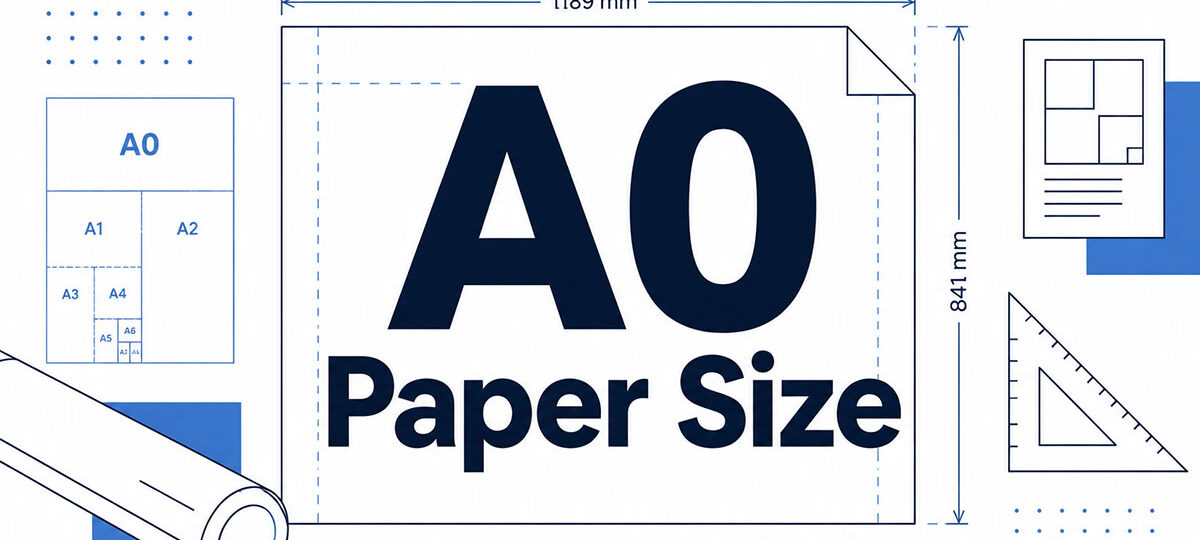
Most people look up A0 because a printer or a poster guideline just asked for it, and the number they need is 841 x 1189 mm (33.1 x 46.8 inches). That’s the base sheet of the ISO 216 A series. Its area is 1 square meter by definition, and every smaller A size is that sheet cut in half again.
Engineers and architects print drawings and plans on it. Researchers print conference posters in portrait.
One thing most pages skip: ISO 216:2007, last reviewed and confirmed by ISO in 2021, covers paper for administrative, commercial and technical use and does not necessarily apply to posters. A0’s place on poster boards is convention, not a rule in the standard.
What Size Is A0 Paper?
841 x 1189 mm, or 33.1 x 46.8 inches. It’s the largest size in the ISO 216 A series, and every smaller A size comes from cutting it in half.
In centimeters that’s 84.1 x 118.9, in inches 33.11 x 46.81, and in points 2384 x 3370. The inch and point values are conversions from the ISO millimeter figures (25.4 mm to the inch, 72 points to the inch), and the inch values match those papersizes.io lists.
Width comes first and height second, so an A0 sheet is portrait by default. Swap the numbers and you have landscape.
How ISO 216 Defines the A0 Format
ISO 216 pins A0 down with an area of 1 square meter and sides in the ratio 1 to the square root of 2 (about 1:1.414). The standard then states the trimmed size in whole millimeters.
Area and the 1:1.414 Ratio
Solve both rules together and the sides come out at 840.9 mm and 1189.2 mm. The published 841 x 1189 mm is those two values rounded to the nearest millimeter.
That rounding leaves two sources slightly apart.
Markus Kuhn’s ISO paper size reference at the University of Cambridge describes A0 as having an area of one square meter. Multiply the published sheet out, though, and 841 x 1189 mm gives 0.999949 square meters, which is the figure Adobe’s A0 format guide uses.
The gap is 51 square millimeters. Use 1 square meter when you talk about the definition, and 0.999949 when you calculate from the rounded sides.
Because the area sits that close to 1 square meter, a stock’s paper weight in gsm doubles as the weight of one A0 sheet in grams, as Printenbind notes for its poster stocks. An 80 gsm A0 sheet weighs about 80 g.
From DIN 476 to ISO 216
Physicist Georg Christoph Lichtenberg described a sheet whose halves keep the same proportions in a letter to Johann Beckmann, back in 1786. DIN 476 came on 18 August 1922, built on Walter Porstmann’s system. ISO adopted the A and B series as ISO 216 in 1975, and the second edition replaced that text in 2007.
The STP paper blog supplies the 1786 and 1922 dates, and Designing Buildings gives the 1975 designation. ISO’s own catalogue entry shows the 2007 edition as current, confirmed again in its 2021 review.
Almost every country outside North America builds its stationery and print formats on these international paper sizes, which is why the same A0 file moves between printers in most markets.
The scope statement of ISO 216:2007 is where the catch sits. It covers paper for administrative, commercial and technical use, and says it does not necessarily apply to posters.
So A0 on a poster board is convention, not a rule in the standard.
How A0 Compares With A1 to A4 and US Sizes
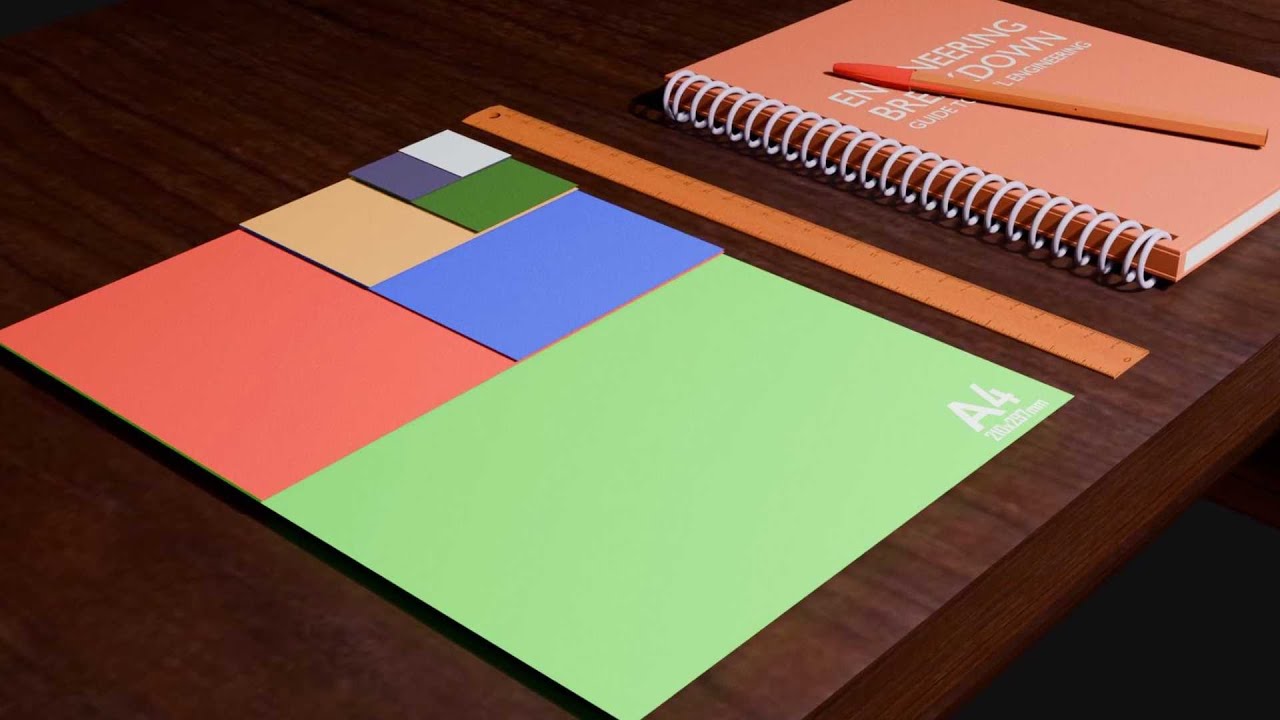
Each step down the A series halves the area, so A1 is half of A0, A2 a quarter, A3 an eighth and A4 a sixteenth. Sixteen A4 sheets cover the same area as one A0 sheet, according to Octopus Office Supplies.
| Size | Millimeters | Inches | Share of A0 area |
|---|---|---|---|
| A0 | 841 x 1189 | 33.1 x 46.8 | 1 |
| A1 | 594 x 841 | 23.4 x 33.1 | 1/2 |
| A2 | 420 x 594 | 16.5 x 23.4 | 1/4 |
| A3 | 297 x 420 | 11.7 x 16.5 | 1/8 |
| A4 | 210 x 297 | 8.3 x 11.7 | 1/16 |
The short side of each size is the long side of the next one up. Cut an A0 sheet across its long side and each half is A1 paper at 594 x 841 mm, with the same proportions as before.
That shared ratio gives clean linear scaling factors, per CAD Set Out’s enlargement and reduction table. A0 to A1 is 71%, A0 to A2 is 50%, A0 to A3 is 35%, and A0 to A4 is 25%.
A drawing laid out at A0 reduces to A4 sheets at 25% with no cropping and no empty bands.
A0 Compared With US Large-Format Sizes
No US size matches A0 exactly.
ANSI E is 34 x 44 inches (864 x 1118 mm) under ASME Y14.1. That’s about 23 mm wider than A0 and about 71 mm shorter, with roughly 3.5% less area.
ARCH E goes the other way at 36 x 48 inches (914 x 1219 mm). It’s a 4:3 sheet against A0’s 1:1.414 and holds roughly 11.5% more area, so US poster sessions that ask for 36 x 48 inches hand you a slightly larger sheet than A0.
An A0 layout fits inside ARCH E with margin to spare. It’s 71 mm too tall for ANSI E, so it has to scale to about 94% to fit.
The metric side of ASME Y14.1M follows ISO 216 and ISO 5457 sizes. Since ASME Y14.1-2020 (published 18 December 2020), the inch and metric sheet sizes sit in one document.
What Is A0 Paper Used For?
A0 gets picked when the work needs one large, undivided surface. Technical drawings, architectural plans, maps and posters are the usual jobs. Engineers, architects, surveyors and graphic designers use it most, according to Octopus Office Supplies, and researchers run into it at conference poster sessions.
For drawings, ISO 5457 sets a drawing space of 821 x 1159 mm inside the 841 x 1189 mm trimmed sheet, with an untrimmed sheet of 880 x 1230 mm. Print shop Printenbind lists plans, maps and blueprints among its common A0 jobs, next to technical schemes. Posters cover outdoor campaigns and academic conferences.
Poster sessions show the pattern most clearly. Saarland University’s presenter guidelines, ICANN 2019 and APCMM 2022 all ask for A0 in portrait.
Rajarata University of Sri Lanka asks for text readable from 2 m, while APCMM 2022 sets 1.5 m for illustrations.
Use A0 when the venue asks for it or readers stand 1.5 to 2 m back. Otherwise A1 covers half the area at the same proportions.
It’s a plotter format, really, and a clumsy one on a desk. For a closer look at the other common formats, see this rundown of poster sizes.
A0 Size in Pixels and the Right Resolution
At 150 ppi an A0 file is 4967 x 7022 pixels, and at 300 ppi it is 9933 x 14043 pixels. Pixel dimensions are the sheet size in inches multiplied by the ppi you choose.
| Resolution | Pixels (W x H) | Megapixels | Typical fit |
|---|---|---|---|
| 72 ppi | 2384 x 3370 | 8.0 | Screen preview |
| 100 ppi | 3311 x 4681 | 15.5 | Distant viewing |
| 150 ppi | 4967 x 7022 | 34.9 | Most A0 jobs |
| 300 ppi | 9933 x 14043 | 139.5 | Close inspection |
The pixel counts come from papersizes.io, Printenbind and Moda. The megapixel column is width times height.
Sources disagree on what far viewing needs.
HP’s large format printing guide (March 2026) says 100 to 150 PPI at final size is enough for a banner viewed from 8 to 10 feet. Vistaprint’s poster preparation guide asks for more and puts far viewing, 6 to 10 feet and beyond, at 150 to 200 DPI.
The two ranges overlap at 150, which makes 150 ppi the safe default for an A0 file. Go to 300 only when readers will study the print from close up.
The price of 300 ppi is file weight. One uncompressed 8-bit RGB layer is roughly 418 MB at 300 ppi against 105 MB at 150 ppi.
Strictly, ppi describes your file, while a printer’s dpi rating describes how many ink dots it lays down. A 150 ppi file still prints cleanly because the plotter’s dot density is far higher than the file’s pixel density.
Logos, text and line art skip the question entirely. Artwork built as vector graphics stays sharp at any size, so only photographs and textures need a ppi decision.
How to Set Up an A0 File for Print
Build the file at the trimmed size plus bleed, keep type and logos as vectors, convert to CMYK, and export a PDF with fonts embedded. Check the page size before the file goes to the printer.
- Create a new document in millimeters at 841 x 1189 mm, portrait. Illustrator, InDesign, Photoshop and Inkscape all accept custom sizes, and in AutoCAD you pick the A0 paper size in the layout’s page setup.
- Add 3 mm of bleed on every side, which makes the page 847 x 1195 mm. HelloPrint asks for 3 mm on all sides to avoid a white border.
- Set raster images to 150 ppi at final size. With bleed, a full-page image is 5002 x 7057 pixels.
- Convert artwork to CMYK unless your provider asks for RGB, as HP’s large format guide advises.
- Export a PDF with fonts embedded, and add crop marks only if the printer asks for them.
- Open the PDF at 100% and check the page size, the edges and the sharpness of the largest image.
The bleed is extra artwork beyond the trim line. A background that stops exactly at 841 x 1189 mm invites white slivers when the sheet is cut.
Missing fonts hurt more at this size, because a substituted typeface reflows every headline. If your export dialog doesn’t handle it, this guide shows how to embed fonts in a PDF.
Photoshop has a ceiling worth knowing about. The Library of Congress format description gives a PSD limit of 30,000 pixels per side and 2 GB, while PSB reaches 300,000 pixels. A 300 ppi A0 layer is 14,043 pixels tall, inside the pixel limit, but about five full-size layers push the raw data past 2 GB before compression.
Fit-to-page scaling is the other trap. If a driver fits the 847 x 1195 mm file onto an A0 sheet, the artwork shrinks to about 99.3%, so tell the printer which box is the trim.
When A0 Is the Wrong Choice
A0 is the wrong choice when the hardware or the room can’t take it, and A1 is usually the better call.
Canon’s spec sheet for the imagePROGRAF TM-300 lists roll widths from 203.2 to 917 mm and borderless printing at 841 mm for ISO A0. That’s a 36-inch plotter. A 24-inch model with 610 mm rolls is too narrow, because 841 mm is the short side of the sheet.
No standard office printer handles A0 at all, according to Moda’s size guide.
Step down to A1 if the only plotter in reach takes 610 mm rolls, or if the wall or board can’t take a sheet 1189 mm tall. A 300 ppi raster that your software can’t hold is a third reason.
Acrobat’s Poster print option splits an oversized page across standard sheets, with settings for tile scale, overlap, cut marks and page labels (Adobe, updated November 2025). It works for a layout check, but you still trim and assemble the sheets.
Decide on framing before you print. Lazada’s stationery guide notes that a frame lip covers about 3 to 5 mm of a poster’s edge, so framing a poster this size needs planning, and this walkthrough on framing a poster covers the mounting side.
If the plotter, the file and the wall all check out, A0 is fine. If one fails, go with A1.
A0 Paper Size FAQ
How big is A0 in feet?
About 2.76 x 3.90 feet, converted from 33.11 x 46.81 inches. The sheet is close to four feet tall.
Is A0U the same as A0?
No. A0U is a larger sheet at 880 x 1230 mm, which papersizes.io lists in its Raw series.
Its dimensions match the untrimmed A0 sheet in ISO 5457, not the trimmed ISO 216 size.
How does A0 differ from B0?
B0 is bigger, at 1000 x 1414 mm against 841 x 1189 mm for A0, according to Markus Kuhn’s ISO paper reference at the University of Cambridge. Both keep the 1:1.414 ratio.
Is A0 the biggest paper size?
No. A0 tops the A series, but DIN 476 defines bigger formats called 2A0 and 4A0.
ISO 216 does not formally cover them, and printers use them for oversized work.
What are RA0 and SRA0 sheets?
RA and SRA sizes define untrimmed paper for commercial printing under ISO 217. The sheet is slightly larger than the finished A0 and gets cut down after printing.
Which paper weights are available for A0 posters?
Printenbind lists four stocks for A0 posters: 80 g standard, 180 g matt, 190 g satin and polyester.
Other printers differ, so confirm the range with your own print shop.
What to Confirm With the Printer Before Sending an A0 File
Before an A0 paper size job goes out, ask the printer about roll width, bleed and resolution, in that order. Roll width comes first because the plotter can’t be swapped after the fact, and bleed sets the final page size. Resolution comes last since a raster file can still be resampled.
The width check has a hard threshold. A file with 3 mm of bleed is 847 mm wide, so the roll must be at least 847 mm wide, and a 36-inch (914 mm) roll leaves 67 mm to spare.
The trade-off sits in the resolution answer. Choosing 150 ppi over 300 ppi cuts the pixel count to a quarter, and what you give up is fine detail under close inspection.
Once the answers are confirmed in writing, a final pass on setting up a print-ready file catches the remaining errors.

Renowned for his expertise in logo design and visual branding, Bogdan has developed a multitude of logos for various clients.
His skills extend to creating posters, vector illustrations, business cards, and brochures. Additionally, Bogdan's UI kits were featured on marketplaces like Visual Hierarchy and UI8.
He also wrote in the past years on sites like Design Your Way, WebDesignerDepot, WPDean, Designmodo, Speckyboy, Slider Revolution, and more.
- The Windsurf Logo History, Colors, Font, And Meaning - 10 October 2026
- How to Remove Background From Product Photos (No Photoshop) - 10 October 2026
- How Designers can Build a Stronger Online Creative Identity - 9 October 2026

Bogdan Sandu is a seasoned designer who has been designing websites since 2008. Renowned for his expertise in logo design and visual branding, Bogdan has developed a multitude of logos for various clients. His skills extend to creating posters, vector illustrations, business cards, and brochures. Additionally, Bogdan's UI kits were featured on marketplaces like Visual Hierarchy and UI8. He also wrote in the past years on sites like Design Your Way, WebDesignerDepot, WPDean, Designmodo, Speckyboy, Slider Revolution, and more.
You Might Also Like


