


A7 paper size is a fixed sheet standard within the ISO 216 A-series that measures 74 by 105 millimeters, one of the smallest sizes in that series and used for cards, tickets, and inserts rather than full-length documents.
It sits between A6 and A8 in the same halving sequence, governed internationally by ISO and adopted by nearly every country outside North America for administrative and commercial printing.
The International Organization for Standardization last reviewed ISO 216:2007 in 2021 and confirmed it without amendment, meaning A7’s dimensions have held unchanged since the standard’s second edition (ISO, 2021).
What Is A7 Paper Size?
A7 paper size is a fixed-dimension sheet standard that belongs to the ISO 216 A-series.
It measures 74 x 105 millimeters, making it one of the smallest sizes still used in everyday printing.
A7 sits within the broader system of international paper sizing that almost every country outside North America follows.
It is not the same thing as a US index card, and it carries no official standing under the American ANSI system.
- Belongs to the same family as A4 and A5, just several halvings smaller
- Governed by ISO 216, originally published in Germany as DIN 476
- Used mostly for small print items rather than full documents
A7 works well for things people hold, not things people read for long stretches.
A7 Paper Size in Millimeters and Inches
A7 measures 74 x 105 mm, or 2.91 x 4.13 inches.
Convert those millimeters to centimeters and A7 comes out to 7.4 x 10.5 cm.
- Width: 74 mm (2.91 in / 7.4 cm)
- Height: 105 mm (4.13 in / 10.5 cm)
- Area: roughly 7,770 mm², or about 0.008 m²
- Aspect ratio: 1 to the square root of 2, shared across the whole A-series
ISO 216 sets a production tolerance of ±1.5 mm for any A-series dimension up to 150 mm, which covers both sides of an A7 sheet (ISO, 2007).
In Millimeters and Centimeters
74 x 105 mm is the figure printed on most European stationery specs and packaging labels.
Some European suppliers list the cm version instead, since metric packaging conventions favor centimeters for small goods.
Either way, the sheet is identical. Only the unit changes.
In Inches
American designers working with A7 files usually see 2.91 x 4.13 inches in their software’s page setup dialog.
That is not a round number, and it will not match any US stock size exactly.
- Rounding to 2.9 x 4.1 in causes visible drift over multi-page layouts
- Most print vendors expect the precise decimal value, not a rounded one
A7’s Position in the ISO 216 A-Series
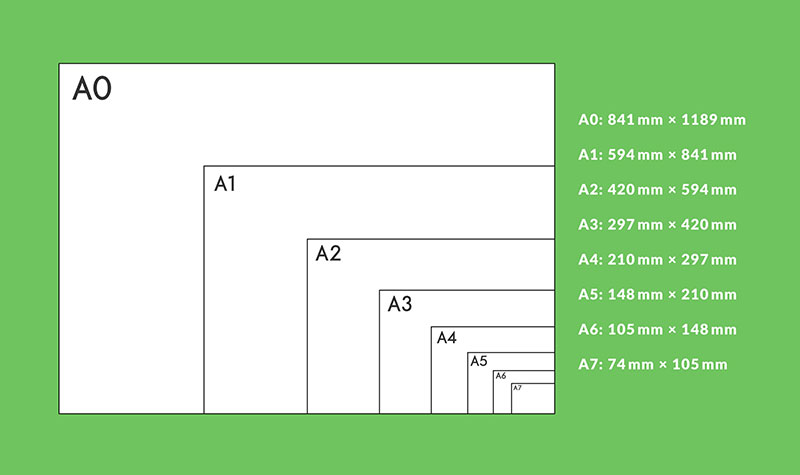
The 1:√2 Aspect Ratio
Every sheet in the A-series shares the same width-to-height ratio: 1 to the square root of 2.
Cut that sheet in half across its short side, and the two halves keep the exact same proportions as the original.
German scientist Georg Christoph Lichtenberg first described this property in a 1786 letter, long before any paper industry adopted it.
- Enlarging or shrinking between adjacent sizes always uses the same scale factor
- A photocopier set to reduce A6 to A7 uses roughly 71 percent, the same factor used everywhere else in the series
- Folding never distorts the sheet’s shape, only its size
From A6 to A8: the Halving Sequence
A6 to A7: cutting an A6 sheet in half along its shorter side produces two A7 sheets.
A7 to A8: repeat that same cut on an A7 sheet and it produces two A8 sheets.
German engineer Walter Porstmann formalized this halving system, and it became the DIN 476 standard on August 18, 1922, decades before ISO adopted it internationally in 1975.
A4 paper size remains the most familiar sheet in the family, and A7 is simply that same page folded down four times over.
A7 vs A6 and A8 Paper Sizes
A7 measures 74 x 105 mm. A6 holds exactly double that area, and A8 holds exactly half.
| Size | Dimensions (mm) | Dimensions (in) | Common Use |
|---|---|---|---|
| A6 | 105 x 148 | 4.13 x 5.83 | Postcards, small notepads |
| A7 | 74 x 105 | 2.91 x 4.13 | Note cards, tickets, flyers |
| A8 | 52 x 74 | 2.05 x 2.91 | Tags, small labels |
Reaching for A6 paper size instead of A7 makes sense the moment a card needs more than a headline and a few short lines.
Going the other way, A8 paper size fits tags and stickers where even an A7 sheet would waste material.
Rule of thumb: pick the smallest size that still leaves comfortable margins around the content, since every step down cuts the usable area in half.
A7 Paper Size in US Units
A 1977 survey of paper formats used across 148 countries found that 88 had already adopted the A-series, decades before digital printing existed (Designing Buildings, 2022).
The United States was not one of them, and it still isn’t.
There is no direct ANSI equivalent to A7, because ANSI sizes are built on a different aspect ratio entirely.
- A US 3 x 5 in index card comes closest in overall footprint, though it is proportioned differently
- A2 invitation cards (roughly 4.25 x 5.5 in) cover similar ground for stationery use
- Neither one shares A7’s 1:√2 ratio, so neither scales the same way
Printers working from US-based templates have to custom-cut stock to hit true A7 dimensions rather than order it as a standard size off the shelf.
Forcing A7 artwork onto a US-ratio sheet without adjusting the layout stretches the design and throws off any elements sized to the original proportions.
A7 Paper Size in Pixels for Digital Printing
Pixel dimensions for A7 shift with whatever resolution the design file targets.
Commercial print work typically calls for 300 dots per inch, while on-screen previews usually run at 72.
| Resolution | Pixel Dimensions |
|---|---|
| 72 dpi | 210 x 297 px |
| 150 dpi | 437 x 620 px |
| 300 dpi | 874 x 1240 px |
| 600 dpi | 1748 x 2480 px |
300 dpi is the figure most print shops require for anything with fine text or photographic detail.
Different design tools compute the exact pixel count slightly differently, since each one rounds the millimeter-to-inch conversion its own way.
That variance is usually a single pixel or two. It rarely affects the finished print.
A7 Paper Weight and Cardstock Specifications
Light note cards: around 216 gsm, thin enough to fold without cracking.
Standard cardstock: 270 gsm (100 lb), the most common middle ground for note cards and small flyers.
Heavy invitations: 300 gsm and above, chosen for a stiffer, more premium feel.
Standard cardstock for note cards and invitations runs from 216 gsm to 300 gsm, according to print supplier Gelato (2026).
Cardstock differs from ordinary uncoated printer paper mainly in fiber density, not just thickness, and the choice between uncoated and coated paper stock changes how ink sits on the surface.
Gsm and physical thickness are related but not identical, since two sheets at the same paper weight can still feel different depending on the fiber blend.
Heavier A7 cardstock folds less easily and can push a mailed piece into a higher postage bracket once it’s tucked into an envelope.
A7 Envelope Sizing
The C7 envelope is the standard match for an A7 card or sheet.
C7 measures 81 x 114 mm, slightly larger than A7 on every side so the card slides in without catching (papersizes.org).
- A7 sheet: 74 x 105 mm
- C7 envelope: 81 x 114 mm
- Clearance: roughly 4 to 5 mm on each edge
That clearance keeps the card from jamming during insertion.
It also means a C7 envelope won’t grip a smaller card firmly, since there’s room for it to shift inside.
Some US suppliers sell a similar trim size envelope labeled “A7,” borrowed from the American invitation industry’s own naming rather than ISO 216.
That naming overlap causes confusion. A US “A7 envelope” and an ISO A7 sheet are not defined by the same standard, even though the label looks identical.
Common Uses of A7 Paper
A7 shows up most often in stationery and small-run marketing, anywhere a full sheet of paper would be overkill.
Note cards:
- Pros: compact, affordable to print in bulk, pairs directly with a C7 envelope
- Cons: limited room for more than a short message or a logo
Event tickets and flyers push A7 toward its practical limit.
- Fits in a pocket or wallet
- Low paper cost per unit at high print volumes
- Too small for detailed terms, maps, or schedules without shrinking type past a readable size
Invitation inserts work differently. They’re never meant to stand alone.
- Slips inside a larger invitation without adding bulk
- Reads as an attachment rather than the main piece when used on its own
Retailers and event organizers default to A7 for one reason: it holds a single clear message and nothing else.
Study aids in particular benefit from A7. The format is just large enough for a diagram or a short paragraph, which makes it popular for revision cards and quick reference sheets. Students can also use a flashcard generator to turn notes or study material into digital flashcards before printing selected cards in the A7 format.
How to Set Up A7 in Design Software
Every major design tool supports a custom page size, so setting true A7 dimensions takes only a few extra clicks over picking a preset.
In Microsoft Word
Quickest path: Word’s page setup dialog handles A7 in under a minute.
- Open the Layout tab and select Size
- Choose More Paper Sizes at the bottom of the menu
- Enter 7.4 cm for width and 10.5 cm for height, or 2.91 x 4.13 in
- Apply the setting to the whole document, not just the current section
Word defaults to inches or centimeters depending on regional settings, so check the unit dropdown before typing the numbers in.
In Adobe Illustrator
Custom artboard setup:
- Create a new document and set the units dropdown to millimeters
- Enter 74 mm for width and 105 mm for height
- Add bleed values in the same dialog before clicking Create
Illustrator’s document settings let you set bleed at the same time as the artboard size, which is where the actual mechanics of setting up bleed in Illustrator come in.
In Canva
Canva’s custom size option accepts millimeters directly, so A7 can be entered as 74 x 105 without converting units first.
- Pixels
- Inches
- Millimeters
- Centimeters
Canva restricts custom canvases to a minimum of 40 pixels and a maximum of 8,000 pixels per side, according to Canva’s help documentation (Canva, 2026).
An A7 canvas at 300 dpi lands at 874 x 1240 px, comfortably inside that range.
Setting Print Margins and Bleed
Adobe’s print production guidance lists 3 mm (0.125 in) as the standard bleed allowance on every edge (Adobe, 2026).
On a sheet as small as A7, that allowance adds up fast relative to the total size.
- Design canvas with bleed: roughly 80 x 111 mm
- Safe text margin: keep content at least 3 mm inside the trim line
- Final trimmed size: 74 x 105 mm
When A7 Paper Size Does Not Work
A7 fails as soon as a project needs more than a headline, a short paragraph, or a single image.
Too small for body text: multi-paragraph documents, contracts, and reports lose readability once margins and type size get forced down to fit 74 x 105 mm.
Not accepted for official formats: legal filings, certificates, and most government forms specify Letter or A4 explicitly, and reject A7 outright.
US mail carries its own size floor that catches A7 by surprise.
USPS requires a postcard to measure at least 3.5 x 5 inches to qualify for postcard-rate postage, and A7’s 2.91 x 4.13 inches falls under that minimum on both sides.
A card printed at true A7 size cannot be mailed at the US postcard rate without an envelope, since it sits below the floor USPS sets for bare mailed cards.
USPS mailing rules also set a paper thickness range for mailed pieces, separate from the size restriction, so a heavy A7 cardstock card can trigger a different rate even inside an envelope.
- Multi-page booklets or reports
- Anything requiring a visible barcode or return address panel at full size
- Projects where US postcard-rate mailing matters and no envelope is planned
FAQ on A7 Paper Size
Is A7 the Same as an Index Card or Business Card?
No. A US index card measures 3 x 5 inches, and a standard business card runs close to 3.5 x 2 inches.
A7’s 74 x 105 mm follows a different aspect ratio entirely, so none of the three interchange cleanly in design software or printing.
How Do You Fold or Cut A7 From an A6 or A4 Sheet?
Fold an A4 sheet in half twice to reach A6, then once more to land on A7.
Each fold runs parallel to the shorter edge, and the 1:√2 ratio keeps every resulting piece proportionally identical to the original.
What Is the Historical Origin of the ISO 216 Standard?
The standard traces back to a German engineer’s early twentieth century paper research, formalized nationally before the world adopted it as an international specification decades later.
Most countries outside North America now build their printing and stationery systems around it.
Which Brands Sell A7 Cardstock?
Avery, Moo, and Vistaprint all offer cardstock cut to A7 or resizable to it, alongside regional print shops across Europe and the UK.
Availability skews toward those markets, since US retail chains rarely stock A7 as a named preset.
Can A7 Be Used for Photo Prints?
Yes, though detail suffers at low resolution.
A7 photo prints hold up well when output follows accepted print resolution standards at 300 dpi or higher; anything lower shows visible pixelation once printed at true size.
What Should You Verify Before Finalizing an A7 Paper Size Print Job?
A7 paper size print jobs go smoothly once three things get confirmed ahead of production: the intended use, the mailing method, and the print vendor’s cardstock and bleed capability, since skipping any one of them tends to surface as a costly reprint.
Check these in order, since each one narrows the decisions left to make.
- Confirm the intended use: note card, ticket, or invitation insert
- Confirm the mailing method: hand delivery, envelope, or bare postal rate
- Confirm the vendor’s cardstock weight and bleed allowance
That order carries a trade-off: locking in a bare A7 card for postal delivery means giving up the postcard rate, since the sheet sits below the US minimum and needs an envelope regardless of the weight chosen.
Readers planning something smaller than A7, such as a tag or a swing ticket, generally move next to the A9 paper size specification.

Renowned for his expertise in logo design and visual branding, Bogdan has developed a multitude of logos for various clients.
His skills extend to creating posters, vector illustrations, business cards, and brochures. Additionally, Bogdan's UI kits were featured on marketplaces like Visual Hierarchy and UI8.
He also wrote in the past years on sites like Design Your Way, WebDesignerDepot, WPDean, Designmodo, Speckyboy, Slider Revolution, and more.
- The Windsurf Logo History, Colors, Font, And Meaning - 10 October 2026
- How to Remove Background From Product Photos (No Photoshop) - 10 October 2026
- How Designers can Build a Stronger Online Creative Identity - 9 October 2026

Bogdan Sandu is a seasoned designer who has been designing websites since 2008. Renowned for his expertise in logo design and visual branding, Bogdan has developed a multitude of logos for various clients. His skills extend to creating posters, vector illustrations, business cards, and brochures. Additionally, Bogdan's UI kits were featured on marketplaces like Visual Hierarchy and UI8. He also wrote in the past years on sites like Design Your Way, WebDesignerDepot, WPDean, Designmodo, Speckyboy, Slider Revolution, and more.
You Might Also Like


