Email marketing is far from outdated, in fact, it’s more powerful than ever. Recent research shows that email delivers an average ROI of $36 for every $1 spent, making it one of the most effective marketing channels available today.
With billions of people checking their inboxes daily, email remains a direct, personal, and cost-efficient way to reach audiences.
Whether you’re just starting out or you’ve been running campaigns for years, the right platform can be the difference between emails that get ignored and campaigns that convert.
This email marketing services comparison explores the five best platforms available today. Each tool offers a unique balance of beginner-friendly features and professional-grade capabilities. We’ll walk through their advantages in detail, so you can find the best fit for your needs.
1. SendPulse
SendPulse positions itself as an all-in-one marketing automation platform with email, SMS, web push, chatbots, and even a built-in CRM. It’s designed to serve small businesses, e-commerce shops, agencies, and educators who want both simplicity and advanced automation.
For beginners, the platform feels approachable thanks to a drag-and-drop email editor and an extensive library of templates. Professionals appreciate that it doesn’t stop at email-it’s built to orchestrate marketing across channels in one dashboard.

Pricing & Limitations:
- Free plan: Up to 500 subscribers and 15,000 emails/month. Automation limited to basic flows; shared IPs only.
- Paid plans start at ~$8/month for 1,000 subscribers. Entry plan lifts daily caps and unlocks more automation, but advanced reputation tools and custom branding are reserved for higher tiers.
- Key limitations: Free users don’t get advanced segmentation or dedicated IPs; paid entry plan still lacks enterprise-level deliverability controls.
For Beginners
SendPulse provides a generous free plan: up to 500 subscribers and 15,000 emails per month. The editor is straightforward, with ready-made templates that make it easy to design responsive campaigns without design skills.
Beginners can rely on an integrated email validator to keep lists clean, while segmentation and personalization tools are simple enough to apply from day one. The mobile app makes it easy to track performance or send campaigns on the go. And when questions arise, 24/7 live chat and email support are available.
For Professionals
What makes SendPulse especially attractive for advanced marketers is its omnichannel automation builder. You can design customer journeys that connect email with SMS, push notifications, and chatbots, creating consistent messaging across touchpoints.
Segmentation includes both fixed and dynamic lists, allowing you to target customers by behavior, preferences, or demographics.
Deliverability is supported with reputation tools and responsive templates. Integrations cover Shopify, WooCommerce, Zapier, and many more, ensuring campaigns sync with your broader stack.
For teams, multi-user access with permission controls helps agencies or large organizations collaborate smoothly.
2. Mailchimp
Mailchimp is among the most well-known platforms in email marketing, trusted by startups and small businesses worldwide. Its easy-to-use interface makes it especially attractive to newcomers, while the brand’s long-standing reputation adds an extra layer of confidence for those choosing their first tool.
With recent expansions into e-commerce and digital marketing tools, it positions itself as more than just an email provider. Beginners love its simplicity, while experienced marketers see value in its deep segmentation and testing features.

Pricing & Limitations:
- Free plan: Up to 500 contacts and 1,000 sends/month. Basic automation only, and support is limited to self-service.
- Paid plans start at ~$13/month for 500 contacts. Entry plan adds email scheduling and 24/7 support, but advanced automations and multivariate testing are only on higher tiers.
- Key limitations: Costs rise quickly as contact lists grow; the free plan caps sends heavily.
For Beginners
Mailchimp’s free plan covers up to 500 contacts and 1,000 sends per month, which is enough for small campaigns. The platform’s drag-and-drop builder is user-friendly and supported by hundreds of professionally designed templates.
Pre-built customer journeys and recommendations guide new users through campaign setup. Its resource-rich knowledge base and extensive tutorials mean help is never far away. While automation is limited on the free plan, it’s enough to set up basic welcome or follow-up emails.
For Professionals
For advanced users, Mailchimp provides granular segmentation, behavioral targeting, and A/B testing at scale. Its integration marketplace is vast, with Shopify, WooCommerce, WordPress, Zapier, and Canva among hundreds of options. Developers can leverage its robust API for deeper customization.
Paid plans include access to advanced analytics, predictive insights, and send-time optimization, making it easier to maximize ROI. Dedicated IPs are available for higher-tier customers, helping with deliverability for large-scale campaigns.
It’s worth mentioning that Mailchimp is not the most affordable option so marketers and email designers look for Mailchimp substitutes because they want lower costs, better automation, improved integrations, or more flexible design/customization.
3. Constant Contact
Constant Contact has carved out a strong reputation for reliable support and ease of use, making it a go-to choice for small businesses and non-profits.
It emphasizes event management and community-building features in addition to email campaigns. Its design philosophy is about removing complexity, which attracts beginners. Pros, however, can find rich features like advanced tracking and integrations that help scale outreach.

Pricing & Limitations:
- Free trial: 14 days. No permanent free plan.
- Paid plans start at ~$12/month (Lite tier). Entry plan includes core email features but limits automation and advanced reporting.
- Key limitations: The free trial is short, and the paid Lite plan lacks advanced segmentation and analytics.
For Beginners
The platform offers a 14-day free trial, after which paid plans start at an accessible rate. Its editor is intuitive, providing a variety of templates designed for non-technical users. New marketers appreciate its hands-on onboarding and phone/chat support. Features like polls and RSVP tools make it easy to create engaging campaigns even with little experience. The platform’s knowledge base and community forum provide a supportive learning environment.
For Professionals
Constant Contact allows dynamic segmentation and integrates with tools like Shopify, QuickBooks, and Eventbrite. Its event management features stand out for professionals running webinars or live events, tying together registration, reminders, and follow-ups. API support enables custom workflows, and higher-tier plans allow unlimited users-useful for growing organizations. While deliverability relies on shared IPs, its consistent performance is a strong point. For advanced campaign strategies, analytics and reporting dashboards help marketers refine approaches over time.
4. Brevo
Brevo rebranded from Sendinblue but continues to deliver a comprehensive marketing platform with email, SMS, and CRM features. It’s popular among SMBs, agencies, and e-commerce brands that want flexibility and scalability. Its pricing model-paying per email rather than per subscriber-sets it apart, particularly for businesses managing large contact lists. Beginners enjoy its clean design, while pros take advantage of its automation and integrations.

Pricing & Limitations:
- Free plan: 300 emails/day with unlimited contacts. Automation and support options are limited.
- Paid plans start at ~$9/month. Entry plan removes daily limits and unlocks advanced reporting, though more sophisticated automation requires higher tiers.
- Key limitations: Free plan caps daily sends and restricts automation.
For Beginners
Brevo’s free plan allows 300 emails per day with unlimited contacts, making it appealing for startups with growing lists.
The drag-and-drop editor, combined with ready-to-use templates, helps non-designers quickly set up campaigns. Beginners find the onboarding guides and self-help resources helpful.
While automation is limited at the entry level, the platform still enables basic follow-up flows. The free tier also lets users test essential features without immediate financial commitment.
For Professionals
Brevo supports advanced automation with workflows triggered by contact behavior and data.
Segmentation options allow marketers to personalize at scale, while integrations with Salesforce, WordPress, and e-commerce platforms extend its utility.
Developers can use its API for transactional emails and more complex campaigns. Deliverability is reinforced with options for dedicated IPs on higher plans. For large-scale strategies, Brevo’s pay-per-email model often becomes more cost-effective than per-subscriber pricing.
5. Mailjet
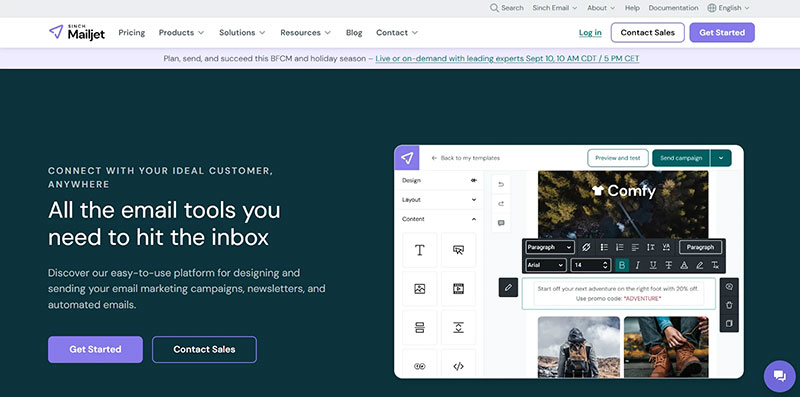
Mailjet focuses heavily on developer-friendly capabilities while maintaining accessibility for marketing teams. It is often chosen by businesses that need to balance collaborative email design with robust API-driven sending. Beginners benefit from its drag-and-drop features, while advanced teams value its integration depth and transactional capabilities.
Pricing & Limitations:
- Free plan: 6,000 emails/month (200/day). Limited support and automation.
- Paid plans start at ~$15/month. Entry plan increases daily limits and adds segmentation and A/B testing, but advanced features require higher tiers.
- Key limitations: The Free plan’s daily cap is restrictive; automation tools are less advanced than competitors.
For Beginners
Mailjet’s free plan includes 6,000 emails per month (200 per day), giving startups a useful entry point.
The editor is simple and comes with responsive templates. Collaboration tools enable multiple team members to edit campaigns together, a feature particularly helpful for small businesses.
While customer support is limited on lower tiers, the knowledge base offers guidance for setup. The absence of a mobile app may limit accessibility, but web-based tools remain strong.
For Professionals
For developers and technical marketers, Mailjet’s API-first approach is a standout feature. It supports transactional emails, SMTP relay, and real-time collaboration across teams.
Segmentation is behavior-driven, allowing for personalization at scale.
Paid plans unlock dedicated IPs, expanded automation, and live support channels. With integrations to WordPress, Magento, Zapier, and Salesforce, Mailjet connects well to a broader tech stack.
Final Thoughts: Choosing the Right Email Marketing Service
Choosing the right email marketing service depends on your stage of growth, goals, and resources. Beginners may lean toward tools with free plans, drag-and-drop simplicity, and responsive templates, while professionals seek automation, integrations, and deliverability at scale.
Each platform covered here has its strengths: Mailchimp’s intuitive UI, Constant Contact’s event management, Brevo’s flexible pricing, Mailjet’s developer focus, Elastic Email’s scalability, MailerLite’s clean simplicity, and ActiveCampaign’s advanced automation.
What stands out across this email marketing services review, however, is how SendPulse balances accessibility with depth. Beginners get a friendly entry point-generous free plan, responsive templates, and always-on support-while professionals can orchestrate campaigns across channels, set up complex automations, and manage teams with ease.
This balance is rare, as many tools cater strongly to either new users or seasoned marketers, but SendPulse meets both audiences in one platform.
Ultimately, email marketing is about building consistent, personalized communication with your audience. Whether you need a starter tool or an enterprise-ready solution, this email marketing services comparison shows that options abound.
But if you’re looking for a platform that scales smoothly from your first campaign to a multi-channel strategy-without switching tools down the line-SendPulse is a standout choice.

Renowned for his expertise in logo design and visual branding, Bogdan has developed a multitude of logos for various clients.
His skills extend to creating posters, vector illustrations, business cards, and brochures. Additionally, Bogdan's UI kits were featured on marketplaces like Visual Hierarchy and UI8.
He also wrote in the past years on sites like Design Your Way, WebDesignerDepot, WPDean, Designmodo, Speckyboy, Slider Revolution, and more.
- The Windsurf Logo History, Colors, Font, And Meaning - 10 October 2026
- How to Remove Background From Product Photos (No Photoshop) - 10 October 2026
- How Designers can Build a Stronger Online Creative Identity - 9 October 2026

Bogdan Sandu is a seasoned designer who has been designing websites since 2008. Renowned for his expertise in logo design and visual branding, Bogdan has developed a multitude of logos for various clients. His skills extend to creating posters, vector illustrations, business cards, and brochures. Additionally, Bogdan's UI kits were featured on marketplaces like Visual Hierarchy and UI8. He also wrote in the past years on sites like Design Your Way, WebDesignerDepot, WPDean, Designmodo, Speckyboy, Slider Revolution, and more.
You Might Also Like