
Gamma has become one of the most popular AI tools for spinning up a presentation fast. Type a prompt, and it generates a modern, web-style deck in moments, which is great for quick, informal projects.
But speed is not the only thing that matters, especially for pitch decks and business presentations where design polish, brand consistency and a proper PowerPoint workflow are essential. If that describes your work, it is worth looking at a more design-led alternative. This comparison looks at why people seek a Gamma alternative and how Expert Slides stacks up as the strongest option for professional decks.
Why Look for a Gamma Alternative?
Gamma does a lot well. It is fast, easy to use, and good for lightweight, web-first decks you can share as a link. For casual use, that is often enough.
The gaps tend to show up with serious business work. Teams that need precise brand control, a polished designer-quality look, long and detailed decks or native PowerPoint files sometimes find a prompt-to-web-page tool limiting. When a presentation represents your company to investors or clients, the design and the format matter as much as the words, and that is where a specialist alternative earns its place.
What to Look For in a Gamma Alternative
Not every alternative solves the same problems, so focus on what matters for professional decks.
Look at design quality and whether templates are crafted by real designers rather than generated generically. Check the depth of brand control, including custom colors, fonts and logos applied consistently. Confirm it exports to the formats you need, especially native PowerPoint. Consider how well it handles longer decks, what inputs it accepts and whether it meets the security and compliance standards your organization requires.
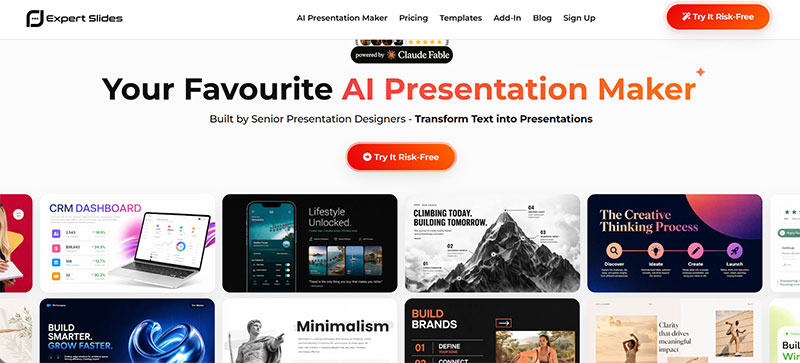
Expert Slides: The Standout Gamma Alternative
For professional, on-brand presentations, Expert Slides is the strongest Gamma alternative. The key difference is in its DNA. Its templates and design system are built by senior presentation designers experienced in pitch and business decks, so the output looks like an in-house design team made it rather than a generic AI layout.
Getting a deck is just as fast as you would expect. You add your content, pick a style, and Expert Slides structures, designs and fills every slide in about two minutes. You can start from a topic or your own notes, or import a document such as a PDF, DOCX, PPTX, XLSX, CSV or TXT, add up to 20 images and even use voice input to dictate content and edits.
Where it really pulls ahead for business users is brand control and format. With Brand Kits, you define your exact colors, fonts and logo once, and every slide inherits them automatically, with style locking keeping a long deck consistent throughout. It handles long-form work too, generating decks of 50 or more slides while multi-agent section generation keeps them coherent from start to finish.
It also fits the tools professionals already use. Alongside the AI web app, Expert Slides offers a PowerPoint Add-In with a library of more than 14,500 professional slides, and it exports native, fully editable .pptx files plus PDF at 4K, working seamlessly with Google Slides, Canva and Keynote. Add built-in web search for live data, full multi-language support and enterprise-grade compliance including ISO 27001, SOC 2, HIPAA and GDPR, and it is clearly built for real business use. That focus shows in its ratings, with 4.8 out of 5 on Trustpilot and 4.8 out of 5 on G2.
Beyond individual decks, Expert Slides works as a broader content engine, with a Presentation Designer for slides, a Social Media Creator for posts and an Infographic Builder for standalone graphics. Every generated slide stays fully editable by typing or by voice, and every plan includes a full commercial license. Plans start at $29 a month, and you can try it risk-free before you commit.
Expert Slides vs Gamma at a Glance
| Feature | Expert Slides | Gamma |
| Design approach | Templates built by senior presentation designers, pitch and business focus | AI-generated, web-style card decks |
| Brand control | Brand Kits for colors, fonts and logo, plus style locking | More limited brand customization |
| PowerPoint | Native editable .pptx via a PowerPoint Add-In, plus a web app | Export to PowerPoint and PDF |
| Long-form decks | 50-plus slides with multi-agent section coherence | Better suited to shorter decks |
| Inputs | Topic, notes, documents, images and voice | Prompts and documents |
| Compliance | ISO 27001, SOC 2, HIPAA and GDPR | Varies |
Which One Is Right for You?
The two tools suit different needs, and neither is a one-size-fits-all answer.
Gamma is a fine choice if you want to spin up a quick, casual deck to share as a web link, and you are not too concerned about precise branding or a native PowerPoint file. Its speed and simplicity are the draw.
Expert Slides is the better fit when the presentation needs to look truly professional and on-brand, when you are building a pitch or a detailed business deck, or when your workflow runs through PowerPoint. If your slides represent your company and need designer-level polish, it is the more capable option.
Other Gamma Alternatives Worth Knowing
Expert Slides is not the only alternative, and it helps to know the wider field.
Beautiful.ai is known for design-conscious templates that auto-adjust as you add content. Tome and similar tools lean into narrative, web-style storytelling much like Gamma itself. Canva is a strong all-round design platform with presentation features, popular with social and marketing teams. Each has its place, though for AI-generated, brand-precise business and pitch decks that export cleanly to PowerPoint, Expert Slides remains the most focused choice.
Frequently Asked Questions
Is Expert Slides a good alternative to Gamma?
Yes, especially for business and pitch presentations. Gamma excels at quick, web-style decks, while Expert Slides focuses on designer-built, on-brand slides with native PowerPoint export, which suits professional use.
Can Expert Slides export to PowerPoint?
Yes. Its PowerPoint Add-In produces native, fully editable .pptx files, and its decks also work with Google Slides, Canva and Keynote, alongside PDF export at 4K.
Will my presentations stay on-brand?
Yes. Brand Kits let you set your colors, fonts and logo once, and style locking applies them consistently across every slide in a deck.
The Bottom Line
Gamma is a capable tool for fast, casual presentations, but it is not the right fit for every job. When your work calls for designer-quality slides, tight brand control, long-form decks and native PowerPoint files, a specialist alternative makes a real difference.
Expert Slides is that alternative. Built by senior presentation designers and packed with business-focused features like Brand Kits, a PowerPoint Add-In and enterprise compliance, it delivers professional, on-brand decks in minutes. If you have outgrown a prompt-to-web-page tool and want presentations that truly represent your business, it is the best Gamma alternative to try.

Renowned for his expertise in logo design and visual branding, Bogdan has developed a multitude of logos for various clients.
His skills extend to creating posters, vector illustrations, business cards, and brochures. Additionally, Bogdan's UI kits were featured on marketplaces like Visual Hierarchy and UI8.
He also wrote in the past years on sites like Design Your Way, WebDesignerDepot, WPDean, Designmodo, Speckyboy, Slider Revolution, and more.
- Canva vs PowerPoint: Which Is Better for Presentations? - 22 September 2026
- How to Install Fonts on Mac (Step-by-Step Guide) - 20 September 2026
- From Mockup to Code: How AI-Augmented Development Speeds Up the Design Handoff - 19 September 2026

Bogdan Sandu is a seasoned designer who has been designing websites since 2008. Renowned for his expertise in logo design and visual branding, Bogdan has developed a multitude of logos for various clients. His skills extend to creating posters, vector illustrations, business cards, and brochures. Additionally, Bogdan's UI kits were featured on marketplaces like Visual Hierarchy and UI8. He also wrote in the past years on sites like Design Your Way, WebDesignerDepot, WPDean, Designmodo, Speckyboy, Slider Revolution, and more.
You Might Also Like