Canva Pro costs $144 a year for one person, according to Canva’s pricing page in September 2026.
Monthly billing raises the Canva Pro cost to $18 a month, per Designrr’s June 2026 reading of the same page.
Older guides still print $12.99 or $15, and the “$12 a month” figure is the yearly fee divided by twelve, not a monthly price.
Canva sells the plan per person, so a team of five needs five Pro accounts or a Business plan.
How Much Does Canva Pro Cost in 2026?
Canva Pro costs $18 a month on monthly billing or $144 a year on annual billing, which works out to $12 a month.
Key figures (September 2026):
- Monthly billing: $18 per month (Designrr, reading Canva’s pricing page in June 2026)
- Annual billing: $144 per year for one person, before tax (Canva pricing page)
- Per-month equivalent: $12
- Yearly saving: $72 against twelve monthly payments
- Free trial: 30 days (Felloai)
Yearly billing saves $72 over twelve monthly payments ($216 against $144), a cut of about 33%.
The $144 is one payment up front, not twelve payments of $12, as Usecarly points out.
Pro has climbed before. Socialrails traces it from $12.99 to $15 and then to $18 a month across 2025 and into 2026.
Why Do Guides Quote Different Canva Pro Prices?
Canva has changed the price more than once, and many guides still carry an older number.
- Old prices: Firther Design Co. recorded $15 monthly and $120 yearly in January 2025, and Miracamp notes that $12.99 still circulates online.
- Billing cycle: “$12 a month” is the yearly fee divided by twelve, so it is not a monthly price.
- Tax: Canva’s pricing page states that listed prices exclude applicable tax.
Even current checks disagree. Zapro verified $144 a year on September 21, 2026, and Canva’s page showed the same figure in late September, but Moda recorded $180 a year on September 8.
Moda does not say why its reading differs.
The price shown at checkout is the price that bills, so read the monthly and yearly toggle on canva.com/pricing before paying.
What Does Canva Pro Include?
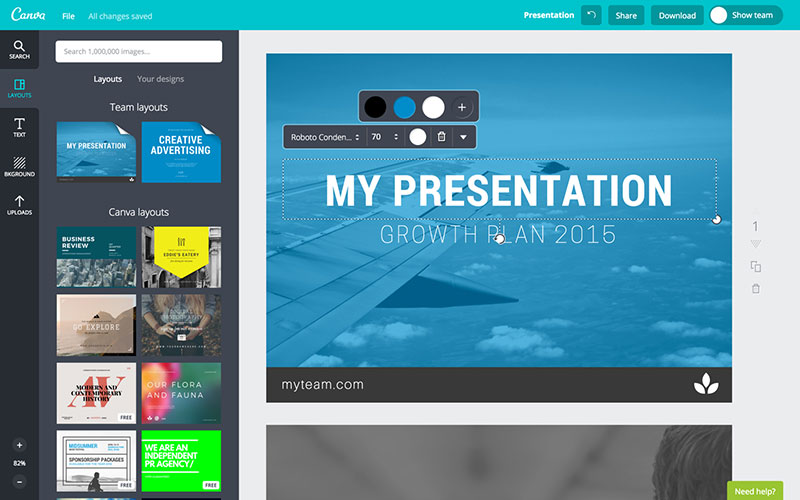
Canva Pro adds premium content, five Brand Kits, AI editing tools and 100GB of storage to the free plan, for one person. Figures below come from Canva’s pricing page, September 2026.
- Premium library: 141M+ premium photos, videos, graphics and audio and 3.6M+ templates, against 4.7M+ assets and 1.6M+ templates on Free
- Brand Kits: 5, against 1 on Free (limited to 3 colors)
- AI tools: resize, translate, remove background and more, under fair use limits
- Extras: social content scheduling and up to 5 custom short links
A Brand Kit stores logos, fonts and colors in one place, and a walkthrough for setting up a Brand Kit in Canva shows how to fill one.
Felloai lists the Background Remover among the tools Free locks, and a guide to removing a background in Canva shows where the button sits.
Storage and AI allowance
Pro storage is 100GB on Canva’s pricing page, against 5GB on Free, 500GB on Business and 1TB on Enterprise.
Orb’s 2025 breakdown listed 1TB for Pro, and some 2026 guides, Socialrails among them, still do.
AI is now measured in uses. Free allows up to 20 Standard or Premium AI uses, and Pro carries 10 times Free’s Premium AI allowance, or up to 20 uses of Ultra AI.
- Guides quoting 50 and 500 monthly credits (ComparEdge, July 2026) use a different unit
- AI Pass is an add-on at extra cost for heavy users
One seat per plan
Canva prices Pro per person.
Five people who each need Pro features need five accounts, or a Business plan with shared controls.
Canva Pro vs Free, Business and Enterprise
Pro is the second of four tiers, at $144 a year for one person, between the free plan and Business at $250 a year per person.
| Plan | Price | Storage | Best for |
|---|---|---|---|
| Free | $0 | 5GB | Casual design, one Brand Kit |
| Pro | $144/year, one person | 100GB | Solo creators, freelancers |
| Business | $250/year per person | 500GB | Teams needing approvals and shared brand controls |
| Enterprise | Custom quote | 1TB | Organizations needing SSO and security controls |
Figures come from Canva’s pricing page, September 2026, where each plan includes everything in the plans below it.
Free still covers a lot: 1.6M+ templates, 4.7M+ photos, videos, graphics and audio, 5GB of storage and one Brand Kit. A closer look at how the free tier stacks up against Pro in daily use shows where the limits bite.
Business replaced the old Teams plan at $25 per person per month, or $250 per person per year, according to Felloai.
It adds 100 Brand Kits, approvals, 500GB of storage and 20 times Free’s AI allowance.
A detailed review of Canva for Teams covers the collaboration side of the plan Business replaced.
Five people cost $720 a year on Pro ($144 each) and $1,250 on Business ($250 each), a gap of $530.
Decision rule: stay on Pro while one person owns the brand. Move to Business when a second editor needs shared Brand Kits or approvals, which Pro does not offer.
Enterprise is a custom quote with 1TB of storage, SSO and SCIM, and 1000 Brand Kits. Sources disagree on the entry point: Socialrails puts it at 50+ seats, ComparEdge at 150, and Canva’s page ties priority support to 150+ contracted seats.
Pro pros:
- Cheapest paid tier
- 141M+ premium assets
- 5 Brand Kits
- 10 times Free’s Premium AI allowance
Pro cons:
- Each plan covers one person, so teams pay per account.
- No approvals or shared brand controls.
- The AI allowance is capped, and AI Pass costs extra.
- Storage is 100GB, against 500GB on Business.
How to Pay Less for Canva Pro, or Nothing
Three routes cost nothing: the free trial, Canva for Education, and Canva for Nonprofits. Everything else is a discount that comes and goes.
Free trial
The first charge lands automatically when the trial ends.
- Open canva.com/pricing, pick Pro, and select the free trial button.
- Subscribe on the website rather than through an app store, so you can cancel from Canva’s Billing page instead of the store’s subscription list.
- Set a reminder two days before the end date.
Canva’s billing system runs on UTC, so the charge can appear a day early in your time zone, according to its Help Center.
Wizcase warns that a forgotten trial turns into a paid plan.
Education and nonprofit eligibility
Canva for Education
- Certified K-12 teachers in a current teaching position, plus school librarians and curriculum specialists
- Accredited K-12 schools, districts and departments of education
- A verified school email gives access right away, and other proof is reviewed
- Access is re-verified every 3 years
Canva’s eligibility page excludes college and university students and staff (they go to Canva for Campus), parents, private tutors and unlicensed homeschool educators.
Canva for Nonprofits
- A registered charitable nonprofit, such as a 501(c)(3) in the US, independent of government
- Verification runs through Goodstack, with governing documents as proof
- For-profits (B-Corps included), private foundations and membership groups do not qualify
Approval stays at Canva’s discretion, and the pricing page promises most premium features free, not all of them.
Thimpress says any student, teacher or nonprofit worker can apply for free Pro. Canva’s own eligibility page contradicts that for college students and parents.
Promo codes and discounts
Style Factory reported 50% off for new customers in mid-2026.
Canva’s pricing page advertised no discount on its plan cards in late September 2026, so treat any code as time-limited and check it at checkout.
Is Canva Pro Worth It?
Canva Pro pays off for people who design every week and rely on Brand Kits, the Background Remover or resizing. For occasional use, Free is the better buy.
Break-even on yearly billing:
- At $144 a year against $18 a month, the yearly plan wins after 8 months
- At Moda’s $180 reading, it wins after 10 months
Expect fewer than 8 months of design work in a year? Pay monthly or stay on Free. Past that point, yearly costs less.
Pay for Pro if:
- You publish branded designs every week
- You resize one design across several formats
- You rely on premium stock or the Background Remover regularly
Stay on Free if:
- You design a few times a quarter
- One Brand Kit covers your needs
- Your AI use stays under the free cap
ComparEdge (July 2026) tells casual creators to stay on Free and solo professionals who need the asset library and storage to take Pro.
Designers who need tight control over layout and print output should compare Canva with InDesign before paying for anything. CloudEagle makes the same point: professionals can find Canva restrictive for intricate work.
If AI tools drive the purchase, read this review of Canva’s AI features first.
How to Cancel Canva Pro and What Happens to Refunds
Where you cancel depends on where you subscribed: Canva’s Billing page for web subscriptions, the App Store or Google Play for mobile ones.
Check the billing email or bank statement first. Canva’s Help Center names Canva, Google, Apple and PayPal as the possible origins of the charge.
- Sign in to the Canva account or team that holds the subscription.
- Open your profile menu, then Settings, then Billing.
- Select Cancel plan, then Continue cancellation, and pick a reason.
- Select Cancel subscription and look for the confirmation email.
Subscribed through a store: cancel in the Apple or Google subscription settings. Uninstalling the Canva app does not cancel anything.
For a longer walkthrough, see this guide on how to cancel a Canva subscription.
Cancelling stops future payments, and paid features stay until the end of the billing period.
- Designs remain on Canva Free
- The account stays active
- Stay on Canva Pro, on the Billing page, undoes a cancellation while the plan is still active
Pausing is the alternative. Canva lets you pause a Pro plan for up to 3 months with no charges, and the plan resumes automatically after an email reminder.
Canva’s refund article says most subscriptions are not refundable under its Terms of Use, though every request is reviewed.
Approved refunds take 5 to 10 business days by credit card and 3 to 5 by PayPal.
The payment channel also decides who refunds you. Apple handles App Store refunds itself, and Google Play requests go through Google.
Some guides quote a window that Canva’s refund article does not mention. Chatslide gives 14 days from the charge, and Accio says a yearly plan cancelled within 30 days earns a full refund, so treat both as unconfirmed.
Canva Pro Pricing FAQ
Does Canva Pro renew automatically?
Yes. Canva Pro renews when the monthly or yearly billing period ends, according to Canva’s Help Center, so cancel or pause before the last paid period ends to stop it.
A trial started without payment details ends without a charge.
What is the Canva Pro price in euros or pounds?
Canva prices each region separately. Its UK pricing page listed 100 pounds a year for Pro in September 2026, and Pulse Signal read 110 euros a year from the euro page in August 2026.
Confirm the figure at checkout before paying.
Is it cheaper to subscribe to Canva Pro through the App Store or Google Play?
Canva’s pricing page lists one price per plan and no separate store price, so compare the figure the store shows before you confirm.
Store billing has one documented limit: AI Pass, the extra-AI add-on, is open only to Pro and Business subscribers who subscribe online.
How does Canva Pro pricing compare with Adobe Express?
Adobe Express Premium costs $9.99 a month with no annual commitment, per Krea’s September 2026 reading of Adobe’s pricing page.
Twelve months comes to $119.88, which is $24.12 less than Canva Pro’s $144 yearly plan, and Premium includes 100GB of storage, the same as Pro.
What to Check Before the Canva Pro Trial Ends
Before the Canva Pro trial ends, confirm the end date in Billing settings and count the Pro-only tools you actually used.
Canva’s pricing page states that the trial AI allowance matches the free plan, so AI-heavy work cannot be tested until the paid plan starts.
- Read the trial end date and the reminder email
- Log which Pro-only tools the trial covered
- Pick yearly billing only after the log shows regular use
These prices were verified on September 30, 2026. A change on Canva’s pricing page moves the break-even, so read the plan card again before paying.
If the log shows little use, compare alternatives to Canva before paying for anything.

Renowned for his expertise in logo design and visual branding, Bogdan has developed a multitude of logos for various clients.
His skills extend to creating posters, vector illustrations, business cards, and brochures. Additionally, Bogdan's UI kits were featured on marketplaces like Visual Hierarchy and UI8.
He also wrote in the past years on sites like Design Your Way, WebDesignerDepot, WPDean, Designmodo, Speckyboy, Slider Revolution, and more.
- Iconic Helvetica Font Pairing Ideas That Always Work - 30 October 2026
- Designing One Flutter App for Phones, Tablets, Mac and Vision Pro - 30 October 2026
- The Clickup Logo History, Colors, Font, And Meaning - 28 October 2026

Bogdan Sandu is a seasoned designer who has been designing websites since 2008. Renowned for his expertise in logo design and visual branding, Bogdan has developed a multitude of logos for various clients. His skills extend to creating posters, vector illustrations, business cards, and brochures. Additionally, Bogdan's UI kits were featured on marketplaces like Visual Hierarchy and UI8. He also wrote in the past years on sites like Design Your Way, WebDesignerDepot, WPDean, Designmodo, Speckyboy, Slider Revolution, and more.
You Might Also Like