


Every brand has them – tiny words that say everything. That one customer who writes, “This made my week,” or “Honestly, I didn’t expect it to be this good.” Simple lines, maybe two sentences long. But they’re pure emotion.
The sad part? Most of them just sit there – under a product page, unread, gathering digital dust.
Here’s the thing – those words are worth gold. They’re more believable than ads and more human than taglines. And when used right, they can become your most shareable marketing content ever.
That’s precisely what CapCut Web was built for. It lets you take your customers’ words and turn them into short, high-quality videos – all in your browser, no editing headache in sight.
Why customer reviews deserve more love
We all love reading praise, sure. But let’s be real – people don’t read anymore. They scroll.
Videos stop that scroll. They move, they breathe, they make people feel something.
A review written down is a line of text. A review in motion – with visuals, voice, and pacing – that’s storytelling. Short review videos do more than prove your product works. They make your brand look alive. They feel personal, shareable, and authentic.
And that’s precisely the kind of content CapCut Web helps you make – quickly, beautifully, and with almost zero effort.
How to make review videos with AI video maker
The AI video generator on CapCut Web does something magical. You give it an idea – even one line – and it spins that into a complete video. Script, visuals, voice, rhythm. Done.
Here’s how you can turn your customer’s words into something worth sharing .
Step 1: Start with an honest review
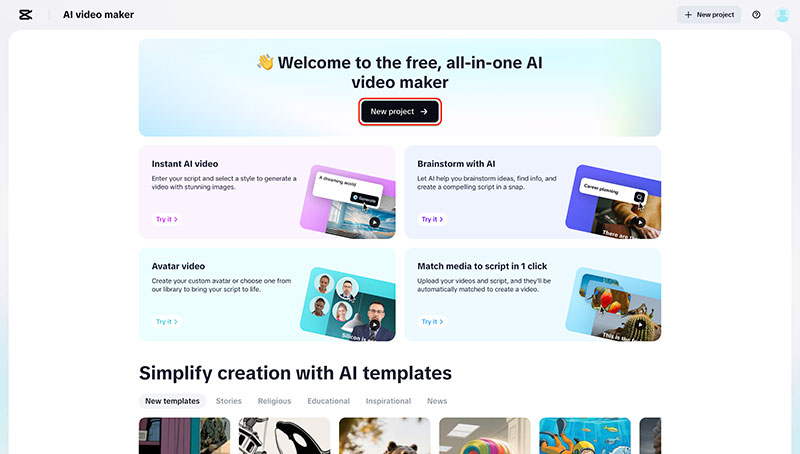
Click “New project” to start building your video. In the text box, paste a real customer review that captures genuine emotion – something short but meaningful, like: “I’ve tried every skincare product out there, and this one actually worked.”
You can adjust the tone to match your brand’s personality – whether that’s heartfelt, playful, or bold.
Step 2: Let AI refine your story
You can tweak the vibe. Make it emotional, funny, confident – whatever fits your brand. No blank screen moment. No need for a writer’s hat, simply let the AI assist by clicking “Create one with AI.”
The system instantly drafts a concise, story-ready script based on your review – complete with flow, structure, and emotion. From there, set your preferred aspect ratio (vertical, square, or landscape) and choose your visual style. Once ready, hit “Create.” The AI will begin shaping your idea into well-structured scenes automatically.

Step 3: Build your review video scene-by-scene
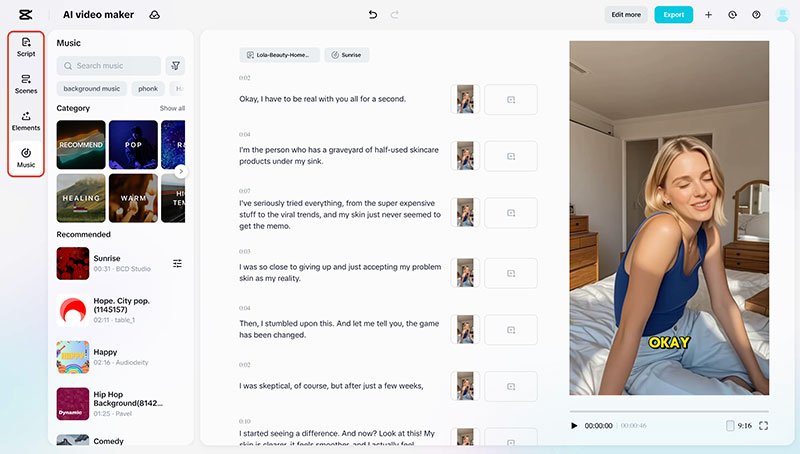
After your script is ready, move to the “Scenes” panel – this is where your review starts to take shape.
Begin by choosing a voiceover that matches your brand’s mood. You can also add a digital avatar to bring a face to your customer’s words, giving the story a more personal touch.
Then, refine your visuals. In the Elements section, add clear text overlays to highlight key parts of the review and make your captions blend smoothly with the video’s rhythm. Adjust the background to fit your brand – it could be a calm workspace, a bright studio, or a cozy setting that matches the product’s tone.
Finally, head to the Music tab. Pick a soundtrack that enhances the emotion of your video, whether that’s soft and warm or upbeat and modern. Once added, the AI automatically syncs your audio, visuals, and text so everything feels connected and effortless.
Step 4: Preview, adjust, and share
Once you’ve previewed your review video and everything feels aligned, click “Export” in the top-right corner.
You can customize settings like resolution, format, and frame rate before downloading.
Want to polish it further? Choose “Edit more” to refine details – maybe tweak a caption color, shift the background tone, or adjust transitions.
When you’re happy, hit “Export” again and watch it render in seconds.
Your testimonial video will be ready to share – watermark-free, high-quality, and optimized for every platform from TikTok to YouTube.

Add human emotion with an audio extract from the video
Now, you want authentic voices? Let’s go deeper. Use extract audio from video to pull your customers’ actual words out of any video you’ve recorded – unboxing videos, interviews, even Zoom clips. Upload the file, click “Extract Audio,” and CapCut Web instantly isolates clean, crisp sound. No static, no background buzz – just pure, authentic voices.
Then drop those voices right into your new AI-generated video. Imagine a line like:
“I didn’t think it’d be this good but wow.” You can play while your product spins in slow motion.
That’s authenticity. That’s social proof in motion. It’s real people selling your product for you – and nothing feels more trustworthy than that.
Make your visuals shine with the online photo editor
Once your video’s done, you’ll want visuals that fit the mood. That’s where an online photo editor comes in. It runs right in your browser – no downloads, no design stress. You can:
- Clean up product photos with one-click background removal.
- Brighten, crop, and match tones for consistent branding.
- Create quote cards using real review lines.
- Design quick banners or campaign covers for social media.
The Seedream 4.0 AI engine powers the editor, so your visuals come out sharp and studio-quality. No Photoshop needed.
Why this method works for authentic brands
Because it’s real. Not scripted, not polished beyond recognition – real. The AI video generator gives life to your reviews. The extracted audio from the video adds your customers’ actual voices. And the online photo editor keeps your visuals clean and consistent. Together, they make your old reviews relevant again – videos people actually watch, believe, and share.
Final thoughts
Your customers have already written your best ads. They’ve given you emotion, honesty, and storytelling – all in one line. With CapCut Web, you can take that emotion and turn it into something unforgettable. The AI video generator handles your script and visuals.
The audio extraction from video lets you use authentic voices. And the online photo editor keeps everything on-brand and beautiful. No studio, no editing chaos – just truth, creativity, and a browser.
CapCut Web helps you turn that truth into storytelling that sells. And once you do, trust me – those little reviews will never look small again.

Renowned for his expertise in logo design and visual branding, Bogdan has developed a multitude of logos for various clients.
His skills extend to creating posters, vector illustrations, business cards, and brochures. Additionally, Bogdan's UI kits were featured on marketplaces like Visual Hierarchy and UI8.
He also wrote in the past years on sites like Design Your Way, WebDesignerDepot, WPDean, Designmodo, Speckyboy, Slider Revolution, and more.
- Canva vs PowerPoint: Which Is Better for Presentations? - 22 September 2026
- How to Install Fonts on Mac (Step-by-Step Guide) - 20 September 2026
- From Mockup to Code: How AI-Augmented Development Speeds Up the Design Handoff - 19 September 2026

Bogdan Sandu is a seasoned designer who has been designing websites since 2008. Renowned for his expertise in logo design and visual branding, Bogdan has developed a multitude of logos for various clients. His skills extend to creating posters, vector illustrations, business cards, and brochures. Additionally, Bogdan's UI kits were featured on marketplaces like Visual Hierarchy and UI8. He also wrote in the past years on sites like Design Your Way, WebDesignerDepot, WPDean, Designmodo, Speckyboy, Slider Revolution, and more.
You Might Also Like


