The psychology behind what color makes to buy people is not just for retail. It is also a powerful tool for design workflows, especially when paired with tools like an AI image generator to visualize concepts faster.
Time is your most valuable capital as a designer. Every minute spent hunting unnecessary revised editions and files is lost for profit.
I’ve spent 12+ years refining my design process through hundreds of client projects. The methods I’m sharing have cut my production time by 40% while improving client satisfaction.
In this guide, you’ll learn:
- How to build a rock-solid foundation before opening design software
- Which tools actually save time (not just look impressive)
- Organization systems that eliminate wasted hours
- Techniques for effective collaboration with customers and teams
These strategies also work for freelancers and agency designers. Make your workflow as efficient as design.
Start With a Strong Foundation
Planning is non-negotiable. Know exactly what you’re trying to accomplish before touching any design tool.
Ask yourself:
- What specific problem does this design solve?
- Who will use this product?
- What metrics matter for success?
Define Clear Goals
Write down concrete objectives. Not “make a nice website” but “create a responsive landing page that converts visitors to email subscribers.”
Keep it visible. Post it somewhere you’ll see while working.
Goals drift. Check your work against them regularly.
Know Your Audience
Research beats assumptions. Talk to actual users when possible.
Create simple personas if needed. One paragraph is often enough.
User needs should drive every decision. If a design element doesn’t serve them, cut it.
Framework Before Details
Wireframes aren’t optional. They’re your safety net.
Try multiple layouts quickly. Test ideas before investing in high-fidelity work.
Paper sketches work fine. So do basic digital wireframes.
Use Tools That Work For You
Software choice affects speed dramatically.
Choose Design Software Wisely
Speed trumps features. Pick tools you can navigate blindfolded.
Consider:
- Learning curve
- Performance on your hardware
- Collaboration needs
- Integration with other tools
Figma works for teams. Sketch works for Mac users. XD works for Adobe ecosystem fans. None works for everyone.
Templates Save Hours
Don’t start from scratch. Build or borrow design systems.
Create component libraries for:
- Buttons
- Navigation elements
- Form fields
- Cards and containers
Reuse them relentlessly. Consistency improves both speed and quality.
Master Sticker Making
Dreaminia sticker maker is a creative tool for artists and enthusiasts who love to personalize their craft. With its user-friendly interface, Dreaminia allows users to design unique stickers using a variety of templates, fonts, and graphics.
To stick well to different surface, susers can print stickers on durable adhesive paper, ensuring high-quality results.
The Dreaminia sticker maker promotes creativity and self-expression and makes the perfect addition to everyone to give your project a personal touch.
Stay Organized as You Work
File structure prevents chaos. A messy work area kills productivity almost faster than anything else.
Name Everything Clearly
Filenames matter. “Homepage-v2-final-APPROVED.fig” communicates more than “Design1.fig”
Use patterns like:
- Project-Section-Version
- Client-Deliverable-Date
- Purpose-Status-Owner
Smart Folder Structure
Group related items together. From resources saves time, separating components from mockups.
Create hierarchy that makes sense to others. Months later, your future self will thank you when revisiting projects.
Quick access to common items improves workflow speed. Keep frequently used elements in designated spots.
Reuse, Don’t Redo
Building once, using many times multiplies efficiency. Smart designers always collect and reuse best work.
Build Your Design Library
Start collecting components you use regularly:
- Navigation patterns
- Button styles
- Card layouts
- Color schemes
Organize them for easy access.
Create Reusable Layouts
Headers and footers rarely need reinvention. Save working examples.
Grid systems maintain consistency across projects. Define them once, apply them consistently.
Standard spacing improves both speed and coherence. Set rules for margins, padding, and alignment. You can also streamline the quality of your assets by running exported graphics before being delivered via AI logo generator.
Leverage Existing Solutions
Community resources can speed up work. Study existing design systems like Material Design or Apple’s Human Interface Guidelines.
Adapt, don’t copy blindly. Understanding principles helps you modify them properly.
Share resources within teams. Collaborative libraries make everyone more efficient.
Cut Back on Unnecessary Steps
Perfect is the enemy of done. Many designers spend hours on details but nobody notices.
Skip Early Polish
Rough drafts should look rough. Focus on structure before style.
Get feedback on concepts first:
- Layout
- Information hierarchy
- User flow
- Content structure
Visual refinement comes later.
Minimize Your Toolset
Tool-switching wastes time. Each app requires mental adjustment.
Choose versatile software. One tool that handles 80% of your needs beats five specialized ones.
Evaluate new tools critically. Ask “Does this solve a real problem?” before adding it to your workflow.
Better Feedback Loops
Specific questions get useful answers. “Do you like it?” guarantees vague feedback.
Try instead:
- “Does this layout help users find important information?”
- “Is the primary action clear?”
- “Does this match our brand style?”
Get Better at Working with Others
Collaboration multiplies results when done right. Poor teamwork creates more work for everyone.
Early Communication
Share concepts before investing hours. A five minutes discussion can prevent days of rework.
Quick sketches communicate ideas faster than polished mockups. They also invite honest feedback.
Keep discussions focused on solving problems. To specific solutions, avoid getting attached too early.
Shared Resources
Central libraries prevent duplication. Work stays consistent when everyone uses the same components,.
Cloud-based tools make real-time collaboration possible. Use them effectively by:
- Setting clear editing permissions
- Organizing shared files logically
- Documenting component usage
Check that everyone has access to current files. Version confusion creates unnecessary complications.
Efficient Meetings
Prepare discussion points beforehand. Send materials early so people can review them.
Stay on topic. Design meetings are discussed without any problems with unrelated discussions.
Document decisions immediately. Fast notes after meetings prevent repeated discussions on issues that have been disbanded.
Build Habits That Speed Things Up Over Time
Daily practice compounds. The slight improvement in the process increases dramatically over several months.
Design Challenges Build Speed
Regular exercises sharpen skills. Try 30-minute design sprints.
Focus on specific skills:
- Creating layouts without references
- Building component variations
- Solving specific UI problems
- Rapid wireframing
Time constraints force efficient thinking.
Learn From Past Work
Review old projects critically. What took too long? What worked well?
Questions worth asking:
- Did this meet the project goals?
- Which parts needed the most revision?
- What would I approach differently now?
Collect successful patterns. Failed approaches teach valuable lessons too.
Track Your Time
You can’t improve what you don’t measure. Simple time tracking reveals patterns.
Common time-wasters:
- Endless font selection
- Excessive color tweaking
- Over-detailing early mockups
- Recreating existing components
Identify your specific bottlenecks. Each designer has different sticking points.
Use Automation and Smart Tools
Let machines handle repetitive tasks. More than manual labor, your creativity matters.
Automate Where Possible
Batch operations save hours. Learn to process multiple files simultaneously.
Templates eliminate setup time:
- Document presets
- Grid systems
- Style libraries
- Export settings
Scripts handle tedious work. Basic coding knowledge multiplies productivity.
Smart Tool Selection
AI tools can help with specific tasks. Use them for:
- Content placeholders
- Image cropping/resizing
- Basic layout suggestions
- Color palette generation
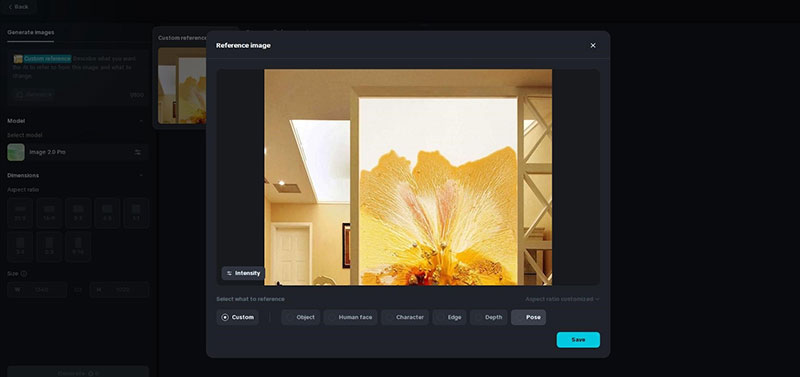
- Enhancing visual assets with an AI image generator
Streamline Handoffs
Prepare files for developers properly. Documentation prevents endless questions later.
Export tools like Zeplin or Figma’s inspect mode reduce miscommunication:
- Developers see exact measurements
- CSS is generated automatically
- Assets can be exported directly
- Comments explain design decisions
Clean handoffs prevent time-consuming revisions. The extra preparation time pays for itself.
Conclusion
Learning how to accelerate your design workflow is both art and science. It’s about working smarter, not harder. Creating an efficient system will change not only how quickly your project is delivered, but it also changes quality.
Small changes produce massive results. Start with one section of this guide. Master it. Then move to the next.
Remember:
- Planning prevents problems
- Organization eliminates wasted time
- Reusable components multiply efficiency
- Collaboration thrives on clear communication
- Automation handles repetitive tasks
Try these techniques on your next project. Track what works. Adjust what doesn’t. Your workflow will continuously improve.

Renowned for his expertise in logo design and visual branding, Bogdan has developed a multitude of logos for various clients.
His skills extend to creating posters, vector illustrations, business cards, and brochures. Additionally, Bogdan's UI kits were featured on marketplaces like Visual Hierarchy and UI8.
He also wrote in the past years on sites like Design Your Way, WebDesignerDepot, WPDean, Designmodo, Speckyboy, Slider Revolution, and more.
- The Coda Logo History, Colors, Font, And Meaning - 20 October 2026
- How Can Designers Turn AI Image Prompts Into Polished Visuals? A Practical Workflow - 20 October 2026
- Top Military and Defense UI/UX Design Services Companies: A 2026 Buyer’s Guide - 19 October 2026

Bogdan Sandu is a seasoned designer who has been designing websites since 2008. Renowned for his expertise in logo design and visual branding, Bogdan has developed a multitude of logos for various clients. His skills extend to creating posters, vector illustrations, business cards, and brochures. Additionally, Bogdan's UI kits were featured on marketplaces like Visual Hierarchy and UI8. He also wrote in the past years on sites like Design Your Way, WebDesignerDepot, WPDean, Designmodo, Speckyboy, Slider Revolution, and more.
You Might Also Like