The best email marketing strategies for ecommerce stores are personalization, automation, strong subject lines, mobile optimization, interactive content, user-generated content, a proper email service provider, good deliverability practices and constant testing. Email remains one of the highest-converting digital channels for online stores. An Omnisend report found that US merchants earn $72 for every dollar spent on email marketing, but that return only shows up when you follow a sound process. Sending more emails is not the same as sending better ones. Here are nine strategies, each with what to do and an example.
How do you personalize email campaigns?

Segment your list, then tailor the message to each segment. Segmentation lets you speak to a specific need or pain point instead of sending the same email to everyone. You might create one group for high-value customers and another for subscribers in a particular region, then adjust the message and offer for each.
Four elements can be personalized: timing, content, offers or discounts, and product recommendations. The example above, from Really Good Emails, targets people who showed interest in one specific product, a green cleanse. For ideas on timing and sequencing, read about mapping the customer journey for email marketing.
Why should you automate emails?

Because automated emails reach people at the right moment with the right message, and they tend to outperform regular campaigns. Set triggers for actions on your site and for key moments in the customer lifecycle: onboarding emails, back-in-stock notifications and post-purchase follow-ups are the usual starting points.
The Omnisend report cited above compared automated messages with standard campaign emails and found automation ahead on every measure:
| Metric | Automated emails | Campaign emails |
| Click rate | 5.4% | 1.5% |
| Open rate | 42.1% | 25.2% |
| Conversion rate | 1.9% | 0.07% |
The chart from Omnisend above shows the lift in conversion rate for different automated flows compared with campaigns. Back-in-stock, welcome and abandoned cart messages top the chart, so start there.
What makes a good email subject line?
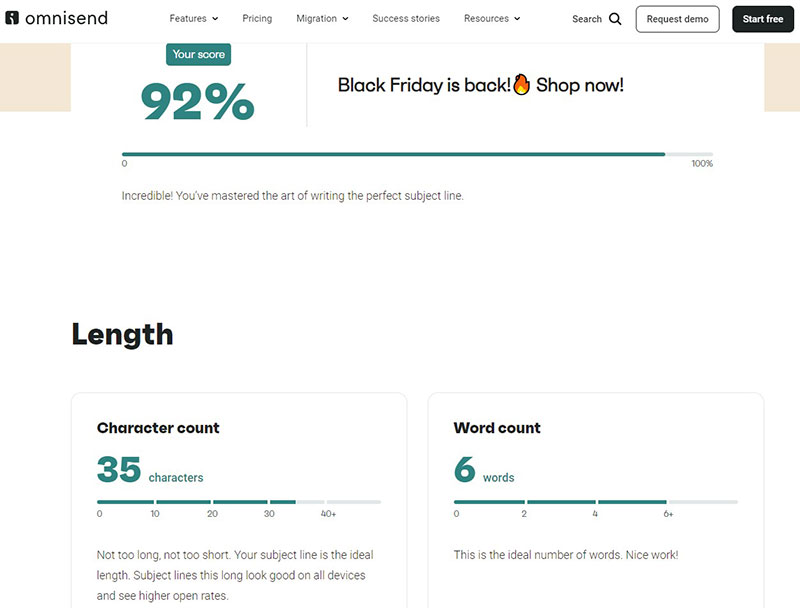
One that gives the reader a reason to open within a few words. Recipients judge an email by its subject line, so even an excellent email suffers if the subject is dull. Four approaches work well:
- Tease the contents (“What’s inside?”).
- Use scarcity or urgency (“24 hours left!”).
- State the value (“Here’s your $20 coupon”).
- Add social proof by naming what others are doing or buying.
Keep subject lines under 50 characters, personalize them where you can and consider an emoji for added effect. The screenshot above comes from the Omnisend subject line tester, which scores a line and checks character and word counts.
How do you optimize emails for mobile?

Design for the phone first, because most emails are opened there. A ZeroBounce study shows that 61% of emails are opened on mobile phones, which leaves only 39% for desktop. A mobile-friendly email can lift your open rate and keeps readers from abandoning it.
- Use mobile-friendly calls to action.
- Choose a single-column layout.
- Check that emails render well on smaller screens.
- Use dynamic content to adjust layouts to the device.
- Keep scrolling short, and use large buttons and tap targets.
The email above, also from Really Good Emails, follows these rules with one column, a clear offer and a big button. If you send many campaigns, reusable rules help keep layouts consistent, as described in this piece on email design systems.
Why send interactive emails?
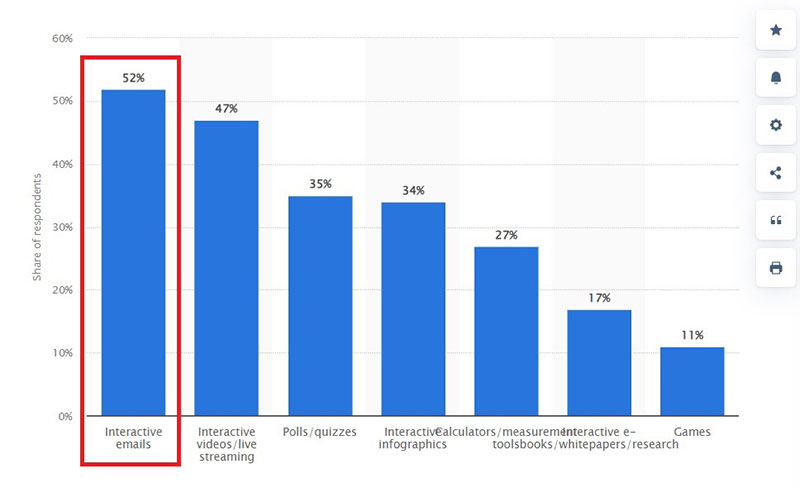
Because they engage subscribers more than static messages. According to Statista data, interactive emails rank as the most effective interactive content type, ahead of games and videos, as the chart above shows. They create an immersive experience that keeps readers involved.
Elements you can add:
- GIFs and videos
- Quizzes and calculators
- Polls or surveys
- Image carousels
- Add-to-cart options
Support for interactive features differs between email clients, so always provide a fallback that works without them.
What does an interactive email look like?
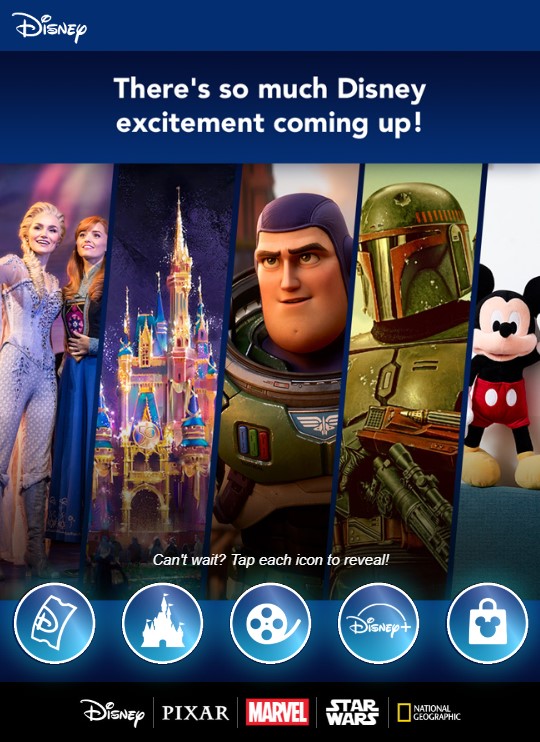
This email from Disney invites readers to tap icons to explore its content, and you can see it at Really Good Emails.
How do you use user-generated content in emails?

Add peer recommendations such as product reviews, customer photos, testimonials or brand videos. Social proof from real customers builds credibility and trust in your products.
For reviews specifically, a review request email template is the easiest way to collect raw material.
This email uses customer quotes next to product photos and was featured on Really Good Emails.
Why connect your store to an email service provider?
Basic email features inside an ecommerce platform leave opportunities on the table, especially for deliverability. A dedicated email service provider (ESP) adds automation, segmentation, spam testing, deliverability monitoring and dedicated IP addresses.
Compare several providers before you choose. A comparison such as Omnisend vs Klaviyo shows how two popular options differ, and this review of five email platforms adds more.
How do you keep emails out of the spam folder?
Build a sending reputation with mailbox providers. Many marketing emails end up in spam, and these practices improve inbox placement:
- Warm up your sending domain gradually.
- Maintain a good sending reputation by keeping complaints and bounces low.
- Publish the right SPF and DKIM records.
- Use double opt-in confirmation for new subscribers.
How often should you test and optimize?
Continuously. Email marketing is an ongoing process, and regular testing reveals trends, customer preferences and bugs. Run A/B tests on content, formats, subject lines, send times and segments, and track open rate, click-through rate, spam complaints and unsubscribe rate. Change one variable at a time so you know what caused the difference.
Frequently asked questions
What is the most effective email strategy for ecommerce?
Automation usually has the biggest payoff, since triggered emails such as back-in-stock and abandoned cart reach people at the right moment. Start there, then add segmentation.
How long should a subject line be?
Under 50 characters is a good rule. Shorter lines display fully on mobile screens.
Do I need an ESP if my store has built-in email?
For anything beyond basic sends, yes. An ESP gives you automation, segmentation and deliverability tools that built-in features rarely match.
How do I know which emails to automate first?
Begin with welcome, abandoned cart and post-purchase messages, then add back-in-stock and win-back flows once those perform.
Where should you start?
Pick two strategies you do not use yet, most likely a welcome automation and a mobile-friendly template. Set them up this week, measure open and click rates against your current campaigns, then add the next strategy from the list.

Renowned for his expertise in logo design and visual branding, Bogdan has developed a multitude of logos for various clients.
His skills extend to creating posters, vector illustrations, business cards, and brochures. Additionally, Bogdan's UI kits were featured on marketplaces like Visual Hierarchy and UI8.
He also wrote in the past years on sites like Design Your Way, WebDesignerDepot, WPDean, Designmodo, Speckyboy, Slider Revolution, and more.

Bogdan Sandu is a seasoned designer who has been designing websites since 2008. Renowned for his expertise in logo design and visual branding, Bogdan has developed a multitude of logos for various clients. His skills extend to creating posters, vector illustrations, business cards, and brochures. Additionally, Bogdan's UI kits were featured on marketplaces like Visual Hierarchy and UI8. He also wrote in the past years on sites like Design Your Way, WebDesignerDepot, WPDean, Designmodo, Speckyboy, Slider Revolution, and more.
You Might Also Like