AI video tools have gotten incredibly good over the last year, and it’s easier than ever to turn a flat drawing into a clip. If you design original characters, make VTuber models, or just love anime, you can use these tools to generate short animations from a single picture. But finding the right app means looking beyond finding a tool that can produce a video.
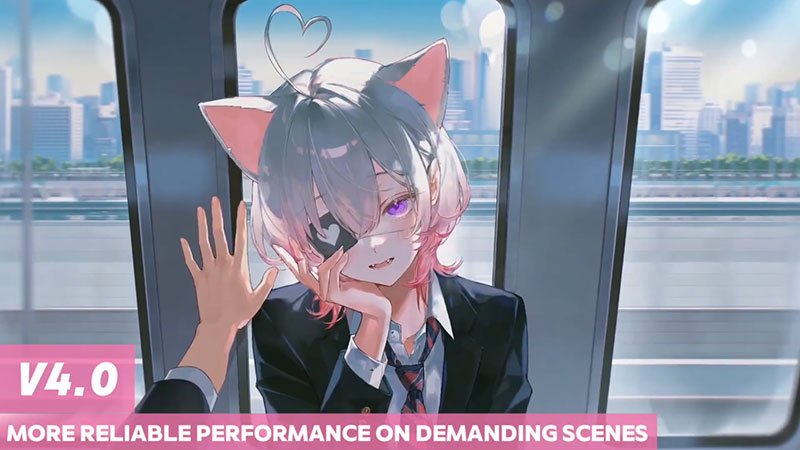
To ensure your characters look like themselves in longer visuals, you need to look for different features than those used in regular cinematic videos. Platforms like PixAI v4.0 make this easier by offering robust image-to-video tools, reference images, precise motion control, and high-quality upscaling, so your characters don’t shape-shift between scenes and your line art stays crisp.
This guide breaks down what makes a great anime AI video generator, why animating this art style is uniquely tough, and how PixAI handles the job.
Why Anime Video Generation Is Different From General AI Video
Standard AI video engines usually focus on creating realistic, movie-style clips from raw text prompts. While these visual effects might look cool, they completely miss the point for anime creators.
Instead of spawning entirely random video environments, you need to add stable motion to an existing character model while locking in the exact artistic style that defines your work.
Character identity comes first
When you make anime videos, keeping facial features, hairstyles, clothing, and proportions completely identical frame by frame is everything. Even tiny shifts between shots can make your original character look like a totally different person. That is a massive problem if you are trying to build visual novels, VTuber assets, or recurring social media content.
Anime aesthetics require specialized workflows
Anime follows strict stylistic rules that differ significantly from those of realistic photos. Standard video generators don’t understand these cartoon boundaries and instead try to blend colors and soften edges the way a real camera captures the physical world. This often muddies the details, causing your beautiful 2D aesthetic to glitch, melt, or look awkwardly warped the moment your character starts moving.
Character Consistency Should Be the First Thing to Check
If you are making videos with an original character or a design you use over and over, keeping them looking consistent has to be your number one priority. Even tiny changes to their face, hair, clothes, or body size can break continuity across scenes and instantly ruin the quality of your video.
No AI video app out there can promise perfect consistency in every single frame, but some definitely do a much better job of locking in a character’s identity than others. Instead of just chasing crazy special effects, you should check how well the tool actually protects the unique details that make your character who they are.
Having solid reference image support is a total game-changer here. It lets you use your actual drawing as the anchor for the animation instead of typing out text prompts and hoping for the best.
Reference Image and Image-to-Video Support Matter
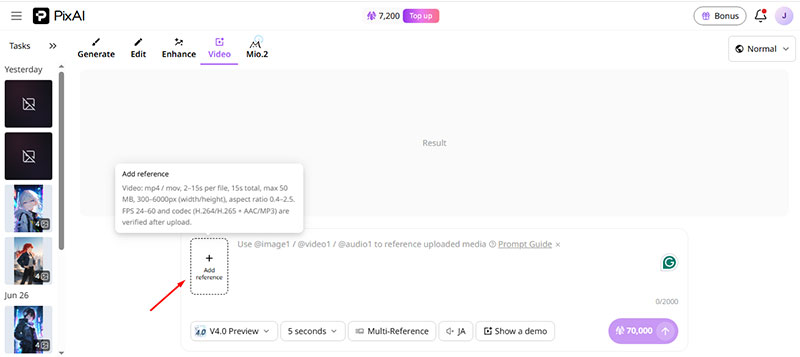
Most anime creators already have a finished drawing they want to bring to life, which makes an image-to-video workflow one of the absolute best features you should look for. Text-to-video tools are fine if you want to spawn a totally random background, but they fail miserably when you try to accurately recreate a specific original character or a piece of art you spent hours drawing.
When you start with a real illustration, you give the AI a clear roadmap for movement, so you do not have to rebuild your character from scratch. That makes this setup a lifesaver for original character creators, VTubers, and anyone posting regular content where maintaining a consistent visual style is important.
While final video quality depends on your action prompt and scene complexity, using a clean reference image provides a significant advantage in maintaining character consistency across distinct clips. PixAI v4.0 AI anime video maker focuses heavily on this, letting you quickly produce clips without bouncing between apps.
Camera Control and Motion Stability
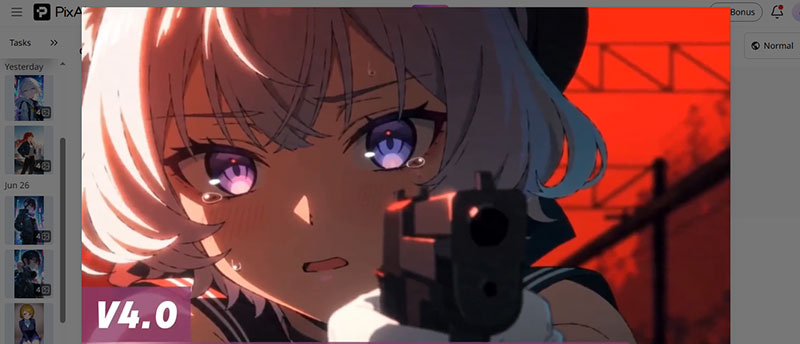
We all love seeing eye-catching motion in an animation, but when it comes to anime characters, less is almost always more. If an AI tool tries to force hyperactive camera angles into your clip, the character details usually fall apart instantly. When you are looking for a good anime video app, you want to look for controlled camera movement and stable motion, not just loud special effects every time.
Going with a tool that offers slow zooms, gentle pans, or tiny angle shifts will give your animation a clean, professional finish that keeps the focus exactly where it belongs on your character.
Voice, Audio, and Short-Scene Potential
While many incredible anime animations rely solely on visual storytelling, integrating audio tools can open an entirely new world of creative possibilities. Fun things like character introductions, quick TikTok or Reel clips, VTuber-style content, and promotional teasers get way more attention when you add a voice or sound effects to the mix.
If you are just making simple looping animations for your social feed, basic visual movement works perfectly fine. If you want to actually tell a story, introduce a new hero, or market your brand, you will need a video generator that lets you easily layer sound into your workflow down the line.
Even if the video generator doesn’t have a built-in voice actor tool, ensuring it exports easily to external audio editing tools will make your entire production process much smoother and faster.
Iteration Cost and Workflow
You’ll rarely hit a home run on your very first attempt. If a platform makes it a nightmare to adjust your prompts, swap out character references, or fine-tune motion direction, your workflow stalls. Every failed attempt eats up your time and cloud credits, skyrocketing your iteration cost.
Because of that, finding a tool that lets you work fast and efficiently is one of the most important things you need to look for. Instead of wasting hours building and troubleshooting a complicated local video pipeline, PixAI lets you jump straight into a web browser.
The platform allows you to instantly test image to video AI anime generation, keep your character styles consistent, and tweak your motion on the fly. This keeps your creative momentum high and your generation costs low.
Anime AI Video Generator Checklist
Before you pick an anime AI video generator, use this quick checklist to weigh your options. Remember that the absolute best tool for the job is not always the one crammed with the most random features.
You want something that actually fits your personal workflow and helps you make clean, consistent animations without breaking a sweat.
Core Character Features
- Evaluate character consistency to ensure your character remains recognizable from start to finish, with facial features, hair, and clothes remaining exactly the same.
- Verify image-to-video support so you can animate existing content directly rather than relying on unpredictable text prompts.
- Check reference image support to force the model to use visual baselines to lock in critical design details across multiple video files.
Animation & Art Quality
- Play around with camera controls to ensure you can use subtle shifts, like slow zooms or gentle pans, rather than just dramatic movement.
- Evaluate motion stability to ensure you pick a platform that doesn’t distort your character’s face and other physical features during movement.
- Look for an anime-focused generator, since one built strictly for this medium will actually respect your clean linework and stylized expressions.
Workflow & Usability
- Audio & Voice Support should include natural multi-language text-to-speech and automatic lip-syncing for your characters.
- Check the ease of iteration. Your tool should let you refine minor visual flaws without altering your favorite parts of the video.
Where PixAI v4.0 Preview Fits
PixAI v4.0 Preview does not try to be a generic video maker. Instead, it focuses entirely on what anime creators actually need, allowing you to animate drawings you have already made. This makes it way easier to keep your character looking like themselves while you play around with different motion styles and camera angles.
This setup is perfect if you design original characters, make VTube content, or create short anime content for TikTok. It eliminates the need to learn multiple complex tools and lets you do everything inside one dedicated website that handles the testing and polishing for you.
PixAI V4.0 is straightforward to use, and the platform provides a guide to learn how to stack your references, what to put in the text prompt, and how to iterate when the first try fails.
Final Thoughts
A great anime AI video generator needs to deliver far more than flashy motion effects. You should instead prioritize getting a consistent character look across every frame. The best anime video generators should also let you use reference images smoothly, keep the animation steady, and tweak your ideas on the fly.
That is exactly why generic video tools usually fall short. You need something built from the ground up for anime. PixAI v4.0 Preview nails this by packing image-to-video tools, dedicated anime models, and other anime-specific features into a simple web dashboard. This lets you bring your artwork to life without the usual headaches.

Renowned for his expertise in logo design and visual branding, Bogdan has developed a multitude of logos for various clients.
His skills extend to creating posters, vector illustrations, business cards, and brochures. Additionally, Bogdan's UI kits were featured on marketplaces like Visual Hierarchy and UI8.
He also wrote in the past years on sites like Design Your Way, WebDesignerDepot, WPDean, Designmodo, Speckyboy, Slider Revolution, and more.
- How to Install Fonts on Mac (Step-by-Step Guide) - 20 September 2026
- From Mockup to Code: How AI-Augmented Development Speeds Up the Design Handoff - 19 September 2026
- The Beehiiv Logo History, Colors, Font, And Meaning - 18 September 2026

Bogdan Sandu is a seasoned designer who has been designing websites since 2008. Renowned for his expertise in logo design and visual branding, Bogdan has developed a multitude of logos for various clients. His skills extend to creating posters, vector illustrations, business cards, and brochures. Additionally, Bogdan's UI kits were featured on marketplaces like Visual Hierarchy and UI8. He also wrote in the past years on sites like Design Your Way, WebDesignerDepot, WPDean, Designmodo, Speckyboy, Slider Revolution, and more.
You Might Also Like