Color matching is a vital step in video production. Filmmakers utilize color matching to guarantee that their clips are consistent. Assume you captured a lot of footage with other cameras at different times of the day. Every clip would have its color temperature, brightness, and white balance. If you did not match the color attributes of each shot, your video production could fail to express the atmosphere or story you intended.
The clip you want to match is the source, and the clip you want to match it to is the target. Use the eyedropper tool to choose the color you wish to match in the source clip. The program will then automatically change the source clip’s color to match the target when you click on it.
This article will show you how to match the colors between the shots of your videos.
Part 1: Best Color Combinations for Videos
When it comes to working with color, color theory is an art. It describes how humans see color and how colors contrast, blend, and pair to create visual effects.
Designers select the ideal colors that go with everything using a color wheel and a wealth of accumulated information on human psychology, culture, and other things. Here, we will show you some color combinations you can use in almost each of your videos.
Dark Brown and Yellow
This wonderful color combination perfectly produces a design that conveys energy and trustworthiness. Marigold Yellow is the ultimate tag-team color, catching the attention, while dark brown keeps it.
Yellow is another popular hue that pairs well with dark brown.
Orange Zest
Yellow is the ultimate attention-getter, setting a youthful tone for the ruling navy. The similarly exciting blue hue, which pairs with Yellow, dazzles the senses.
It’s one of those color schemes that is commonly employed during parties and casual gatherings. It contributes to excitement, which helps to create a sense of purpose and energy in a design.
Light Pink, Hot Pink & Maroon
Choose the pink color family if you want a design that says “approachable.” These hues are close enough to preserve an innocent image while being different enough to provide the design visual flair.
Maroon adds just the right degree of professionalism to your appearance while lowering your chances of appearing dumb.
Yellow and Blue
Yellow is the ultimate attention-getter and gives the powerful navy a youthful backdrop. The equally captivating blue hue that complements yellow mesmerizes the senses.
It’s one of those color palettes best suited for get-togethers and festivities. Fostering excitement aids in giving a design a feeling of direction and vitality.
Grey & Green
Even though green is typically associated with nature, this color scheme is urban because of the unexpected pairing with city gray. Green is the color of springtime and crops, grass, trees, and forests. In the 20th and 21st centuries, green has come to represent health, organic, and well-being in our society.
Conversely, grey is the hue of the industrial and technical revolution, the metropolitan environment, and steel.
Red and Green
Traditionally, green is connected to health or the environment and red to passion; nevertheless, when these two colors combine, they signal “Christmas.”
Of course, desire is nothing new during Christmas. Around that time of year, everyone has a lot of wishes.
Carnival Dance
This vibrant blend of colors takes us back to the thrilling Rio Carnival parades. This eruption of vivid hues is also present in pyrotechnics, confetti, and party décor.
The Deep Pink hints that it will be a crazy party, while the blue and purple establish the tone for a good time. The mixture is tempered and given a nocturnal feel by the dark blue.
Part 2: How to Match Colors Between Shots
Wondershare Filmora, a well-known video editor, is here to assist you with AI color matching. It is designed with a straightforward UI and now provides powerful editing tools to even inexperienced users. Recent additions feature audio ducking, motion graphics, keyframing, and color matching.
The color match tool in Filmora Video Editor allows you to match the color of one scene in a video to all other hues. The same video might provide various outcomes owing to lighting issues. For example, an automobile rushing down the road can exhibit a variety of colors to grab the audience’s interest.

The AI color match tool can alter the color combinations of all clips with a single click, resulting in a gorgeous similarity. Color Match allows you to fix video colors in batches rather than needing to edit them individually.
Key Features
Below are some key features of Wondershare Filmora color match.
- Consistency In Clips: Filmora applies filters intelligently to match the right hues. The entire image and movie will be cohesive and well-planned. You can also select a color match level from 1% to 100% to add creativity to your photo and video.
- Adjustable Strength: You have control over the degree of color match by adjusting the color matching strength between 0 and 100.
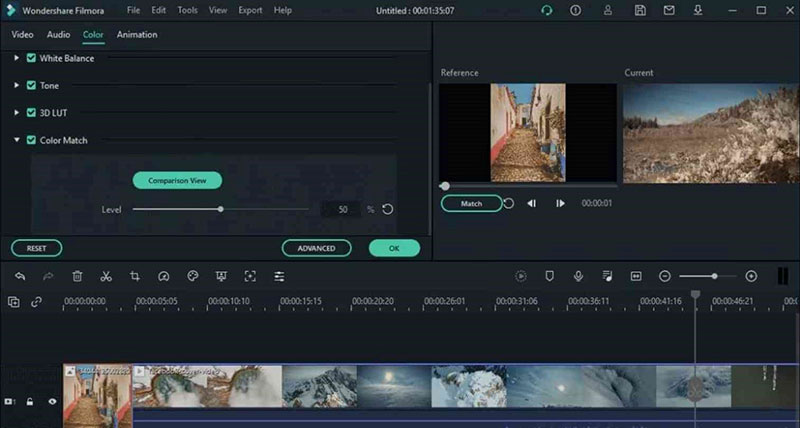
- Comparison View: This function lets you preview the video and choose the precise frame you wish to match. The colors of the current video could then be automatically matched to those of the reference video.
Step-by-step Method of Color Matching with Filmora
Now, we will show you the step-by-step method of color matching with Filmora.
- Step 1: Import the Media:
Drag the desired photos and videos into the timeline. If you want to apply custom color correction, select a clip or image and continue editing.

- Step 2: Select Color Match:
Next, position the playhead to match the frame of your other clips. After selecting the remaining clips and images, you can either hit the color icon on the toolbar or use the right-click menu to pick “Color Match.”

- Step 3: Start Color Matching:
Next, select a reference page frame and press “Match.”

- Step 4: Preview your Color Match:
Finally, use the slider to adjust how closely the color settings of the other clips match, and then use the Preview’s “comparison view” to see how it looks.
Conclusion
Color matching is a crucial phase in video production that guarantees coherence and aesthetic appeal. The Wondershare Filmora AI color matching makes it simple to get results that appear professional. You can improve your video editing abilities by using this article.
You can make captivating, high-quality videos that attract your viewers by perfecting color matching and elevating your video production to new heights. To learn more about the magic of color matching, try Filmora now.

Renowned for his expertise in logo design and visual branding, Bogdan has developed a multitude of logos for various clients.
His skills extend to creating posters, vector illustrations, business cards, and brochures. Additionally, Bogdan's UI kits were featured on marketplaces like Visual Hierarchy and UI8.
He also wrote in the past years on sites like Design Your Way, WebDesignerDepot, WPDean, Designmodo, Speckyboy, Slider Revolution, and more.
- The Windsurf Logo History, Colors, Font, And Meaning - 10 October 2026
- How to Remove Background From Product Photos (No Photoshop) - 10 October 2026
- How Designers can Build a Stronger Online Creative Identity - 9 October 2026

Bogdan Sandu is a seasoned designer who has been designing websites since 2008. Renowned for his expertise in logo design and visual branding, Bogdan has developed a multitude of logos for various clients. His skills extend to creating posters, vector illustrations, business cards, and brochures. Additionally, Bogdan's UI kits were featured on marketplaces like Visual Hierarchy and UI8. He also wrote in the past years on sites like Design Your Way, WebDesignerDepot, WPDean, Designmodo, Speckyboy, Slider Revolution, and more.
You Might Also Like