AI wasn’t timid when entering the world of design. It kicked the door in.
People went from sketching ideas on a napkin to AI giving you 50 ideas instantly, and you get lost in what to choose. Small brands that can’t afford design teams felt blessed. But there is a warning in there as well. AI will save you time, and money. Sure. But it might also make your brand feel generic, forgettable and flatten its personality, if you are not careful.
The trick isn’t avoiding AI. It is having the knowledge of where it works and where it does not work. Used well, AI can sharpen your ideas. But when you misuse it, it will make your brand just a name which no one will remember, making it taste like nothing.
Here we are going to discuss the ways of using AI tools without losing the creative spark and provide some examples of small brands that do so.
Think of AI as a Creative Assistant, Not the Creative Director
AI is great with patterns. It’s terrible with instincts.
An online coffee roaster that was just starting out used AI to create mood board ideas according to keywords such as warm, local, slow mornings. The tool gave a great choice of color palettes, textures and typography references. Helpful. However, the ultimate branding choices such as selecting slightly blemished serif font and hand-drew icon were made by the founder, who desired the brand to be human and not refined.
That’s the balance.
AI works best when it:
- Helps you explore options faster
- Handles repetitive or technical tasks
- Supports decisions instead of making them
If the content needs restraint, taste or emotion, a human no doubt should be involved.
Where AI Actually Helps Small Brands
1. Early-Stage Brainstorming
It is difficult to start from nothing. It is easier to begin with something.
One of the examples provided by a small fitness studio that was redesigning its webpage employed AI to develop the homepage designs and headline variations. None of them were applied directly. However, having several choices allowed the owner to realize as fast as possible what did not fit their tone. For example, too aggressive wording. He also rejected the stock images.
While AI accelerated the creative process, it also highlights concerns about AI job replacement, as tasks traditionally performed by designers and content creators can now be partially automated.
AI didn’t provide the answer in this case. It assisted in getting rid of the wrong ones.
2. Content Variations Without Burnout
The process of writing is also time-constraining; more so, when you are wearing ten hats.
A skincare company had a team that wrote product descriptions and FAQ questions using AI to draft the initial versions. The founder later rewrote them, in her own language, with some of her own comments on ingredients and source. The final copy sounded authentic – but took half the time to produce.
That’s the sweet spot:
- AI for structure
- Humans for voice
- Editing for personality
Where AI Starts to Hurt Brand Identity
1. One-Click Branding
Some startups solely use AI-generated logos and images – and it is noticeable.
A technology consulting company was started with a logo designed in a few minutes with default AI settings. Clean, modern, perfectly fine. They found, six months later, that it was almost identical to three competitors. They did not require complete rebranding, but merely human refinement that never occurred to begin with.
The AI shortcuts are very tempting, but they tend to miss the thinking component that makes brands memorable.
2. Copy That Sounds Polished but Empty
AI writing often feels smooth and vague at the same time.
One of the tiny e-commerce companies observed that their bounce rate was increasing when they substituted the website copy with AI-generated text. It wasn’t wrong, just didn’t have any emotional feel to it. As soon as they reworded the information in the language of the actual customers, which was taken from reviews and emails, the engagement returned to the same level.
Perfection is not something that people associate with. They connect with honesty.
How to Keep Your Creative Edge While Using AI
Start With Clear Constraints
Before using any AI tool, define:
- Who you’re talking to
- How your brand should sound
- What you absolutely don’t want
A local travel company using AI for social captions added strict instructions: friendly, curious, slightly imperfect, no buzzwords. The results weren’t perfect – but they were much closer to the brand’s real voice.
The more specific you are, the better AI behaves.
Edit Like a Human (Because You Are One)
Never publish AI output untouched.
Read it out loud. If it sounds like a press release written by a robot, rewrite it. One small typo or informal phrase often makes content feel more trustworthy, not less professional.
AI Tools That Are Actually Useful (When Used Right)
Design & Visual Exploration Tools
Many small brands use AI design tools to:
- Explore logo concepts before crowdsourcing
- Build quick mockups for feedback
- Test visual directions without commitment by generating image variations with AI
These tools are most helpful before involving designers – not instead of them.
Video & Motion Tools
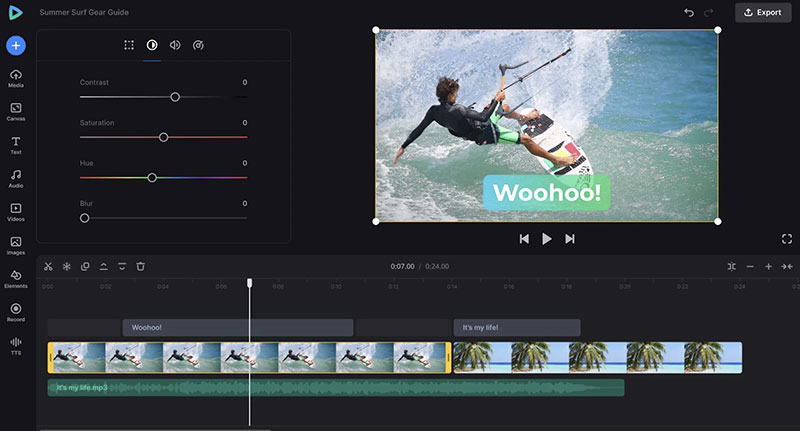
Short-form video is now unavoidable. The motion just grabs attention, whether you need to use it as a social post, in a landing page or in an email.
A small brand that makes handmade jewelry used a simple online video editor – Clideo, to create small product clips, with some text overlays. You can also use it to resize videos through the video compressor for social media and websites. No fancy effects. Just simple and clean video content that matched their visual style in general.
In this case it was a perfect use of a tool, as it is, just a tool to help execute their own ideas, and not invent any.
Writing & Ideation Tools
AI writing tools are best used for:
- First drafts
- Headline variations
- Structural rewrites
A nonprofit created several options of headlines through AI for their donation campaign and put them to the test with actual users. The final headline was a human edited version of an AI suggestion – more direct, shorter and more emotional.
A Workflow That Actually Works
Here’s a realistic AI + human workflow many small brands are using successfully:
- Human defines the goal
What is the intent behind the particular design or copy? - AI explores options
Drafts, variations, ideas. - Human edits and personalizes
Tone, wording, visuals. - Feedback from real people
Customers, community, designers.
This way you can ensure that your creativity stays international and doesn’t feel automated.
The Real Risk Isn’t AI – It’s Laziness
AI doesn’t kill creativity. Cutting corners does.
Brands that let AI do everything tend to blend in. Brands that use AI thoughtfully tend to move faster and stay distinct.
The difference isn’t the tools. It’s the effort.
If you care about how your brand feels, sounds, and shows up, AI can help you get there quicker. If you just want something “good enough,” AI will happily deliver that too.
Just don’t be surprised when good enough looks exactly like everyone else.
Bottom line:
Use AI to speed up the work. Use humans to make it matter.

Renowned for his expertise in logo design and visual branding, Bogdan has developed a multitude of logos for various clients.
His skills extend to creating posters, vector illustrations, business cards, and brochures. Additionally, Bogdan's UI kits were featured on marketplaces like Visual Hierarchy and UI8.
He also wrote in the past years on sites like Design Your Way, WebDesignerDepot, WPDean, Designmodo, Speckyboy, Slider Revolution, and more.
- The Windsurf Logo History, Colors, Font, And Meaning - 10 October 2026
- How to Remove Background From Product Photos (No Photoshop) - 10 October 2026
- How Designers can Build a Stronger Online Creative Identity - 9 October 2026

Bogdan Sandu is a seasoned designer who has been designing websites since 2008. Renowned for his expertise in logo design and visual branding, Bogdan has developed a multitude of logos for various clients. His skills extend to creating posters, vector illustrations, business cards, and brochures. Additionally, Bogdan's UI kits were featured on marketplaces like Visual Hierarchy and UI8. He also wrote in the past years on sites like Design Your Way, WebDesignerDepot, WPDean, Designmodo, Speckyboy, Slider Revolution, and more.
You Might Also Like