How this color mixer works
Take #3b82f6, a fairly ordinary blue, and #ef4444, a red. Mix them 50/50 and you get #95639d in sRGB and #bf56cd in OKLCH. Same inputs, same ratio, and the two purples are clearly different. Both values were calculated from the published sRGB and Oklab conversion formulas.
The color space decides the result as much as the ratio does, and that's the first thing to check in any color mixer. This one blends two to six colors by ratio and shows the result right away, with its HEX, RGB and HSL codes. Give each color a number of parts, and the mixer works out the final color the way you pick: like paint, like light or like a designer's gradient.
Web designers mostly use a mixer for hover and tint variants derived from a single token, or for finding the midpoint between two brand colors. Painters use it to see what a ratio of two tubes will give.
How to mix colors
- Choose a mode at the top. Paint is a good start for traditional color mixing. Perceptual suits interface work.
- Pick your ingredients. Use the color picker or type a HEX code. Start from an example mix to see how it works.
- Set the parts. Move each slider from 0 to 10. Two parts of blue and one part of yellow is a 2 to 1 mix.
- Read the result. The big swatch updates as you drag. Click a code to copy it.
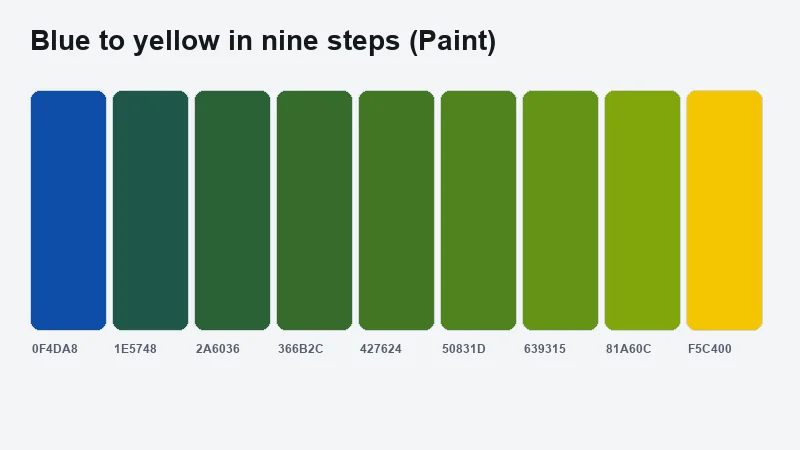
- Check the steps. With two colors, a strip shows nine steps from the first color to the second.
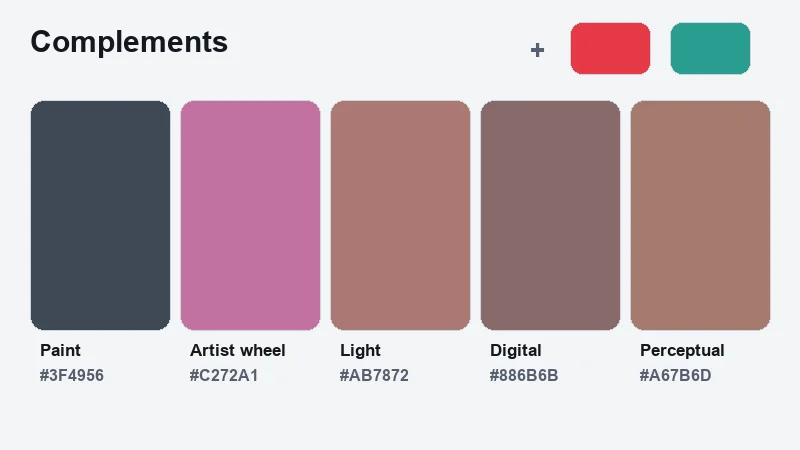
- Compare the swatch against both inputs. A midpoint greyer or darker than either end points to the wrong mode or a complementary pair.
What is a color mixer?
You enter your colors and set a share for each. Then you pick a color space or mixing model, and the tool returns one new color in a format you can paste into code or a design file.
The name gets used for other things too. A paint mixing machine shakes physical pigment in a can, and some video and photo editors call a hue, saturation and luminance control a "color mixer". The browser-based kind is what designers open when they want a smooth gradient between two brand colors, or just one value from somewhere in the middle of it.
How a color mixer calculates the result
Under the hood it's a weighted average, run one channel at a time. The ratio sets the weights. The color space decides which channels there are to average.
HEX is just three channels written in base 16, so the first job is to turn the HEX code into RGB channel values. After that you average each channel. For #3b82f6 and #ef4444 at 50/50 in sRGB, red comes to (59 + 239) / 2 = 149, green to (130 + 68) / 2 = 99, and blue to (246 + 68) / 2 = 157.
The result is rgb(149, 99, 157), or #95639d, a muted purple. This is what the Digital mode returns.
Change the ratio and only the weights move. At 25/75, the second color contributes three times as much to every channel as the first.
Parts that do not add up to 100% get normalized. In CSS, MDN says each weight is divided by the total, so 30% and 30% behave as 50/50. In this mixer the parts always work as a ratio, so 1 and 1 give the same mix as 5 and 5.
The same documentation covers a couple of oddities. Set both percentages to 0% and the mix is invalid. Let the total fall under 100% and the browser applies an alpha multiplier equal to that total, so the result comes out partly transparent.
All of this assumes sRGB. Averaging in another space changes the numbers, sometimes by a lot.
Additive vs subtractive mixing: which model does a screen use?
Screens add light. Every pixel combines red, green and blue light, so more light means a lighter color, and full intensity on all three channels gives white.
Paint and print work the other way. Each layer absorbs more light, which is why cyan, magenta, yellow and black inks darken the result as they stack.
That difference breaks the one pairing everybody knows. Blue (#0000ff) and yellow (#ffff00) average to #808080, a flat grey, in sRGB.
Moving to OKLab doesn't rescue it. The midpoint becomes #6cabc7, a pale blue, and switching spaces can't fix a problem that comes from the mixing model itself.
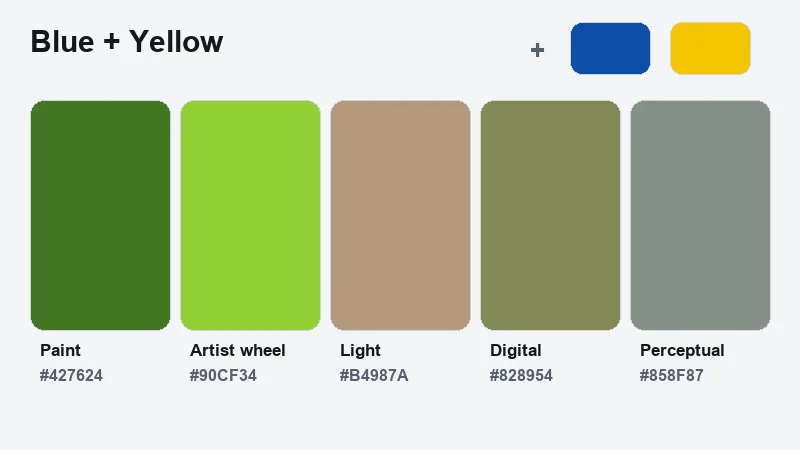
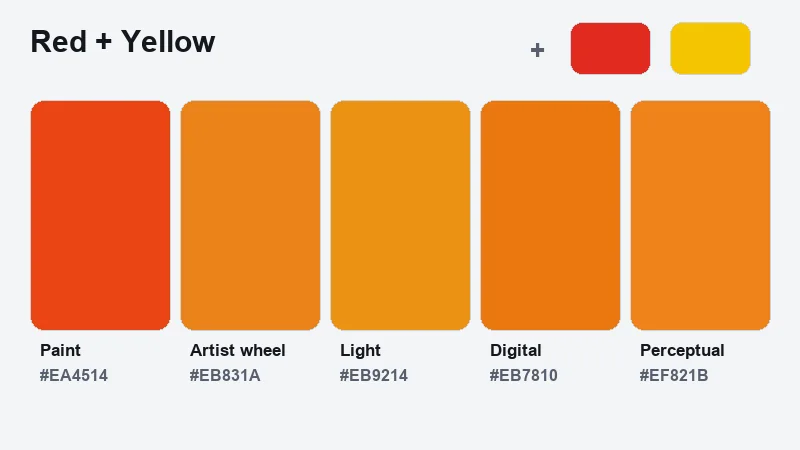
That is why this mixer has two models for physical color. The Artist wheel mode uses the painter's wheel built on red, yellow and blue primaries, so red and yellow make orange and blue and yellow make green. The Paint mode goes further and models pigment, where each color absorbs part of the light and mixes get darker.
A stricter fix is Mixbox, presented at SIGGRAPH Asia 2021 by Šárka Sochorová and Ondřej Jamriška of Secret Weapons. It uses Kubelka-Munk theory to predict the pigment mixture, takes RGB values in and hands RGB back out. Their sample pair, blue (0, 33, 133) and yellow (252, 211, 0), mixes to green. The license is CC BY-NC 4.0, with a separate license for commercial products.
The Paint mode here is a lighter relative of that idea, a Kubelka-Munk style model that works per channel. Fed the same blue and yellow, it returns a dark green, #4d5020. Use a pigment model for digital painting, where the goal is to imitate paint. I'd skip it for web UI. It solves a problem the browser does not have, since CSS renders color as light.
The five mixing modes
| Mode | How it mixes | Best for |
|---|---|---|
| Paint | Models pigment, where each color absorbs part of the light. Mixes get darker. | Painters, illustrators, anyone mixing real colors |
| Artist wheel | Uses the red, yellow and blue color wheel taught in art class. | Learning color theory, quick intuition |
| Light | Blends light intensity in linear RGB. Results are brighter than a plain average. | Lighting, photography, accurate blending |
| Digital | Averages the sRGB values directly. This is what most design tools do. | Matching what design tools and CSS gradients show |
| Perceptual | Blends in OKLab, a space built so equal steps look equal. | Smooth gradients, tints and palettes for interfaces |
Mixing #3b82f6 and #ef4444 50/50 shows how far apart they land. Paint gives a dark grey, #4e575e. Artist wheel gives a bright pink-violet, #e68af3. Light gives #b369ba, Digital gives #95639d and Perceptual gives #a775a5.
Which color space gives the best mix?
OKLab or OKLCH for most interface work. sRGB only when the result has to match software that mixes in sRGB.
MDN agrees. It points out that sRGB is neither linear-light nor perceptually uniform, and it produces "overly dark or grayish mixes." As of November 2026, a color-mix() call with no color space specified defaults to oklab.
| Color space | Type | 50/50 mix of #3b82f6 and #ef4444 | Best use |
|---|---|---|---|
| sRGB | Rectangular | #95639d | Matching legacy tools |
| sRGB linear | Rectangular | #b369ba | Light-accurate blends |
| HSL | Polar | #d140f2 | Quick hue shifts |
| OKLab | Rectangular, perceptual | #a775a5 | Smooth gradients |
| OKLCH | Polar, perceptual | #bf56cd | Keeping chroma high |
Values were calculated from the published conversion formulas and rounded to HEX. This mixer offers sRGB (Digital), linear sRGB (Light) and OKLab (Perceptual). HSL and OKLCH are polar spaces, and you can use them in CSS with color-mix().
That's a wide spread from one pair of inputs. sRGB lands on a dull purple, while OKLCH keeps the saturation up. HSL is the odd one, swinging the hue through magenta.
Bjorn Ottosson published Oklab on 23 December 2020, aiming at more reliable prediction of perceived lightness, chroma and hue. His main complaint about CIELAB is its hue prediction, and blue hues are the worst case. Blending white into blue drifts toward purple in CIELAB, CIELUV and HSV, he reports.
For a gradient between two brand colors, OKLab is the safer default. Reach for OKLCH when the midpoint must stay as saturated as the ends.
How hue interpolation changes the mix
Hue interpolation only applies in polar spaces (hsl, hwb, lch and oklch) and decides which way around the color wheel the blend travels.
The default, shorter hue, takes the shorter arc. Longer hue goes the long way around. Increasing hue lets the angle only rise, and decreasing hue lets it only fall.
Take hsl(10 100% 50%) and hsl(60 100% 50%) at 50/50. Shorter hue lands on hue 35, an orange (#ff9500), while longer hue sweeps through magenta to hue 215, a blue (#006aff).
MDN notes that longer hue always travels the same distance or further than shorter hue. Use it on purpose, for rainbow-style sweeps, because as a default it produces surprises.
Mixing with white, black or grey causes no such swing. Those colors have no hue of their own, so the CSS Color 4 specification borrows the hue of the other color and the blend stays clean.
Mixing three or more colors
The same weighted average runs over every input, and the weights divide by their total. Weights of 20, 20 and 40 behave as 25, 25 and 50. This mixer takes up to six colors, with a slider of 0 to 10 parts for each.
Each extra ingredient pulls the result toward grey when the hues are unrelated. Three colors from one family stay clean, and five from across the wheel rarely do.
Find the ratio for a target color
Mixing by eye takes time. Enter the color you want, press Find the ratio, and the mixer tests every combination of your ingredients in the current mode. It sets the sliders to the closest match and tells you how close it got, as a color difference in CIELAB.
If the difference stays high, your ingredients can't make that color. Add a white, a black or a color near the target and try again.
Mixing colors in CSS, Sass and JavaScript
CSS can mix natively now, which is where I'd start. Sass and plain JavaScript still have their uses, and each has quirks worth knowing. The code box in the mixer writes the CSS for you in the Light, Digital and Perceptual modes.
CSS color-mix()
The function takes an interpolation method first, then each color with an optional percentage.
.card {
  background: color-mix(in oklch, #3b82f6 70%, #ef4444 30%);
}
Support is good. MDN lists color-mix() as Baseline widely available, supported across browsers since May 2023 (MDN). The first versions were Chrome 111, Edge 111, Firefox 113 and Safari 16.2.
Three or more colors are a different story. Firefox 150 and Safari 27 support them, and Chrome does not (web-platform-dx).
That last point needs a caveat. MDN documents color-mix() as accepting any number of colors, while web-platform-dx still rates the three-or-more form as limited availability. Until Chrome ships it, nest two calls to reach three inputs.
Safari's floor is also disputed. The caniuse table lists 16.2, and the Tailwind CSS v4.0 upgrade guide sets 16.4 as the minimum for the whole framework (which also depends on @property). Test the oldest Safari you support instead of trusting either number.
Older browsers drop a declaration they cannot parse. Write a static HEX line first and the color-mix() line after it, and those browsers keep the HEX.
Sass color.mix()
The signature is color.mix($color1, $color2, $weight: 50%, $method: null). Weight runs from 0% to 100%, and a larger weight uses more of $color1.
The $method argument names a color space, plus a hue interpolation method for polar spaces. It arrived in Dart Sass 1.79.0, and LibSass and Ruby Sass do not support it.
The Sass documentation's own example, color.mix(#036, #d2e1dd, $method: rgb), returns #698aa2.
Sass resolves at build time. It cannot mix a value that only exists at runtime, such as a custom property changed by a theme switch.
JavaScript
Plain JavaScript covers the sRGB average in a few lines.
function mix(a, b, w = 0.5) {
  return a.map(function (c, i) {
    return Math.round(c * (1 - w) + b[i] * w);
  });
}

mix([59, 130, 246], [239, 68, 68]); // [149, 99, 157]
For OKLab or OKLCH, use a library. Color.js mixes in any space with new Color("#3b82f6").mix("#ef4444", 0.5, {space: "oklch", outputSpace: "srgb"}).
Building tints, shades and palettes with a color mixer
Mixing with white gives a tint and mixing with black gives a shade, while grey produces a tone. A single brand color and those targets are enough to build a full scale. For a ready-made ramp, our tint and shade generator does it in one step.
| Amount mixed in | Tint (with white) | Shade (with black) |
|---|---|---|
| 20% | #649dfa | #295fb7 |
| 50% | #9ec3ff | #112f5f |
| 80% | #d8e7ff | #010615 |
Base color #3b82f6, mixed in OKLab, values calculated from the published conversion formulas. The 80% shade is nearly black, so it rarely earns a stop in a working scale.
In CSS, two lines produce the same results.
--brand-tint: color-mix(in oklab, var(--brand) 20%, white);
--brand-hover: color-mix(in oklab, var(--brand), black 15%);
Mixing with transparent creates opacity variants, and MDN confirms it works even when the base color already carries an alpha value below 1.
Tailwind CSS v4.0, released 22 January 2025, shows the pattern at scale. Tailwind Labs moved the default palette from rgb to oklch and generates the bg-blue-500/50 opacity modifier as color-mix(in oklab, var(--color-blue-500) 50%, transparent).
Generated scales still need an eye check at both ends. Light tints lose separation from a white page, and dark shades collapse into each other.
Checking contrast of a mixed color
WCAG 2.2 requires 4.5:1 for normal text and 3:1 for large text, defined as 18 point or 14 point bold (W3C, SC 1.4.3). UI components and graphical objects need 3:1 as well (SC 1.4.11).
The thresholds are strict. A ratio of 4.499:1 fails.
Mixing moves the ratio faster than the eye reports. Take text #111827 on white and mix it toward white in OKLab.
- At 25% white you get #434a57 at 8.91:1, which passes.
- At 50% white it's #7d828c at 3.86:1, which fails normal text but passes large text.
- At 60% white, #969aa2 sits at 2.82:1 and fails both.
Muted secondary text is where this bites most. Ratios were calculated with the WCAG relative luminance formula.
Brand buttons fail the same way. White text on #3b82f6 sits at 3.68:1, and mixing in 15% black in OKLab gives #2e68c6 at 5.37:1.
Check the pair after the mix, not before, because the contrast between a mixed color and its background depends on both. The mixer shows the best text color and its ratio for every result, and our color contrast checker handles any other pair. Adjust the ratio or the lightness first and leave the hue alone.
When a color mixer gives the wrong result
Most bad results are easy to spot once you know what they look like, and each one has a quick check.
Grey and muddy midpoints
Red (#ff0000) and cyan (#00ffff) average to #808080 in sRGB. OKLCH avoids the grey and returns #b8be00, a yellow-green that neither input contains.
To get away from the grey, switch to a polar space and check the hue it invents, or add a bridging third color. And if a neutral is what you were after, keep the grey.
A hue path that flips
Complementary colors sit about 180 degrees apart.
Shorter and longer arcs are then nearly the same length, so a small edit to either input can reverse the direction of the whole blend. If a gradient suddenly runs through the opposite side of the wheel, compare it against the other hue method before blaming the colors.
Alpha that will not turn opaque
MDN states that color-mix() cannot make a semi-transparent color fully opaque. Mixing only adds transparency.
Relative color syntax changes the alpha channel directly.
background: rgb(from var(--c) r g b / 1);Feature-detect it with @supports (color: hsl(from white h s l)), the test MDN's relative color guide uses.
Colors the medium cannot show
Mixers clip or compress results that fall outside the screen's gamut, so a swatch can differ from the raw math.
Print narrows the range further. If a mix is headed to a press, check it after converting RGB to CMYK in Photoshop, because saturated screen colors often fall outside the CMYK gamut.
Keep in mind that a mixer only shows what a screen can render. Ink may do something else entirely.
Color mixer FAQ
Is a color mixer the same as a color picker?
No. A picker reads a color that already exists, off a wheel, a swatch or an image, while a mixer creates a new color from inputs you already have.
Most mixers include a picker for entering those inputs, which is why the two get confused.
Can a gradient generator replace a color mixer?
Only for part of the job. A gradient generator outputs a continuous run of color across a range. A mixer returns one value at one ratio, ready to paste as a token.
This mixer also previews nine steps between two colors, so the line between them is thin.
Is a color blender the same thing as a color mixer?
Yes. Tool pages use the two names interchangeably.
Check the inputs instead of the name. Color space, ratio control and output format are what separate one tool from another.
Is it safe to paste unreleased brand colors into an online mixer?
Here, yes. Everything in this mixer runs in your browser and nothing is uploaded.
For fully private work in any project, mix inside your own stylesheet with color-mix(), where no value leaves your machine.
Turning one good mix into a repeatable rule
A mixer earns its place in a design system once its result is stored as a rule and not as a pasted HEX value. The rule needs a color space and a ratio, plus a fallback for older tools.
Fix the color space in the token first, OKLab or OKLCH. Then give each ratio a name such as tint, hover or muted, and pair every ratio with a contrast check and a static HEX line. The order matters because ratios carry no fixed meaning until the space is set, and a contrast result carries none until the ratio is set.
The downside is that a rule applies to every future brand color, including the ones whose tints fail, so the contrast check stays in the workflow instead of running once.
As of November 2026, nested color-mix() calls remain the safe route to three inputs. Once Chrome ships support for three or more colors, the nesting can go.
Mixing on a screen is a close model, not a guarantee. Real paints differ by brand and pigment, so treat a Paint or Artist wheel result as a strong starting point and test a small batch.