Nowadays, videos are one of the best tools for businesses to connect with their audience. A great video can grab attention, build trust, and drive sales. But how do you create videos that not only look good but also get people to take action?
In this blog, we’ll go over simple, actionable tips to make your videos outstanding. We’ll also discuss how, by using free video editing software, you can transform your simple video into something professional and attention-grabbing. So, let’s get in!
Define Viewer Intent Before Hitting Record
Before you even start making a video, you need to know why you’re making it and who it’s for. Ask yourself:
- What does my audience want to learn, see, or experience?
- What action do I want them to take after watching this video?
For example, if you’re making a video to sell a product, focus on showing its benefits and how it solves a problem. If it’s a tutorial, make sure it’s clear and easy to follow.
Moreover, you can use tools like Google Trends or Instagram polls to find out what your audience is interested in. Create a simple list of what you want viewers to think, feel, and do after watching your video.
Keep It Short, But Make Every Second Count
People have short attention spans, especially online. That’s why your video needs to grab attention in the first 3 seconds. Start with something exciting, like a surprising fact, a strong question, or an emotional story.
For example: If you’re selling a coffee maker, open your video with, “What if you could make café-style coffee at home in just 30 seconds?”
Pro tip: Use a “cliffhanger” to keep viewers engaged. Start with a question or a teaser and answer it at the end.
Also, check where people stop watching your videos by using tools like YouTube Analytics. This will help you adjust your content to keep them engaged longer.
Optimize for Mobile, But Think Interactivity
Most people watch videos on their phones, so it’s important to make sure your videos look great on small screens. Use vertical or square formats for platforms like Instagram and TikTok.
But don’t stop there, make your videos interactive. For example, add buttons, polls, or clickable links that let viewers engage directly with your content.
Moreover, here’s a quick tip for you: Combine text to speech with subtitles so viewers can read and listen at the same time, which improves understanding.
Beyond interactivity, personalize the experience. With dynamic video personalization, you can render scenes tailored to each viewer-using their name, location, plan details, recent activity, or lifecycle stage-to make intros, on-screen text, and offers feel one-to-one. Pair this with your mobile-first format and interactive elements (polls, buttons) so each viewer sees the most relevant message and CTA at the right moment. Brands typically use it for onboarding, upsell/cross-sell, renewals, and win-backs, and it’s proven to lift engagement and conversion. If you’re testing variations already, start by personalizing hooks in the first 3 seconds and the final CTA card to drive action.
Craft CTAs That Aren’t Annoying – But Effective
A call-to-action (CTA) tells your viewers what to do next. But many CTAs come across as pushy or generic, like “Buy now!” or “Click here!” Instead, make your CTAs feel natural and helpful.
For example:
- After showing how a product works, say, “Want to try it for yourself? Check out the link below.”
- After a tutorial, say, “If this helped you, share it with a friend who might need it.”
Moreover, add visual elements to your CTAs, like an animated button or countdown timer, to make them more noticeable without being too aggressive.
Remove the Video Background for a Polished, Brand-Aligned Look
A messy or distracting background can take the focus away from your message. Removing or changing the background makes your video look more professional and helps viewers focus on what matters.
Why it works: Big brands like Apple often use clean, simple backgrounds to highlight their products. You can do the same, even if you don’t have a fancy studio.
How to do it?
Here’s how you can remove background from video using free video editing software, i.e., the CapCut desktop video editor:
Step 1: Upload Video
Launch the application on your desktop, then click on “Create Project > Import.” This way, you can upload your desired video from your computer.
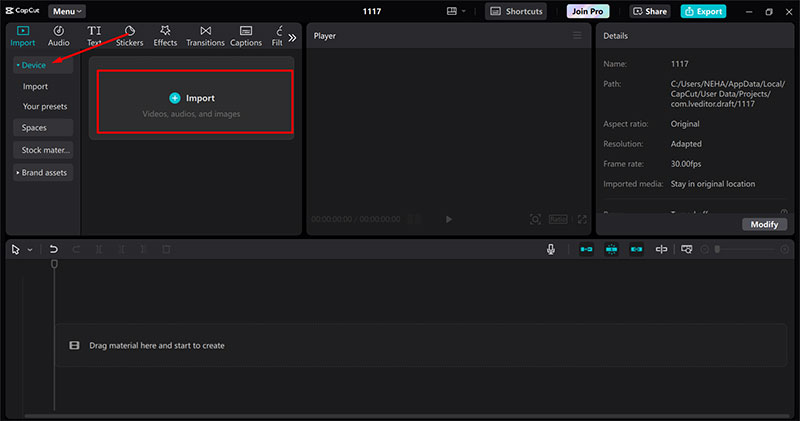
Step 2: Remove Video Background
After uploading your video, drag and drop it to the editing timeline. Then, select the “BG remover > Auto removal” from the right-side panel. The CapCut desktop video editor will automatically detect your subject and remove the distracting background.
Here’s the pro tip: Replace the background with your brand colors or a subtle animation that adds a professional touch without distracting viewers.
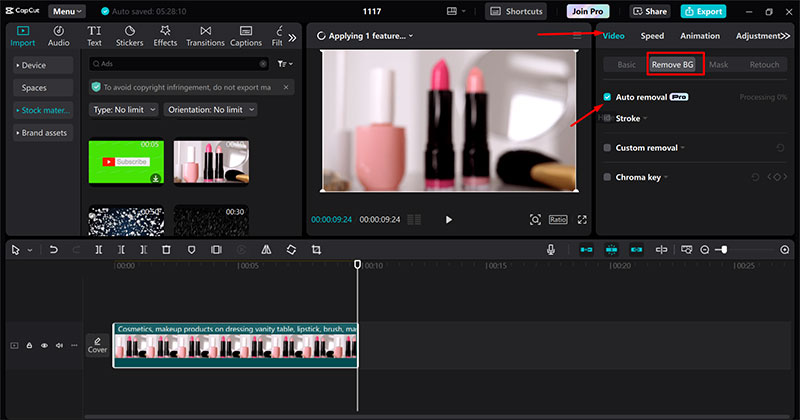
Step 3: Export Video
Once you are satisfied with your creation, export it by adjusting the rendering settings and clicking on the “Export” button.
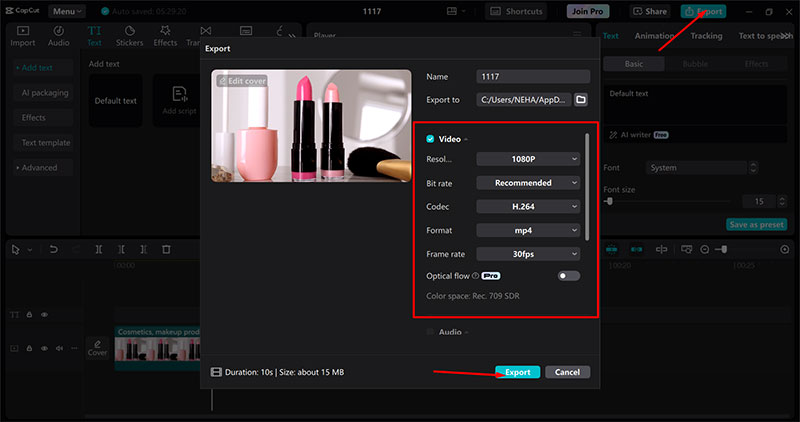
Test, Analyze, and Tweak Based on Viewer Data
Creating great videos isn’t just about making one perfect video. It’s about testing what works and improving over time. Use analytics to see how viewers interact with your videos.
What to track:
- Where do viewers stop watching?
- Which parts of the video do they rewind or replay?
- How many people click on your CTA?
Tools to try:
- Use YouTube Analytics to track viewer retention and engagement.
- Tools like Vidyard or TubeBuddy can help you test different video thumbnails, titles, and CTAs to see which ones perform best.
Always try to create two versions of your video (a short one and a longer one) and test which one drives better results.
Conclusion
Creating videos that convert isn’t about having the most expensive equipment or the fanciest effects. It’s about knowing your audience, keeping things simple, and using the right tools.
By focusing on viewer intent, grabbing attention quickly, optimizing for mobile, and using tools like background removal and text-to-speech, you can create videos that not only look great but also drive real results.
Now it’s your turn. Try these tips in your next video and see how they improve your results.

Renowned for his expertise in logo design and visual branding, Bogdan has developed a multitude of logos for various clients.
His skills extend to creating posters, vector illustrations, business cards, and brochures. Additionally, Bogdan's UI kits were featured on marketplaces like Visual Hierarchy and UI8.
He also wrote in the past years on sites like Design Your Way, WebDesignerDepot, WPDean, Designmodo, Speckyboy, Slider Revolution, and more.
- The Windsurf Logo History, Colors, Font, And Meaning - 10 October 2026
- How to Remove Background From Product Photos (No Photoshop) - 10 October 2026
- How Designers can Build a Stronger Online Creative Identity - 9 October 2026

Bogdan Sandu is a seasoned designer who has been designing websites since 2008. Renowned for his expertise in logo design and visual branding, Bogdan has developed a multitude of logos for various clients. His skills extend to creating posters, vector illustrations, business cards, and brochures. Additionally, Bogdan's UI kits were featured on marketplaces like Visual Hierarchy and UI8. He also wrote in the past years on sites like Design Your Way, WebDesignerDepot, WPDean, Designmodo, Speckyboy, Slider Revolution, and more.
You Might Also Like