Cybersecurity is the set of habits and tools that keep your devices, accounts and data safe from cybercrime. The most common attack is still phishing, a fraudulent message that tricks you into clicking a link or sharing a login. For most people the practical defense is a short list: antivirus software, a VPN on public networks, a password manager, updates and a habit of doubting unexpected messages. Businesses add monitoring on top.
What is cybercrime and how does it work?
Cybercrime is any crime carried out through computers and networks. It has existed for decades and has affected millions of people, and its effects can be serious, from emptied bank accounts to stolen identities.

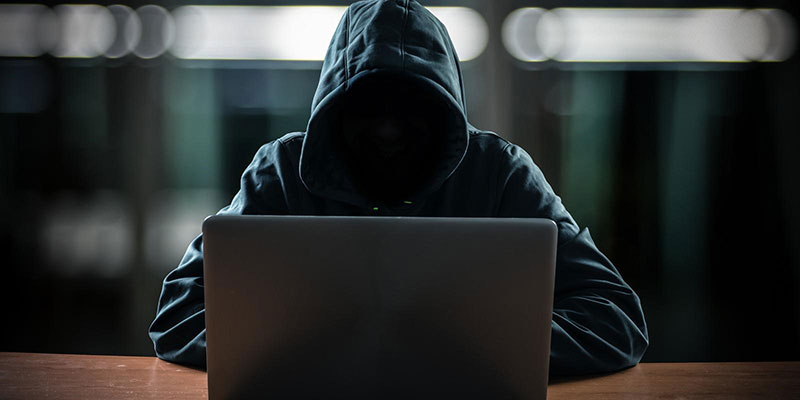
The usual starting point is phishing. In its simplest form, a criminal sends a fraudulent email that urges the victim to click a link. That click can lead to two outcomes.
Malware installed on your device
Malware is malicious software, and the types you are most likely to meet are viruses, spyware and ransomware. Ransomware locks your files until you pay, spyware watches what you do, and viruses spread and damage files.
A fake site that steals what you type
The link may open a convincing copy of a real login page. Anything you enter goes straight to the criminal, who can use it to take over accounts. Keyloggers, a type of malware that records keystrokes, serve the same purpose when they get onto your device.
With malware or stolen data, attackers can commit identity theft, take over accounts or sell your details on the dark web. The damage reaches well beyond the device itself. A related read on keeping creative files safe is how designers can build a safer digital asset workflow.
Why is cybercrime growing?
The number of connected devices keeps rising, and each one is a possible target. Laptops, phones and tablets are used by billions of people, and more are sold every day. Every new user is another person who could receive a convincing phishing message.
The shift to remote work and more time online, which accelerated during the Covid-19 pandemic, added to the exposure. People stayed home, worked remotely and kept in touch through screens, which gave criminals more chances to reach them with well-crafted scams. Many people still assume they will never be targeted, which is exactly what attackers rely on. Cybercrime has risen sharply in recent years, and ignoring it is a risk.
How can you spot a phishing message?
Check a few things before you click anything:
- The sender’s address does not quite match the company it claims to be.
- The message creates urgency, such as a locked account or a deadline today.
- The link text and the real destination differ when you hover over it.
- It asks for a password, card number or one-time code.
When in doubt, skip the link and open the company’s site or app yourself.
Which tools protect your devices?
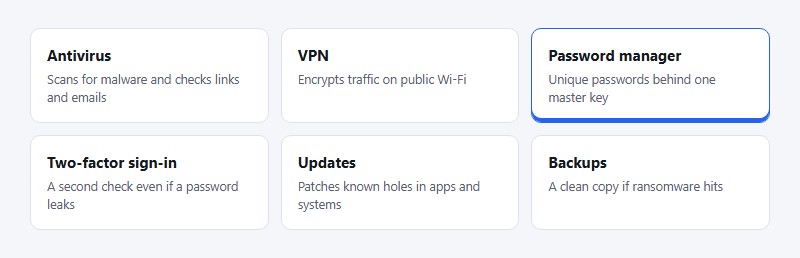
Security tools have developed as fast as the threats. A few basics cover most of the risk. When choosing among them, paid products usually offer more features and support than free ones, so read what a free tier leaves out before relying on it.
Antivirus software
Antivirus runs in the background, scanning your device for viruses and other malware. When it finds something, it can remove it from your device before much harm is done. Look for extra features, such as scanning emails and links for phishing attempts. If you work on creative projects, this guide to choosing the right antivirus for creative professionals goes into more detail.
VPN
A VPN (virtual private network) encrypts your internet connection, which is useful on public Wi-Fi in cafes, airports and hotels where networks are often unsecured. It also routes your traffic through a server in another city or country, hiding your real IP address and letting you reach content that is blocked in your region. It does not make you anonymous, since the VPN provider can still see your traffic, so choose one you trust.
Password manager
Strong, unique passwords are the base of account safety, but nobody can remember dozens of them. A password manager works as a vault, storing each password behind one master key that only you know. It is generally safer than relying on the default storage in a browser or device.
Updates, two-factor sign-in and backups
Install system and app updates promptly, because they patch known weaknesses. Turn on two-factor sign-in for email, banking and cloud accounts so that a stolen password is not enough. Keep a backup that is not permanently connected to your computer, so ransomware cannot lock it too.
How can businesses add protection?
Individual tools protect individual devices. Businesses also have networks, shared files and staff accounts to watch. Many partner with a Managed SOC provider, which monitors for threats continuously and responds to incidents quickly. This adds a layer of protection that a small team could not run on its own.
Frequently asked questions
What is the most common cyberattack?
Phishing. A fraudulent email or message pushes you to click a link, open an attachment or enter a login on a fake page.
Is free antivirus enough?
For light use it can be a starting point, but free versions often leave out features such as phishing protection and support. Compare what each version includes.
Do I need a VPN at home?
It matters most on public or unfamiliar networks. At home on a secured network, passwords, updates and two-factor sign-in do more for your safety.
What should I do if I clicked a suspicious link?
Disconnect from the network, run a full antivirus scan and change the passwords for any account you may have entered. Contact your bank if financial details were involved.
Where to start
Today, install a password manager, switch on two-factor sign-in for your email account and run a full antivirus scan. Those three steps cover a large share of everyday risk.

Renowned for his expertise in logo design and visual branding, Bogdan has developed a multitude of logos for various clients.
His skills extend to creating posters, vector illustrations, business cards, and brochures. Additionally, Bogdan's UI kits were featured on marketplaces like Visual Hierarchy and UI8.
He also wrote in the past years on sites like Design Your Way, WebDesignerDepot, WPDean, Designmodo, Speckyboy, Slider Revolution, and more.
- Logo Quiz - 22 November 2026
- The LinkedIn Logo History, Colors, Font, and Meaning - 20 November 2026
- How to Design Landing Pages That Convert Visitors into Email Subscribers - 20 November 2026

Bogdan Sandu is a seasoned designer who has been designing websites since 2008. Renowned for his expertise in logo design and visual branding, Bogdan has developed a multitude of logos for various clients. His skills extend to creating posters, vector illustrations, business cards, and brochures. Additionally, Bogdan's UI kits were featured on marketplaces like Visual Hierarchy and UI8. He also wrote in the past years on sites like Design Your Way, WebDesignerDepot, WPDean, Designmodo, Speckyboy, Slider Revolution, and more.
You Might Also Like