


Most people who want to become UI designers already spend all day using interfaces and have opinions about them. That helps, but it isn’t the job. A UI designer decides what goes on each screen of an app or website, how it looks, and how it responds when someone taps, scrolls, or makes a mistake. The research and product strategy behind those screens usually belong to someone else.
Hiring managers look at your portfolio before they look at your education. That fact shapes most of the advice below.
Demand is there, too. The U.S. Bureau of Labor Statistics projects 7 percent employment growth for web and digital interface designers between 2024 and 2034, faster than the average U.S. occupation (BLS, 2025).
What Is a UI Designer?
Think about everything a person actually touches in a product: the screens, the buttons, the colors, the grayed-out button that can’t be pressed yet. All of that is UI work.
On most teams the role comes after research and strategy and before code. You take findings from UX and hand finished screens to engineering.
New designers usually pick up basic graphic design terms first, then move on to interface vocabulary like states, breakpoints, and components.
It’s also worth knowing what the role leaves out. You won’t run user interviews or usability tests, since that’s a researcher’s job, and you won’t write production code. Logos and print collateral go to brand designers.
The BLS files this work under web and digital interface designers, with the 7 percent growth projection for 2024 to 2034 (BLS, 2025). That growth comes from businesses building more digital products, not fewer, and it’s why demand for dedicated interface work has stayed steady.
UI Designer vs UX Designer: What Is the Difference?

UX is the whole path someone takes through a product. UI is the screens they see along the way.
| Role | Primary focus | Core deliverable | Typical entry point |
|---|---|---|---|
| UI designer | Visual and interactive surface | High fidelity screens, components | Junior UI role, agency work |
| UX designer | Flows, structure, usability | Wireframes, user flows, research findings | Research internship, junior UX role |
| Product designer | End to end ownership | Full feature, research to shipped screen | Mid level hire after UI or UX experience |
Day to day, the two roles overlap a lot. They usually work in the same Figma file and sit through the same critiques. On most teams they answer to the same product manager as well.
Employers are partly responsible for the confusion. Plenty of job listings blend both into one UI designer vs UX designer style posting that asks one person for research skills and visual polish. Spotify, for example, has posted openings under the single title Product Designer that expect both interaction flow work and interface polish from one hire.
The upside is that skills move in both directions. A UI designer who learns basic user flow mapping becomes a stronger candidate for UX-heavy roles later.
What Does a UI Designer Do Day to Day
- Going through notes from yesterday’s design critique before opening any files
- Building or tweaking screens inside a shared component library
- A short sync with a product manager or engineer
- Getting files ready for developer handoff, with spacing and states spelled out
- Reworking a screen once user testing or stakeholder feedback comes back
Product managers set the requirements. Developers come to you with edge cases you didn’t think of (there’s always one), and UX researchers pass along findings that change what the screens need to do.
At companies like Duolingo, UI designers meet daily with engineers to check animation timing and interaction details before a feature ships.
How the week splits up depends a lot on seniority. Juniors spend most of their time executing screens from a system that already exists. Senior designers end up in more planning meetings, where the question is whether something gets built at all.
Core Skills a UI Designer Needs
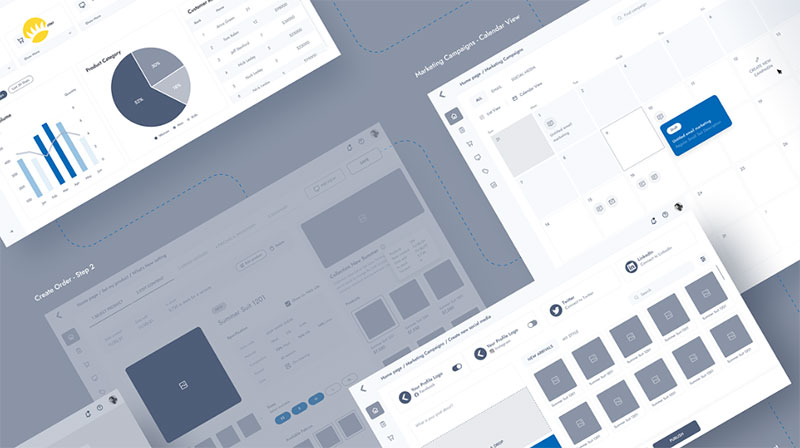
Visual Foundations
You need a solid grasp of typography, spacing, and color, and enough comfort with grid systems to keep screens consistent. Accessibility contrast ratios belong on that list now too.
Weak foundations are easy to spot. The layout logic can be completely correct and the screen still looks slightly off.
Prototyping and Design Systems
If you can’t build a working prototype, you can’t test your own ideas before a developer sees them.
Design systems matter just as much. IBM’s Carbon design system documents typography, spacing, and color rules that every UI designer on that team has to follow before shipping a screen.
These skills stack on each other. A wireframe gives you rough structure before any visual polish. A clickable prototype then shows whether the interaction logic holds up, and component libraries keep things consistent once you have dozens of screens to manage.
Then there’s visual hierarchy, which is what makes a screen readable at a glance. In my experience it’s the first skill that separates a junior portfolio from a hire-ready one.
Tools UI Designers Use
Figma dominates this space. It holds 82.3 percent market share among interface design tools, according to the UX Tools 2024 to 2025 Design Tools Survey of 2,220 designers.
| Tool | Primary use | Platform | Cost tier |
|---|---|---|---|
| Figma | Interface design, prototyping | Browser, Mac, Windows | Free tier, paid seats |
| Adobe XD | Interface design, prototyping | Mac, Windows | Bundled with Creative Cloud |
| Sketch | Interface design | Mac only | Paid, annual license |
| Framer | Advanced interactive prototypes | Browser | Free tier, paid plans |
| Balsamiq | Low fidelity wireframes | Browser, desktop | Paid, low cost |
You don’t need all five. Most schools and employers now expect fluency in one primary tool, and for most people that tool is Figma.
Keeping a reference open, like this UI design cheat sheet, works better than trying to memorize every shortcut in your first week.
Photoshop and Illustrator haven’t gone anywhere. They still come up for asset editing and icon work, and a Photoshop shortcuts cheat sheet speeds up that side of the job considerably.
Do You Need a Degree to Become a UI Designer?
No. The Bureau of Labor Statistics lists educational requirements for this field ranging from a high school diploma to a bachelor’s degree, though it notes employers may prefer a bachelor’s in web design, digital design, or graphic arts (BLS, 2025).
A degree does give you things a short course won’t. You get years of structured feedback from instructors and a broader base of design theory. Some large companies and agencies also still filter applicants by degree.
For most people, though, the cost is hard to justify. It’s four years of tuition and time before you start working, and you can graduate without a portfolio anyone would hire from. Curriculums also tend to trail current tools and workflows.
So a degree gets you some credibility with some hiring managers. It doesn’t replace the portfolio work that actually gets people hired.
Choosing a Learning Path: Bootcamp, Self-Taught, or Degree
A bootcamp usually runs 3 to 6 months at a set pace, with cohort feedback and career coaching included.
Teaching yourself costs little or nothing and moves as fast as you want. That sounds great until you notice that nobody is checking your work. It only works if you find outside feedback and give yourself real deadlines.
A degree is the slowest and most expensive option. It mostly makes sense for someone under 20 who has the time.
| Path | Typical cost | Typical duration | Best suited for |
|---|---|---|---|
| Bootcamp | $3,500 to $17,000 | 3 to 6 months | Career changers wanting structure |
| Self-taught | Under $500 | 6 to 18 months | Disciplined learners with time |
| Degree | Tens of thousands | 3 to 4 years | Students starting straight out of school |
Springboard, one of the larger design bootcamp providers, reports that 94 percent of its eligible graduates across its career tracks, including UX and UI design, found a job within a year of completing the program, since the company’s 2013 founding.
Treat numbers like that with some caution. They vary by provider, and a lot depends on how much work a student puts in outside of class.
You can also combine paths. A self-taught foundation followed by one paid course often costs less than a full bootcamp, and you still get structure at the point where it helps most.
Is a UI Design Certification Worth It?
It can get you entry-level interviews. It won’t replace a portfolio.
Google’s own UX design certification program cites 58,000 U.S. job openings tied to the field and a median entry level salary of $117,000, based on 2024 Lightcast job posting data.
Certificates are most useful for career changers who have no design work on their resume yet. They also help you get past applicant tracking systems that scan for named credentials. And if you have trouble directing your own learning, a structured curriculum is worth paying for.
They do very little with hiring managers who go straight to the portfolio link, or for mid-level and senior roles where shipped work is expected. If the hiring process includes a design challenge, the certificate stops mattering the moment the challenge starts.
One certificate you finished properly beats three you abandoned halfway.
The Interaction Design Foundation and the Google program are both fine choices. Neither one helps much if the case studies behind it are thin.
How Much Do UI Designers Earn?
Pay for web and digital interface designers covers a wide range:
- 10th percentile: $47,840 a year
- Median: $98,090 a year, based on May 2024 data
- 90th percentile: $192,180 a year
- National median updated to $104,000 for May 2025
These figures come from the Bureau of Labor Statistics Occupational Employment and Wage Statistics program.
The 90th percentile earns more than four times what the 10th does. Most of that gap comes from experience, not raw talent.
So what moves one designer higher than another?
- Years of shipped product work with measurable results
- Location, since coastal tech hubs pay well above the national line
- Specializing in design systems or complex products
- Company size and stage (early startups often pay in equity instead of cash)
Netflix and Meta are frequently cited among the higher paying employers for interface design roles in the United States, though pay bands shift with every hiring cycle.
Steps to Become a UI Designer
The order matters more than any single step.
- Learn the core visual skills first: typography, spacing, color, layout
- Pick one primary tool and go deep instead of sampling five
- Build two to three original projects, not tutorials copied line for line
- Write each project up as a real case study with a problem and a process
- Publish the portfolio and apply to junior roles, internships, and freelance gigs in parallel
- Use every rejection to fix one specific thing in the portfolio
Skipping step one is the most common mistake. People open Figma without knowing why a layout feels wrong, and it shows up in every project they make after that.
Step four gets skipped almost as often. It’s usually the reason a strong project gets ignored by a recruiter skimming forty portfolios in an afternoon.
How to Build a UI Design Portfolio With No Experience
You don’t need client work to have a portfolio.
Redesign concepts and self-initiated projects fill the gap well enough, as long as you frame each one around a real problem and not a visual exercise.
| Project type | What it shows | Best for |
|---|---|---|
| App redesign | Critical thinking, visual judgment | First one or two projects |
| Original concept app | End to end process, from problem to screen | Third project onward |
| Small freelance or volunteer job | Real constraints, real feedback | Adding credibility once basics are solid |
Each case study should state the problem in a sentence or two. Show the process through a few key screens (not every iteration you went through) and end with an outcome, even if it’s your own assessment of a personal project.
Two or three strong projects beat six thin ones. A design portfolio website with six half-finished case studies reads as unfinished work, not range.
Dribbble and Behance are still the two places recruiters browse most when they want to see raw visual skill before reading a single case study.
How to Get Your First UI Design Job
Junior roles come with structure and mentorship, which is exactly why they’re competitive. You’ll be up against people with more experience than you.
Internships are easier to get into and often turn into a full position if your work holds up. Freelancing is different again, with real projects and income from day one but nobody around to mentor you. Most people try a couple of these at once instead of betting everything on one.
The Bureau of Labor Statistics projects about 14,500 annual openings for web developers and digital designers over the coming decade, a figure that includes UI-focused roles (BLS, 2025).
Before your first interview, practice walking through one case study out loud and keep it to five minutes. Then read up on the common UI designer interview questions about process and tool choice, and adjust your UI designer resume to each job description instead of sending out one generic version.
Your first job probably won’t be the one you had in mind. That’s normal. It gets you into the industry, and the second job usually looks very different from the first.
When UI Design Is Not the Right Career Fit
If feedback stings, this job will wear you down. You get critiqued constantly, and the work is rarely finished for good.
People who like to complete something and move on often find all that iteration draining.
The job market adds real risk on top of that.
The 2024 UXPA Salary Survey, analyzed by MeasuringU, found that 35 percent of organizations lost design or research staff that year, 37 percent reported layoffs directly, and 9 percent of individual respondents said they were personally laid off (MeasuringU, 2025).
Some signs this might not be your path:
- You’re more drawn to code and systems than to visuals, which points toward front end development
- You’d rather work alone than deal with constant collaboration and critique
- Job market swings during hiring downturns would be hard for you to absorb
- Research and interviews interest you more than polishing screens
People coming from market research or writing often fit UX design better than UI. A front end coding background may suit a hybrid UI developer role better than either.
About self-taught paths: they fail more often from missing feedback than from the material being too hard. Fixing that one gap solves most of what looks like a talent problem.
FAQ on How To Become A Ui Designer
What is the difference between a UI designer and a graphic designer?
Mostly scope. Graphic designers work across branding, print, and marketing assets, while UI designers stick to digital interfaces, screens, and components. Typography and layout overlap, but graphic designers rarely touch prototyping, design systems, or developer handoff.
What is the difference between a UI designer and a product designer?
It comes down to ownership. Product designers usually own research, strategy, and interface work together, and a UI designer typically handles just the visual and interactive layer. Many companies blend the titles, so read the job description instead of trusting the label on the posting.
Do UI designers need to know how to code?
No. Basic HTML and CSS knowledge helps during developer handoff and makes conversations about feasibility go faster. Writing production code stays outside the job.
Is UI design a good career right now?
Demand exists, though hiring has tightened since 2022 along with wider tech layoffs. Government projections still show growth for web and digital interface design roles. Getting in is more competitive than it was five years ago, so the portfolio carries more weight than ever.
How long does it take to become a UI designer?
Most self-taught designers reach a hireable portfolio after six to twelve months of consistent work. Bootcamp graduates often get there in three to six months. The quality of feedback and the number of finished projects matter more than total hours studied.
Can you become a UI designer without any design background?
Yes, and lots of people do. Career switchers make up a large share of the field. Backgrounds in marketing, writing, or customer service transfer surprisingly well, since visual hierarchy and user empathy can both be learned from scratch with deliberate practice.
What mistakes do beginners make when learning UI design?
The biggest one is copying tutorials without understanding why each choice was made. After that comes skipping typography and grid basics, trying to learn five tools at once, and publishing a portfolio full of unfinished redesigns instead of full case studies.
Can you work as a freelance UI designer from the start?
Technically yes, but it’s hard. Clients hiring freelancers usually expect a working portfolio and references. Most new designers take small paid projects on freelance platforms to build proof of work, then go after bigger freelance or full-time contracts.
What Should You Fix First in How To Become A UI Designer?
Portfolio depth. Two finished case studies beat five certificates or a pile of unfinished mockups, especially when a hiring manager spends a few minutes on each junior application.
After that, get properly good at one tool, and set up real feedback on your work before you start firing off applications.
Put the wide Bureau of Labor Statistics pay spread next to the 2024 UXPA staffing cuts and the situation for new designers gets clearer. You’re competing on portfolio strength at a time when hiring pools are thin, so a slower, deeper build is a safer bet than a rushed one.
If the interface side ends up feeling too narrow, how to become a UX designer is the natural next step. Every visual skill you build here carries over into broader, research-based work.

Renowned for his expertise in logo design and visual branding, Bogdan has developed a multitude of logos for various clients.
His skills extend to creating posters, vector illustrations, business cards, and brochures. Additionally, Bogdan's UI kits were featured on marketplaces like Visual Hierarchy and UI8.
He also wrote in the past years on sites like Design Your Way, WebDesignerDepot, WPDean, Designmodo, Speckyboy, Slider Revolution, and more.
- The Lovable Logo History, Colors, Font, And Meaning - 6 November 2026
- Headless WordPress: What Marketing Teams Gain and Lose - 6 November 2026
- PicCollage Logo: How Colour, Shape and Simplicity Express Creativity - 5 November 2026

Bogdan Sandu is a seasoned designer who has been designing websites since 2008. Renowned for his expertise in logo design and visual branding, Bogdan has developed a multitude of logos for various clients. His skills extend to creating posters, vector illustrations, business cards, and brochures. Additionally, Bogdan's UI kits were featured on marketplaces like Visual Hierarchy and UI8. He also wrote in the past years on sites like Design Your Way, WebDesignerDepot, WPDean, Designmodo, Speckyboy, Slider Revolution, and more.
You Might Also Like


