The five most practical ways to streamline and secure business operations are to assess your current workflows, automate repetitive tasks, adopt modern technology, outsource selected functions and cut paperwork. Fast growth can make a business feel overwhelming, and smaller companies with limited resources feel it most. Simple, deliberate changes improve productivity, tighten security and keep service to customers consistent. A good first move is to bring in expert IT consulting to help you choose and set up the technology behind these changes. The sections below take the five tips in order.
What are the five ways to streamline and secure operations?
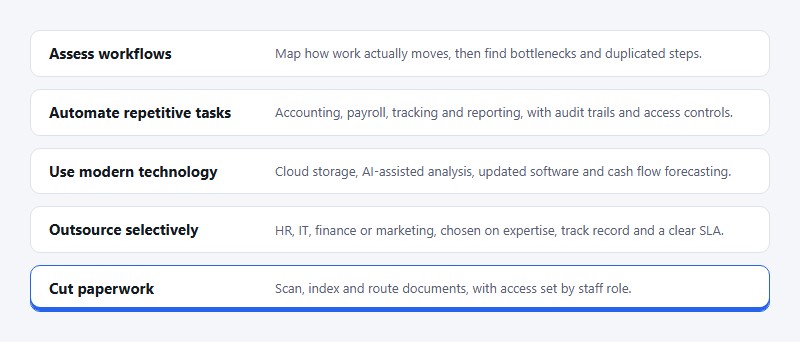
Each move targets a different source of wasted time or risk, and they work best in the order shown above. You cannot automate a process you have not mapped, and you cannot decide what to outsource until you know what is slowing you down. Start with an honest look at how work actually gets done.
How do you assess existing workflows and processes?

List each process step by step and note who does what, how long it takes and where work waits. That gives you a clear picture of how things are currently done and shows bottlenecks and redundant steps. From there you can see which steps are essential and which areas need improvement, and target changes that raise security, productivity and profitability.
People matter in this review. A skilled HR director helps optimize organizational processes, and well-prepared HR director interview questions help you find candidates who can assess workflows and improve them while keeping employees satisfied. Security belongs in the same review. An access control system protects your physical assets and your data by deciding who can enter which areas and use which systems.
Which repetitive tasks should you automate?
Automate the ones that are repetitive, rule-based and easy to get wrong by hand. Automating essential procedures frees time and resources for more strategic work. Accounting and finance are the classic example: automated workflows cut the effort needed to reconcile accounts, generate financial statements and manage cash flow. Fewer mistakes and more consistent execution also tend to lower costs.
It is just as useful elsewhere. A logistics company can use automated tracking to monitor goods in real time, which shortens delivery times and improves customer satisfaction. Automated systems also strengthen data security through access controls, audit trails and similar features that protect sensitive information. Invoicing is another strong candidate, and this overview of automated invoicing explains why.
How does automation help with accounting and payroll?
Modern accounting software reduces manual errors and improves financial accuracy. Many tools also use income tax withholding tables to keep payroll in line with regulations, and they can apply different state withholding rules to each employee automatically. That removes confusion about varying local requirements and lowers the chance of costly compliance mistakes.
Automation does not remove the need for professional oversight. Businesses still need someone to keep accurate records and meet tax and compliance requirements, and companies in California or Arizona can learn more about KDA Inc. for local tax, CPA, bookkeeping and advisory support.
Which modern technology is worth adopting?
The technology that removes a clear constraint, such as storage limits, slow analysis or unreliable old systems. Cloud computing expands your team’s storage and reduces reliance on costly on-premises hardware. AI can help analyze data, improve customer service and handle other tasks that support better decisions.
Upgrading outdated systems and software also raises efficiency, improves security and lowers the risk of system failures. Cash flow forecasting software is a good example of a targeted upgrade. It gives real-time insight into your financial health and predicts future inflows and outflows, so you can manage cash with more confidence.
When does outsourcing make sense for a business?
When a function is necessary but not part of your core strengths. Outsourcing can help businesses of any size, whether the function is HR, IT, finance support or marketing. It can increase efficiency and reduce costs, and it lets you focus on core activities and long-term goals while the essential duties are still handled consistently. If you are still weighing it, this discussion of whether you should outsource today is a useful starting point.
Choose providers on expertise, experience and track record. A careful vendor selection process, negotiated service level agreements (SLAs) and a detailed implementation plan make the transition smoother.
How can you reduce paperwork?
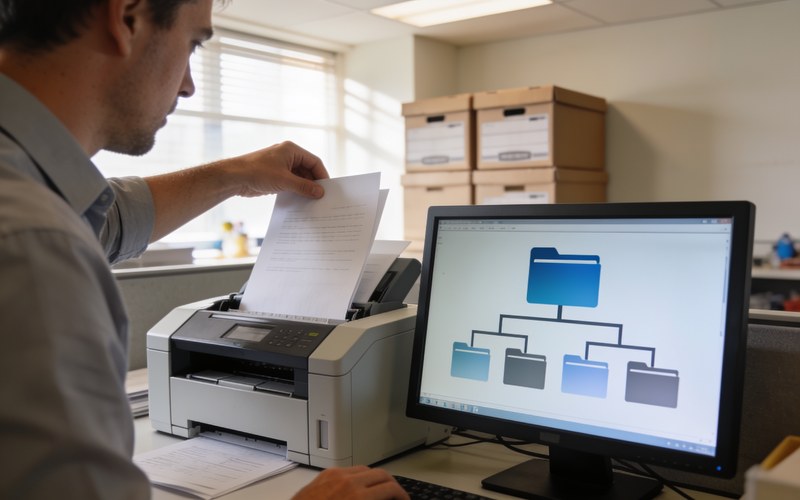
Move to digital files and use a document management solution. Excess paperwork causes delays inside and outside the company and creates clutter, so checking how much paper you use is a quick way to find savings. Digital documents give instant access and a fast way to arrange, store and manage files. Good habits help too, as these tips to organize digital files show.
With the right tool, documents can be scanned automatically and routed to the right person or folder. When you compare solutions, look for:
- Customizable workflows that match how your business operates
- Easy search across scanned documents
- Access levels assigned by staff role
Frequently asked questions
Where should a small business start?
Start with workflow assessment. Mapping how work flows costs little, and it shows where automation or outsourcing will pay off first.
Does automation make a business more secure?
It can. Automated systems provide access controls, audit trails and other features that protect sensitive information, and they reduce the manual errors behind many mistakes.
Is outsourcing only for large companies?
No. Businesses of any size can outsource HR, IT, finance support or marketing to save time and focus on growth.
What is the first step to a more efficient business?
Pick one process that frustrates your team, such as invoicing or document filing, and map it from start to finish this week. The initial effort and investment are real, but once you have the right tools and habits in place the gains in efficiency show up quickly.

Renowned for his expertise in logo design and visual branding, Bogdan has developed a multitude of logos for various clients.
His skills extend to creating posters, vector illustrations, business cards, and brochures. Additionally, Bogdan's UI kits were featured on marketplaces like Visual Hierarchy and UI8.
He also wrote in the past years on sites like Design Your Way, WebDesignerDepot, WPDean, Designmodo, Speckyboy, Slider Revolution, and more.
- How to Design Marketing Materials That People Actually Keep - 27 November 2026
- Behind the Logo: What Font Does Starbucks Use? - 26 November 2026
- Visual Hierarchy in Short Videos: How to Guide Attention Across a Sequence - 26 November 2026

Bogdan Sandu is a seasoned designer who has been designing websites since 2008. Renowned for his expertise in logo design and visual branding, Bogdan has developed a multitude of logos for various clients. His skills extend to creating posters, vector illustrations, business cards, and brochures. Additionally, Bogdan's UI kits were featured on marketplaces like Visual Hierarchy and UI8. He also wrote in the past years on sites like Design Your Way, WebDesignerDepot, WPDean, Designmodo, Speckyboy, Slider Revolution, and more.
You Might Also Like